JCrop用来裁剪图片,本篇想体验的是:
在视图页上传图片:

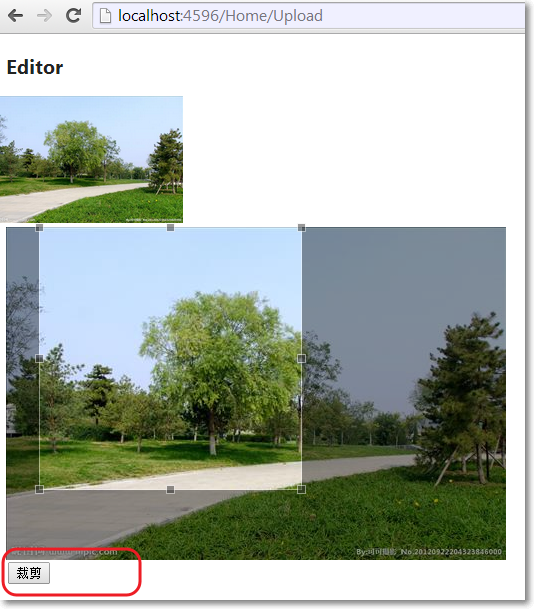
上传成功,跳转到另外一个编辑视图页,使用JCrop对该图片裁剪,并保存图片到指定文件夹:
裁剪成功后,在主视图页显示裁剪图片:

当然,实际项目中最有可能的做法是:在本页上传、裁剪并保存。
□ 思路
→在上传图片视图页,把图片上传保存到一个临时文件夹Upload
→在编辑裁剪视图页,点击"裁剪"按钮,把JCrop能提供的参数,比如宽度、高度、离顶部距离,离底部距离,离左右端距离等封装成类,传递给控制器方法
→控制器方法根据接收到的参数,对图片裁剪,把图片保存到目标文件夹ProfileImages,并删除掉临时文件夹Upload里对应的图片。
为了配合上传图片的主视图页,需要一个与之对应的View Model,其中包含图片路径的属性。而这个图片路径属性不是简单的字段显示编辑,当主视图页的View Model被传递到图片编辑、裁剪视图页后,根据JScrop特点,肯定有针对图片的裁剪和预览区域,所以,我们需要针对主视图页View Model的路径属性使用UIHint特性,为该属性定制显示和编辑视图。主视图页的View Model为:
using System.ComponentModel.DataAnnotations;

namespace MvcApplication1.Models
{
    public class ProfileViewModel
    {
        [UIHint("ProfileImage")]
        public string ImageUrl { get; set; }
    }
}
在图片编辑、裁剪视图页,对应的View Model不仅有主视图页的View Model作为它的属性,还有与JCrop相关的属性,这些属性无需显示,只需要以隐藏域的方式存在着,通过JCrop的事件,把JCrop参数赋值给这些隐藏域。对应的View Model为:
using System.Web.Mvc;

namespace MvcApplication1.Models
{
    public class EditorInputModel
    {
        public ProfileViewModel Profile { get; set; }
        [HiddenInput]
        public double Top { get; set; }
        [HiddenInput]
        public double Bottom { get; set; }
        [HiddenInput]
        public double Left { get; set; }
        [HiddenInput]
        public double Right { get; set; }
        [HiddenInput]
        public double Width { get; set; }
        [HiddenInput]
        public double Height { get; set; }
    }
}
在上传图片的主视图页中,需要引入Microsoft.Web.Helpers(通过NuGet),使用该命名空间下的FileUpload帮我们生成上传元素。
@using Microsoft.Web.Helpers
@model MvcApplication1.Models.ProfileViewModel


@{
    ViewBag.Title = "Index";
    Layout = "~/Views/Shared/_Layout.cshtml";
}

<h2>Index</h2>
@using (Html.BeginForm("Upload", "Home", FormMethod.Post, new {@encType = "multipart/form-data"}))
{
    @Html.DisplayFor(x => x.ImageUrl)<br/>
    @FileUpload.GetHtml(initialNumberOfFiles:1,includeFormTag:false, uploadText:"上传图片")<br/>
    <input type="submit" name="submit" text="上传" />
}
在HomeController中:
action方法Upload用来接收来自主视图的View Model,把图片保存到临时文件夹Upload中,并把主视图的View Model赋值给编辑、裁剪视图中View Model的属性。
还需要引入System.Web.Helpers组件,该组件WebImage类,提供了针对上传图片处理的一些API。
action方Edit接收来自编辑、裁剪视图中View Model,根据参数,使用WebImage类的API对图片裁剪,保存到目标文件夹ProfileImages,并删除临时文件夹Upload中的相关图片。
using System.Web.Mvc;
using MvcApplication1.Models;
using System.Web.Helpers;
using System.IO;

namespace MvcApplication1.Controllers
{
    public class HomeController : Controller
    {
        public ActionResult Index()
        {
            return View();
        }

        //如果图片上传成功就到裁剪页、即编辑页
        [HttpPost]
        public ActionResult Upload(ProfileViewModel model)
        {
            var image = WebImage.GetImageFromRequest(); //必须引用System.Web.Helpers程序集
            if (image != null)
            {
                //限制图片的长度不能大于500像素
                if (image.Width > 500)
                {
                    image.Resize(500, ((500*image.Height)/image.Width));
                }

                //根据图片的名称获取相对路径
                var filename = Path.GetFileName(image.FileName);
                //保存图片到指定文件夹
                image.Save(Path.Combine("~/Upload/", filename));

                //获取图片的绝对路径
                filename = Path.Combine("../Upload/", filename);
                model.ImageUrl = Url.Content(filename);

                var editModel = new EditorInputModel()
                {
                    Profile = model,
                    Width = image.Width,
                    Height = image.Height,
                    Top = image.Height * 0.1,
                    Left = image.Width * 0.9,
                    Right = image.Width * 0.9,
                    Bottom = image.Height * 0.9
                };
                return View("Editor", editModel);
            }
            return View("Index", model);
        }

        //裁剪页 编辑页
        [HttpPost]
        public ActionResult Edit(EditorInputModel editor)
        {
            //var image = new WebImage("~/" + editor.Profile.ImageUrl);
            var image = new WebImage(editor.Profile.ImageUrl);
            var height = image.Height;
            var width = image.Width;

            image.Crop((int) editor.Top, (int) editor.Left, (int) (height - editor.Bottom), (int) (width - editor.Right));
            var originalFile = editor.Profile.ImageUrl;//图片原路径

            editor.Profile.ImageUrl = Url.Content("~/ProfileImages/" + Path.GetFileName(image.FileName));
            image.Resize(100, 100, true, false);
            image.Save(@"~" + editor.Profile.ImageUrl);

            System.IO.File.Delete(Server.MapPath(originalFile)); //把在Upload中的上传图片删除掉
            return View("Index", editor.Profile);
        }

    }
}
在编辑、裁剪视图页,需要引用Jcrop对应的css和js文件。
@model MvcApplication1.Models.EditorInputModel

@{
    ViewBag.Title = "Editor";
    Layout = "~/Views/Shared/_Layout.cshtml";
}

<h2>Editor</h2>
<link href="~/Content/jquery.Jcrop.css" rel="stylesheet" />


<div id="mainform">
    @using (Html.BeginForm("Edit", "Home", FormMethod.Post))
    {
        @Html.EditorFor(x => x.Profile.ImageUrl)
        @Html.HiddenFor(x => x.Left)
        @Html.HiddenFor(x => x.Right)
        @Html.HiddenFor(x => x.Top)
        @Html.HiddenFor(x => x.Bottom)
        @Html.HiddenFor(x => x.Profile.ImageUrl)
        <input type="submit" name="action" value="裁剪"/>
    }
</div>

@section scripts
{
    <script src="~/Scripts/jquery.Jcrop.js"></script>
    <script type="text/javascript">
        $(function() {
            $('#profileImageEditor').Jcrop({
                onChange: showPreview,
                onSelect: showPreview,
                setSelect: [@Model.Top, @Model.Left, @Model.Right, @Model.Bottom],
                aspectRatio: 1
            });
        });

        function showPreview(coords) {
            if (parseInt(coords.w) > 0) {
                $('#Top').val(coords.y);
                $('#Left').val(coords.x);
                $('#Bottom').val(coords.y2);
                $('#Right').val(coords.x2);

                var width = @Model.Width;
                var height = @Model.Height;
                var rx = 100 / coords.w;
                var ry = 100 / coords.h;

                $('#preview').css({
                     Math.round(rx * width) + 'px',
                    height: Math.round(ry * height) + 'px',
                    marginLeft: '-' + Math.round(rx * coords.x) + 'px',
                    marginTop: '-' + Math.round(ry * coords.y) + 'px'
                });
            }

        }
    </script>
}
既然为主视图View Model的ImageUrl打上了[UIHint("ProfileImage")]特性,这意味着必须有对应的自定义强类型视图。
public class ProfileViewModel
    {
        [UIHint("ProfileImage")]
        public string ImageUrl { get; set; }
    }
Views/Home/EditorTemplates/ProfileImage.cshtml,是针对ImageUrl属性的自定义编辑模版:
@model System.String
<div id="cropContainer">
    <div id="cropPreview">
        <img src="@(String.IsNullOrEmpty(Model) ? "" : Model)" id="preview" />
    </div>
    <div id="cropDisplay">
        <img src="@(String.IsNullOrEmpty(Model) ? "" : Model)" id="profileImageEditor" />
    </div>
</div>
Views/Home/DisplayTemplates/ProfileImage.cshtml,是针对ImageUrl属性的自定义显示模版:
@model System.String

<img src="@(String.IsNullOrEmpty(Model) ? "" : Model)" id="profileImage" />
参考资料:
http://blog.tallan.com/2011/02/04/using-mvc3-razor-helpers-and-jcrop-to-upload-and-crop-images/
http://www.schnieds.com/2011/07/image-upload-crop-and-resize-with.html
http://zootfroot.blogspot.com/2010/12/mvc-file-upload-using-uploadify-with.html