UITableView:表格视图控件,继承滚动视图控件UIScrollView,(类似于UIPickerView选择器,它主要通过设置数据源代理和行为代理实现协议来设置单元格)
@interface UITableView : UIScrollView <NSCoding>
@property (nonatomic, readonly) UITableViewStyle style;//表格样式
@property (nonatomic, assign) id <UITableViewDataSource> dataSource; //数据源代理
@property (nonatomic, assign) id <UITableViewDelegate> delegate;//操作代理
@property (nonatomic) CGFloat rowHeight; //行高
@property (nonatomic) CGFloat sectionHeaderHeight;//组表头高度
@property (nonatomic) CGFloat sectionFooterHeight; //组表尾高度
@property (nonatomic) CGFloat estimatedRowHeight ; //行评估高度
@property (nonatomic) CGFloat estimatedSectionHeaderHeight ;//组表头评估高度
@property (nonatomic) CGFloat estimatedSectionFooterHeight ;//组表尾评估高度
@property (nonatomic) UIEdgeInsets separatorInset;//分离矩形区域
@property(nonatomic, readwrite, retain) UIView *backgroundView //背景视图
@end
2.基本方法:
- (instancetype)initWithFrame:(CGRect)frame style:(UITableViewStyle)style; //初始化
- (NSInteger)numberOfSections; //组数
- (NSInteger)numberOfRowsInSection:(NSInteger)section; //某一组行数
- (CGRect)rectForSection:(NSInteger)section; //某一组的矩形区域
- (CGRect)rectForHeaderInSection:(NSInteger)section;//某一组的表头矩形区域
- (CGRect)rectForFooterInSection:(NSInteger)section;//某一组表尾矩形区域
- (CGRect)rectForRowAtIndexPath:(NSIndexPath *)indexPath;//某一组某行的矩形区域
- (NSIndexPath *)indexPathForRowAtPoint:(CGPoint)point; //返回指定表单元的NSIndexPath路径信息
- (NSIndexPath *)indexPathForCell:(UITableViewCell *)cell; // 返回指定表单元的NSIndexPath路径信息
- (NSArray *)indexPathsForRowsInRect:(CGRect)rect; // 返回指定CGRect的NSIndexPath路径信息数组
- (UITableViewCell *)cellForRowAtIndexPath:(NSIndexPath *)indexPath; //返回某组某一行的单元格
- (NSArray *)visibleCells;//返回可见单元格数组
- (NSArray *)indexPathsForVisibleRows;//返回可见行的索引数组
- (UITableViewHeaderFooterView *)headerViewForSection:(NSInteger)section ;//返回某一组表头视图
- (UITableViewHeaderFooterView *)footerViewForSection:(NSInteger)section ;//返回某一组表尾视图
- (void)scrollToRowAtIndexPath:(NSIndexPath *)indexPath atScrollPosition: (UITableViewScrollPosition)
scrollPosition animated:(BOOL)animated;//将单元格滑动到指定位置的行
- (void)scrollToNearestSelectedRowAtScrollPosition:(UITableViewScrollPosition)scrollPosition animated:(BOOL)animated;//将单元格滑动到选中的行
- (UITableViewCellAccessoryType)tableView:(UITableView *)tableView accessoryTypeForRowWithIndexPath:(NSIndexPath *)indexPath //返回标记效果类型
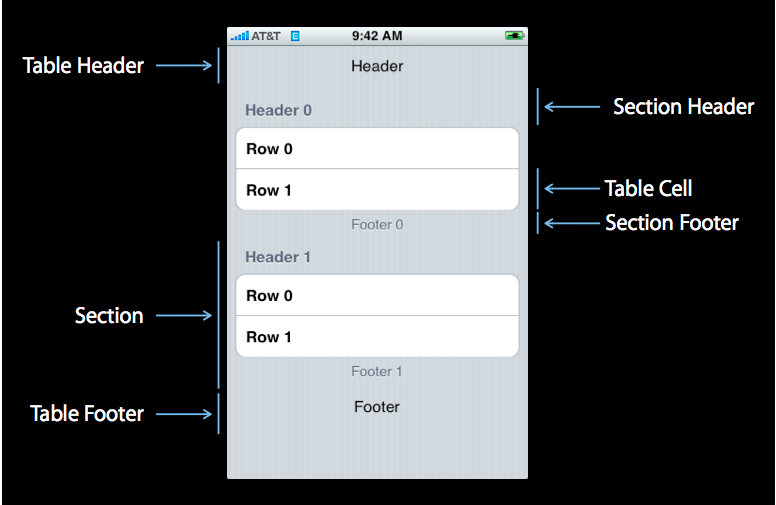
Plain类型:
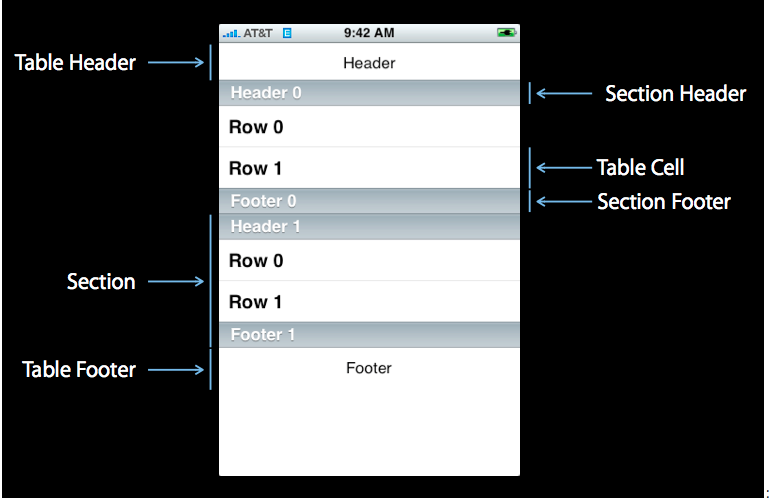


UITableViewStylePlain, // 规则的表格式图
UITableViewStyleGrouped //分组的表格视图
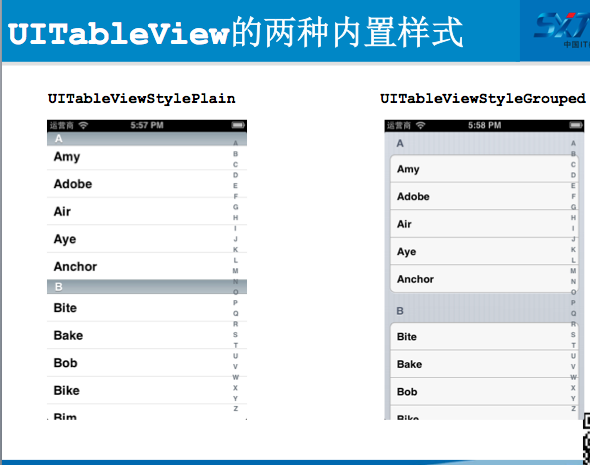
4.标记单元格Cell (对选中的单元格做处理的显示方式)
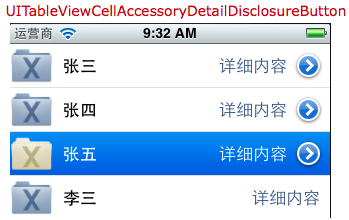
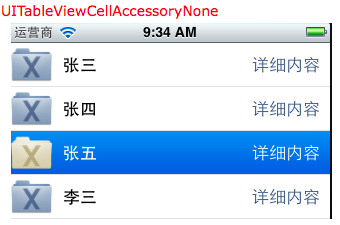
标记分别有四种效果:
UITableViewCellAccessoryCheckmark //单元格右边每条记录后面打上对勾
UITableViewCellAccessoryDetailDisclosureButton //单元格右边带箭头的小圆按钮,可以添加事件
UITableViewCellAccessoryDisclosureIndicator//展开指示器,相当于内容被折叠起来后可以打开
UITableViewCellAccessoryNone//没有任何的样式
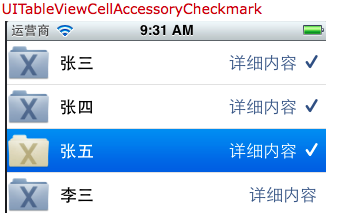

5.对单元格的编辑三种类型:
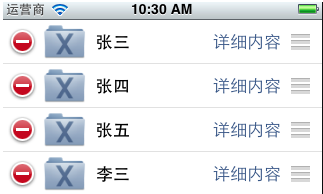
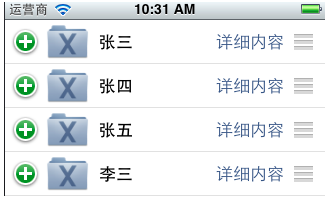
UITableViewCellEditingStyleDelete //删除选中的单元格
UITableViewCellEditingStyleInsert//插入新的单元格
UITableViewCellEditingStyleNone//移动单元格
6.在删除和添加单元格的用到UITableViewRowAnimation几种动画刷新效果
UITableViewRowAnimationAutomatic //单元格按自动方式滑入/出
UITableViewRowAnimationTop //单元格滑动到相邻单元格之上
UITableViewRowAnimationBottom //单元格滑动到相邻单元格之下
UITableViewRowAnimationLeft //单元格往左滑入/出
UITableViewRowAnimationRight //单元格往右滑入/出
UITableViewRowAnimationMiddle // 单元格往中间滑入/出
UITableViewRowAnimationFade //单元格淡入/出
UITableViewRowAnimationNone //没有动画效果
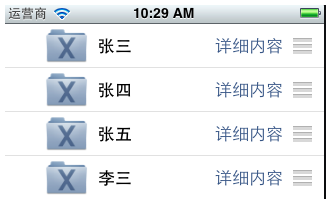
7.UITableView提供了4种基本的表格视图单元格,在SDK 3.0 之后,每个单元格都有3个属性textLabel(主标题),detailTextLabel(副标题)和imageView(图像视图)。
下面一一介绍这4种基本单元格类型格式:
<1>UITableViewCellStyleDefault
该格式提供了一个简单的左对齐的文本标签textLabel和一个可选的图像imageView。如果显示图像,那么图像将在最左边。
这种格式虽然可以设置detailTextLabel,但是不会显示该标签。
<2>UITableViewCellStyleSubtitle
该格式与前一种相比,增加了对detailTextLabel的支持,该标签将会显示在textLabel标签的下面,字体相对较小。
<3>UITableViewCellStyleValue1
该格式居左显示textLabel,居右显示detailTextLabel,且字体较小。
该格式不支持图像。
<4>UITableViewCellStyleValue2
该格式居左现实一个小型蓝色主标签textLabel,在其右边显示一个小型黑色副标题详细标签detailTextLabel。
该格式不支持图像
二、表格视图的数据源协议:UITableViewDataSource
@protocol UITableViewDataSource<NSObject>
@required
//设置每组多少行
- (NSInteger)tableView:(UITableView *)tableView numberOfRowsInSection:(NSInteger)section;
//设置每一行的单元格
- (UITableViewCell *)tableView:(UITableView *)tableView cellForRowAtIndexPath:(NSIndexPath *)indexPath;
@optional
//设置有多少组
- (NSInteger)numberOfSectionsInTableView:(UITableView *)tableView;
//设置表头内容
- (NSString *)tableView:(UITableView *)tableView titleForHeaderInSection:(NSInteger)section;
//设置表尾内容
- (NSString *)tableView:(UITableView *)tableView titleForFooterInSection:(NSInteger)section;
//设置编辑状态(某一行是否可以编辑(删除))
- (BOOL)tableView:(UITableView *)tableView canEditRowAtIndexPath:(NSIndexPath *)indexPath;
//设置移动状态(某一行是否可以移动来进行重新排序)
- (BOOL)tableView:(UITableView *)tableView canMoveRowAtIndexPath:(NSIndexPath *)indexPath;
//右边的索引栏的内容
- (NSArray *)sectionIndexTitlesForTableView:(UITableView *)tableView;
//根据单元格索引和内容返回组索引
- (NSInteger)tableView:(UITableView *)tableView sectionForSectionIndexTitle:(NSString *)title atIndex:(NSInteger)index;
//对指定的组、行的单元格执行编辑操作(增加、删除、插入)
- (void)tableView:(UITableView *)tableView commitEditingStyle:(UITableViewCellEditingStyle)editingStyle forRowAtIndexPath:(NSIndexPath *)indexPath;
//对指定的组、行的单元格执行移动操作
- (void)tableView:(UITableView *)tableView moveRowAtIndexPath:(NSIndexPath *)sourceIndexPath toIndexPath:(NSIndexPath *)destinationIndexPath;
@end
三、//NSIndexPath
@interface NSIndexPath (UITableView)
+ (NSIndexPath *)indexPathForRow:(NSInteger)row inSection:(NSInteger)section;
@property(nonatomic,readonly) NSInteger section; //组
@property(nonatomic,readonly) NSInteger row;//行
@end
四、表格视图的行为协议:UITableViewDelegate
@protocol UITableViewDelegate<NSObject, UIScrollViewDelegate>
@optional
//选择某一行单元格开始时
- (void)tableView:(UITableView *)tableView willDisplayCell:(UITableViewCell *)cell forRowAtIndexPath:(NSIndexPath *)indexPath;
//选择某一组表头视图开始时
- (void)tableView:(UITableView *)tableView willDisplayHeaderView:(UIView *)view forSection:(NSInteger)section ;
//选择某一组表尾视图开始时
- (void)tableView:(UITableView *)tableView willDisplayFooterView:(UIView *)view forSection:(NSInteger)section;
//选择某一行单元格开始时
- (void)tableView:(UITableView *)tableView didEndDisplayingCell:(UITableViewCell *)cell forRowAtIndexPath:(NSIndexPath*)indexPath ;
//选择某一组表头视图结束时
- (void)tableView:(UITableView *)tableView didEndDisplayingHeaderView:(UIView *)view forSection:(NSInteger)section ;
//选择某一组表尾视图结束时
- (void)tableView:(UITableView *)tableView didEndDisplayingFooterView:(UIView *)view forSection:(NSInteger)section;
//选中了UITableView的某一行
- (void)tableView:(UITableView *)tableView didSelectRowAtIndexPath:(NSIndexPath *)indexPath;
//取消了UITableView的某一行
- (void)tableView:(UITableView *)tableView didDeselectRowAtIndexPath:(NSIndexPath *)
//返回某一行的高度
- (CGFloat)tableView:(UITableView *)tableView heightForRowAtIndexPath:(NSIndexPath *)indexPath;
//返回某一组表头的高度
- (CGFloat)tableView:(UITableView *)tableView heightForHeaderInSection:(NSInteger)section;
//返回某一组表尾的高度
- (CGFloat)tableView:(UITableView *)tableView heightForFooterInSection:(NSInteger)section;
//显示某一组表尾的视图
//设置每一行的等级缩进(数字越小,等级越高)
//返回单元格的编辑类型
-(UITableViewCellEditingStyle)tableView:(UITableView *)tableView editingStyleForRowAtIndexPath:(NSIndexPath *)indexPath
@end
重点:获取indexPath的三种方式
//1.通过标记tag获取
//1.1通过按钮的tag获取indexPath
//Product *product = [self.products objectAtIndex:sender.tag];
//1.2通过拿出按钮的父视图的父视图获取单元格
//shopingTableViewCell *cell = (shopingTableViewCell*)sender.superview.superview;(button->contentView->cell)
//NSIndexPath *indexPath = [self.tableView indexPathForCell:cell];
//Product *product = [self.products objectAtIndex:indexPath.row];
//1.3通过event记录的触摸点获取indexPath
UITouch *touch = [[event allTouches] anyObject];
CGPoint point = [touch locationInView:self.tableView];
NSIndexPath *indexPath = [self.tableView indexPathForRowAtPoint:point];
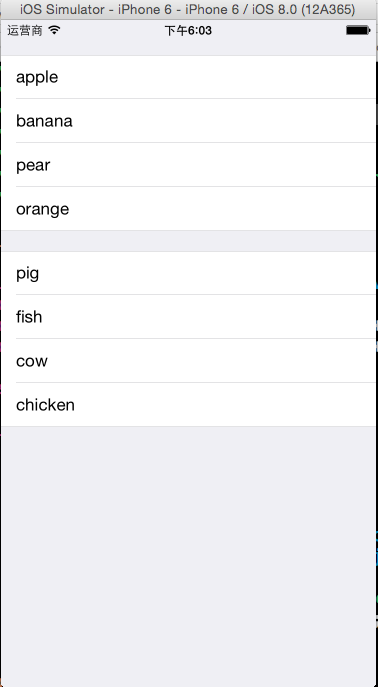
范例一:制作一个水果分组表格

 1 #import "ViewController.h"
 2
 3 @interface ViewController ()<UITableViewDataSource>
 4 @property (weak, nonatomic) IBOutlet UITableView *tableView;
 5 @property (strong,nonatomic)NSArray *fruit;
 6 @property (strong,nonatomic)NSArray *meat;
 7
 8 @end
 9
10 @implementation ViewController
11
12 - (void)viewDidLoad {
13     [super viewDidLoad];
14     //初始化数据
15     self.fruit = [NSArray arrayWithObjects:@"apple",@"banana",@"pear",@"orange",nil];
16     self.meat = [NSArray arrayWithObjects:@"pig",@"fish",@"cow",@"chicken", nil];
17
18     //设置tableView的数据源代理dataSource
19     self.tableView.dataSource = self;
20 }
21
22 #pragma mark  - tableView的数据源方法
23 //设置有多少组
24 -(NSInteger)numberOfSectionsInTableView:(UITableView *)tableView
25 {
26     return 2;
27 }
28 //设置每组多少行
29 -(NSInteger)tableView:(UITableView *)tableView numberOfRowsInSection:(NSInteger)section
30 {
31     return section==0?[self.fruit count]:[self.meat count];
32 }
33 //设置每一行的单元格
34 -(UITableViewCell *)tableView:(UITableView *)tableView cellForRowAtIndexPath:(NSIndexPath *)indexPath
35 {
36     UITableViewCell *cell = [[UITableViewCell alloc]initWithStyle:UITableViewCellStyleDefault reuseIdentifier:nil];
37
38     cell.textLabel.text = indexPath.section==0?self.fruit[[indexPath row]]:self.meat[[indexPath row]];
39
40     return cell;
41 }
42 @end
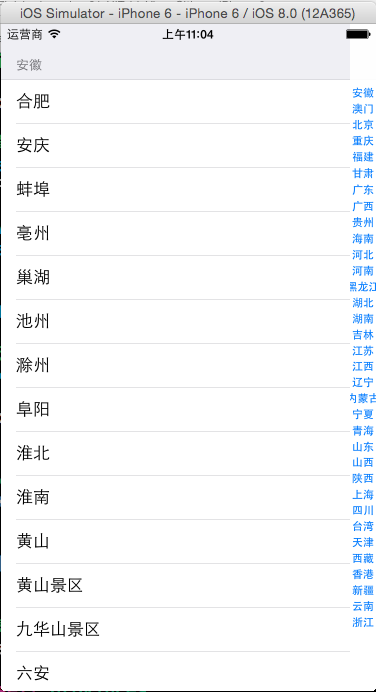
范例二:制作一个中国城市表格
 1 #import "ViewController.h"
 2
 3 @interface ViewController ()<UITableViewDataSource>
 4 @property (strong,nonatomic)UITableView *tableView;
 5 @property (strong,nonatomic)NSArray *provinces;
 6 @property (strong,nonatomic)NSDictionary *cities;
 7 @end
 8
 9 @implementation ViewController
10
11 - (void)viewDidLoad {
12     [super viewDidLoad];
13     //初始化数据
14     NSBundle *bundle = [NSBundle mainBundle];
15     NSString *path = [bundle pathForResource:@"cities" ofType:@"plist"];
16     NSDictionary *dictionary = [NSDictionary dictionaryWithContentsOfFile:path];
17     if(dictionary)
18     {
19         self.provinces = [dictionary objectForKey:@"provinces"];
20         self.cities = [dictionary objectForKey:@"cities"];
21     }
22
23     //创建UITableView,设置数据源
24     self.tableView = [[UITableView alloc]initWithFrame:self.view.frame style:UITableViewStyleGrouped];
25
26     self.tableView.dataSource = self;
27
28     [self.view addSubview:self.tableView];
29 }
30
31 #pragma mark -tableView数据源方法
32 //有多少个section
33 -(NSInteger)numberOfSectionsInTableView:(UITableView *)tableView
34 {
35     return self.provinces.count;
36 }
37 //每个section有多少个row
38 -(NSInteger)tableView:(UITableView *)tableView numberOfRowsInSection:(NSInteger)section
39 {
40     //取出某省的所有城市
41     NSArray *citiesOfProvince = [self.cities objectForKey:self.provinces[section]];
42     return citiesOfProvince.count;
43 }
44 //设置每一个单元格的内容
45 -(UITableViewCell *)tableView:(UITableView *)tableView cellForRowAtIndexPath:(NSIndexPath *)indexPath
46 {
47     //1.根据reuseIdentifier,先到对象池中去找重用的单元格对象,重用单个页面显示的所有单元格,节约内存
48     static NSString *reuseIdentifier = @"cityCell";
49     UITableViewCell *cell = [self.tableView dequeueReusableCellWithIdentifier:reuseIdentifier];
50     //2.如果没有找到,自己创建单元格对象
51     if(cell == nil)
52     {
53         cell = [[UITableViewCell alloc]initWithStyle:UITableViewCellStyleDefault reuseIdentifier:reuseIdentifier];
54         NSLog(@"创建单元格对象");
55     }
56     //3.设置单元格对象的内容
57     //取出某省的所有城市
58     NSArray *citiesOfProvince = [self.cities objectForKey:self.provinces[[indexPath section]]];
59
60     //设置单元格的内容为相应的城市的名称
61     cell.textLabel.text = [citiesOfProvince objectAtIndex:[indexPath row]];
62
63     return cell;
64 }
65
66 //设置每一个section头部的名称,设置省的名字
67 -(NSString *)tableView:(UITableView *)tableView titleForHeaderInSection:(NSInteger)section
68 {
69     return [self.provinces objectAtIndex:section];
70 }
71
72 //添加右边的索引,便于查找对应的省
73 -(NSArray*)sectionIndexTitlesForTableView:(UITableView *)tableView
74 {
75     return self.provinces;
76 }
77
78 @end
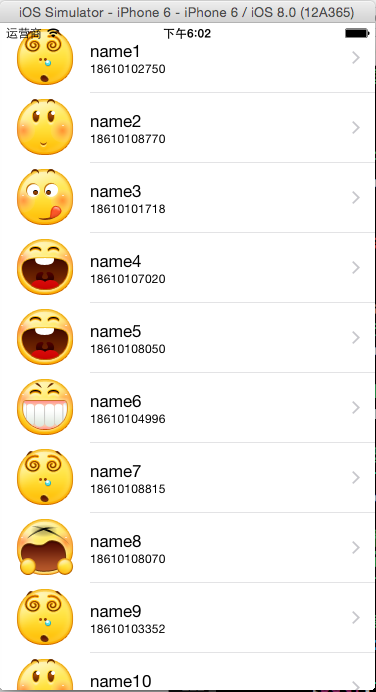
范例三 制作带有图像、主标题、副标题的通讯录
  1 #import "ViewController.h"
  2 #import "Contact.h"
  3 #define CONTACT_NUM 20
  4 @interface ViewController ()<UITableViewDataSource,UITableViewDelegate,UIAlertViewDelegate>
  5 @property (strong,nonatomic)UITableView *tableView;
  6 @property (strong,nonatomic)NSArray *contacts;
  7 @end
  8
  9 @implementation ViewController
 10
 11 - (void)viewDidLoad {
 12     [super viewDidLoad];
 13     //初始化联系人信息
 14     NSMutableArray *arrayM = [NSMutableArray arrayWithCapacity:CONTACT_NUM];
 15     for(int i=0; i<CONTACT_NUM; i++)
 16     {
 17         Contact *contact = [[Contact alloc]initWithName:[NSString stringWithFormat:@"name%d",i+1] andTel:[NSString stringWithFormat:@"1861010%04d",arc4random_uniform(10000)] andFaceName:[NSString stringWithFormat:@"%d.png",arc4random_uniform(9)]];
 18         [arrayM addObject:contact];
 19     }
 20     self.contacts =  arrayM;
 21
 22     //创建tableView
 23     self.tableView = [[UITableView alloc]initWithFrame:self.view.frame style:UITableViewStylePlain];
 24
 25     self.tableView.dataSource = self;
 26     self.tableView.delegate = self;
 27
 28     [self.view addSubview:self.tableView];
 29 }
 30
 31 #pragma mark -tableView的数据源方法
 32
 33 //每个组section有多少row
 34 -(NSInteger)tableView:(UITableView *)tableView numberOfRowsInSection:(NSInteger)section
 35 {
 36     return self.contacts.count;
 37 }
 38 //设置每一个单元格的内容
 39 -(UITableViewCell *)tableView:(UITableView *)tableView cellForRowAtIndexPath:(NSIndexPath *)indexPath
 40 {
 41     //1.根据reuseIdentifier,先到对象池中去找重用的单元格对象
 42     static NSString *reuseIdentifier = @"contactCell";
 43     UITableViewCell *cell = [self.tableView dequeueReusableCellWithIdentifier:reuseIdentifier];
 44     //2.如果没有找到,自己创建单元格对象
 45     if(cell == nil)
 46     {
 47         cell = [[UITableViewCell alloc]initWithStyle:UITableViewCellStyleSubtitle reuseIdentifier:reuseIdentifier];
 48     }
 49     //3.设置单元格对象的内容
 50     Contact *contact = [self.contacts objectAtIndex:indexPath.row];
 51     //设置头像
 52     [cell.imageView setImage:[UIImage imageNamed:contact.faceName]];
 53     //设置姓名
 54     cell.textLabel.text = contact.name;
 55     //设置电话
 56     cell.detailTextLabel.text = contact.tel;
 57
 58     //设置辅助指引视图
 59     cell.accessoryType = UITableViewCellAccessoryDisclosureIndicator;
 60
 61     return cell;
 62 }
 63
 64 #pragma mark -tableVie的代理方法
 65 //设置单元格每行的高度
 66 -(CGFloat)tableView:(UITableView *)tableView heightForRowAtIndexPath:(NSIndexPath *)indexPath
 67 {
 68     return 70;
 69 }
 70
 71 //选中某行时的操作
 72 -(void)tableView:(UITableView *)tableView didSelectRowAtIndexPath:(NSIndexPath *)indexPath
 73 {
 74     //NSLog(@"选中了第%ld行",[indexPath row]);
 75     //创建一个提示框
 76     UIAlertView *alertView = [[UIAlertView alloc]initWithTitle:@"提示" message:[NSString stringWithFormat:@"你选中了第%ld行",indexPath.row] delegate:self cancelButtonTitle:@"确定" otherButtonTitles:@"取消", nil];
 77     //设置类型
 78     alertView.alertViewStyle = UIAlertViewStylePlainTextInput;
 79
 80     //在文本框当中显示原来的名字
 81     Contact *contact = [self.contacts objectAtIndex:indexPath.row];
 82     [alertView textFieldAtIndex:0].text = contact.name;
 83
 84     //用tag记录选中的行号
 85     alertView.tag = indexPath.row;
 86
 87     //显示提示框
 88     [alertView show];
 89 }
 90
 91 //取消了某行的操作
 92 -(void)tableView:(UITableView *)tableView didDeselectRowAtIndexPath:(NSIndexPath *)indexPath
 93 {
 94     NSLog(@"取消了第%ld行",[indexPath row]);
 95 }
 96
 97 #pragma mark -alertView代理方法
 98 //获取点击了那个按钮
 99 -(void)alertView:(UIAlertView *)alertView clickedButtonAtIndex:(NSInteger)buttonIndex
100 {
101     //NSLog(@"buttonIndex:%ld",buttonIndex);
102     if(buttonIndex == 0) //确定
103     {
104         //1.修改数据模型
105         Contact *contact = [self.contacts objectAtIndex:alertView.tag];
106         [contact setName:[alertView textFieldAtIndex:0].text];
107
108         //2.表格刷新,显示新的数据
109         //表格全部刷新
110         //[self.tableView reloadData];
111
112         //表格局部刷新
113         NSIndexPath *indexpath = [NSIndexPath indexPathForRow:alertView.tag inSection:0];
114         [self.tableView reloadRowsAtIndexPaths:@[indexpath] withRowAnimation:UITableViewRowAnimationLeft];
115     }
116 }
117 @end
范例四、删除单元格、插入单元格
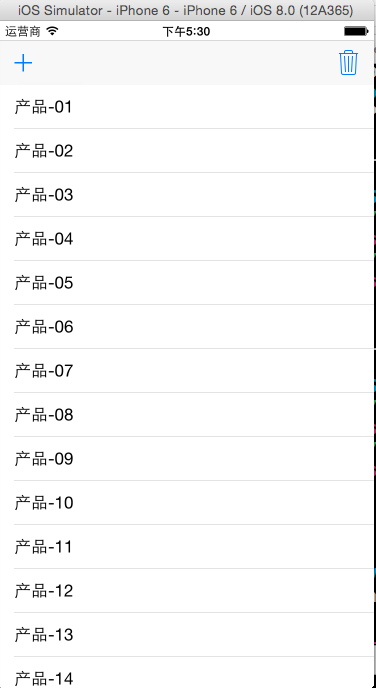 前《=====》后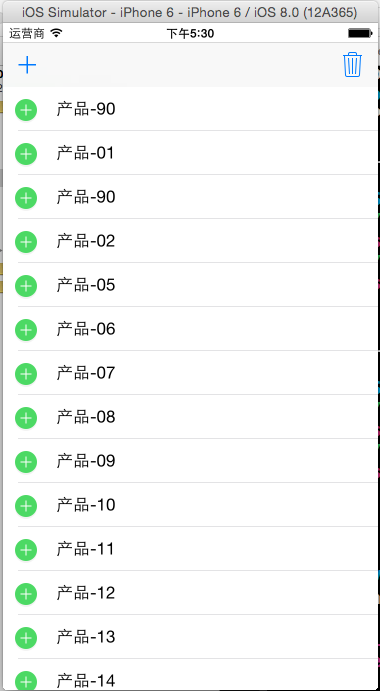
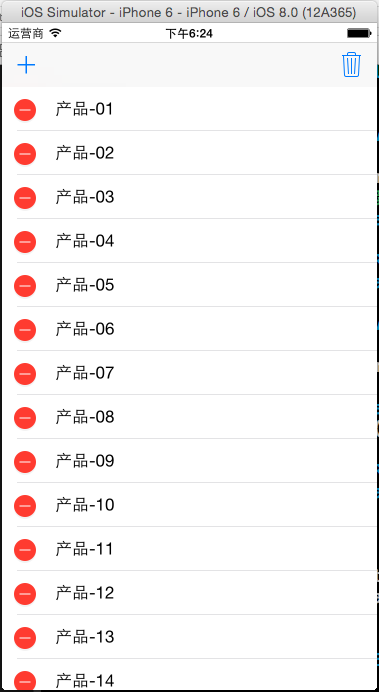 前<======>后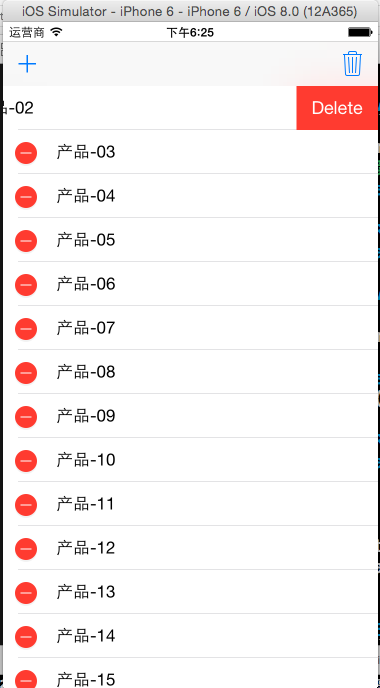
 1 #import "ViewController.h"
 2 #define ARRAYM_NUM 20
 3 @interface ViewController ()<UITableViewDataSource,UITableViewDelegate>
 4 @property (weak, nonatomic) IBOutlet UITableView *tableView;
 5 @property (strong,nonatomic)NSMutableArray *arrayM;
 6 @property (assign,nonatomic)BOOL isDelete;
 7 @end
 8
 9 @implementation ViewController
10 - (IBAction)addClicked:(UIBarButtonItem *)sender {
11     self.isDelete = NO;
12     self.tableView.editing = !self.tableView.editing;
13 }
14 - (IBAction)deleteClicked:(UIBarButtonItem *)sender {
15     self.isDelete = YES;
16     self.tableView.editing = !self.tableView.editing;
17 }
18
19 - (void)viewDidLoad {
20     [super viewDidLoad];
21     //初始化数据
22     self.arrayM = [NSMutableArray arrayWithCapacity:ARRAYM_NUM];
23     for (int i=0; i<ARRAYM_NUM; i++)
24     {
25         NSString *productName = [NSString stringWithFormat:@"产品-%02d",i+1];
26         [self.arrayM addObject:productName];
27
28         //设置tableView的数据源和代理
29         self.tableView.dataSource = self;
30         self.tableView.delegate = self;
31     }
32 }
33
34 #pragma mark -tableView的数据源方法
35
36 //每组多少行
37 -(NSInteger)tableView:(UITableView *)tableView numberOfRowsInSection:(NSInteger)section
38 {
39      return self.arrayM.count;
40 }
41 //设置每一个单元格的内容
42 -(UITableViewCell *)tableView:(UITableView *)tableView cellForRowAtIndexPath:(NSIndexPath *)indexPath
43 {
44     //1.根据reuseIdentifier,先到对象池中去找重用的单元格对象
45     static NSString *reuseIdentifier = @"productCell";
46     UITableViewCell *cell = [self.tableView dequeueReusableCellWithIdentifier:reuseIdentifier];
47     //2.如果没有找到,自己创建单元格对象
48     if(cell == nil)
49     {
50         cell = [[UITableViewCell alloc]initWithStyle:UITableViewCellStyleDefault reuseIdentifier:reuseIdentifier];
51     }
52     //3.设置单元格对象的内容
53     cell.textLabel.text = [self.arrayM objectAtIndex:indexPath.row];
54
55     return cell;
56 }
57
58 //tableView的编辑的处理
59 -(void)tableView:(UITableView *)tableView commitEditingStyle:(UITableViewCellEditingStyle)editingStyle forRowAtIndexPath:(NSIndexPath *)indexPath
60 {
61     if(editingStyle == UITableViewCellEditingStyleDelete)
62     {
63         NSLog(@"要删除第%ld行",indexPath.row);
64         //1.要在数组中删掉相应的元素
65         [self.arrayM removeObjectAtIndex:indexPath.row];
66         //2.做局部的刷新
67         [self.tableView deleteRowsAtIndexPaths:@[indexPath] withRowAnimation:UITableViewRowAnimationMiddle];
68     }
69     if(editingStyle == UITableViewCellEditingStyleInsert)
70     {
71         NSLog(@"要插入第%ld行",indexPath.row);
72         //1.要在数组中插入新的元素
73         [self.arrayM insertObject:[NSString stringWithFormat:@"产品-%02d", arc4random_uniform(100)] atIndex:indexPath.row];
74         //2.做局部的刷新
75         [self.tableView insertRowsAtIndexPaths:@[indexPath] withRowAnimation:UITableViewRowAnimationRight];
76     }
77 }
78
79 -(UITableViewCellEditingStyle)tableView:(UITableView *)tableView editingStyleForRowAtIndexPath:(NSIndexPath *)indexPath
80 {
81     if(self.isDelete)
82         return UITableViewCellEditingStyleDelete;
83     else
84         return UITableViewCellEditingStyleInsert;
85 }
86 @end
 1 //设置每一个单元格的内容
 2 -(UITableViewCell *)tableView:(UITableView *)tableView cellForRowAtIndexPath:(NSIndexPath *)indexPath
 3 {
 4     //1.根据reuseIdentifier,先到对象池中去找重用的单元格对象
 5     static NSString *reuseIdentifier = @"<#name#>";
 6     UITableViewCell *cell = [self.tableView dequeueReusableCellWithIdentifier:reuseIdentifier];
 7     //2.如果没有找到,自己创建单元格对象
 8     if(cell == nil)
 9     {
10         cell = [[UITableViewCell alloc]initWithStyle:UITableViewCellStyleDefault reuseIdentifier:reuseIdentifier];
11     }
12     //3.设置单元格对象的内容
13
14     return cell;
15 }
tableView的编辑模式(删除、插入)分三步处理
1.打开tableView的编辑模式
self.tableView.editing = YES
2.返回单元格的编辑类型
编辑类型三种:none、insert、delete
默认的编辑类型为delete
-(UITableViewCellEditingStyle)tableView:(UITableView *)tableView editingStyleForRowAtIndexPath:(NSIndexPath *)indexPath
3.对单元格进行具体的编辑处理
-(void)tableView:(UITableView *)tableView commitEditingStyle:(UITableViewCellEditingStyle)editingStyle forRowAtIndexPath:(NSIndexPath *)indexPath
 1 //tableView的编辑的处理
 2 -(void)tableView:(UITableView *)tableView commitEditingStyle:(UITableViewCellEditingStyle)editingStyle forRowAtIndexPath:(NSIndexPath *)indexPath
 3 {
 4     if(editingStyle == UITableViewCellEditingStyleDelete)
 5     {
 6         NSLog(@"要删除第%ld行",indexPath.row);
 7         //1.要在数组中删掉相应的元素
 8         [self.arrayM removeObjectAtIndex:indexPath.row];
 9         //2.做局部的刷新
10         [self.tableView deleteRowsAtIndexPaths:@[indexPath] withRowAnimation:UITableViewRowAnimationMiddle];
11     }
12     if(editingStyle == UITableViewCellEditingStyleInsert)
13     {
14         NSLog(@"要插入第%ld行",indexPath.row);
15         //1.要在数组中插入新的元素
16         [self.arrayM insertObject:[NSString stringWithFormat:@"产品-%02d", arc4random_uniform(100)] atIndex:indexPath.row];
17         //2.做局部的刷新
18         [self.tableView insertRowsAtIndexPaths:@[indexPath] withRowAnimation:UITableViewRowAnimationRight];
19     }
20 }
21
22 //返回单元格编辑类型
23 -(UITableViewCellEditingStyle)tableView:(UITableView *)tableView editingStyleForRowAtIndexPath:(NSIndexPath *)indexPath
24 {
25     if(self.isDelete)
26         return UITableViewCellEditingStyleDelete;
27     else
28        return UITableViewCellEditingStyleInsert;
29 }
在tableView中移动单元格的步骤:
1、把tableView的editing设置成YES
2、在返回单元格编辑类型方法时一定要返回none
3、设置单元格能够移动(返回YES)
-(BOOL)tableView:(UITableView *)tableView canMoveRowAtIndexPath:(NSIndexPath *)indexPath
4、进行单元格移动后的处理
-(void)tableView:(UITableView *)tableView moveRowAtIndexPath:(NSIndexPath *)sourceIndexPath toIndexPath:(NSIndexPath *)destinationIndexPath
 1 //返回单元格编辑类型
 2 -(UITableViewCellEditingStyle)tableView:(UITableView *)tableView editingStyleForRowAtIndexPath:(NSIndexPath *)indexPath
 3 {
 4      return UITableViewCellEditingStyleNone;
 5 }
 6 //设置单元格是否能移动
 7 -(BOOL)tableView:(UITableView *)tableView canMoveRowAtIndexPath:(NSIndexPath *)indexPath
 8 {
 9     return YES;
10 }
11
12 //移动单元格时的处理
13 -(void)tableView:(UITableView *)tableView moveRowAtIndexPath:(NSIndexPath *)sourceIndexPath toIndexPath:(NSIndexPath *)destinationIndexPath
14 {
15     //修改数组中的元素的顺序
16     //1.先取出要移动的元素
17     NSString *item = [self.arrayM objectAtIndex:sourceIndexPath.row];
18
19     //2.先把原来位置的元素删掉
20     [self.arrayM removeObjectAtIndex:sourceIndexPath.row];
21
22     //3.在新的位置上重新插入
23     [self.arrayM insertObject:item atIndex:destinationIndexPath.row];
24 }