在EF core里,可以通过实现IEntityTypeConfiguration来进行映射。
一、官网文档
https://docs.microsoft.com/en-us/ef/core/what-is-new/ef-core-2.0
二、示例(.net core控制台程序)
示例使用的数据库是mysql
1、新建模型:
    public class Students
    {
        public int Id { get; set; }

        public string Name { get; set; }

        public decimal Score { get; set; }
    }
2、实现IEntityTypeConfiguration
    public class StudentsMap : IEntityTypeConfiguration<Students>
    {
        public void Configure(EntityTypeBuilder<Students> builder)
        {
            builder.ToTable("Students");
            builder.HasKey(m => m.Id);
            builder.Property(m => m.Id).ValueGeneratedOnAdd();
            builder.Property(m => m.Name);
        }
    }
3、定义context
    public class SchoolContext : DbContext
    {
        protected override void OnConfiguring(DbContextOptionsBuilder optionsBuilder)
        {
            optionsBuilder.UseMySql("Server=localhost;port=3306;database=test;uid=root;pwd=pwd;Convert Zero Datetime=True;", b => b.MaxBatchSize(30));
        }
        protected override void OnModelCreating(ModelBuilder builder)
        {
            base.OnModelCreating(builder);
            builder.ApplyConfiguration(new StudentsMap());
        }
    }
4、使用migrations迁移命令,得到数据库。
5、测试添加数据
    class Program
    {
        static void Main(string[] args)
        {
            using (var _context = new SchoolContext())
            {
                var stu = new Students()
                {
                    Name = "test",
                    Score = 100
                };
                _context.Set<Students>().Add(stu);
                _context.SaveChanges();
            }
        }
    }
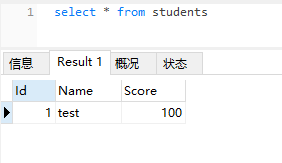
6、查看数据库,数据已经插入: