一、什么是特性
特性是一种允许我们向程序的程序集添加元数据的语言结构,它是用于保存程序结构信息的某种特殊类型的类。
MSDN中对它的解释是:特性提供功能强大的方法以将声明信息与 C# 代码(类型、方法、属性等)相关联。特性与程序实体关联后,即可在运行时使用名为“反射”的技术查询属性。
(有关元数据和反射的知识,点击查看 C# 反射)
二、使用特性
特性的目的是告诉编译器把程序结构的某组元数据嵌入程序集,它可以放置在几乎所有的声明中(但特定的属性可能限制在其上有效的声明类型)。其语法为:
● 在结构前放置特性片段来运用特性
● 特性片段被方括号包围,其中是特性名和特性的参数列表
例:
  [Serializable]    //不含参数的特性
    public class MyClass
    {...}

   [MyAttribute("firt","second","finally")]    //带有参数的特性
public class MyClass {...}
注: 大多数特性只针对直接跟随在一个或多个特性片段后的结构
单个结构可以运用多个特性,使用时可以把独立的特性片段互相叠在一起或使用分成单个特性片段,特性之间用逗号分隔

[Serializable]
[MyAttribute("firt","second","finally")]    //独立的特性片段
...


[MyAttribute("firt","second","finally"), Serializable]    //逗号分隔
...
某些属性对于给定实体可以指定多次。例如,Conditional 就是一个可多次使用的属性:
[Conditional("DEBUG"), Conditional("TEST1")]
void TraceMethod()
{
    // ...
}
特性的目标是应用该特性的实体。例如,特性可以应用于类、特定方法或整个程序集。默认情况下,特性应用于它后面的元素。但是,您也可以显式标识要将特性应用于方法还是它的参数或返回值。
| C#中标准特性目标名称 | 适用对象 |
| assembly | 整个程序集 |
| module | 当前程序集模块(不同于Visual Basic 模块) |
| field | 在类或结构中的字段 |
| event | Event |
| method | 方法或get和set属性访问器 |
| param | 方法参数或set属性访问器的参数 |
| property | Property |
| return | 方法、属性索引器或get属性访问器的返回值 |
| type | 结构、类、接口、枚举或委托 |
| typevar | 指定使用泛型结构的类型参数 |
三、自定义特性
特性的用法虽然很特殊,但它只是某个特殊类型的类。
3.1 声明自定义的特性
总体上声明特性和声明其他类是一样的,只是所有的特性都派生自System.Attribute。根据惯例,特性名使用Pascal命名法并且以Attribute后缀结尾,当为目标应用特性时,我们可以不使用后缀。如:对于SerializableAttribute
和MyAttributeAttribute这两个特性,我们在把它应用到结构的时候可以使用[Serializable和MyAttribute短名
public class MyAttributeAttribute : System.Attribute
{...}
当然它也有构造函数。和其他类一样,每个特性至少有一个公共构造函数,如果你不声明构造函数,编译器会产生一个隐式、公共且无参的构造函数。
public class MyAttributeAttribute : System.Attribute
    {
        public string Description;
        public string ver;
        public string Reviwer;

        public MyAttributeAttribute(string desc,string ver,string Rev)    //构造函数
        {
            Description = desc;
            this.ver = ver;
            Reviwer = Rev;
        }
    }
3.2 限制特性的使用
前面我们已经知道,可以在类上面运用特性,而特性本身就是类,有一个很重要的预定义特性AttributeUsage可以运用到自定义特性上,我们可以用它来限制特性使用在某个目标类型上
下面的例子使自定义的特性只能应用到方法和类上
[AttributeUsage(AttributeTargets.Class | AttributeTargets.Method)]
    public class MyAttributeAttribute : System.Attribute
    {...}
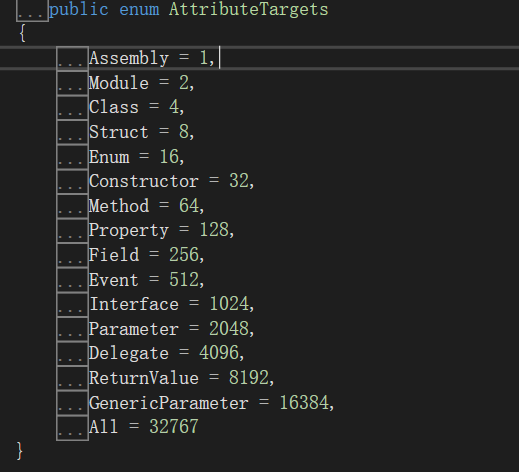
简单解读一下AttributeUsage特性,它有三个重要的公共属性,如下表
| 名字 | 意义 | 默认值 |
| ValidOn | 指定特性允许的目标类型。构造函数的第一个参数必须是AttributeTarget类型的枚举值 | |
| Inherited | 布尔值,指示特性能否被派生类和重写成员继承 | true |
| AllowMultiple | 布尔值,指示特性能否被重复放置在同一个程序实体前多次 | false |
在vs中按f12查阅定义我们可以看到,AttributeTarget枚举的成员有
看一个小例子
[AttributeUsage(AttributeTargets.Class | AttributeTargets.Method,   //必须的,指示MyAttribute只能应用到类和方法上
        Inherited = false,   //可选,表明不能被派生类继承
        AllowMultiple = false)]   //可选,表明不能有MyAttribute的多个实例应用到同一个目标上
    public class MyAttributeAttribute : System.Attribute
    {...}
3.3访问特性
定义好特性了,怎么进行访问呢?对于自定义的特性,我们可以用Type中的IsDefined和GetCustomAttributes方法来获取
3.3.1 使用IsDefined方法
public abstract bool IsDefined(Type attributeType, bool inherit),它是用来检测某个特性是否应用到了某个类上
参数说明: attributeType : 要搜索的自定义特性的类型。 搜索范围包括派生的类型。
inherit:true 搜索此成员继承链,以查找这些属性;否则为 false。 属性和事件,则忽略此参数
返回结果: true 如果一个或多个实例 attributeType 或其派生任何的类型为应用于此成员; 否则为 false。
下面代码片段是用来检查MyAttribute特性是否被运用到MyClass类
MyClass mc = new MyClass();
Type t = mc.GetType();
bool def = t.IsDefined(typeof(MyAttributeAttribute),false);
if (def)
    Console.WriteLine("MyAttribute is defined!");
3.3.2 使用GetCustomAttributes方法
public abstract object[] GetCustomAttributes(bool inherit),调用它后,会创建每一个与目标相关联的特性的实例
参数说明: inherit: true 搜索此成员继承链,以查找这些属性;否则为 false
返回结果:返回所有应用于此成员的自定义特性的数组,因此我们必须将它强制转换为相应的特性类型
//自定义特性

[AttributeUsage(AttributeTargets.Class | AttributeTargets.Method)]
    public class MyAttributeAttribute : System.Attribute
    {
        public string Description;
        public string ver;
        public string Reviwer;

        public MyAttributeAttribute(string desc,string ver,string Rev)
        {
            Description = desc;
            this.ver = ver;
            Reviwer = Rev;
        }
    }

//定义类
[MyAttribute("firt","second","finally")]
    class MyClass
    {

    }

 static void Main(string[] args)
        {
            MyClass mc = new MyClass();
            Type t = mc.GetType();
            Object[] obj = t.GetCustomAttributes(false);

            foreach(Attribute a in obj)
            {
                MyAttributeAttribute attr = a as MyAttributeAttribute;
                if(attr != null)
                {
                    Console.WriteLine("Description : {0}", attr.Description);
                    Console.WriteLine("ver : {0}", attr.ver);
                    Console.WriteLine("review: {0}", attr.Reviwer);
                }
            }
        }
结果:
四、预定义的特性
4.1 Obsolete特性
Obsolete特性将public ObsoleteAttribute()程序结构标注为过期的,并且在代码编译时显式有用的警告信息,它有三种重载
public ObsoleteAttribute()
public ObsoleteAttribute(string message) 参数说明: message:描述了可选的变通方法文本字符串。
public ObsoleteAttribute(string message, bool error) 参数说明:message:描述了可选的变通方法文本字符串。 error:true 如果使用过时的元素将生成编译器错误; false 如果使用它将生成编译器警告。
举个例子:
using System;
using System.Runtime.CompilerServices;

namespace 特性
{
    class Program
    {
        [Obsolete("Use method SuperPrintOut")]
        static void Print(string str,[CallerFilePath] string filePath = "")
        {
            Console.WriteLine(str);
            Console.WriteLine("filePath {0}", filePath);
        }


        static void Main(string[] args)
        {
            string path = "no path";
            Print("nothing",path);
            Console.ReadKey();
        }
    }
}
运行没有问题,不过出现了警告:
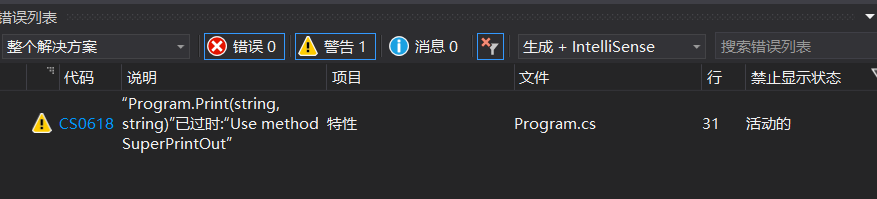
如果将 [Obsolete("Use method SuperPrintOut")] 改成[Obsolete("Use method SuperPrintOut",true)] 的话,编译则会出现错误信息

4.2 Conditional 特性
public ConditionalAttribute(string conditionString),指示编译器,如果定义了conditionString编译符号,就和普通方法没有区别,否则忽略代码中方法这个方法的所有调用
#define fun    //定义编译符号
using System;
using System.Runtime.CompilerServices;

namespace 特性
{
    class Program
    {
        [Conditional("fun")]
        static void Fun(string str)
        {
            Console.WriteLine(str);
        }

        static void Main(string[] args)
        {
            Fun("hello");
            Console.ReadKey();
        }
    }

}
由于定义了fun,所以Fun函数会被调用,如果没有定义,这忽略Fun函数的调用
4.3 调用者信息特性
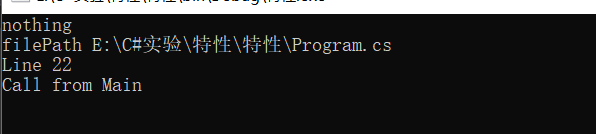
调用者信息特性可以访问文件路径、代码行数、调用成员的名称等源代码信息,这三个特性的名称分别为CallerFilePath、CallerLineNumber和CallerMemberName,这些方法只能用于方法中的可选参数
using System;
using System.Runtime.CompilerServices;

namespace 特性
{
    class Program
    {
        static void Print(string str,
            [CallerFilePath] string filePath = "",
            [CallerLineNumber] int num = 0,
            [CallerMemberName] string name = "")
        {
            Console.WriteLine(str);
            Console.WriteLine("filePath {0}", filePath);
            Console.WriteLine("Line {0}", num);
            Console.WriteLine("Call from {0}", name);
        }

        static void Main(string[] args)
        {
            Print("nothing");
            Console.ReadKey();
        }
    }
}