该项目用来介绍SpringMVC对参数接受的方法:
项目目录树:在前一个项目上修改添加
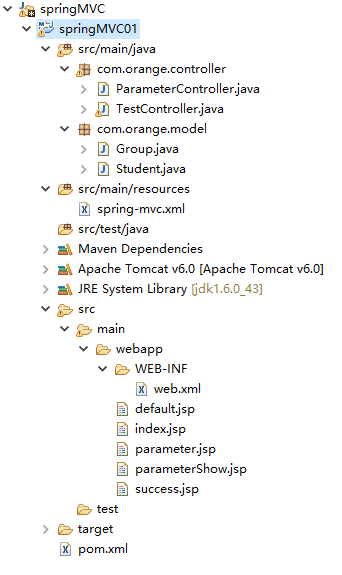
新添加了Student类和Group类,用来测试整体参数接受
Student.java
package com.orange.model;

public class Student {

    private String name;

    private String password;

    private Group group;

    public String getName() {
        return name;
    }

    public void setName(String name) {
        this.name = name;
    }

    public String getPassword() {
        return password;
    }

    public void setPassword(String password) {
        this.password = password;
    }

    public Group getGroup() {
        return group;
    }

    public void setGroup(Group group) {
        this.group = group;
    }


}
Group.java
package com.orange.model;

public class Group {

    private int id;

    private String name;

    public int getId() {
        return id;
    }

    public void setId(int id) {
        this.id = id;
    }

    public String getName() {
        return name;
    }

    public void setName(String name) {
        this.name = name;
    }


}
提供控制类ParameterController.java
package com.orange.controller;

import org.springframework.stereotype.Controller;
import org.springframework.web.bind.annotation.RequestMapping;
import org.springframework.web.bind.annotation.RequestParam;
import org.springframework.web.servlet.ModelAndView;

import com.orange.model.Student;

@Controller
@RequestMapping(value="/parameter")
public class ParameterController {

    @RequestMapping(value="/tp1") //参数逐个接受
    public ModelAndView doParameter1(String name, String password, ModelAndView mav){
        mav.addObject("name", name);
        mav.addObject("password", password);
        mav.setViewName("/parameterShow.jsp");
        return mav;
    }

    @RequestMapping(value="/tp2") //参数整体接受,使用Student类中的属性来接受参数
    public ModelAndView doParameter2(Student studenttp2, ModelAndView mav){
        mav.addObject("studenttp2", studenttp2);
        mav.setViewName("/parameterShow.jsp");
        return mav;
    }

    @RequestMapping(value="/tp3") //参数域属性接受
    public ModelAndView doParameter3(Student studenttp3, ModelAndView mav){
        mav.addObject("studenttp3", studenttp3);
        mav.setViewName("/parameterShow.jsp");
        return mav;
    }

    @RequestMapping(value="/tp4") //参数修正,把提交的参数pname修改为name,参数ppassword修改为password
    public ModelAndView doParameter4(@RequestParam("pname") String name, @RequestParam("ppassword") String passwordtp4, ModelAndView mav){
        mav.addObject("nametp4", name);
        mav.addObject("passwordtp4", passwordtp4);
        mav.setViewName("/parameterShow.jsp");
        return mav;
    }

}
测试的jsp文件,
parameter.jsp
<%@ page language="java" contentType="text/html; charset=GBK"
    pageEncoding="GBK"%>
<%@ taglib prefix="c" uri="http://java.sun.com/jstl/core" %>
<%@ taglib prefix="fn" uri="http://java.sun.com/jsp/jstl/functions" %>
<%
    String path = request.getContextPath();
    String basePath = request.getScheme()+"://"+request.getServerName()+":"+request.getServerPort()+path+"/";
%>
<!DOCTYPE html PUBLIC "-//W3C//DTD HTML 4.01 Transitional//EN" "http://www.w3.org/TR/html4/loose.dtd">
<html>
<head>
<meta http-equiv="Content-Type" content="text/html; charset=GBK">
<base href="<%=basePath %>">
<title>Default Page</title>
</head>
<body>
    <div>
        <h1>参数逐个接受</h1><br>
        <form action="parameter/tp1">
            name: <input type="text" name="name"><br>
            password: <input type="text" name="password"><br>
            <input type="submit" value="submit">
        </form>
    </div>
    <hr>
    <div>
        <h1>参数整体接受</h1>
        <form action="parameter/tp2">
            name: <input type="text" name="name"><br>
            password: <input type="text" name="password"><br>
            <input type="submit" value="submit">
        </form>
    </div>
    <hr>
    <div>
        <h1>参数域属性接受</h1>
        <form action="parameter/tp3">
            name: <input type="text" name="name"><br>
            password: <input type="text" name="password"><br>
            group.id <input type="text" name="group.id"><br>
            group.name <input type="text" name="group.name"><br>
            <input type="submit" value="submit">
        </form>
    </div>
    <hr>
    <div>
        <h1>参数修正</h1>
        <form action="parameter/tp4">
            name: <input type="text" name="pname"><br>
            password: <input type="text" name="ppassword"><br>
            <input type="submit" value="submit">
        </form>
    </div>
    <hr>
</body>
</html>
展示提交结果的jsp文件parameterShow.jsp
<%@ page language="java" contentType="text/html; charset=GBK"
    pageEncoding="GBK"%>
<%@ taglib prefix="c" uri="http://java.sun.com/jstl/core" %>
<%@ taglib prefix="fn" uri="http://java.sun.com/jsp/jstl/functions" %>
<%
    String path = request.getContextPath();
    String basePath = request.getScheme()+"://"+request.getServerName()+":"+request.getServerPort()+path+"/";
%>
<!DOCTYPE html PUBLIC "-//W3C//DTD HTML 4.01 Transitional//EN" "http://www.w3.org/TR/html4/loose.dtd">
<html>
<head>
<meta http-equiv="Content-Type" content="text/html; charset=GBK">
<base href="<%=basePath %>">
<title>Default Page</title>
</head>
<body>
    <div>
        <h1>参数逐个接受</h1>
        <c:out value="${name }" /><br>
        <c:out value="${password }" /><br>
    </div>
    <hr>
    <div>
        <h1>参数整体接受</h1>
        <c:out value="${studenttp2.name }" /><br>
        <c:out value="${studenttp2.password }" /><br>
    </div>
    <hr>
    <div>
        <h1>参数域属性接受</h1>
        <c:out value="${studenttp3.name }" /><br>
        <c:out value="${studenttp3.password }" /><br>
        <c:out value="${studenttp3.group.id }" /><br>
        <c:out value="${studenttp3.group.name }" /><br>
    </div>
    <hr>
    <div>
        <h1>参数修正</h1>
        <c:out value="${nametp4 }" /><br>
        <c:out value="${passwordtp4 }" /><br>
    </div>
</body>
</html>
通过不同的提交,测试各个接受方式的结果,这里就不在一一展示测试结果了