在学习windows sdk编程的时候遇到这个问题。书上写的百思不得其解,于是求助msdn。我们先看看msdn怎么说。
-
ALTERNATE Selects alternate mode (fills the area between odd-numbered and even-numbered polygon sides on each scan line). WINDING Selects winding mode (fills any region with a nonzero winding value).
In general, the modes differ only in cases where a complex, overlapping polygon must be filled (for example, a five-sided polygon that forms a five-pointed star with a pentagon in the center). In such cases, ALTERNATE mode fills every other enclosed region within the polygon (that is, the points of the star), but WINDING mode fills all regions (that is, the points and the pentagon).
When the fill mode is ALTERNATE, GDI fills the area between odd-numbered and even-numbered polygon sides on each scan line. That is, GDI fills the area between the first and second side, between the third and fourth side, and so on.
When the fill mode is WINDING, GDI fills any region that has a nonzero winding value. This value is defined as the number of times a pen used to draw the polygon would go around the region. The direction of each edge of the polygon is important.
好吧闲的没事,翻译下,权当锻炼英语。
一般来说,这两种模式的区别仅仅是在需要填充复杂的,可重叠的多变形的时候,比如一个五边形产生的五角星形和中间的五边形。在这个例子中,alternate模式填充每一个多边形的包围区域,也就是说五角星的角。但是,winding模式填充所有的区域,也就说 五角星的角和中间的五边形。
当填充模式是alternate的时候。gdi填充每个扫描线穿过的的偶数号边和奇数号边。也就是说,gdi填充第一条边和第二条边中间的区域,第三条和第四条中间的区域,以此类推。注意是从奇数到偶数才被填充。
当填充模式是winding。gdi填充任何winding value为非0的区域。这个值被定义为画笔画多边形所环绕这个区域的次数。每个多边形边缘的方向很重要。
以上为msdn所述。开始的时候不太明白,于是,百度,看了几篇,关于winding value的计算懂了,关于alternate,真心觉得似是而非。又耐着性子看了几遍图和网上各篇文章的描述。好吧,终于猛然开窍了懂了。先看图。

图一
左边是alternate模式画出的,右边是winding模式。红色的线,好吧,那就是扫描线。我们看第二条穿过了1,2.和3,4。所以填充。2,3就不填了。因为只填奇到偶。

图二
下面看winding value怎么算
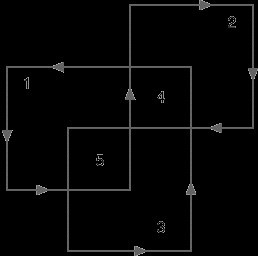
在WINDING模式下 算法是以一个“内部计数器”和“假想的线”决定的,扫描线遇到顺时针就加1(或减去1)逆时针就减去1(或者加1) 。当其非0时填充,为0不填充。
这样在winding模式下重叠区5需要填充,4不需要
 附个书上的代码
程序5-5 ALTWIND ALTWIND.C /*------------------------------------------------------------------- ALTWIND.C -- Alternate and Winding Fill Modes (c) Charles Petzold, 1998 -------------------------------------------------------------------*/ #include <windows.h> LRESULT CALLBACK WndProc (HWND, UINT, WPARAM, LPARAM) ; int WINAPI WinMain (HINSTANCE hInstance, HINSTANCE hPrevInstance, PSTR szCmdLine, int iCmdShow) { static TCHAR szAppName[] = TEXT ("AltWind") ; HWND hwnd ; MSG msg ; WNDCLASS wndclass ; wndclass.style = CS_HREDRAW | CS_VREDRAW ; wndclass.lpfnWndProc= WndProc ; wndclass.cbClsExtra = 0 ; wndclass.cbWndExtra = 0 ; wndclass.hInstance = hInstance ; wndclass.hIcon = LoadIcon (NULL, IDI_APPLICATION) ; wndclass.hCursor = LoadCursor (NULL, IDC_ARROW) ; wndclass.hbrBackground= (HBRUSH) GetStockObject (WHITE_BRUSH) ; wndclass.lpszMenuName= NULL ; wndclass.lpszClassName= szAppName ; if (!RegisterClass (&wndclass)) { MessageBox ( NULL, TEXT ("Program requires Windows NT!"), szAppName, MB_ICONERROR) ; return 0 ; } hwnd = CreateWindow (szAppName, TEXT ("Alternate and Winding Fill Modes"), WS_OVERLAPPEDWINDOW, CW_USEDEFAULT, CW_USEDEFAULT, CW_USEDEFAULT, CW_USEDEFAULT, NULL, NULL, hInstance, NULL) ; ShowWindow (hwnd, iCmdShow) ; UpdateWindow (hwnd) ; while (GetMessage (&msg, NULL, 0, 0)) { TranslateMessage (&msg) ; DispatchMessage (&msg) ; } return msg.wParam ; } LRESULT CALLBACK WndProc (HWND hwnd, UINT message, WPARAM wParam, LPARAM lParam) { static POINT aptFigure [10] = {10,70, 50,70, 50,10, 90,10, 90,50, 30,50, 30,90, 70,90, 70,30, 10,30 }; static int cxClient, cyClient ; HDC hdc ; int i ; PAINTSTRUCT ps ; POINT apt[10] ; switch (message) { case WM_SIZE: cxClient = LOWORD (lParam) ; cyClient = HIWORD (lParam) ; return 0 ; case WM_PAINT: hdc = BeginPaint (hwnd, &ps) ; SelectObject (hdc, GetStockObject (GRAY_BRUSH)) ; for (i = 0 ; i < 10 ; i++) { apt[i].x = cxClient * aptFigure[i].x / 200 ; apt[i].y = cyClient * aptFigure[i].y / 100 ; } SetPolyFillMode (hdc, ALTERNATE) ; Polygon (hdc, apt, 10) ; for (i = 0 ; i < 10 ; i++) { apt[i].x += cxClient / 2 ; } SetPolyFillMode (hdc, WINDING) ; Polygon (hdc, apt, 10) ; EndPaint (hwnd, &ps) ; return 0 ; case WM_DESTROY: PostQuitMessage (0) ; return 0 ; } return DefWindowProc (hwnd, message, wParam, lParam) ; }



