tomcat在eclipse里面能正常启动,而在浏览器中访问http://localhost:8080/不能访问,且报404错误。同时其他项目页面也不能访问。
关闭eclipse里面的tomcat,在tomcat安装目录下双击startup.bat手动启动tomcat服务器。访问htt://localhost:8080/能正常访问tomcat管理页面。
原因:
eclipse将tomcat的项目发布目录(tomcat 目录中的webapp)重定向了,所以你会发现在tomcat安装目录下的webapp目录里面找不到你的项目文件。
解决办法:
重新配置下tomcat服务器:
在eclipse中的server页面,双击tomcat服务,会看到如图所示的配置页面:
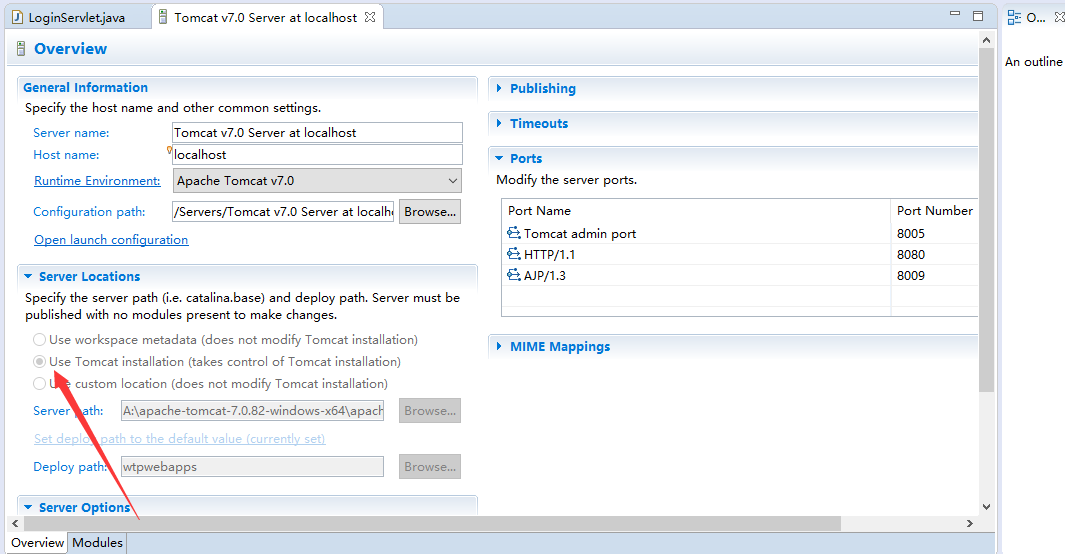
tomcat中部署了项目的话,Server Locations 里选项会灰掉不能修改,要修改必须得先把tomcat中的部署的服务都移除。
通过右键单击tomcat服务器选择 Add and Remove,在弹出的对话框中移除已部署的项目。移除完确定后,在右键clean,在双击tomcat服务器将看到上面的选项面板部分可编辑了。
重启tomcat服务器,访问http://localhost:8080则能正常访问了,自己部署的项目也能正常访问了。