小程序官方流程图如下,官方地址 : https://developers.weixin.qq.com/miniprogram/dev/framework/open-ability/login.html :
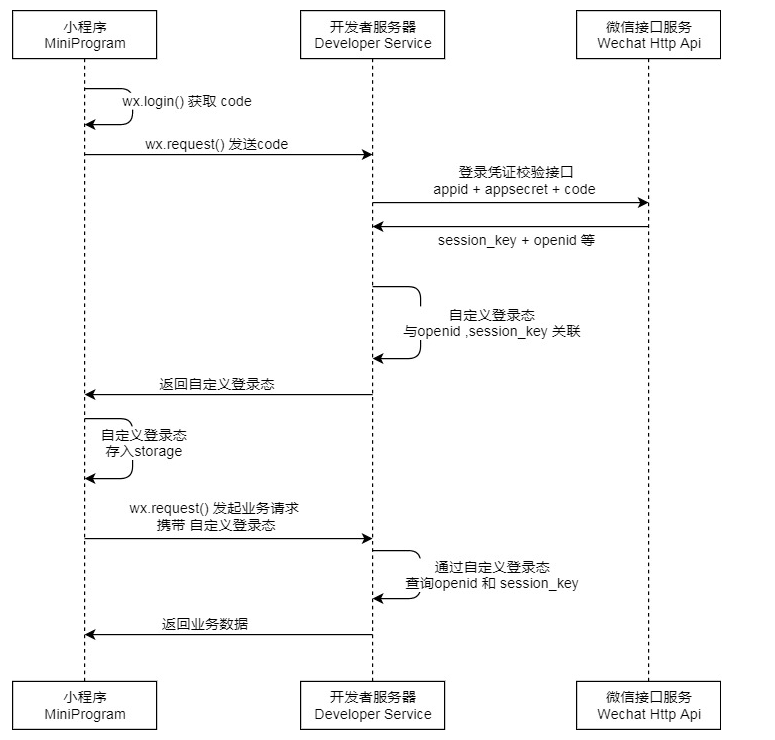
如果此图理解不清楚的地方,也可参看我的博客 : https://www.cnblogs.com/ealenxie/p/9888064.html
本文是对接微信小程序自定义登录的一个完整例子实现 ,技术栈为 : SpringBoot+Shiro+JWT+JPA+Redis。
如果对该例子比较感兴趣或者觉得言语表达比较啰嗦,可查看完整的项目地址 : https://github.com/EalenXie/shiro-jwt-applet
主要实现 : 实现了小程序的自定义登陆,将自定义登陆态token返回给小程序作为登陆凭证。用户的信息保存在数据库中,登陆态token缓存在redis中。
效果如下 :
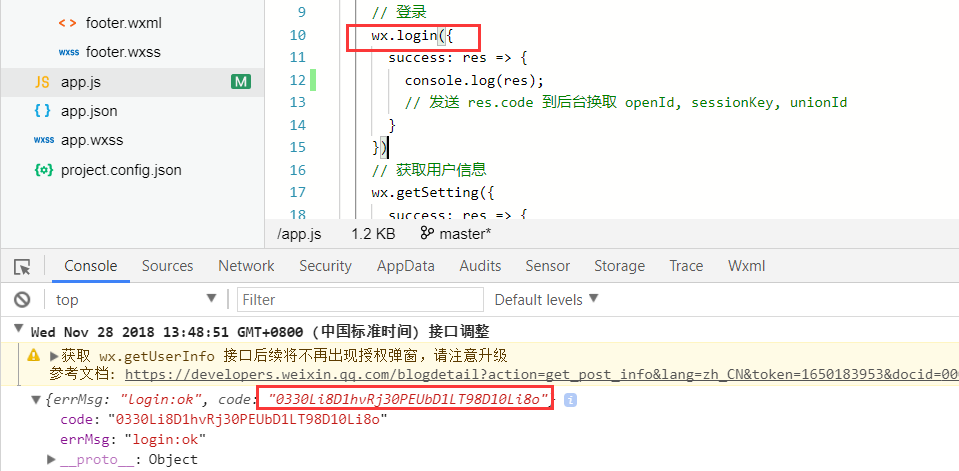
1 . 首先从我们的小程序端调用wx.login() ,获取临时凭证code :
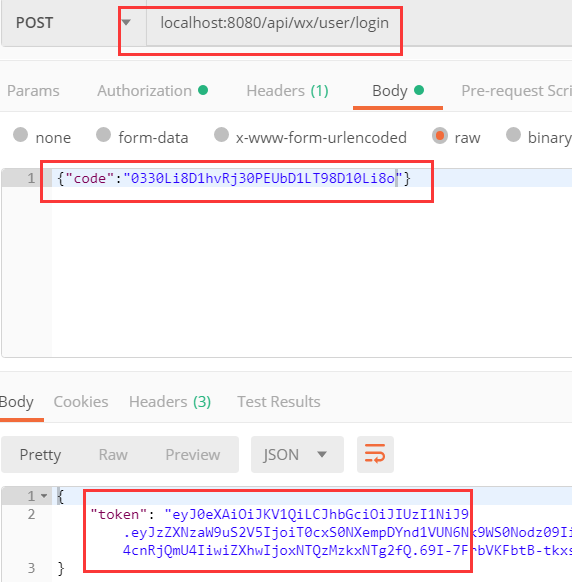
2 . 模拟使用该code,进行小程序的登陆获取自定义登陆态 token,用postman进行测试 :
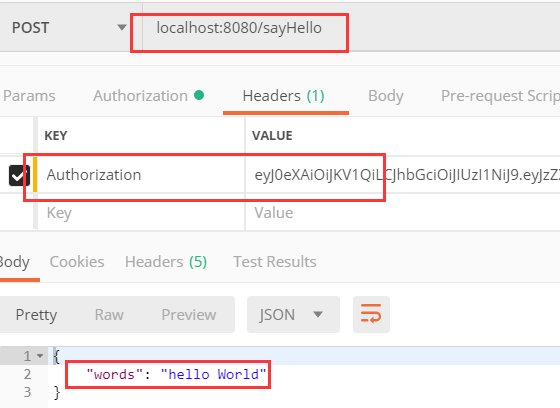
3 . 调用我们需要认证的接口,并携带该token进行鉴权,获取到返回信息 :
前方高能,本例代码说明较多, 以下是主要的搭建流程 :
1 . 首先新建maven项目 shiro-jwt-applet ,pom依赖 ,主要是shiro和jwt的依赖,和SpringBoot的一些基础依赖。
<?xml version="1.0" encoding="UTF-8"?>
<project xmlns="http://maven.apache.org/POM/4.0.0" xmlns:xsi="http://www.w3.org/2001/XMLSchema-instance"
         xsi:schemaLocation="http://maven.apache.org/POM/4.0.0 http://maven.apache.org/xsd/maven-4.0.0.xsd">
    <modelVersion>4.0.0</modelVersion>

    <groupId>name.ealen</groupId>
    <artifactId>shiro-jwt-applet</artifactId>
    <version>0.0.1-SNAPSHOT</version>
    <packaging>jar</packaging>

    <name>shiro-wx-jwt</name>
    <description>Demo project for Spring Boot</description>

    <parent>
        <groupId>org.springframework.boot</groupId>
        <artifactId>spring-boot-starter-parent</artifactId>
        <version>2.0.6.RELEASE</version>
        <relativePath/> <!-- lookup parent from repository -->
    </parent>

    <properties>
        <project.build.sourceEncoding>UTF-8</project.build.sourceEncoding>
        <project.reporting.outputEncoding>UTF-8</project.reporting.outputEncoding>
        <java.version>1.8</java.version>
    </properties>

    <dependencies>
        <dependency>
            <groupId>org.springframework.boot</groupId>
            <artifactId>spring-boot-starter-actuator</artifactId>
        </dependency>
        <dependency>
            <groupId>org.springframework.boot</groupId>
            <artifactId>spring-boot-starter-data-jpa</artifactId>
        </dependency>
        <dependency>
            <groupId>org.springframework.boot</groupId>
            <artifactId>spring-boot-starter-data-redis</artifactId>
        </dependency>
        <dependency>
            <groupId>org.springframework.boot</groupId>
            <artifactId>spring-boot-starter-web</artifactId>
        </dependency>
        <dependency>
            <groupId>org.springframework.boot</groupId>
            <artifactId>spring-boot-starter-test</artifactId>
            <scope>test</scope>
        </dependency>
        <dependency>
            <groupId>mysql</groupId>
            <artifactId>mysql-connector-java</artifactId>
        </dependency>
        <dependency>
            <groupId>org.apache.shiro</groupId>
            <artifactId>shiro-spring</artifactId>
            <version>1.4.0</version>
        </dependency>
        <dependency>
            <groupId>com.auth0</groupId>
            <artifactId>java-jwt</artifactId>
            <version>3.4.1</version>
        </dependency>
        <dependency>
            <groupId>com.alibaba</groupId>
            <artifactId>fastjson</artifactId>
            <version>1.2.47</version>
        </dependency>
    </dependencies>

    <build>
        <plugins>
            <plugin>
                <groupId>org.springframework.boot</groupId>
                <artifactId>spring-boot-maven-plugin</artifactId>
            </plugin>
        </plugins>
    </build>


</project>
2 . 配置你的application.yml ,主要是配置你的小程序appid和secret,还有你的数据库和redis
## 请自行修改下面信息

spring:
  application:
    name: shiro-jwt-applet
  jpa:
    hibernate:
      ddl-auto: create      # 请自行修改 请自行修改 请自行修改

#  datasource本地配置
  datasource:
    url: jdbc:mysql://localhost:3306/yourdatabase
    username: yourname
    password: yourpass
    driver-class-name: com.mysql.jdbc.Driver

#  redis本地配置 请自行配置
  redis:
    database: 0
    host: localhost
    port: 6379

#  微信小程序配置 appid /appsecret
wx:
  applet:
    appid: yourappid
    appsecret: yourappsecret
3 . 定义我们存储的微信小程序登陆的实体信息 WxAccount :
package name.ealen.domain.entity;

import org.springframework.format.annotation.DateTimeFormat;

import javax.persistence.Entity;
import javax.persistence.GeneratedValue;
import javax.persistence.Id;
import javax.persistence.Table;
import java.util.Date;

/**
 * Created by EalenXie on 2018/11/26 10:26.
 * 实体 属性描述 这里只是简单示例,你可以自定义相关用户信息
 */
@Entity
@Table
public class WxAccount {
    @Id
    @GeneratedValue
    private Integer id;
    private String wxOpenid;
    private String sessionKey;
    @DateTimeFormat(pattern = "yyyy-MM-dd HH:mm:ss")
    private Date lastTime;
    /**
     * 省略getter/setter
     */
}
和一个简单的dao 访问数据库 WxAccountRepository :
package name.ealen.domain.repository;

import name.ealen.domain.entity.WxAccount;
import org.springframework.data.jpa.repository.JpaRepository;

/**
 * Created by EalenXie on 2018/11/26 10:32.
 */
public interface WxAccountRepository extends JpaRepository<WxAccount, Integer> {

    /**
     * 根据OpenId查询用户信息
     */
    WxAccount findByWxOpenid(String wxOpenId);
}
4 . 定义我们应用的服务说明 WxAppletService :
package name.ealen.application;

import name.ealen.interfaces.dto.Token;

/**
 * Created by EalenXie on 2018/11/26 10:40.
 * 微信小程序自定义登陆 服务说明
 */
public interface WxAppletService {

    /**
     * 微信小程序用户登陆,完整流程可参考下面官方地址,本例中是按此流程开发
     * https://developers.weixin.qq.com/miniprogram/dev/framework/open-ability/login.html
     * 1 . 我们的微信小程序端传入code。
     * 2 . 调用微信code2session接口获取openid和session_key
     * 3 . 根据openid和session_key自定义登陆态(Token)
     * 4 . 返回自定义登陆态(Token)给小程序端。
     * 5 . 我们的小程序端调用其他需要认证的api,请在header的Authorization里面携带 token信息
     *
     * @param code 小程序端 调用 wx.login 获取到的code,用于调用 微信code2session接口
     * @return Token 返回后端 自定义登陆态 token  基于JWT实现
     */
    public Token wxUserLogin(String code);

}
返回给微信小程序token对象声明 Token :
package name.ealen.interfaces.dto;

/**
 * Created by EalenXie on 2018/11/26 18:49.
 * DTO 返回值token对象
 */
public class Token {

    private String token;

    public Token(String token) {
        this.token = token;
    }
    /**
     * 省略getter/setter
     */
}
5. 配置需要的基本组件,RestTemplate,Redis:
package name.ealen.infrastructure.config;

import org.springframework.context.annotation.Bean;
import org.springframework.context.annotation.Configuration;
import org.springframework.http.client.ClientHttpRequestFactory;
import org.springframework.http.client.SimpleClientHttpRequestFactory;
import org.springframework.web.client.RestTemplate;

/**
 * Created by EalenXie on 2018-03-23 07:37
 * RestTemplate的配置类
 */
@Configuration
public class RestTemplateConfig {

    @Bean
    public RestTemplate restTemplate(ClientHttpRequestFactory factory) {
        return new RestTemplate(factory);
    }

    @Bean
    public ClientHttpRequestFactory simpleClientHttpRequestFactory() {
        SimpleClientHttpRequestFactory factory = new SimpleClientHttpRequestFactory();
        factory.setReadTimeout(1000 * 60);                                           //读取超时时间为单位为60秒
        factory.setConnectTimeout(1000 * 10);                                        //连接超时时间设置为10秒
        return factory;
    }
}
Redis的配置。本例是Springboot2.0的写法(和1.8的版本写法略有不同):
package name.ealen.infrastructure.config;

import org.springframework.cache.CacheManager;
import org.springframework.cache.annotation.EnableCaching;
import org.springframework.context.annotation.Bean;
import org.springframework.context.annotation.Configuration;
import org.springframework.data.redis.cache.RedisCacheManager;
import org.springframework.data.redis.connection.RedisConnectionFactory;

/**
 * Created by EalenXie on 2018-03-23 07:37
 * Redis的配置类
 */
@Configuration
@EnableCaching
public class RedisConfig {

    @Bean
    public CacheManager cacheManager(RedisConnectionFactory factory) {
        return RedisCacheManager.create(factory);
    }
}
6. JWT的核心过滤器配置。继承了Shiro的BasicHttpAuthenticationFilter,并重写了其鉴权的过滤方法 :
package name.ealen.infrastructure.config.jwt;

import name.ealen.domain.vo.JwtToken;
import org.apache.shiro.web.filter.authc.BasicHttpAuthenticationFilter;
import org.springframework.http.HttpStatus;
import org.springframework.web.bind.annotation.RequestMethod;

import javax.servlet.ServletRequest;
import javax.servlet.ServletResponse;
import javax.servlet.http.HttpServletRequest;
import javax.servlet.http.HttpServletResponse;

/**
 * Created by EalenXie on 2018/11/26 10:26.
 * JWT核心过滤器配置
 * 所有的请求都会先经过Filter,所以我们继承官方的BasicHttpAuthenticationFilter,并且重写鉴权的方法。
 * 执行流程 preHandle->isAccessAllowed->isLoginAttempt->executeLogin
 */
public class JwtFilter extends BasicHttpAuthenticationFilter {

    /**
     * 判断用户是否想要进行 需要验证的操作
     * 检测header里面是否包含Authorization字段即可
     */
    @Override
    protected boolean isLoginAttempt(ServletRequest request, ServletResponse response) {
        String auth = getAuthzHeader(request);
        return auth != null && !auth.equals("");

    }
    /**
     * 此方法调用登陆,验证逻辑
     */
    @Override
    protected boolean isAccessAllowed(ServletRequest request, ServletResponse response, Object mappedValue) {
        if (isLoginAttempt(request, response)) {
            JwtToken token = new JwtToken(getAuthzHeader(request));
            getSubject(request, response).login(token);
        }
        return true;
    }
    /**
     * 提供跨域支持
     */
    @Override
    protected boolean preHandle(ServletRequest request, ServletResponse response) throws Exception {
        HttpServletRequest httpServletRequest = (HttpServletRequest) request;
        HttpServletResponse httpServletResponse = (HttpServletResponse) response;
        httpServletResponse.setHeader("Access-control-Allow-Origin", httpServletRequest.getHeader("Origin"));
        httpServletResponse.setHeader("Access-Control-Allow-Methods", "GET,POST,OPTIONS,PUT,DELETE");
        httpServletResponse.setHeader("Access-Control-Allow-Headers", httpServletRequest.getHeader("Access-Control-Request-Headers"));
        // 跨域时会首先发送一个option请求,这里我们给option请求直接返回正常状态
        if (httpServletRequest.getMethod().equals(RequestMethod.OPTIONS.name())) {
            httpServletResponse.setStatus(HttpStatus.OK.value());
            return false;
        }
        return super.preHandle(request, response);
    }
}
JWT的核心配置(包含Token的加密创建,JWT续期,解密验证) :
package name.ealen.infrastructure.config.jwt;

import com.auth0.jwt.JWT;
import com.auth0.jwt.JWTVerifier;
import com.auth0.jwt.algorithms.Algorithm;
import com.auth0.jwt.exceptions.JWTDecodeException;
import name.ealen.domain.entity.WxAccount;
import org.springframework.beans.factory.annotation.Autowired;
import org.springframework.data.redis.core.StringRedisTemplate;
import org.springframework.stereotype.Component;

import java.util.Date;
import java.util.UUID;
import java.util.concurrent.TimeUnit;

/**
 * Created by EalenXie on 2018/11/22 17:16.
 */
@Component
public class JwtConfig {

    /**
     * JWT 自定义密钥 我这里写死的
     */
    private static final String SECRET_KEY = "5371f568a45e5ab1f442c38e0932aef24447139b";

    /**
     * JWT 过期时间值 这里写死为和小程序时间一致 7200 秒,也就是两个小时
     */
    private static long expire_time = 7200;

    @Autowired
    private StringRedisTemplate redisTemplate;

    /**
     * 根据微信用户登陆信息创建 token
     * 注 : 这里的token会被缓存到redis中,用作为二次验证
     * redis里面缓存的时间应该和jwt token的过期时间设置相同
     *
     * @param wxAccount 微信用户信息
     * @return 返回 jwt token
     */
    public String createTokenByWxAccount(WxAccount wxAccount) {
        String jwtId = UUID.randomUUID().toString();                 //JWT 随机ID,做为验证的key
        //1 . 加密算法进行签名得到token
        Algorithm algorithm = Algorithm.HMAC256(SECRET_KEY);
        String token = JWT.create()
                .withClaim("wxOpenId", wxAccount.getWxOpenid())
                .withClaim("sessionKey", wxAccount.getSessionKey())
                .withClaim("jwt-id", jwtId)
                .withExpiresAt(new Date(System.currentTimeMillis() + expire_time*1000))  //JWT 配置过期时间的正确姿势
                .sign(algorithm);
        //2 . Redis缓存JWT, 注 : 请和JWT过期时间一致
        redisTemplate.opsForValue().set("JWT-SESSION-" + jwtId, token, expire_time, TimeUnit.SECONDS);
        return token;
    }

    /**
     * 校验token是否正确
     * 1 . 根据token解密,解密出jwt-id , 先从redis中查找出redisToken,匹配是否相同
     * 2 . 然后再对redisToken进行解密,解密成功则 继续流程 和 进行token续期
     *
     * @param token 密钥
     * @return 返回是否校验通过
     */
    public boolean verifyToken(String token) {
        try {
            //1 . 根据token解密,解密出jwt-id , 先从redis中查找出redisToken,匹配是否相同
            String redisToken = redisTemplate.opsForValue().get("JWT-SESSION-" + getJwtIdByToken(token));
            if (!redisToken.equals(token)) return false;

            //2 . 得到算法相同的JWTVerifier
            Algorithm algorithm = Algorithm.HMAC256(SECRET_KEY);
            JWTVerifier verifier = JWT.require(algorithm)
                    .withClaim("wxOpenId", getWxOpenIdByToken(redisToken))
                    .withClaim("sessionKey", getSessionKeyByToken(redisToken))
                    .withClaim("jwt-id", getJwtIdByToken(redisToken))
                    .acceptExpiresAt(System.currentTimeMillis() + expire_time*1000 )  //JWT 正确的配置续期姿势
                    .build();
            //3 . 验证token
            verifier.verify(redisToken);
            //4 . Redis缓存JWT续期
            redisTemplate.opsForValue().set("JWT-SESSION-" + getJwtIdByToken(token), redisToken, expire_time, TimeUnit.SECONDS);
            return true;
        } catch (Exception e) { //捕捉到任何异常都视为校验失败
            return false;
        }
    }

    /**
     * 根据Token获取wxOpenId(注意坑点 : 就算token不正确,也有可能解密出wxOpenId,同下)
     */
    public String getWxOpenIdByToken(String token) throws JWTDecodeException {
        return JWT.decode(token).getClaim("wxOpenId").asString();
    }

    /**
     * 根据Token获取sessionKey
     */
    public String getSessionKeyByToken(String token) throws JWTDecodeException {
        return JWT.decode(token).getClaim("sessionKey").asString();
    }

    /**
     * 根据Token 获取jwt-id
     */
    private String getJwtIdByToken(String token) throws JWTDecodeException {
        return JWT.decode(token).getClaim("jwt-id").asString();
    }
}
7 . 自定义Shiro的Realm配置,Realm是自定义登陆及授权的逻辑配置 :
package name.ealen.infrastructure.config.shiro;


import name.ealen.domain.vo.JwtToken;
import name.ealen.infrastructure.config.jwt.JwtConfig;
import org.apache.shiro.authc.AuthenticationException;
import org.apache.shiro.authc.AuthenticationInfo;
import org.apache.shiro.authc.AuthenticationToken;
import org.apache.shiro.authc.SimpleAuthenticationInfo;
import org.apache.shiro.authc.credential.CredentialsMatcher;
import org.apache.shiro.authz.AuthorizationInfo;
import org.apache.shiro.authz.SimpleAuthorizationInfo;
import org.apache.shiro.realm.AuthorizingRealm;
import org.apache.shiro.realm.Realm;
import org.apache.shiro.subject.PrincipalCollection;
import org.springframework.stereotype.Component;

import javax.annotation.Resource;
import java.util.Collections;
import java.util.LinkedList;
import java.util.List;

/**
 * Created by EalenXie on 2018/11/26 12:12.
 * Realm 的一个配置管理类 allRealm()方法得到所有的realm
 */
@Component
public class ShiroRealmConfig {

    @Resource
    private JwtConfig jwtConfig;

    /**
     * 配置所有自定义的realm,方便起见,应对可能有多个realm的情况
     */
    public List<Realm> allRealm() {
        List<Realm> realmList = new LinkedList<>();
        AuthorizingRealm jwtRealm = jwtRealm();
        realmList.add(jwtRealm);
        return Collections.unmodifiableList(realmList);
    }

    /**
     * 自定义 JWT的 Realm
     * 重写 Realm 的 supports() 方法是通过 JWT 进行登录判断的关键
     */
    private AuthorizingRealm jwtRealm() {
        AuthorizingRealm jwtRealm = new AuthorizingRealm() {
            /**
             * 注意坑点 : 必须重写此方法,不然Shiro会报错
             * 因为创建了 JWTToken 用于替换Shiro原生 token,所以必须在此方法中显式的进行替换,否则在进行判断时会一直失败
             */
            @Override
            public boolean supports(AuthenticationToken token) {
                return token instanceof JwtToken;
            }

            @Override
            protected AuthorizationInfo doGetAuthorizationInfo(PrincipalCollection principals) {
                return new SimpleAuthorizationInfo();
            }

            /**
             * 校验 验证token逻辑
             */
            @Override
            protected AuthenticationInfo doGetAuthenticationInfo(AuthenticationToken token) {
                String jwtToken = (String) token.getCredentials();
                String wxOpenId = jwtConfig.getWxOpenIdByToken(jwtToken);
                String sessionKey = jwtConfig.getSessionKeyByToken(jwtToken);
                if (wxOpenId == null || wxOpenId.equals(""))
                    throw new AuthenticationException("user account not exits , please check your token");
                if (sessionKey == null || sessionKey.equals(""))
                    throw new AuthenticationException("sessionKey is invalid , please check your token");
                if (!jwtConfig.verifyToken(jwtToken))
                    throw new AuthenticationException("token is invalid , please check your token");
                return new SimpleAuthenticationInfo(token, token, getName());
            }
        };
        jwtRealm.setCredentialsMatcher(credentialsMatcher());
        return jwtRealm;
    }

    /**
     * 注意坑点 : 密码校验 , 这里因为是JWT形式,就无需密码校验和加密,直接让其返回为true(如果不设置的话,该值默认为false,即始终验证不通过)
     */
    private CredentialsMatcher credentialsMatcher() {
        return (token, info) -> true;
    }
}
Shiro的核心配置,包含配置Realm :
package name.ealen.infrastructure.config.shiro;

import name.ealen.infrastructure.config.jwt.JwtFilter;
import org.apache.shiro.mgt.DefaultSessionStorageEvaluator;
import org.apache.shiro.mgt.DefaultSubjectDAO;
import org.apache.shiro.spring.LifecycleBeanPostProcessor;
import org.apache.shiro.spring.security.interceptor.AuthorizationAttributeSourceAdvisor;
import org.apache.shiro.spring.web.ShiroFilterFactoryBean;
import org.apache.shiro.web.mgt.DefaultWebSecurityManager;
import org.springframework.aop.framework.autoproxy.DefaultAdvisorAutoProxyCreator;
import org.springframework.context.annotation.Bean;
import org.springframework.context.annotation.Configuration;
import org.springframework.context.annotation.DependsOn;

import javax.servlet.Filter;
import java.util.HashMap;
import java.util.Map;

/**
 * Created by EalenXie on 2018/11/22 18:28.
 */
@Configuration
public class ShirConfig {

    /**
     * SecurityManager,安全管理器,所有与安全相关的操作都会与之进行交互;
     * 它管理着所有Subject,所有Subject都绑定到SecurityManager,与Subject的所有交互都会委托给SecurityManager
     * DefaultWebSecurityManager :
     * 会创建默认的DefaultSubjectDAO(它又会默认创建DefaultSessionStorageEvaluator)
     * 会默认创建DefaultWebSubjectFactory
     * 会默认创建ModularRealmAuthenticator
     */
    @Bean
    public DefaultWebSecurityManager securityManager(ShiroRealmConfig shiroRealmConfig) {
        DefaultWebSecurityManager securityManager = new DefaultWebSecurityManager();
        securityManager.setRealms(shiroRealmConfig.allRealm());     //设置realm
        DefaultSubjectDAO subjectDAO = (DefaultSubjectDAO) securityManager.getSubjectDAO();
        // 关闭自带session
        DefaultSessionStorageEvaluator evaluator = (DefaultSessionStorageEvaluator) subjectDAO.getSessionStorageEvaluator();
        evaluator.setSessionStorageEnabled(Boolean.FALSE);
        subjectDAO.setSessionStorageEvaluator(evaluator);
        return securityManager;
    }
    /**
     * 配置Shiro的访问策略
     */
    @Bean
    public ShiroFilterFactoryBean factory(DefaultWebSecurityManager securityManager) {
        ShiroFilterFactoryBean factoryBean = new ShiroFilterFactoryBean();
        Map<String, Filter> filterMap = new HashMap<>();
        filterMap.put("jwt", new JwtFilter());
        factoryBean.setFilters(filterMap);
        factoryBean.setSecurityManager(securityManager);
        Map<String, String> filterRuleMap = new HashMap<>();
        //登陆相关api不需要被过滤器拦截
        filterRuleMap.put("/api/wx/user/login/**", "anon");
        filterRuleMap.put("/api/response/**", "anon");
        // 所有请求通过JWT Filter
        filterRuleMap.put("/**", "jwt");
        factoryBean.setFilterChainDefinitionMap(filterRuleMap);
        return factoryBean;
    }
    /**
     * 添加注解支持
     */
    @Bean
    @DependsOn("lifecycleBeanPostProcessor")
    public DefaultAdvisorAutoProxyCreator defaultAdvisorAutoProxyCreator() {
        DefaultAdvisorAutoProxyCreator defaultAdvisorAutoProxyCreator = new DefaultAdvisorAutoProxyCreator();
        defaultAdvisorAutoProxyCreator.setProxyTargetClass(true); // 强制使用cglib,防止重复代理和可能引起代理出错的问题
        return defaultAdvisorAutoProxyCreator;
    }
    /**
     * 添加注解依赖
     */
    @Bean
    public LifecycleBeanPostProcessor lifecycleBeanPostProcessor() {
        return new LifecycleBeanPostProcessor();
    }

    /**
     * 开启注解验证
     */
    @Bean
    public AuthorizationAttributeSourceAdvisor authorizationAttributeSourceAdvisor(DefaultWebSecurityManager securityManager) {
        AuthorizationAttributeSourceAdvisor authorizationAttributeSourceAdvisor = new AuthorizationAttributeSourceAdvisor();
        authorizationAttributeSourceAdvisor.setSecurityManager(securityManager);
        return authorizationAttributeSourceAdvisor;
    }
}
用于Shiro鉴权的JwtToken对象 :
package name.ealen.domain.vo;

import org.apache.shiro.authc.AuthenticationToken;

/**
 * Created by EalenXie on 2018/11/22 18:21.
 * 鉴权用的token vo ,实现 AuthenticationToken
 */
public class JwtToken implements AuthenticationToken {

    private String token;

    public JwtToken(String token) {
        this.token = token;
    }

    @Override
    public Object getPrincipal() {
        return token;
    }

    @Override
    public Object getCredentials() {
        return token;
    }

    public String getToken() {
        return token;
    }

    public void setToken(String token) {
        this.token = token;
    }
}
8 . 实现实体的行为及业务逻辑,此例主要是调用微信接口code2session和创建返回token :
package name.ealen.domain.service;

import name.ealen.application.WxAppletService;
import name.ealen.domain.entity.WxAccount;
import name.ealen.domain.repository.WxAccountRepository;
import name.ealen.domain.vo.Code2SessionResponse;
import name.ealen.infrastructure.config.jwt.JwtConfig;
import name.ealen.infrastructure.util.HttpUtil;
import name.ealen.infrastructure.util.JSONUtil;
import name.ealen.interfaces.dto.Token;
import org.apache.shiro.authc.AuthenticationException;
import org.springframework.beans.factory.annotation.Value;
import org.springframework.http.HttpEntity;
import org.springframework.http.HttpHeaders;
import org.springframework.http.HttpMethod;
import org.springframework.stereotype.Service;
import org.springframework.util.LinkedMultiValueMap;
import org.springframework.util.MultiValueMap;
import org.springframework.web.client.RestTemplate;

import javax.annotation.Resource;
import java.net.URI;
import java.util.Date;

/**
 * Created by EalenXie on 2018/11/26 10:50.
 * 实体 行为描述
 */
@Service
public class WxAccountService implements WxAppletService {

    @Resource
    private RestTemplate restTemplate;

    @Value("${wx.applet.appid}")
    private String appid;

    @Value("${wx.applet.appsecret}")
    private String appSecret;

    @Resource
    private WxAccountRepository wxAccountRepository;

    @Resource
    private JwtConfig jwtConfig;

    /**
     * 微信的 code2session 接口 获取微信用户信息
     * 官方说明 : https://developers.weixin.qq.com/miniprogram/dev/api/open-api/login/code2Session.html
     */
    private String code2Session(String jsCode) {
        String code2SessionUrl = "https://api.weixin.qq.com/sns/jscode2session";
        MultiValueMap<String, String> params = new LinkedMultiValueMap<>();
        params.add("appid", appid);
        params.add("secret", appSecret);
        params.add("js_code", jsCode);
        params.add("grant_type", "authorization_code");
        URI code2Session = HttpUtil.getURIwithParams(code2SessionUrl, params);
        return restTemplate.exchange(code2Session, HttpMethod.GET, new HttpEntity<String>(new HttpHeaders()), String.class).getBody();
    }


    /**
     * 微信小程序用户登陆,完整流程可参考下面官方地址,本例中是按此流程开发
     * https://developers.weixin.qq.com/miniprogram/dev/framework/open-ability/login.html
     *
     * @param code 小程序端 调用 wx.login 获取到的code,用于调用 微信code2session接口
     * @return 返回后端 自定义登陆态 token  基于JWT实现
     */
    @Override
    public Token wxUserLogin(String code) {
        //1 . code2session返回JSON数据
        String resultJson = code2Session(code);
        //2 . 解析数据
        Code2SessionResponse response = JSONUtil.jsonString2Object(resultJson, Code2SessionResponse.class);
        if (!response.getErrcode().equals("0"))
            throw new AuthenticationException("code2session失败 : " + response.getErrmsg());
        else {
            //3 . 先从本地数据库中查找用户是否存在
            WxAccount wxAccount = wxAccountRepository.findByWxOpenid(response.getOpenid());
            if (wxAccount == null) {
                wxAccount = new WxAccount();
                wxAccount.setWxOpenid(response.getOpenid());    //不存在就新建用户
            }
            //4 . 更新sessionKey和 登陆时间
            wxAccount.setSessionKey(response.getSession_key());
            wxAccount.setLastTime(new Date());
            wxAccountRepository.save(wxAccount);
            //5 . JWT 返回自定义登陆态 Token
            String token = jwtConfig.createTokenByWxAccount(wxAccount);
            return new Token(token);
        }
    }
}
小程序code2session接口的返回VO对象Code2SessionResponse :
package name.ealen.domain.vo;

/**
 * 微信小程序 Code2Session 接口返回值 对象
 * 具体可以参考小程序官方API说明 : https://developers.weixin.qq.com/miniprogram/dev/api/open-api/login/code2Session.html
 */
public class Code2SessionResponse {

    private String openid;
    private String session_key;
    private String unionid;
    private String errcode = "0";
    private String errmsg;
    private int expires_in;
    /**
     * 省略getter/setter
     */
}
9. 定义我们的接口信息WxAppletController,此例包含一个登录获取token的api和一个需要认证的测试api :
package name.ealen.interfaces.facade;

import name.ealen.application.WxAppletService;
import org.apache.shiro.authz.annotation.RequiresAuthentication;
import org.springframework.http.HttpStatus;
import org.springframework.http.ResponseEntity;
import org.springframework.web.bind.annotation.*;

import javax.annotation.Resource;
import java.util.HashMap;
import java.util.Map;


/**
 * Created by EalenXie on 2018/11/26 10:44.
 * 小程序后台 某 API
 */
@RestController
public class WxAppletController {

    @Resource
    private WxAppletService wxAppletService;

    /**
     * 微信小程序端用户登陆api
     * 返回给小程序端 自定义登陆态 token
     */
    @PostMapping("/api/wx/user/login")
    public ResponseEntity wxAppletLoginApi(@RequestBody Map<String, String> request) {
        if (!request.containsKey("code") || request.get("code") == null || request.get("code").equals("")) {
            Map<String, String> result = new HashMap<>();
            result.put("msg", "缺少参数code或code不合法");
            return new ResponseEntity<>(result, HttpStatus.BAD_REQUEST);
        } else {
            return new ResponseEntity<>(wxAppletService.wxUserLogin(request.get("code")), HttpStatus.OK);
        }
    }

    /**
     * 需要认证的测试接口  需要 @RequiresAuthentication 注解,则调用此接口需要 header 中携带自定义登陆态 authorization
     */
    @RequiresAuthentication
    @PostMapping("/sayHello")
    public ResponseEntity sayHello() {
        Map<String, String> result = new HashMap<>();
        result.put("words", "hello World");
        return new ResponseEntity<>(result, HttpStatus.OK);
    }
}
10 . 运行主类,检查与数据库和redis的连接,进行测试 :
package name.ealen;

import org.springframework.boot.SpringApplication;
import org.springframework.boot.autoconfigure.SpringBootApplication;

/**
 * Created by EalenXie on 2018/11/26 10:25.
 */
@SpringBootApplication
public class ShiroJwtAppletApplication {

    public static void main(String[] args) {
        SpringApplication.run(ShiroJwtAppletApplication.class, args);
    }
}
以上,就是基于Shiro,JWT实现微信小程序登录完整例子的逻辑过程说明及其实现。
原创不易,转载请注明出处,十分感谢各位支持和提出意见。