很久没用.net winform 做东西,对控件相对比较陌生,另外控件的UI也不是那么好改。公司项目需要有web客户端,同时有软件客户端形式。考虑再三采用webBrowser+html 来实现 。用html 可以实现灵活的UI设计,js操作数据相应效果也不差。但是有以下几个问题需要解决
一、兼容性
webBrowser 调用的是IE浏览器,一般的 在 xp操作系统之前 包括xp 用的是 兼容IE6的系统默认浏览器。 何为兼容IE6的默认浏览器呢。比如XP 赚的是IE7 那么我们知道每个IE版本里头实际上是有兼容下一个版本的兼容视图。那么这个时候webBrowser调用的浏览器是系统默认浏览器,如果系统是IE7调用的就是IE7,但是渲染的效果是兼容IE6的视图,说白了就是IE6的渲染效果。 win7以上的系统 用的就是兼容IE7的系统默认浏览器(道理跟上述一样)。
知道了调用的分别是什么用渲染效果的浏览器,那么我们要做的html 、js的兼容就只需要做到IE6、IE7这两种浏览器兼容。事实上比起原始的winForm多了要做兼容的痛苦,而且有万恶的IE6要做。
网上有些童鞋 为了避免兼容性的痛苦直接 用 WebKit .NET 项目,我也考虑到用WebKit .NET,但是通过以下两个权衡放弃了
- 客户端必须打包 WebKit .NET 到时客户端变臃肿
- 项目同时又web端,web端做了IE的activex控件,activex直接调取控件不了
二、form窗体和js交互
Form 和 js交互是我要考虑的核心问题,起初我想到的是,在html端 通过ajax请求一个地址,地址里面带一些参数。然后Form端通过webbrowser嗅探到地址的变化做出相应测处理:
<html>
    <head>echosong Test</head>
    <script type="text/javascript">//发送命令给Form
        function IframCmd (str) {
            document.getElementById("myFram").src=str;
        }
    </script>
    <body >
        <input type="button" value="发送页面改版命令"  onClick="IframCmd(‘发送字符’)"/>
    </body>
</html>
using System;
using System.Collections.Generic;
using System.Drawing;
using System.Windows.Forms;
using System.Diagnostics;

namespace web
{
    /// <summary>
    /// Description of MainForm.
    /// </summary>
    public partial class MainForm : Form
    {
        public MainForm()
        {
            InitializeComponent();
            //加载本地的html文件 如果是服务器上直接跟绝对URL地址
            this.webBrowser1.Navigate(System.Environment.CurrentDirectory+"/1.html");
        }

        //监控地址变化,实现通宵方法(1
        void WebBrowser1Navigating(object sender, WebBrowserNavigatingEventArgs e)
        {
           string cmdStr =e.Url.ToString();

            if(cmdStr.Contains("__")){

                MessageBox.Show(cmdStr);

            }
        }
    }
}
运行的效果当点击发送命令的时候 Form会弹出发送字符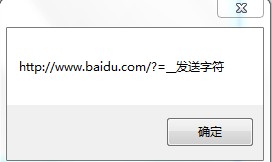
这种交互能达到目的,但是效率上有点问题,每次需要请求一个不必要的地址,反应速度让人有点不爽。那么有么有js可以直接跟Form交互的办法呢,我们知道用.net 写的dll只要对外公开(注册托管库),那么js就能调用其的方法,那么webbowser Form具有这样的特性没有呢。赶紧实验上代码:
<html>
    <head><title>echosong Test</title></head>
    <script type="text/javascript">
        //直接调用Form里头的函数
        function FormFun() {
            if (typeof window.external.getMaterialList != "undefined") {
                str = document.getElementById("inputTest").value;
                window.external.getMaterialList(str);
            }
        }
        function initialize () {
            //由于要等页面加载完,Form才能给其赋值所以用这个函数来初始化告诉From页面加载完毕让From来初始化 inputTest数据
            if (typeof window.external.inInt != "undefined") {
                window.external.inInt();
            }
        }
        //发送命令给Form
        function IframCmd (str) {
            document.getElementById("myFram").src="http://www.baidu.com?="+str;
        }
    </script>
    <body onLoad="initialize()">
        <input type="text" value="" id="inputTest" ><!--获取Form数据-->
        <input type="button" value="直接调用FormFun函数"  onClick="FormFun()"/>
        <input type="button" value="发送页面改版命令"  onClick="IframCmd('__发送字符')"/>
        <iframe src="" name="" id="myFram" width="1" height="1"></iframe>
    </body>
</html>
/*
 * 由SharpDevelop创建。
 * 用户: song
 * 日期: 2013/10/4
 * 时间: 22:50
 *
 * 要改变这种模板请点击 工具|选项|代码编写|编辑标准头文件
 */
using System;
using System.Collections.Generic;
using System.Drawing;
using System.Windows.Forms;
using System.Diagnostics;

namespace web
{
    /// <summary>
    /// Description of MainForm.
    /// </summary>
    public partial class MainForm : Form
    {
        public MainForm()
        {

            InitializeComponent();

            //加载本地的html文件 如果是服务器上直接跟绝对URL地址
            this.webBrowser1.Navigate(System.Environment.CurrentDirectory+"/1.html");

            //建立脚本通宵
            this.webBrowser1.ObjectForScripting = this;
        }

        //用来直接被js调用的函数
        public void getMaterialList(string str){

            MessageBox.Show(str);
        }

        //在html文档加载完全后用来给html原始赋值
        public void inInt(){
            this.webBrowser1.Document.GetElementById("inputTest").SetAttribute("value","页面加载赋值给文本框");
        }


        //监控地址变化,实现通宵方法(1
        void WebBrowser1Navigating(object sender, WebBrowserNavigatingEventArgs e)
        {
            string cmdStr =e.Url.ToString();
            if(cmdStr.Contains("__")){
                MessageBox.Show(cmdStr);
            }
        }
    }
}
然后在 C#项目的属性文件 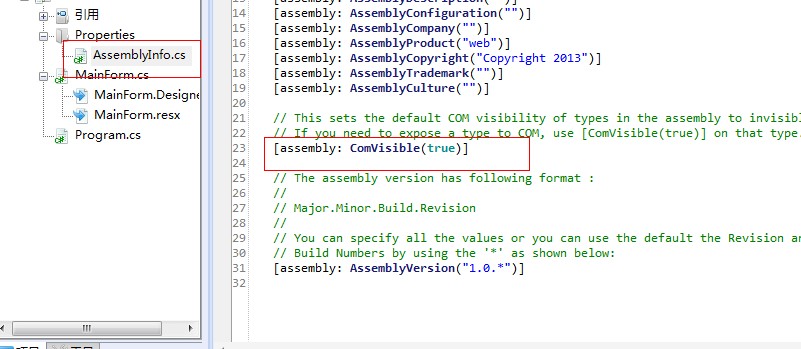
这里原本是false改成true。
这样一来代码正常跑通!!!
运行效果: 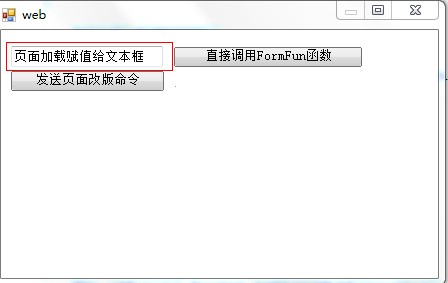
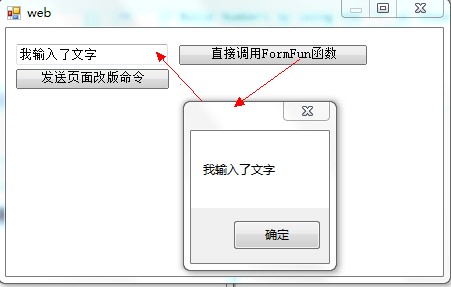
这里 js 里面有个 window.external.***() 意思表示调用浏览器提供的外部方法。