在这里就不科普webassemly的作用以及好处了,请自行百度。
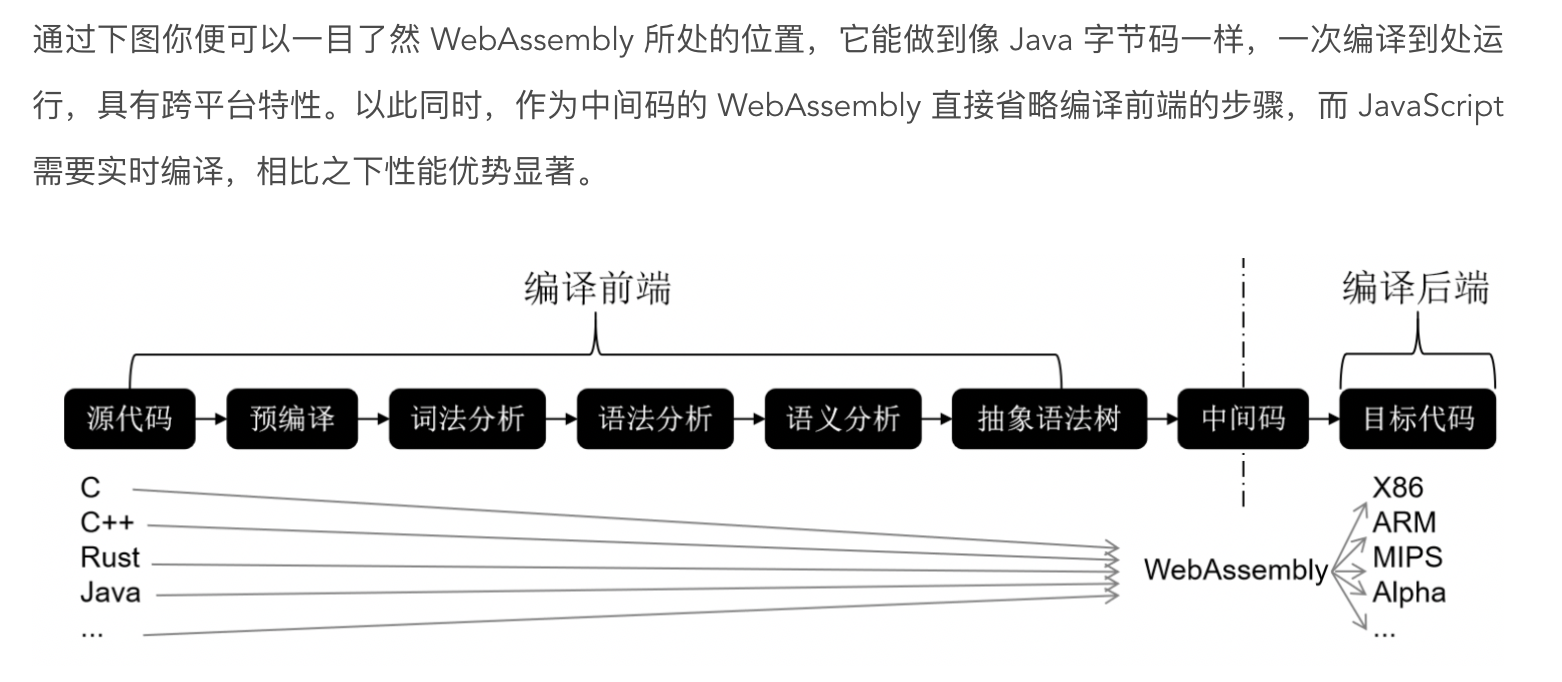
那么,怎么通过js的方式在浏览器中运行c程序呢,其中原理如下:

可能另一张图会更详细:
1.安装emscripten
说明文档地址:https://emscripten.org/docs/getting_started/downloads.html
以下步骤为macOs下命令:
step1:克隆项目------------git clone https://github.com/emscripten-core/emsdk.git
step2:进入项目目录--------cd emsdk
step3:安装最新emsdk工具---./emsdk install latest
step4:激活---------------./emsdk activate latest
step5:执行批处理添加环境变量source ./emsdk_env.sh
已经安装好了,看一下版本:

2.写一个c文件(test.c)并转换.wasm
#include <emscripten/emscripten.h>

int EMSCRIPTEN_KEEPALIVE add(int a, int b) {
   return a + b;
}

int EMSCRIPTEN_KEEPALIVE fibonacci(int n) {
    if (n <= 1) {
        return n;
    } else {
        return fibonacci(n - 1) + fibonacci(n - 2);
    }
}
注意,红字必须,这是相比常规c文件不同的地方。
转换命令:
emcc test.c -Os -s WASM=1 -s SIDE_MODULE=1 -o test.wasm
然后你就在相同目录下得到了一个test.wasm文件。
3.通过js引入.wasm并执行其中函数
这里我封装了一个引入.wasm文件的工具函数,代码如下:
const importObj = {
    global: {},
    env: {
        'memory': new WebAssembly.Memory({initial: 256, maximum: 256}),
        '__memory_base': 0,
        'tableBase': 0,
        'table': new WebAssembly.Table({initial: 10, element: 'anyfunc'}),
        abort:alert
    }
};

export async function addModule(url,callback){
    fetch(url).then(response =>
        response.arrayBuffer()
    ).then(bytes => WebAssembly.instantiate(bytes,importObj)).then(results => {
        var instance = results.instance;
        var module = instance.exports;
        callback(module);
    });
}
index.html:
<!DOCTYPE html>
<html lang="en">
<head>
    <meta charset="UTF-8">
    <meta name="viewport" content="width=device-width, initial-scale=1.0">
    <meta http-equiv="X-UA-Compatible" content="ie=edge">
    <title>WebAssemblyLearning</title>
</head>
<body>

</body>

<script type="module">
    import {addModule} from './utils/wasm.js';
    var num = 42;
    function getDuring(func,type){
        const start = Date.now();
        func(num);
        console.log(type +'执行斐波那契数列消耗时间:' +(Date.now() - start) + 'ms
');
    };
    addModule('./add.wasm',function(module){
        getDuring(module._fibonacci,'C程序');
    });
    function fibonacci(n) {
        if (n <= 1) {
            return n;
        } else {
            return fibonacci(n - 1) + fibonacci(n - 2);
        };
    };
    console.error('递归次数:'+ num);
    getDuring(fibonacci,'JavaScript')
</script>

</html>
我们看到,上面通过两种不同的方式执行了一个递归次数为42的斐波那契数列求和函数,对比一下两者的性能:
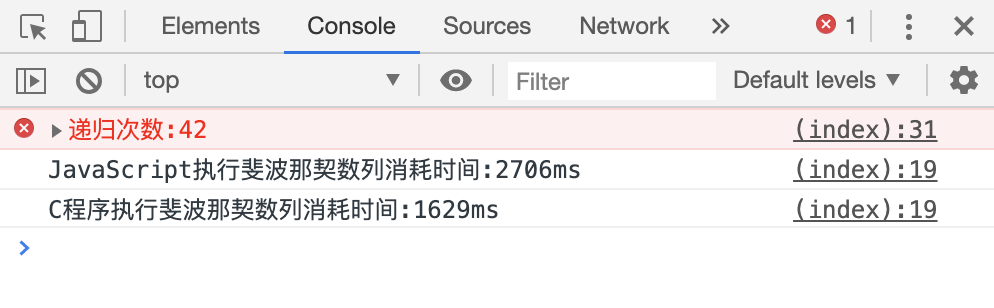
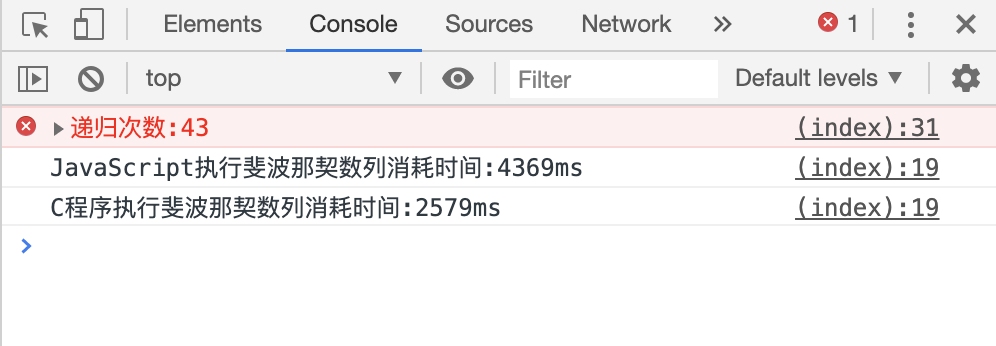

所以对于追求性能的web程序来说,webassemly将是一个很好的选择。