WebApi返回json格式字符串, 在网上能找到好几种方法, 其中有三种普遍的方法, 但是感觉都不怎么好.
先贴一下, 网上给的常用方法吧.
方法一:(改配置法)
找到Global.asax文件,在Application_Start()方法中添加一句:
protected void Application_Start()
{
    AreaRegistration.RegisterAllAreas();
    WebApiConfig.Register(GlobalConfiguration.Configuration);
    FilterConfig.RegisterGlobalFilters(GlobalFilters.Filters);
    RouteConfig.RegisterRoutes(RouteTable.Routes);
    // 使api返回为json
    GlobalConfiguration.Configuration.Formatters.XmlFormatter.SupportedMediaTypes.Clear();
}
这样返回的结果就都是json类型了,但有个不好的地方,如果返回的结果是String类型,如123,返回的json就会变成"123";
解决的方法是自定义返回类型(返回类型为HttpResponseMessage)
public HttpResponseMessage PostUserName(User user)
{
    String userName = user.userName;
    var result = new HttpResponseMessage{ Content = new StringContent(userName,Encoding.GetEncoding("UTF-8"), "application/json")};
    return result;
}
方法二:(万金油法)
方法一中又要改配置,又要处理返回值为String类型的json,甚是麻烦,不如就不用webapi中的的自动序列化对象,自己序列化后再返回
public HttpResponseMessage PostUser(User user)
{
    JavaScriptSerializer serializer = new JavaScriptSerializer();
    string str = serializer.Serialize(user);
    HttpResponseMessage result = new HttpResponseMessage { Content = new StringContent(str, Encoding.GetEncoding("UTF-8"), "application/json") };
    return result;
}
为了不在每个接口中都反复写那几句代码,所以就封装为一个方法这样使用就方便多了。
public static HttpResponseMessage toJson(Object obj)
{
    String str;
    if (obj is String ||obj is Char)
    {
        str = obj.ToString();
    }
    else
    {
        JavaScriptSerializer serializer = new JavaScriptSerializer();
        str = serializer.Serialize(obj);
    }
    HttpResponseMessage result = new HttpResponseMessage { Content = new StringContent(str, Encoding.GetEncoding("UTF-8"), "application/json") };
    return result;
}
方法三:(最麻烦的方法)
方法一最简单,但杀伤力太大,所有的返回的xml格式都会被毙掉,那么方法三就可以只让api接口中毙掉xml,返回json
先写一个处理返回的类:
public class JsonContentNegotiator : IContentNegotiator
{
    private readonly JsonMediaTypeFormatter _jsonFormatter;

    public JsonContentNegotiator(JsonMediaTypeFormatter formatter)
    {
        _jsonFormatter = formatter;
    }

    public ContentNegotiationResult Negotiate(Type type, HttpRequestMessage request, IEnumerable<MediaTypeFormatter> formatters)
    {
        var result = new ContentNegotiationResult(_jsonFormatter, new  MediaTypeHeaderValue("application/json"));
        return result;
    }
}
找到App_Start中的WebApiConfig.cs文件,打开找到Register(HttpConfiguration config)方法
添加以下代码:
var jsonFormatter = new JsonMediaTypeFormatter();
config.Services.Replace(typeof(IContentNegotiator), new JsonContentNegotiator(jsonFormatter));
添加后代码如下:
public static void Register(HttpConfiguration config)
{
    config.Routes.MapHttpRoute(
        name: "DefaultApi",
        routeTemplate: "api/{controller}/{action}/{id}",
        defaults: new { id = RouteParameter.Optional }
    );
    var jsonFormatter = new JsonMediaTypeFormatter();
    config.Services.Replace(typeof(IContentNegotiator), new  JsonContentNegotiator(jsonFormatter));
}
方法三如果返回的结果是String类型,如123,返回的json就会变成"123",解决方法同方法一。
其实WebApi会自动把返回的对象转为xml和json两种格式并存的形式,方法一与方法三是毙掉了xml的返回,而方法二是自定义返回。
以上三种方法, 就是我找到的比较普遍的方法了. 但是总觉得并不是那么好. 都要改这改那的.
还有一种方式能返回json格式字符串. 先看一下效果吧.
public class HomeController : ApiController
{
    [HttpGet]
    public JsonData Know(string msg)
    {
        msg = "WebApi 已接收到信息" ;
        return new JsonData() { Content = new List<string>() { "a", "b", "c" }, IsSuccess = true, Message = msg };
    }

    public List<string> Get()
    {
        return new List<string>() { "a", "b", "c"};
    }
}

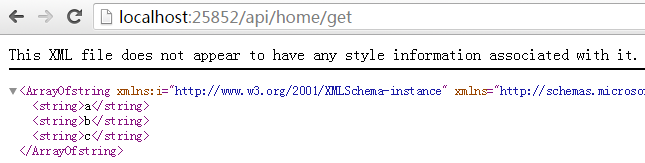
看的出来, Know方法返回的是 json 格式的字符串, Get方法, 返回的是xml格式的.
从上面来看, 主要是返回值不一样. 那么JsonData里面有什么秘密呢?
public class JsonData : ISerializable
{
    #region 属性

    /// <summary>
    /// 表示业务是否正常
    /// </summary>
  public bool IsSuccess { get; set; }

    /// <summary>
    /// 返回消息,成功的消息和错误消息都在这里
    /// </summary>
  public string Message { get; set; }

    /// <summary>
    /// 用于返回复杂结果
    /// </summary>
  public object Content { get; set; }
    #endregion

    #region 方法
    /// <summary>
    /// 自定义序列化方法
    /// </summary>
    /// <param name="info"></param>
    /// <param name="context"></param>
    public void GetObjectData(SerializationInfo info, StreamingContext context)
    {
        // 运用info对象来添加你所需要序列化的项
        info.AddValue("IsSuccess", IsSuccess);
        info.AddValue("Message", Message);
        if (Content != null)
        {
            info.AddValue("Content", Convert.ChangeType(Content, Content.GetType()));
        }
        else
        {
            info.AddValue("Content", null);
        }
    }

    public JsonData() { }
    #endregion
}
这里主要是要实现 ISerializable 接口 .
可能有人注意到, 我访问api的时候, 路由模式和访问mvc是一样的, 其实这里很简单, 只需要在webapi路由注册哪里, 加入一个路由就可以了.
config.Routes.MapHttpRoute(
    name: "DefaultApi1",
    routeTemplate: "api/{controller}/{action}",
    defaults: new { id = RouteParameter.Optional }
);
这样, 就加入了一个路由匹配规则进去. 只不过, 需要在Know方法上面, 加上一些访问限制条件. 如httpget, 否则, 如果直接去访问, 是不可以的.