1. 前言
前面关于Spring Security写了两篇文章,一篇是介绍UsernamePasswordAuthenticationFilter,另一篇是介绍 AuthenticationManager。很多同学表示无法理解这两个东西有什么用,能解决哪些实际问题?所以今天就对这两篇理论进行实战运用,我们从零写一个短信验证码登录并适配到Spring Security体系中。如果你在阅读中有什么疑问可以回头看看这两篇文章,能解决很多疑惑。
当然你可以修改成邮箱或者其它通讯设备的验证码登录。
2. 验证码生命周期
验证码存在有效期,一般5分钟。 一般逻辑是用户输入手机号后去获取验证码,服务端对验证码进行缓存。在最大有效期内用户只能使用验证码验证成功一次(避免验证码浪费);超过最大时间后失效。
验证码的缓存生命周期:
public interface CaptchaCacheStorage {

    /**
     * 验证码放入缓存.
     *
     * @param phone the phone
     * @return the string
     */
    String put(String phone);

    /**
     * 从缓存取验证码.
     *
     * @param phone the phone
     * @return the string
     */
    String get(String phone);

    /**
     * 验证码手动过期.
     *
     * @param phone the phone
     */
    void expire(String phone);
}
我们一般会借助于缓存中间件,比如Redis、Ehcache、Memcached等等来做这个事情。为了方便收看该教程的同学们所使用的不同的中间件。这里我结合Spring Cache特意抽象了验证码的缓存处理。
private static final String SMS_CAPTCHA_CACHE = "captcha";
@Bean
CaptchaCacheStorage captchaCacheStorage() {
    return new CaptchaCacheStorage() {

        @CachePut(cacheNames = SMS_CAPTCHA_CACHE, key = "#phone")
        @Override
        public String put(String phone) {
            return RandomUtil.randomNumbers(5);
        }

        @Cacheable(cacheNames = SMS_CAPTCHA_CACHE, key = "#phone")
        @Override
        public String get(String phone) {
            return null;
        }

        @CacheEvict(cacheNames = SMS_CAPTCHA_CACHE, key = "#phone")
        @Override
        public void expire(String phone) {

        }
    };
}
务必保证缓存的可靠性,这与用户的体验息息相关。
接着我们就来编写验证码服务了,验证码服务的核心功能有两个:发送验证码和验证码校验。其它的诸如统计、黑名单、历史记录可根据实际业务定制。这里只实现核心功能。
/**
 * 验证码服务.
 * 两个功能: 发送和校验.
 *
 * @param captchaCacheStorage the captcha cache storage
 * @return the captcha service
 */
@Bean
public CaptchaService captchaService(CaptchaCacheStorage captchaCacheStorage) {
    return new CaptchaService() {
        @Override
        public boolean sendCaptcha(String phone) {
            String existed = captchaCacheStorage.get(phone);
            if (StringUtils.hasText(existed)) {
                // 节约成本的话如果缓存中有可用的验证码 不再发新的验证码
                log.warn("captcha code 【 {} 】 is available now", existed);
                return false;
            }
            // 生成验证码并放入缓存
            String captchaCode = captchaCacheStorage.put(phone);
            log.info("captcha: {}", captchaCode);

            //todo 这里自行完善调用第三方短信服务发送验证码
            return true;
        }

        @Override
        public boolean verifyCaptcha(String phone, String code) {
            String cacheCode = captchaCacheStorage.get(phone);

            if (Objects.equals(cacheCode, code)) {
                // 验证通过手动过期
                captchaCacheStorage.expire(phone);
                return true;
            }
            return false;
        }
    };
}
接下来就可以根据CaptchaService编写短信发送接口/captcha/{phone}了。
@RestController
@RequestMapping("/captcha")
public class CaptchaController {

    @Resource
    CaptchaService captchaService;


    /**
     * 模拟手机号发送验证码.
     *
     * @param phone the mobile
     * @return the rest
     */
    @GetMapping("/{phone}")
    public Rest<?> captchaByMobile(@PathVariable String phone) {
        //todo 手机号 正则自行验证

        if (captchaService.sendCaptcha(phone)){
            return RestBody.ok("验证码发送成功");
        }
        return RestBody.failure(-999,"验证码发送失败");
    }

}
3. 集成到Spring Security
下面的教程就必须用到前两篇介绍的知识了。我们要实现验证码登录就必须定义一个Servlet Filter进行处理。它的作用这里再重复一下:
- 拦截短信登录接口。
- 获取登录参数并封装为
Authentication凭据。 - 交给
AuthenticationManager认证。
我们需要先定制Authentication和AuthenticationManager
3.1 验证码凭据
Authentication在我看来就是一个载体,在未得到认证之前它用来携带登录的关键参数,比如用户名和密码、验证码;在认证成功后它携带用户的信息和角色集。所以模仿UsernamePasswordAuthenticationToken 来实现一个CaptchaAuthenticationToken,去掉不必要的功能,抄就完事儿了:
package cn.felord.spring.security.captcha;

import org.springframework.security.authentication.AbstractAuthenticationToken;
import org.springframework.security.core.GrantedAuthority;
import org.springframework.security.core.SpringSecurityCoreVersion;

import java.util.Collection;

/**
 * 验证码认证凭据.
 * @author felord.cn
 */
public class CaptchaAuthenticationToken extends AbstractAuthenticationToken {

    private static final long serialVersionUID = SpringSecurityCoreVersion.SERIAL_VERSION_UID;

    private final Object principal;
    private String captcha;

    /**
     * 此构造函数用来初始化未授信凭据.
     *
     * @param principal   the principal
     * @param captcha the captcha
     * @see CaptchaAuthenticationToken#CaptchaAuthenticationToken(Object, String, Collection)
     */
    public CaptchaAuthenticationToken(Object principal, String captcha) {
        super(null);
        this.principal =  principal;
        this.captcha = captcha;
        setAuthenticated(false);
    }

    /**
     * 此构造函数用来初始化授信凭据.
     *
     * @param principal       the principal
     * @param captcha     the captcha
     * @param authorities the authorities
     * @see CaptchaAuthenticationToken#CaptchaAuthenticationToken(Object, String)
     */
    public CaptchaAuthenticationToken(Object principal, String captcha,
                                      Collection<? extends GrantedAuthority> authorities) {
        super(authorities);
        this.principal = principal;
        this.captcha = captcha;
        super.setAuthenticated(true); // must use super, as we override
    }

    public Object getCredentials() {
        return this.captcha;
    }

    public Object getPrincipal() {
        return this.principal;
    }

    public void setAuthenticated(boolean isAuthenticated) throws IllegalArgumentException {
        if (isAuthenticated) {
            throw new IllegalArgumentException(
                    "Cannot set this token to trusted - use constructor which takes a GrantedAuthority list instead");
        }

        super.setAuthenticated(false);
    }

    @Override
    public void eraseCredentials() {
        super.eraseCredentials();
        captcha = null;
    }
3.2 验证码认证管理器
我们还需要定制一个AuthenticationManager来对上面定义的凭据CaptchaAuthenticationToken进行认证处理。下面这张图有必要再拿出来看一下:
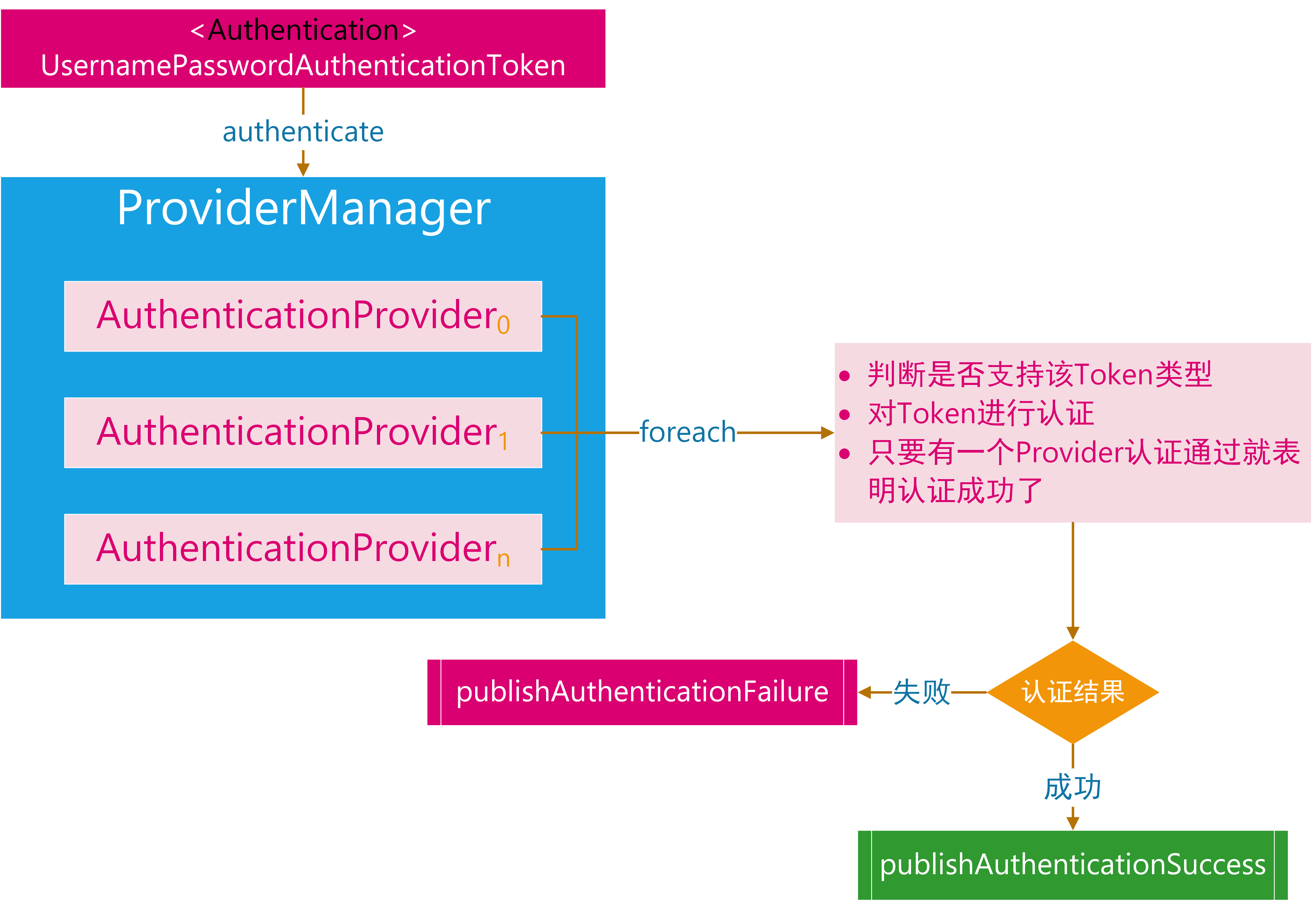
要定义AuthenticationManager只需要定义其实现ProviderManager。而ProviderManager又需要依赖AuthenticationProvider。所以我们要实现一个专门处理CaptchaAuthenticationToken的AuthenticationProvider。AuthenticationProvider的流程是:
- 从
CaptchaAuthenticationToken拿到手机号、验证码。 - 利用手机号从数据库查询用户信息,并判断用户是否是有效用户,实际上就是实现
UserDetailsService接口 - 验证码校验。
- 校验成功则封装授信的凭据。
- 校验失败抛出认证异常。
根据这个流程实现如下:
package cn.felord.spring.security.captcha;

import lombok.extern.slf4j.Slf4j;
import org.springframework.beans.factory.InitializingBean;
import org.springframework.context.MessageSource;
import org.springframework.context.MessageSourceAware;
import org.springframework.context.support.MessageSourceAccessor;
import org.springframework.security.authentication.AuthenticationProvider;
import org.springframework.security.authentication.BadCredentialsException;
import org.springframework.security.core.Authentication;
import org.springframework.security.core.AuthenticationException;
import org.springframework.security.core.GrantedAuthority;
import org.springframework.security.core.SpringSecurityMessageSource;
import org.springframework.security.core.authority.mapping.GrantedAuthoritiesMapper;
import org.springframework.security.core.authority.mapping.NullAuthoritiesMapper;
import org.springframework.security.core.userdetails.UserDetails;
import org.springframework.security.core.userdetails.UserDetailsService;
import org.springframework.util.Assert;

import java.util.Collection;
import java.util.Objects;

/**
 * 验证码认证器.
 * @author felord.cn
 */
@Slf4j
public class CaptchaAuthenticationProvider implements AuthenticationProvider, InitializingBean, MessageSourceAware {
    private final GrantedAuthoritiesMapper authoritiesMapper = new NullAuthoritiesMapper();
    private final UserDetailsService userDetailsService;
    private final CaptchaService captchaService;
    private MessageSourceAccessor messages = SpringSecurityMessageSource.getAccessor();

    /**
     * Instantiates a new Captcha authentication provider.
     *
     * @param userDetailsService the user details service
     * @param captchaService     the captcha service
     */
    public CaptchaAuthenticationProvider(UserDetailsService userDetailsService, CaptchaService captchaService) {
        this.userDetailsService = userDetailsService;
        this.captchaService = captchaService;
    }

    @Override
    public Authentication authenticate(Authentication authentication) throws AuthenticationException {
        Assert.isInstanceOf(CaptchaAuthenticationToken.class, authentication,
                () -> messages.getMessage(
                        "CaptchaAuthenticationProvider.onlySupports",
                        "Only CaptchaAuthenticationToken is supported"));

        CaptchaAuthenticationToken unAuthenticationToken = (CaptchaAuthenticationToken) authentication;

        String phone = unAuthenticationToken.getName();
        String rawCode = (String) unAuthenticationToken.getCredentials();

        UserDetails userDetails = userDetailsService.loadUserByUsername(phone);

        // 此处省略对UserDetails 的可用性 是否过期  是否锁定 是否失效的检验  建议根据实际情况添加  或者在 UserDetailsService 的实现中处理
        if (Objects.isNull(userDetails)) {
            throw new BadCredentialsException("Bad credentials");
        }

        // 验证码校验
        if (captchaService.verifyCaptcha(phone, rawCode)) {
            return createSuccessAuthentication(authentication, userDetails);
        } else {
            throw new BadCredentialsException("captcha is not matched");
        }

    }

    @Override
    public boolean supports(Class<?> authentication) {
        return CaptchaAuthenticationToken.class.isAssignableFrom(authentication);
    }

    @Override
    public void afterPropertiesSet() throws Exception {
        Assert.notNull(userDetailsService, "userDetailsService must not be null");
        Assert.notNull(captchaService, "captchaService must not be null");
    }

    @Override
    public void setMessageSource(MessageSource messageSource) {
        this.messages = new MessageSourceAccessor(messageSource);
    }

    /**
     * 认证成功将非授信凭据转为授信凭据.
     * 封装用户信息 角色信息。
     *
     * @param authentication the authentication
     * @param user           the user
     * @return the authentication
     */
    protected Authentication createSuccessAuthentication(Authentication authentication, UserDetails user) {

        Collection<? extends GrantedAuthority> authorities = authoritiesMapper.mapAuthorities(user.getAuthorities());
        CaptchaAuthenticationToken authenticationToken = new CaptchaAuthenticationToken(user, null, authorities);
        authenticationToken.setDetails(authentication.getDetails());

        return authenticationToken;
    }

}
然后就可以组装ProviderManager了:
ProviderManager providerManager = new ProviderManager(Collections.singletonList(captchaAuthenticationProvider));
经过3.1和3.2的准备,我们的准备工作就完成了。
3.3 验证码认证过滤器
定制好验证码凭据和验证码认证管理器后我们就可以定义验证码认证过滤器了。修改一下UsernamePasswordAuthenticationFilter就能满足需求:
package cn.felord.spring.security.captcha;

import org.springframework.lang.Nullable;
import org.springframework.security.authentication.AuthenticationServiceException;
import org.springframework.security.core.Authentication;
import org.springframework.security.core.AuthenticationException;
import org.springframework.security.web.authentication.AbstractAuthenticationProcessingFilter;
import org.springframework.security.web.util.matcher.AntPathRequestMatcher;

import javax.servlet.http.HttpServletRequest;
import javax.servlet.http.HttpServletResponse;

public class CaptchaAuthenticationFilter extends AbstractAuthenticationProcessingFilter {


    public static final String SPRING_SECURITY_FORM_PHONE_KEY = "phone";
    public static final String SPRING_SECURITY_FORM_CAPTCHA_KEY = "captcha";


    public CaptchaAuthenticationFilter() {
        super(new AntPathRequestMatcher("/clogin", "POST"));
    }

    public Authentication attemptAuthentication(HttpServletRequest request,
                                                HttpServletResponse response) throws AuthenticationException {

        if (!request.getMethod().equals("POST")) {
            throw new AuthenticationServiceException(
                    "Authentication method not supported: " + request.getMethod());
        }

        String phone = obtainPhone(request);
        String captcha = obtainCaptcha(request);

        if (phone == null) {
            phone = "";
        }

        if (captcha == null) {
            captcha = "";
        }

        phone = phone.trim();

        CaptchaAuthenticationToken authRequest = new CaptchaAuthenticationToken(
                phone, captcha);

        // Allow subclasses to set the "details" property
        setDetails(request, authRequest);

        return this.getAuthenticationManager().authenticate(authRequest);
    }

    @Nullable
    protected String obtainCaptcha(HttpServletRequest request) {
        return request.getParameter(SPRING_SECURITY_FORM_CAPTCHA_KEY);
    }

    @Nullable
    protected String obtainPhone(HttpServletRequest request) {
        return request.getParameter(SPRING_SECURITY_FORM_PHONE_KEY);
    }

    protected void setDetails(HttpServletRequest request,
                              CaptchaAuthenticationToken authRequest) {
        authRequest.setDetails(authenticationDetailsSource.buildDetails(request));
    }

}
这里我们指定了拦截验证码登陆的请求为:
POST /clogin?phone=手机号&captcha=验证码 HTTP/1.1
Host: localhost:8082
接下来就是配置了。
3.4 配置
我把所有的验证码认证的相关配置集中了起来,并加上了注释。
package cn.felord.spring.security.captcha;

import cn.hutool.core.util.RandomUtil;
import lombok.extern.slf4j.Slf4j;
import org.springframework.beans.factory.annotation.Qualifier;
import org.springframework.cache.annotation.CacheEvict;
import org.springframework.cache.annotation.CachePut;
import org.springframework.cache.annotation.Cacheable;
import org.springframework.context.annotation.Bean;
import org.springframework.context.annotation.Configuration;
import org.springframework.security.authentication.ProviderManager;
import org.springframework.security.core.authority.AuthorityUtils;
import org.springframework.security.core.userdetails.User;
import org.springframework.security.core.userdetails.UserDetailsService;
import org.springframework.security.web.authentication.AuthenticationFailureHandler;
import org.springframework.security.web.authentication.AuthenticationSuccessHandler;
import org.springframework.util.StringUtils;

import java.util.Collections;
import java.util.Objects;

/**
 * 验证码认证配置.
 *
 * @author felord.cn
 * @since 13 :23
 */
@Slf4j
@Configuration
public class CaptchaAuthenticationConfiguration {
    private static final String SMS_CAPTCHA_CACHE = "captcha";

    /**
     * spring cache 管理验证码的生命周期.
     *
     * @return the captcha cache storage
     */
    @Bean
    CaptchaCacheStorage captchaCacheStorage() {
        return new CaptchaCacheStorage() {

            @CachePut(cacheNames = SMS_CAPTCHA_CACHE, key = "#phone")
            @Override
            public String put(String phone) {
                return RandomUtil.randomNumbers(5);
            }

            @Cacheable(cacheNames = SMS_CAPTCHA_CACHE, key = "#phone")
            @Override
            public String get(String phone) {
                return null;
            }

            @CacheEvict(cacheNames = SMS_CAPTCHA_CACHE, key = "#phone")
            @Override
            public void expire(String phone) {

            }
        };
    }

    /**
     * 验证码服务.
     * 两个功能: 发送和校验.
     *
     * @param captchaCacheStorage the captcha cache storage
     * @return the captcha service
     */
    @Bean
    public CaptchaService captchaService(CaptchaCacheStorage captchaCacheStorage) {
        return new CaptchaService() {
            @Override
            public boolean sendCaptcha(String phone) {
                String existed = captchaCacheStorage.get(phone);
                if (StringUtils.hasText(existed)) {
                    // 节约成本的话如果缓存存在可用的验证码 不再发新的验证码
                    log.warn("captcha code 【 {} 】 is available now", existed);
                    return false;
                }
                // 生成验证码并放入缓存
                String captchaCode = captchaCacheStorage.put(phone);
                log.info("captcha: {}", captchaCode);

                //todo 这里自行完善调用第三方短信服务
                return true;
            }

            @Override
            public boolean verifyCaptcha(String phone, String code) {
                String cacheCode = captchaCacheStorage.get(phone);

                if (Objects.equals(cacheCode, code)) {
                    // 验证通过手动过期
                    captchaCacheStorage.expire(phone);
                    return true;
                }
                return false;
            }
        };
    }

    /**
     * 自行实现根据手机号查询可用的用户,这里简单举例.
     * 注意该接口可能出现多态。所以最好加上注解@Qualifier
     *
     * @return the user details service
     */
    @Bean
    @Qualifier("captchaUserDetailsService")
    public UserDetailsService captchaUserDetailsService() {
        // 验证码登陆后密码无意义了但是需要填充一下
        return username -> User.withUsername(username).password("TEMP")
                //todo  这里权限 你需要自己注入
                .authorities(AuthorityUtils.createAuthorityList("ROLE_ADMIN", "ROLE_APP")).build();
    }

    /**
     * 验证码认证器.
     *
     * @param captchaService     the captcha service
     * @param userDetailsService the user details service
     * @return the captcha authentication provider
     */
    @Bean
    public CaptchaAuthenticationProvider captchaAuthenticationProvider(CaptchaService captchaService,
                                                                       @Qualifier("captchaUserDetailsService")
                                                                               UserDetailsService userDetailsService) {
        return new CaptchaAuthenticationProvider(userDetailsService, captchaService);
    }


    /**
     * 验证码认证过滤器.
     *
     * @param authenticationSuccessHandler  the authentication success handler
     * @param authenticationFailureHandler  the authentication failure handler
     * @param captchaAuthenticationProvider the captcha authentication provider
     * @return the captcha authentication filter
     */
    @Bean
    public CaptchaAuthenticationFilter captchaAuthenticationFilter(AuthenticationSuccessHandler authenticationSuccessHandler,
                                                                   AuthenticationFailureHandler authenticationFailureHandler,
                                                                   CaptchaAuthenticationProvider captchaAuthenticationProvider) {
        CaptchaAuthenticationFilter captchaAuthenticationFilter = new CaptchaAuthenticationFilter();
        // 配置 authenticationManager
        ProviderManager providerManager = new ProviderManager(Collections.singletonList(captchaAuthenticationProvider));
        captchaAuthenticationFilter.setAuthenticationManager(providerManager);
        // 成功处理器
        captchaAuthenticationFilter.setAuthenticationSuccessHandler(authenticationSuccessHandler);
        // 失败处理器
        captchaAuthenticationFilter.setAuthenticationFailureHandler(authenticationFailureHandler);

        return captchaAuthenticationFilter;
    }
}
然而这并没有完,你需要将CaptchaAuthenticationFilter配置到整个Spring Security的过滤器链中,这种看了胖哥教程的同学应该非常熟悉了。
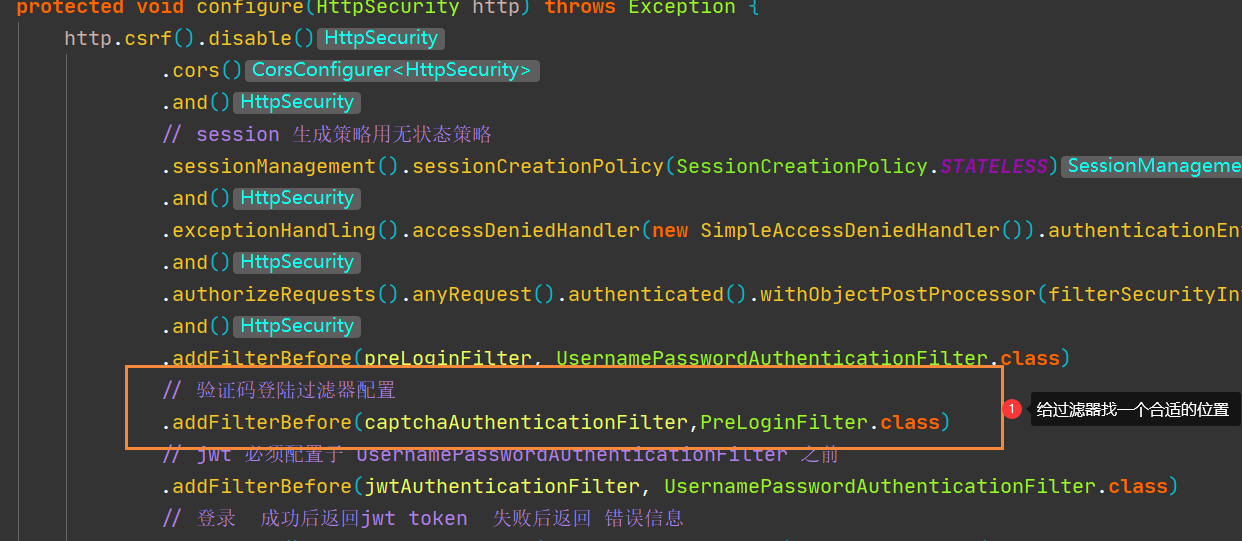
请特别注意:务必保证登录接口和验证码接口可以匿名访问,如果是动态权限可以给接口添加
ROLE_ANONYMOUS角色。
大功告成,测试如下:
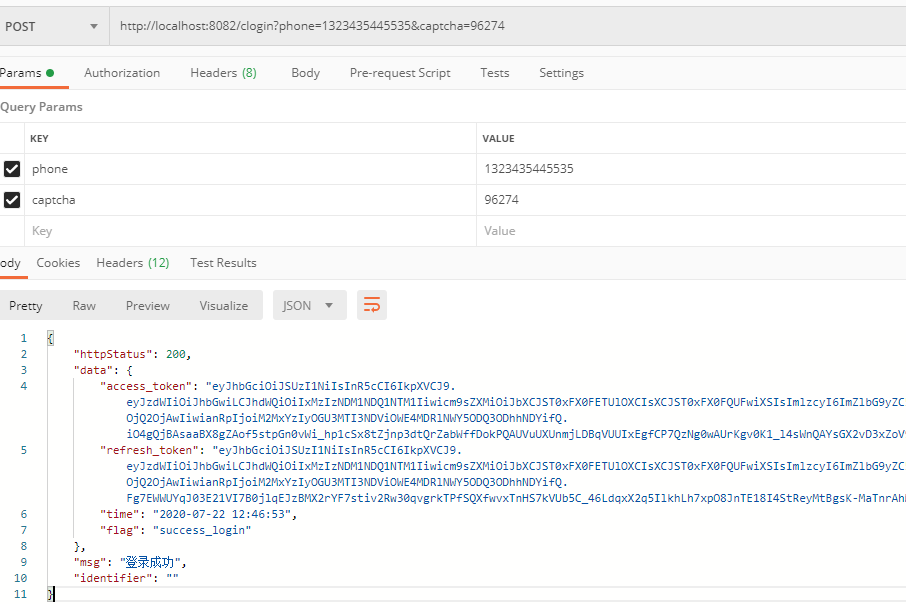
而且原先的登录方式不受影响。
4. 总结
通过对UsernamePasswordAuthenticationFilter和 AuthenticationManager的系统学习,我们了解了Spring Security认证的整个流程,本文是对这两篇的一个实际运用。相信看到这一篇后你就不会对前几篇的图解懵逼了,这也是理论到实践的一次尝试。DEMO 可以通过个人博客felord.cn相关文章获取。
关注公众号:Felordcn 获取更多资讯