flask是python web开发比较主流的框架之一,也是我在工作中使用的主要开发框架。一直对其是如何保证线程安全的问题比较好奇,所以简单的探究了一番,由于只是简单查看了源码,并未深入细致研究,因此以下内容仅为个人理解,不保证正确性。
首先是很多文章都说flask会为每一个request启动一个线程,每个request都在单独线程中处理,因此保证了线程安全。于是就做了一个简单的测试。首先是写一个简单的flask程序(只需要有最简单的功能用于测试即可),然后我们知道一个flask应用启动之后实际上是作为一个 WSGI application的,之后所有接收到的请求都会经由flask的wsgi_app(self, environ, start_response)方法去处理,所以就来看一下这个方法(注释已去掉)。

def wsgi_app(self, environ, start_response):
        ctx = self.request_context(environ)
        ctx.push()
        error = None
        try:
            try:
                response = self.full_dispatch_request()
            except Exception as e:
                error = e
                response = self.handle_exception(e)
            return response(environ, start_response)
        finally:
            if self.should_ignore_error(error):
                error = None
            ctx.auto_pop(error)
那么这个request_context又是什么东西呢?它是一个RequestContext对象,文档是这么说的:
|
1
2
3
4
|
The request context contains all request relevant information. It iscreated at the beginning of the request and pushed to the`_request_ctx_stack` and removed at the end of it. It will create theURL adapter and request object for the WSGI environment provided. |
说的很清楚,这个对象的上下文包含着request相关的信息。也就是说每一个请求到来之后,flask都会为它新建一个RequestContext对象,并且将这个对象push进全局变量_request_ctx_stack中,在push前还要检查_app_ctx_stack,如果_app_ctx_stack的栈顶元素不存在或是与当前的应用不一致,则首先push appcontext 到_app_ctx_stack中,再push requestcontext。源码如下:
def push(self):

        top = _request_ctx_stack.top
        if top is not None and top.preserved:
            top.pop(top._preserved_exc)

        # Before we push the request context we have to ensure that there
        # is an application context.
        app_ctx = _app_ctx_stack.top
        if app_ctx is None or app_ctx.app != self.app:
            app_ctx = self.app.app_context()
            app_ctx.push()
            self._implicit_app_ctx_stack.append(app_ctx)
        else:
            self._implicit_app_ctx_stack.append(None)
        if hasattr(sys, 'exc_clear'):
            sys.exc_clear()

        _request_ctx_stack.push(self)
        # Open the session at the moment that the request context is
        # available. This allows a custom open_session method to use the
        # request context (e.g. code that access database information
        # stored on `g` instead of the appcontext).
        self.session = self.app.open_session(self.request)
        if self.session is None:
            self.session = self.app.make_null_session()
通过上面的两步,每一个请求的应用上下文和请求上下文就被push到了全局变量_request_ctx_stack和_app_ctx_stack中。
现在我们知道了_request_ctx_stack和_app_ctx_stack是何时被push的,每一个请求到来都会导致新的RequestContext和AppContext被建立并push,一旦请求处理完毕就被pop出去。而无论是_app_ctx_stack还是_request_ctx_stack都是一个LocalStack对象,这是werkzeug中的一个对象,看看它里边有什么:
class LocalStack(object):

    def __init__(self):
        self._local = Local()

    def __release_local__(self):
        self._local.__release_local__()

    def _get__ident_func__(self):
        return self._local.__ident_func__

    def _set__ident_func__(self, value):
        object.__setattr__(self._local, '__ident_func__', value)
    __ident_func__ = property(_get__ident_func__, _set__ident_func__)
    del _get__ident_func__, _set__ident_func__

    def __call__(self):
        def _lookup():
            rv = self.top
            if rv is None:
                raise RuntimeError('object unbound')
            return rv
        return LocalProxy(_lookup)

    def push(self, obj):
        """Pushes a new item to the stack"""
        rv = getattr(self._local, 'stack', None)
        if rv is None:
            self._local.stack = rv = []
        rv.append(obj)
        return rv

    def pop(self):
        """Removes the topmost item from the stack, will return the
        old value or `None` if the stack was already empty.
        """
        stack = getattr(self._local, 'stack', None)
        if stack is None:
            return None
        elif len(stack) == 1:
            release_local(self._local)
            return stack[-1]
        else:
            return stack.pop()

    @property
    def top(self):
        """The topmost item on the stack.  If the stack is empty,
        `None` is returned.
        """
        try:
            return self._local.stack[-1]
        except (AttributeError, IndexError):
            return None
可以看到,这个对象的几乎所有重要属性在_local这一属性中,它是一个Local对象,很有意思,如果看一下Local的构造器,会发现其中包含有重要属性__ident_func__,
def __init__(self):
    object.__setattr__(self, '__storage__', {})
    object.__setattr__(self, '__ident_func__', get_ident)
这一属性由get_ident方法提供,这个方法的作用是提供当前线程的id,用于区别同时存在的多个线程Return a non-zero integer that uniquely identifiamongst other threads that exist simultaneously.
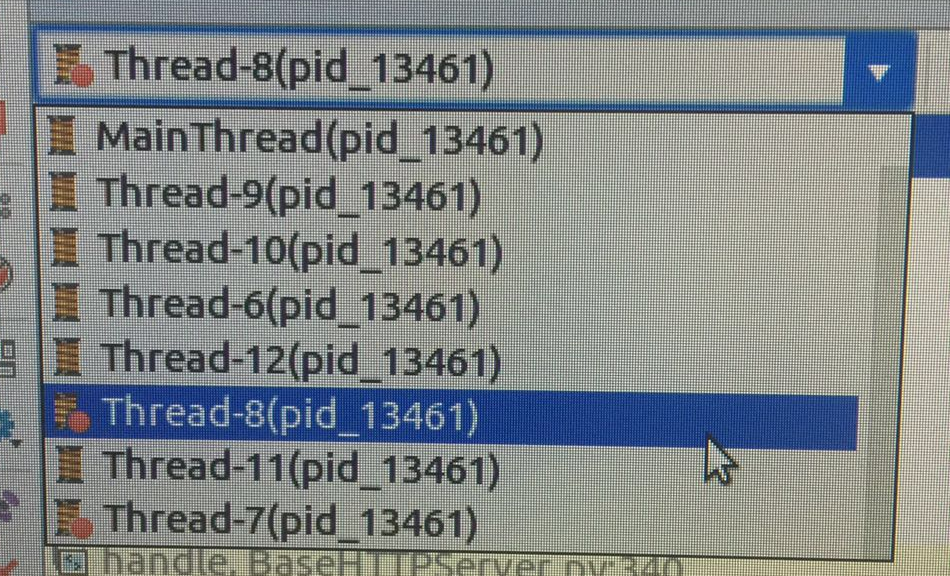
  到此为止,可见作为一个全局变量_request_ctx_stack和_app_ctx_stack应该都是只有一个线程去处理,没有发现哪里有可以为每个请求都开启一个线程的代码,实际测试一下,可以发现确实所有的请求都只运行在一个线程上(使用pycharm的debug模式可以看到当前程序启动
的所有线程,在当前这种情型下除了主线程外只有一个Thread-6,无论多少请求都一样)

这下就有趣了,传说中的每个请求一个线程果然没有出现,那么flask的线程安全是如何保证的呢?如果把每次请求到来时附带的environ(wsgi_app方法参数中的environ)打印看看的话就会发现,每个environ都携带了请求相关的全部上下文信息,在请求到来的时候通过附带的
environ重建context,并push到栈中,然后立刻处理该请求,处理完毕后将其pop出去。
  那么很多文章说的每个请求一个线程到底是在哪里建立的呢?这就要去仔细看一下flask.app的run方法了:
    def run(self, host=None, port=None, debug=None, **options):

        from werkzeug.serving import run_simple
        if host is None:
            host = '127.0.0.1'
        if port is None:
            server_name = self.config['SERVER_NAME']
            if server_name and ':' in server_name:
                port = int(server_name.rsplit(':', 1)[1])
            else:
                port = 5000
        if debug is not None:
            self.debug = bool(debug)
        options.setdefault('use_reloader', self.debug)
        options.setdefault('use_debugger', self.debug)
        try:
            run_simple(host, port, self, **options)
        finally:
            # reset the first request information if the development server
            # reset normally.  This makes it possible to restart the server
            # without reloader and that stuff from an interactive shell.
            self._got_first_request = False
这个方法实际上是对werkzeug的run_simple方法的简单包装。而run_simple方法则有趣的多(这一段把注释也贴上)
def run_simple(hostname, port, application, use_reloader=False,
               use_debugger=False, use_evalex=True,
               extra_files=None, reloader_interval=1,
               reloader_type='auto', threaded=False,
               processes=1, request_handler=None, static_files=None,
               passthrough_errors=False, ssl_context=None):
    """Start a WSGI application. Optional features include a reloader,
    multithreading and fork support.

    This function has a command-line interface too::

        python -m werkzeug.serving --help

    .. versionadded:: 0.5
       `static_files` was added to simplify serving of static files as well
       as `passthrough_errors`.

    .. versionadded:: 0.6
       support for SSL was added.

    .. versionadded:: 0.8
       Added support for automatically loading a SSL context from certificate
       file and private key.

    .. versionadded:: 0.9
       Added command-line interface.

    .. versionadded:: 0.10
       Improved the reloader and added support for changing the backend
       through the `reloader_type` parameter.  See :ref:`reloader`
       for more information.

    :param hostname: The host for the application.  eg: ``'localhost'``
    :param port: The port for the server.  eg: ``8080``
    :param application: the WSGI application to execute
    :param use_reloader: should the server automatically restart the python
                         process if modules were changed?
    :param use_debugger: should the werkzeug debugging system be used?
    :param use_evalex: should the exception evaluation feature be enabled?
    :param extra_files: a list of files the reloader should watch
                        additionally to the modules.  For example configuration
                        files.
    :param reloader_interval: the interval for the reloader in seconds.
    :param reloader_type: the type of reloader to use.  The default is
                          auto detection.  Valid values are ``'stat'`` and
                          ``'watchdog'``. See :ref:`reloader` for more
                          information.
    :param threaded: should the process handle each request in a separate
                     thread?
    :param processes: if greater than 1 then handle each request in a new process
                      up to this maximum number of concurrent processes.
    :param request_handler: optional parameter that can be used to replace
                            the default one.  You can use this to replace it
                            with a different
                            :class:`~BaseHTTPServer.BaseHTTPRequestHandler`
                            subclass.
    :param static_files: a dict of paths for static files.  This works exactly
                         like :class:`SharedDataMiddleware`, it's actually
                         just wrapping the application in that middleware before
                         serving.
    :param passthrough_errors: set this to `True` to disable the error catching.
                               This means that the server will die on errors but
                               it can be useful to hook debuggers in (pdb etc.)
    :param ssl_context: an SSL context for the connection. Either an
                        :class:`ssl.SSLContext`, a tuple in the form
                        ``(cert_file, pkey_file)``, the string ``'adhoc'`` if
                        the server should automatically create one, or ``None``
                        to disable SSL (which is the default).
    """
    if use_debugger:
        from werkzeug.debug import DebuggedApplication
        application = DebuggedApplication(application, use_evalex)
    if static_files:
        from werkzeug.wsgi import SharedDataMiddleware
        application = SharedDataMiddleware(application, static_files)

    def log_startup(sock):
        display_hostname = hostname not in ('', '*') and hostname or 'localhost'
        if ':' in display_hostname:
            display_hostname = '[%s]' % display_hostname
        quit_msg = '(Press CTRL+C to quit)'
        port = sock.getsockname()[1]
        _log('info', ' * Running on %s://%s:%d/ %s',
             ssl_context is None and 'http' or 'https',
             display_hostname, port, quit_msg)

    def inner():
        try:
            fd = int(os.environ['WERKZEUG_SERVER_FD'])
        except (LookupError, ValueError):
            fd = None
        srv = make_server(hostname, port, application, threaded,
                          processes, request_handler,
                          passthrough_errors, ssl_context,
                          fd=fd)
        if fd is None:
            log_startup(srv.socket)
        srv.serve_forever()

    if use_reloader:
        # If we're not running already in the subprocess that is the
        # reloader we want to open up a socket early to make sure the
        # port is actually available.
        if os.environ.get('WERKZEUG_RUN_MAIN') != 'true':
            if port == 0 and not can_open_by_fd:
                raise ValueError('Cannot bind to a random port with enabled '
                                 'reloader if the Python interpreter does '
                                 'not support socket opening by fd.')

            # Create and destroy a socket so that any exceptions are
            # raised before we spawn a separate Python interpreter and
            # lose this ability.
            address_family = select_ip_version(hostname, port)
            s = socket.socket(address_family, socket.SOCK_STREAM)
            s.setsockopt(socket.SOL_SOCKET, socket.SO_REUSEADDR, 1)
            s.bind((hostname, port))
            if hasattr(s, 'set_inheritable'):
                s.set_inheritable(True)

            # If we can open the socket by file descriptor, then we can just
            # reuse this one and our socket will survive the restarts.
            if can_open_by_fd:
                os.environ['WERKZEUG_SERVER_FD'] = str(s.fileno())
                s.listen(LISTEN_QUEUE)
                log_startup(s)
            else:
                s.close()

        from ._reloader import run_with_reloader
        run_with_reloader(inner, extra_files, reloader_interval,
                          reloader_type)
    else:
        inner()
默认情况下会执行inner方法,inner方法创建了一个server并启动,这样一个flask应用算是真正的启动了。那么秘密就在make_server里了
def make_server(host=None, port=None, app=None, threaded=False, processes=1,
                request_handler=None, passthrough_errors=False,
                ssl_context=None, fd=None):
    """Create a new server instance that is either threaded, or forks
    or just processes one request after another.
    """
    if threaded and processes > 1:
        raise ValueError("cannot have a multithreaded and "
                         "multi process server.")
    elif threaded:
        return ThreadedWSGIServer(host, port, app, request_handler,
                                  passthrough_errors, ssl_context, fd=fd)
    elif processes > 1:
        return ForkingWSGIServer(host, port, app, processes, request_handler,
                                 passthrough_errors, ssl_context, fd=fd)
    else:
        return BaseWSGIServer(host, port, app, request_handler,
                              passthrough_errors, ssl_context, fd=fd)
好了,这一下我们一直以来的疑问就找到答案了,原来一个flask应用的server并非只有一种类型,它是可以设定的,默认情况下创建的是一个 BaseWSGIServer,如果指定了threaded参数就启动一个ThreadedWSGIServer,如果设定的processes>1则启动一个ForkingWSGIServer。
事已至此,后面的事情就是追本溯源了:
class ThreadedWSGIServer(ThreadingMixIn, BaseWSGIServer):

    """A WSGI server that does threading."""
    multithread = True
ThreadedWSGIServer是ThreadingMixIn和BaseWSGIServer的子类,
class ThreadingMixIn:
    """Mix-in class to handle each request in a new thread."""

    # Decides how threads will act upon termination of the
    # main process
    daemon_threads = False

    def process_request_thread(self, request, client_address):
        """Same as in BaseServer but as a thread.

        In addition, exception handling is done here.

        """
        try:
            self.finish_request(request, client_address)
            self.shutdown_request(request)
        except:
            self.handle_error(request, client_address)
            self.shutdown_request(request)

    def process_request(self, request, client_address):
        """Start a new thread to process the request."""
        t = threading.Thread(target = self.process_request_thread,
                             args = (request, client_address))
        t.daemon = self.daemon_threads
        t.start()
源码写的太明白了,原来是ThreadingMixIn的实例以多线程的方式去处理每一个请求,这样对开发者来说,只有在启动app时将threaded参数设定为True,flask才会真正以多线程的方式去处理每一个请求。
  实际去测试一下,发现将threaded设置没True后,果然每一个请求都会开启一个单独的线程去处理。