一、问题描述
以github为例
每次在向github服务器 推送代码(git push),都会提示输入用户名密码
二、问题原因
在clone 代码时使用的是HTTS协议
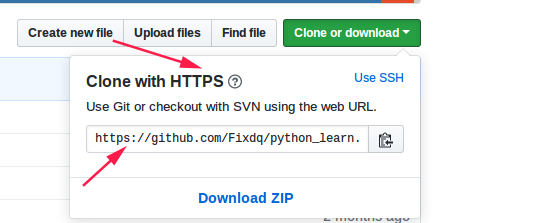
三、解决方法
1.clone代码时使用SSH协议
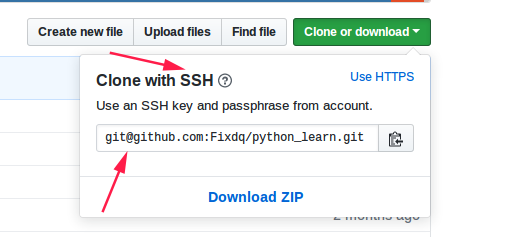
2.本地git配置 打开终端
-----------------------系统配置------------------------------------
git config --global core.quotepath false  //支持utf-8编码 解决中文乱码
git config --global user.name username
git config --global user.email address@email.com
-----------------------系统配置------------------------------------
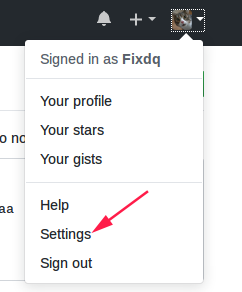
3.生成一个新密钥并将它添加到github
#1 打开终端,输入一下文本,替换自己的github邮箱地址
# 注意:生成秘钥的时候,会提示输入密码,直接默认回车,
$ssh-keygen -t rsa -b 4096 -C "your_email@example.com"
#2 生成的公钥和私钥在 /home/you/.ssh/目录下  id_rsa 和id_rsa.pub

#3 复制公钥
$ cat /home/you/.ssh/id_rsa.pub
----------------------------------------------------------------------------------------------------

-------------------------------------------------------------------------------------------------------
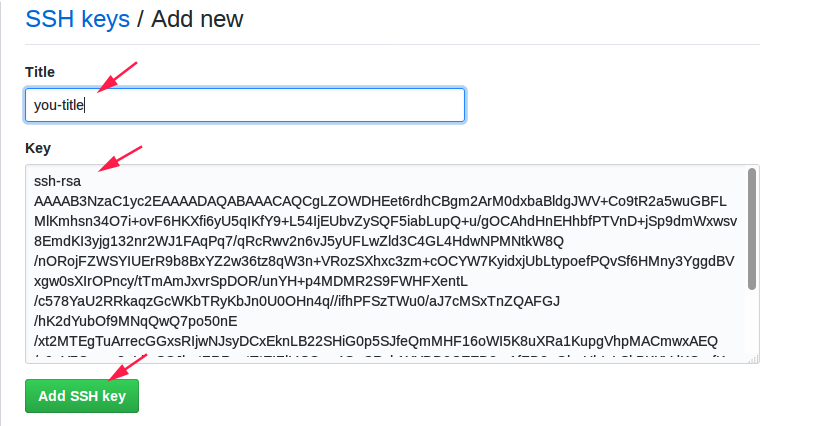
github 官网上写的清清楚楚,可直接进入看官网教程
https://help.github.com/articles/generating-a-new-ssh-key-and-adding-it-to-the-ssh-agent/