聚光灯示例,截图:
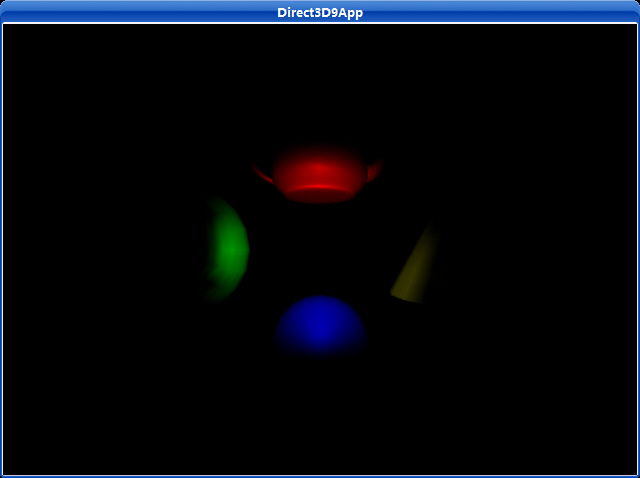
源代码:
/**************************************************************************************
Demonstrates using a spot light with D3DX objects.
You can move the spotlight around the scene with the arrow keys.
**************************************************************************************/
#include "d3dUtility.h"
#pragma warning(disable : 4100)
#define MESH_TEAPOT 0
#define MESH_SPHERE 1
#define MESH_TORUS 2
#define MESH_CYLINDER 3
#define NUM_MESH 4
const int WIDTH = 640;
const int HEIGHT = 480;
IDirect3DDevice9* g_d3d_device;
ID3DXMesh* g_object_meshes[NUM_MESH];
D3DXMATRIX g_world_matrices[NUM_MESH];
D3DMATERIAL9 g_materials[NUM_MESH];
D3DLIGHT9 g_spot_light;
////////////////////////////////////////////////////////////////////////////////////////////////////
bool setup()
{
// create objects
D3DXCreateTeapot(g_d3d_device, &g_object_meshes[MESH_TEAPOT], NULL);
D3DXCreateSphere(g_d3d_device, 1.0f, 20, 20, &g_object_meshes[MESH_SPHERE], NULL);
D3DXCreateTorus(g_d3d_device, 0.5f, 1.0f, 20, 20, &g_object_meshes[MESH_TORUS], NULL);
D3DXCreateCylinder(g_d3d_device, 0.5f, 1.5f, 2.0f, 20, 20, &g_object_meshes[MESH_CYLINDER], NULL);
// build world matrices - position the objects in world space
D3DXMatrixTranslation(&g_world_matrices[MESH_TEAPOT], 0.0f, 2.0f, 0.0f);
D3DXMatrixTranslation(&g_world_matrices[MESH_SPHERE], 0.0f, -2.0f, 0.0f);
D3DXMatrixTranslation(&g_world_matrices[MESH_TORUS], -3.0f, 0.0f, 0.0f);
D3DXMatrixTranslation(&g_world_matrices[MESH_CYLINDER], 3.0f, 0.0f, 0.0f);
D3DXMATRIX rx;
D3DXMatrixRotationX(&rx, D3DX_PI * 0.5f);
g_world_matrices[MESH_CYLINDER] *= rx;
// setup the object's materials
g_materials[MESH_TEAPOT] = RED_MATERIAL;
g_materials[MESH_SPHERE] = BLUE_MATERIAL;
g_materials[MESH_TORUS] = GREEN_MATERIAL;
g_materials[MESH_CYLINDER] = YELLOW_MATERIAL;
for(int i = 0; i < NUM_MESH; i++)
g_materials[i].Power = 20.0f;
// setup a spot light
D3DXVECTOR3 light_pos(0.0f, 0.0f, -5.0f);
D3DXVECTOR3 light_dir(0.0f, 0.0f, 1.0f);
D3DXCOLOR color = WHITE;
g_spot_light = init_spot_light(&light_pos, &light_dir, &color);
// set and enable the light
g_d3d_device->SetLight(0, &g_spot_light);
g_d3d_device->LightEnable(0, TRUE);
// turn off specular lighting and instruct Direct3D to renormalize normals
g_d3d_device->SetRenderState(D3DRS_NORMALIZENORMALS, TRUE);
g_d3d_device->SetRenderState(D3DRS_SPECULARENABLE, TRUE);
// position and aim the camera
D3DXVECTOR3 position(0.0f, 0.0f, -5.0f);
D3DXVECTOR3 target(0.0f, 0.0f, 0.0f);
D3DXVECTOR3 up(0.0f, 1.0f, 0.0f);
D3DXMATRIX view_matrix;
D3DXMatrixLookAtLH(&view_matrix, &position, &target, &up);
g_d3d_device->SetTransform(D3DTS_VIEW, &view_matrix);
// set the projection matrix
D3DXMATRIX proj;
D3DXMatrixPerspectiveFovLH(&proj, D3DX_PI * 0.5f, (float)WIDTH/HEIGHT, 1.0f, 1000.0f);
g_d3d_device->SetTransform(D3DTS_PROJECTION, &proj);
return true;
}
void cleanup()
{
for(int i = 0; i < NUM_MESH; i++)
safe_release<ID3DXMesh*>(g_object_meshes[i]);
}
bool display(float time_delta)
{
// move spot light around based on keyboard input
if(GetAsyncKeyState(VK_LEFT) & 0x8000f)
g_spot_light.Direction.x -= 0.5f * time_delta;
if(GetAsyncKeyState(VK_RIGHT) & 0x8000f)
g_spot_light.Direction.x += 0.5f * time_delta;
if(GetAsyncKeyState(VK_UP) & 0x8000f)
g_spot_light.Direction.y += 0.5f * time_delta;
if(GetAsyncKeyState(VK_DOWN) & 0x8000f)
g_spot_light.Direction.y -= 0.5f * time_delta;
// update the light
g_d3d_device->SetLight(0, &g_spot_light);
g_d3d_device->LightEnable(0, TRUE);
// draw the scene
g_d3d_device->Clear(0, NULL, D3DCLEAR_TARGET | D3DCLEAR_ZBUFFER, 0x00000000, 1.0f, 0);
g_d3d_device->BeginScene();
for(int i = 0; i < NUM_MESH; i++)
{
// set material and world matrix for ith object, then render the ith object.
g_d3d_device->SetMaterial(&g_materials[i]);
g_d3d_device->SetTransform(D3DTS_WORLD, &g_world_matrices[i]);
g_object_meshes[i]->DrawSubset(0);
}
g_d3d_device->EndScene();
g_d3d_device->Present(NULL, NULL, NULL, NULL);
return true;
}
LRESULT CALLBACK wnd_proc(HWND hwnd, UINT msg, WPARAM word_param, LPARAM long_param)
{
switch(msg)
{
case WM_DESTROY:
PostQuitMessage(0);
break;
case WM_KEYDOWN:
if(word_param == VK_ESCAPE)
DestroyWindow(hwnd);
break;
}
return DefWindowProc(hwnd, msg, word_param, long_param);
}
int WINAPI WinMain(HINSTANCE inst, HINSTANCE, PSTR cmd_line, int cmd_show)
{
if(! init_d3d(inst, WIDTH, HEIGHT, true, D3DDEVTYPE_HAL, &g_d3d_device))
{
MessageBox(NULL, "init_d3d() - failed.", 0, MB_OK);
return 0;
}
if(! setup())
{
MessageBox(NULL, "Steup() - failed.", 0, MB_OK);
return 0;
}
enter_msg_loop(display);
cleanup();
g_d3d_device->Release();
return 0;
}