背景
在许多时候为了更好的解析文本,我们不仅仅需要将文本分词,去停这么简单,除了获取关键词与新词汇以外,我们还需要对获取每个粒度的其他信息,比如词性标注,在python中NLPIR就可以很好的完成这个任务,如果你没有NLPIR那么你可以参考这篇文章NLPIR快速搭建,或者直接下载我已经准备好的汉语自然语言处理文件包NLP源码集合
代码,亦是我的笔记
# - * - coding: utf - 8 -*-
#
# 作者:田丰(FontTian)
# 创建时间:'2017/7/3'
# 邮箱:fonttian@Gmaill.com
# CSDN:http://blog.csdn.net/fontthrone

import nltk
import sys
import nlpir

sys.path.append("../")

reload(sys)
sys.setdefaultencoding('utf-8')

import jieba
from jieba import posseg


def cutstrpos(txt):
    # 分词+词性
    cutstr = posseg.cut(txt)
    result = ""
    for word, flag in cutstr:
        result += word + "/" + flag + ' '
    return result


def cutstring(txt):
    # 分词
    cutstr = jieba.cut(txt)
    result = " ".join(cutstr)
    return result


# 读取文件
txtfileobject = open('txt/nltest1.txt')
textstr = ""
try:
    filestr = txtfileobject.read()
finally:
    txtfileobject.close()


# 使用NLPIR2016 进行分词
def ChineseWordsSegmentationByNLPIR2016(text):
    txt = nlpir.seg(text)
    seg_list = []

    for t in txt:
        seg_list.append(t[0].encode('utf-8'))

    return seg_list


stopwords_path = 'stopwordsstopwords1893.txt'  # 停用词词表


# 去除停用词
def ClearStopWordsWithListByNLPIR2016(seg_list):
    mywordlist = []
    liststr = "/ ".join(seg_list)
    f_stop = open(stopwords_path)
    try:
        f_stop_text = f_stop.read()
        f_stop_text = unicode(f_stop_text, 'utf-8')
    finally:
        f_stop.close()
    f_stop_seg_list = f_stop_text.split('
')
    for myword in liststr.split('/'):
        if not (myword.strip() in f_stop_seg_list) and len(myword.strip()) > 1:
            mywordlist.append(myword)
    return ''.join(mywordlist)


# print filestr
filestr2 = ClearStopWordsWithListByNLPIR2016(ChineseWordsSegmentationByNLPIR2016(filestr)).replace(' ', '')

# 中文分词并标注词性
posstr = cutstrpos(filestr2)

print '**** show is end ****'

print ' '
print 'This is posster'
print posstr

strtag = [nltk.tag.str2tuple(word) for word in posstr.split()]
# for item in strtag:
#     print item
strsBySeg = nlpir.seg(filestr)
strsBySeg2 = nlpir.seg(filestr2)
strsByParagraphProcess = nlpir.ParagraphProcess(filestr, 1)
strsByParagraphProcessA = nlpir.ParagraphProcessA(filestr, ChineseWordsSegmentationByNLPIR2016(filestr)[0], 1)

print ' '
print ' '
print '**** strtag ****'

for word, tag in strtag:
    print word, "/", tag, "|",

print ' '
print ' '
print '**** strsBySeg ****'
for word, tag in strsBySeg:
    print word, "/", tag, "|",

print ' '
print ' '
print '**** strsBySeg2 ****'
for word, tag in strsBySeg2:
    print word, "/", tag, "|",

print ' '
print ' '
print '**** strsByParagraphProcess ****'
print strsByParagraphProcess

# print ' '
# print ' '
# print '**** strsByParagraphProcessA ****'
#
# for item in strsByParagraphProcessA:
#     print item,

print ' '
print ' '
print '**** show is end ****
实用示例
NLPIR会自动对人名进行分词与标注,借助该功能我们可以获取自定义新词,或者提取与某类人有关的句子.下面是我前段时间在写一个项目demon时刚写的测试代码
# - * - coding: utf - 8 -*-
#
# 作者:田丰(FontTian)
# 创建时间:'2017/7/11'
# 邮箱:fonttian@Gmaill.com
# CSDN:http://blog.csdn.net/fontthrone
from os import path
from scipy.misc import imread
import matplotlib.pyplot as plt
import jieba
from nlpir import *
from wordcloud import WordCloud, ImageColorGenerator
import sys
reload(sys)
sys.setdefaultencoding('utf-8')
d = path.dirname(__file__)

text = '接待钟世镇院士,筹备杨东奇部长接待事宜。'
stopwords_path = 'stopwordsCNENstopwords.txt'  # 停用词词表
number = 10

def ShowByItem(List):
    print '********* show ', str(List), ' end *********'
    for item in List:
        print item,
    print
    print '********* show ', str(List), ' end *********'

#  使用NLPIR2016 获取名字
def FindAcademicianNameByNLPIR2016(text,isAddYuanShi):
    txt = seg(text)
    seg_list = []

    for i in range(len(txt)):
        if txt[i][1] == 'nr' and txt[i+1][0] == '院士':
            if isAddYuanShi == 1:
                seg_list.append(txt[i][0].encode('utf-8')+'院士')
            else:
                seg_list.append(txt[i][0].encode('utf-8'))


    return seg_list

str2 = FindAcademicianNameByNLPIR2016(text,1)

ShowByItem(str2)


# 输出
********* show  ['xe9x92x9fxe4xb8x96xe9x95x87xe9x99xa2xe5xa3xab']  end
钟世镇院士
********* show  ['xe9x92x9fxe4xb8x96xe9x95x87xe9x99xa2xe5xa3xab']  end
在demon中使用的
使用NLPIR2016 获取名字
def FindAcademicianNameByNLPIR2016(text,isAddYuanShi):
    txt = seg(text)
    seg_list = []

    for i in range(len(txt)):
        if txt[i][1] == 'nr' and txt[i+1][0] == '院士':
            if isAddYuanShi == 1:
                seg_list.append(txt[i][0].encode('utf-8')+'院士')
            else:
                seg_list.append(txt[i][0].encode('utf-8'))


strAcademicianName = FindAcademicianNameByNLPIR2016(fullContent,1)
strAcademicianName = list(set(strAcademicianName))
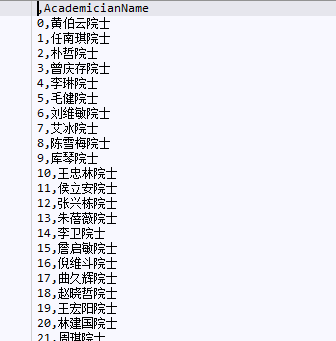
# 利用pandas存储
dfAcademicianName = pd.DataFrame(strAcademicianName)
dfAcademicianName.columns = ['AcademicianName']
dfAcademicianName.to_csv('csv/dfAcademicianName')
# 利用Pandas 获取
dfNewWords = pd.read_csv("csv/dfNewWords")
dfAcademicianName = pd.read_csv("csv/dfAcademicianName")

# 你也可以将其加入用户新词汇
# add_word(dfAcademicianName['AcademicianName'])

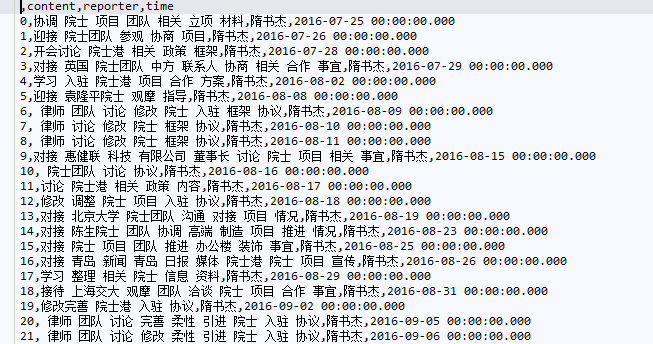
# 提取所有带有院士的报告
def GetAcademicianCSV(df,strColumn,df1):
    dfAcademicianName = pd.read_csv("csv/dfAcademicianName")
    listAcademicianName = list(dfAcademicianName['AcademicianName'])
    print type(listAcademicianName)

    mywordlistAcademicianName =[]
    mywordlisttime = []
    mywordAca = []
    df1 = df1.copy()
    numlen = len(df1.index)
    for i in range(numlen):
        for myword in df1.loc[i, strColumn].split():
            if (myword in listAcademicianName) and len(myword) > 1:
                print myword
                mywordlistAcademicianName.append(df.loc[i, strColumn])
                mywordAca.append(myword)
                mywordlisttime.append(df.loc[i, 'time'])

    return mywordlistAcademicianName,mywordlisttime,mywordAca

# 返回的信息
mywordlistAcademicianName, mywordlisttime,mywordAca = GetAcademicianCSV(df,'content',df1)