MYSQL类实现从数据库相应的表中获取所有属性及其数据,数据为元组类型。返回结果存放在字典中
 1 import pymysql
 2
 3
 4 class MYSQL:
 5     def __init__(self):
 6         pass
 7
 8     def __del__(self):
 9         self._cursor.close()
10         self._connect.close()
11
12     def connectDB(self):
13         """
14         连接数据库
15         :return:
16         """
17         try:
18             self._connect = pymysql.Connect(
19                 host='localhost',
20                 port=3306,
21                 user='root',
22                 passwd='123456',
23                 db='test',
24                 charset='utf8'
25             )
26
27             return 1
28         except:
29             return 0
30
31     def readObject(self, target):
32         """
33         读取评价对象
34         :return: list对象:所有的评价对象及其数据,数据的行数
35         """
36         self._cursor=self._connect.cursor()
37         result = {}  # {字段:该字段的所有值列表(包含字段)}
38         name = []    # target表的所有字段的列表
39         data = ()
40         sql = "select COLUMN_NAME from information_schema.COLUMNS where table_name = '%s'"
41         name_sql = "select %s from %s"
42         self._cursor.execute(sql % target)
43         results = self._cursor.fetchall()
44         for row in results:
45             name.append(row[0])
46
47         # print(name)
48
49         for i in name:
50             self._cursor.execute(name_sql % (i, target))
51             data = self._cursor.fetchall()
52             # Python 字典 setdefault() 函数
53             # 如果字典中包含有给定键,则返回该键对应的值,否则返回为该键设置的值
54             result.setdefault(i, data)
55
56         return result, len(data)
57
58
59 if __name__ == '__main__':
60
61     mysql = MYSQL()
62     flag = mysql.connectDB()
63     if flag == 0:
64         print('数据库连接失败')
65     else:
66         print('数据库连接成功')
67         data, row_count = mysql.readObject('employee')
68         print(data)
69         print(row_count)
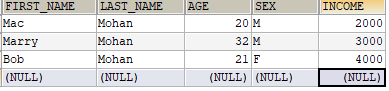
输出结果:
数据库连接成功
{'FIRST_NAME': (('Mac',), ('Marry',), ('Bob',)), 'LAST_NAME': (('Mohan',), ('Mohan',), ('Mohan',)), 'AGE': ((20,), (32,), (21,)), 'SEX': (('M',), ('M',), ('F',)), 'INCOME': ((2000.0,), (3000.0,), (4000.0,))}
3