在ECMAScript5中对Object新增的些方法,以前没注意的同志们,嘻嘻,下面我们再一起来边看边学。
| 1、Object之create |
Create单词意为创造嘛,作为Object的静态方法,不言而喻那当然是创建对象呗。
谁的对象呢?
当然不是我的。。。
好吧,Object.create(prototype,descriptors)是创建一个具有指定原型且可选择性地包含指定属性的对象并返回。
纳尼,什么意思?
我们一起demo下呗。
<!DOCTYPE html>
    <head>
        <title>create</title>
        <meta http-equiv="Content-Type" content="text/html; charset=utf-8"/>
    </head>
    <body>
        <script>
           var newObj = Object.create(null,{
               /*自带name,age属性*/
               name: {
                   value: 'Monkey'
               },
               age: {
                   value: 24
               }
           });
           console.log(newObj.name);
           console.log(newObj.age);
           //输出为null:原因是我们通过Object.create创建了一个null原型的对象
           //http://www.cnblogs.com/giggle/p/5208199.html
           console.log(Object.getPrototypeOf(newObj));
        </script>
    </body>
</html>
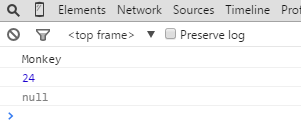
下面是Object.create具体讲解:
|
Object.create( prototype, descriptors ) |
|
|
prototype |
必须。要用作原型的对象。可为null |
|
descrioptors |
该对象的属性。 “数据属性”可获取且可设置值的属性。数据属性描述符包含value特性,以及writable、enumerable和configurable特性。若未指定最后三个特性,则它们的默认值是false。 |
|
返回值 |
一个具有指定的内部原型且包含指定的属性的新对象 |
注:用Object.create创建对象时,descriptors一定要是“数据属性”哦!!
什么意思。
我们再来写个demo,看看


<!DOCTYPE html>
    <head>
        <title>create</title>
        <meta http-equiv="Content-Type" content="text/html; charset=utf-8"/>
    </head>
    <body>
        <script>
           var newObj = Object.create(null,{
               //这里我没有按照着name:{}这种格式,而是普通格式
               name: 'Monkey',
               age: 24
           });
           //下面会报错滴
           console.log(newObj.name);
           console.log(newObj.age);
        </script>
    </body>
</html>
运行上面的代码,chrome下看看

大伙看见上面报的错了么。切记切记
| 2、Object之defineProperty |
在上面大家不是看见Object.create方法么,其实这是核心哦。下面的都是辅助它的呢。
比如这个defineProperty,其实就是将属性添加到对象,或修改对象的现有属性。
|
Object.defineProperty(object, propertyName, descriptor) |
|
|
object |
必须。在其上添加新属性或修改已有属性。 |
|
propertyName |
必须。属性名 |
|
descriptor |
又是它。描述属性的 |
|
返回值 |
已修改的对象 |
Demo一下:
<!DOCTYPE html>
    <head>
        <title>defineProperty</title>
        <meta http-equiv="Content-Type" content="text/html; charset=utf-8"/>
    </head>
    <body>
        <script>
            var obj = Object.create(null);
            //利用defineProperty为obj对象添加一个newDataProperty属性
            Object.defineProperty(obj,"newDataProperty",{
                value:'Monkey',
                writable:true
            });
            console.log(obj.newDataProperty);
        </script>
    </body>
</html>

| 3、Object之defineProperties |
在上面我们看见了Object.defineProperty是添加或修改一个属性,这个嘛,从单词就知道咯,复数嘛,就是添加或修改一个或多个属性到对象咯。
|
Object.defineProperties(object,descriptors) |
|
|
object |
必须。对其添加或修改的属性对象 |
|
descriptors |
必须。包含一个或多个描述对象的JavaScript对象。 |
|
返回值 |
已修改的对象 |
<!DOCTYPE html>
    <head>
        <title>defineProperties</title>
        <meta http-equiv="Content-Type" content="text/html; charset=utf-8"/>
    </head>
    <body>
        <script>
            var obj = Object.create(null);
            //利用defineProperties为obj对象添加两个新属性
            Object.defineProperties(obj,{
                name:{
                    value:'Monkey'
                },
                age: {
                    value:24
                }
            });
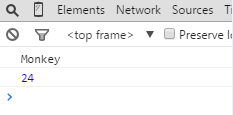
            console.log(obj.name);
            console.log(obj.age);
        </script>
    </body>
</html>
| 4、Object之getOwnPropertyDescriptor |
这个静态方法就是,获取指定对象自身属性的描述符。而不是从对象的原型继承的哦。
|
Object.getOwnPropertyDescriptor(object,propertyname) |
|
|
object |
必须。访问属性的对象 |
|
propertyname |
必须。属性名 |
|
返回值 |
属性描述符 |
<!DOCTYPE html>
    <head>
        <title>getOwnPropertyDescriptor</title>
        <meta http-equiv="Content-Type" content="text/html; charset=utf-8"/>
    </head>
    <body>
        <script>
            //通过Object.create创建一个对象
            var obj = Object.create(null,{
                name:{
                    value:'Monkey',
                    writable:true
                }
            });
            //获得name的描述对象
            var descriptor = Object.getOwnPropertyDescriptor(obj,'name');
            console.log(descriptor);
        </script>
    </body>
</html>

从上面可以看出Object.getOwnPropertyDescriptor的确是返回的属性的描述信息对象哦。
| 5、Object之getOwnPropertyNames |
返回对象自己的属性名称。是对象自己的,而不是继承的哦。
|
Object.getOwnPropertyNames(object) |
|
|
object |
必须。返回属于该对象的所有属性名 |
|
返回值 |
包含对象自己属性的名称 |
<!DOCTYPE html>
    <head>
        <title>getOwnPropertyNames</title>
        <meta http-equiv="Content-Type" content="text/html; charset=utf-8"/>
    </head>
    <body>
        <script>
            function Fn(name,age){
                this.name = name;
                this.age = age;
                this.fn1 = function(){
                    console.log(this.name+"    "+this.age);
                };
            }
            Fn.prototype.fn2 = function(){
                console.log(this.name);
            };
            Fn.prototype.attr1 = this.name;
            obj = new Fn('Monkey',24);
            /*
                从上面的代码可知:obj自己的对象为name,age,fn1
                                  继承的为fn2,attr1
            */
            console.log(Object.getOwnPropertyNames(obj));
        </script>
    </body>
</html>