前言
本篇,我主要写下一般 sql 的缓存依赖,还有使用 MVC 过滤器的数据库缓存依赖。
什么是缓存依赖
缓存
把你要访问的资源,放在内存中,占用一定的内存空间,从而使用户读取内存中的数据,进而减少读取数据库,或资源文件的次数,从而对你的程序并发量,以及返回请求速率上得到提高的一种机制。
缓存的不及时性
由于在缓存的作用时间内,数据放在内存中,不知道数据源是否已经改变,从而使信息失去即时效应。
解决不及时性
为了解决第二条的不及时性,微软想到的就是缓存依赖。
缓存依赖
缓存通过监测依赖项(文件或数据库)的读写,来通知缓存是否过期的一种机制。
比如,依赖项是123.txt 文件,缓存的数据是234.txt 中的数据,那么缓存机制可通过监测123.txt 文件中数据的是否变化,来移除缓存234.txt 文件的数据。感觉扯淡,还是上代码更给力。
缓存依赖项(文件)
//文件缓存依赖
if (cache.Get("key") == null)//如果依赖项中的数据发生变化,此会被通知缓存清空(系统完成清空)
{
    CacheDependency dp = new CacheDependency(Server.MapPath("/Data/123.txt"));//建立缓存依赖项dp
    string str = DoIOFile.ReadFiles("/Data/111.txt");
    cache.Insert("key", str, dp);
}
Response.Write(cache.Get("key"));   //如果123.txt这个文件的内容不变就一直读取缓存中的数据,一旦123.txt文件中的数据改变,则重新读取111.txt文件中的数据
效果:缓存的数据是111.txt 中的数据,111.txt 中的数据发生变化,钥匙为 key的 缓存不会被清空,也就是依旧显示没改前的数据。但是如果缓存依赖项123.txt 中的数据一旦发生变化,缓存立马被清空,重新写入缓存中新的数据。这就是缓存依赖的好处,你可以试下,我不忽悠你。
缓存依赖项(文件夹)
//文件夹缓存依赖
if (cache.Get("key") == null)//如果依赖项中的数据发生变化,此会被通知缓存清空(系统完成清空)
{
    CacheDependency dp = new CacheDependency(Server.MapPath("/Data"));//建立缓存依赖项dp
    string str = DoIOFile.ReadFiles("111.txt");
    cache.Insert("key", str, dp);
}
Response.Write(cache.Get("key"));
效果:这里 /Data 是个文件夹,他下面直属 Data 所有一级文件(就是不能算嵌套文件夹的文件)如果有变动,都会触发通知,清空缓存。
缓存依赖项(多文件)
//多文件依赖项
if (cache.Get("key") == null)//如果依赖项中的数据发生变化,此会被通知缓存清空(系统完成清空)
{
    CacheDependency dp1 = new CacheDependency(Server.MapPath("/Data/123/123.txt")); //这里是监视文件或目录
    CacheDependency dp2 = new CacheDependency(Server.MapPath("/Data/123.txt"));

    CacheDependency[] dps = new CacheDependency[] { dp1, dp2 };
    AggregateCacheDependency aDp = new AggregateCacheDependency(); //多个依赖项
    aDp.Add(dps);
    string str = DoIOFile.ReadFiles("111.txt");
    cache.Insert("key", str, aDp);
}
Response.Write(cache.Get("key"));
效果:依赖项中的任何一个文件有变动,缓存清空,写入新缓存。
MVC中的缓存
MVC 中缓存的使用方法相对来说比较简单,只要在过滤器上定义一下就行啦,其它的我就不累述啦,与webForm无异。
[OutputCache(Duration = 20)] //定义缓存,秒为单位,Duration是必填项
public ActionResult Index()
{
    string str = DoIOFile.ReadFiles("/111.txt");
    Response.Write(str);
    return View();
}
具体配置详见:http://msdn.microsoft.com/zh-cn/library/system.web.mvc.outputcacheattribute.aspx
缓存依赖(数据库表)
1.打开项目配置文件
<connectionStrings>
    <add name="Am_WeixinWeb" connectionString="data source=192.168.1.200;initial catalog=Am_WeixinWeb;uid=sa;password=lh1234;"  />
  </connectionStrings>
<system.web>
    <caching>
      <sqlCacheDependency enabled="true" pollTime="2000">
        <databases>
          <add name="Test" connectionStringName="Am_WeixinWeb" />
        </databases>
      </sqlCacheDependency>
    </caching>
</system.web>
注记:pollTime,毫秒为单位,意识是每隔2秒检测下数据库,检测表是否有发生变化。connectionStringName 为数据库链接字符串。
2.启动数据库缓存依赖
在 C 盘中,搜索到工具 aspnet_regsql.exe
在命令中 cd:运行到此工具的文件下,键入下面命令
aspnet_regsql -C "data source=;initial catalog=codematic;user id=sa;password=" -ed -et -t "T_table"
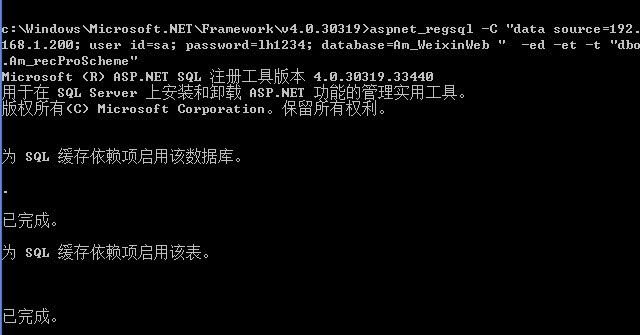
参数:-c 后跟连接字符串,-t 后接建立缓存依赖的表名
工具命令参数列表详见:http://msdn.microsoft.com/zh-cn/library/ms229862
3.使用缓存依赖项
//sql缓存依赖
DataSet ds = new DataSet();
if (cache.Get("key") == null)
{
    string conStr = DoXml.ReadWebConfigConnectionStrings("Am_WeixinWeb");
    SqlConnection conn = new SqlConnection(conStr);
    string sql = "select top(1) recContent from Am_recProScheme";
    SqlCommand cmd = new SqlCommand(sql, conn);
    SqlDataAdapter sda = new SqlDataAdapter(cmd);

    sda.Fill(ds, "tb1");
    SqlCacheDependency dep = new SqlCacheDependency("Test", "Am_recProScheme");  //Test对应配置项的缓存配置key ,后面是数据库表名
    cache.Insert("key", ds.Tables["tb1"].Rows[0]["recContent"].ToString(), dep);
}
Response.Write(cache.Get("key"));
效果:数据库 Am_WeixinWeb 中表 Am_recProScheme 中的数据有所变动,则清空缓存,重新写入。
MVC过滤器中配置缓存依赖(数据库)
1.打开项目配置文件
<connectionStrings>
  <add name="Am_WeixinWeb" connectionString="data source=192.168.1.200;initial catalog=Am_WeixinWeb;uid=sa;password=lh1234;" />
</connectionStrings>
<caching>
  <sqlCacheDependency enabled="true" pollTime="2000">
    <databases>
      <add name="Test" connectionStringName="Am_WeixinWeb" />
    </databases>
  </sqlCacheDependency>
</caching>
注记:pollTime,毫秒为单位,意识是每隔2秒检测下数据库,检测表是否有发生变化。connectionStringName为数据库链接字符串。
2.配置过滤器
//mvc缓存依赖
[OutputCache(Duration = 20, SqlDependency = "Test:Am_recProScheme")] //Test:为缓存配置的key,后面跟的是缓存依赖表
public ActionResult Index()
{
    Response.Write(db.Am_recProScheme.FirstOrDefault().recContent);
    return View();
}
效果:数据库Am_WeixinWeb中表Am_recProScheme中的数据有所变动,则清空缓存,重新写入。