引子
在了解MVC路由之前,必须了解的概念是"片段"。片段是指除主机名和查询字符串以外的、以"/"分隔的各个部分。比如,在http://site.com/Home/Index中,包含2个片段,第一个片段是Home,第二个片段是Index。
URL匹配的特点:
● 保守的:URL中的片段数量必须和路由规则中的片段数量一致(路由规则没有设置默认值的前提下)
● 宽松的:在满足片段数要求的前提下,URL中的片段内容是宽松的
本篇涉及的方面包括:
1、路由惯例
2、自定义片段变量
3、设置路由规则搜寻的命名空间和控制器的优先顺序
4、路由约束
5、路由允许对静态文件的请求
6、生成链接
7、生成URL
路由惯例
□ 当URL中对应的controller,action根本不存在,报404错误。
routes.MapRoute("MyRoute", "{controller}/{action}");
http://localhost:2213/Demo/Index 报404错误 因为还没有创建Demo控制器
□ 当URL中对应的controller,action存在,而路由规则的片段数量和URL的片段数量不等,报404错误。

routes.MapRoute("MyRoute", "{controller}/{action}");
http://localhost:2213/ 报404错误
http://localhost:2213/Home 报404错误
http://localhost:2213/Home/Index/Index 报404错误
□ 当URL中对应的controller,action存在,路由规则中设置了默认值,URL中的某些片段可省略。
routes.MapRoute("MyRoute", "{controller}/{action}",new {action = "Index"});
http://localhost:2213/Home 可以,因为设置了默认的action值
http://localhost:2213/Home/Index 当然也可以
□ 当路由规则中设置了静态片段,即使在路由规则中设置了默认值,URL的片段数量必须和路由规则中的动态片段数量一致,不能缺省。
routes.IgnoreRoute("{resource}.axd/{*pathInfo}");

            routes.MapRoute(
                name: "Default",
                url: "{controller}/{action}",
                defaults: new { controller = "Home", action = "Index" }
            );

            routes.MapRoute(
                name:"",
                url:"Category/{controller}/{action}",
                defaults: new {controller = "Home", action = "Index"}
            );
在第二条路由规则中,Category是静态片段,{controller}和{action}是2个动态片段。以上,当给这2个动态片段同时赋默认值,由于URL中的动态片段数量也必须是2个,所以这里的动态片段赋默认值,赋不赋都无所谓了,即动态片段默认值是无效的。
http://localhost:2213/Category/ 报404错误,因为 第二条路由要求2个片段变量
http://localhost:2213/Category/Home/Index 可以
□ 当路由中设置了静态片段,并且在路由规则中只为一个动态片段赋了默认值,那么这个赋值是有效的,URL中动态片段数量还是必须和路由规则中的动态片段数量一致。
routes.MapRoute(
                name:"Shop",
                url:"Shop/{action}",
                defaults:new {controller = "Home"}
            );
http://localhost:2213/Shop  报404错误,因为必须至少一个片段变量
http://localhost:2213/Shop/Index 可以,显式Home/Index.cshtml的内容,个动态片段{controller}赋的默认值起作用了。
□ 当路由规则中设置了混合片段,URL中的片段数量必须和路由规则片段数量一致,且URL片段中同时包含静态和动态
routes.MapRoute(
                name:"",
                url:"X{controller}/{action}"
            );

            routes.MapRoute(
                name: "Default",
                url: "{controller}/{action}",
                defaults: new { controller = "Home", action = "Index" }
            );

            routes.MapRoute(
                name:"Category",
                url:"Category/{controller}/{action}",
                defaults: new {controller = "Home", action = "Index"}
            );
在第一条路由股则中,X{controller}是混合片段。
http://localhost:2213/XHome/  报404错误
http://localhost:2213/XHome/Index 可以
□ 路由的添加是有顺序的
在下面的路由,会添加到RouteCollection的结尾处。
□ 路由的匹配是有顺序的
从上到下开始匹配。
□ 路由的优先顺序是有讲究的
一般把具体的路由规则放在上面,把宽泛的路由规则放在下面。
如果把具体的路由规则放在下面,把宽泛的路由规则放在上面。
routes.MapRoute(
                name: "Default",
                url: "{controller}/{action}",
                defaults: new { controller = "Home", action = "Index" }
            );

            routes.MapRoute(
                name: "",
                url: "X{controller}/{action}"
            );
http://localhost:2213/XHome/Index 报404错误,因为对第一条宽泛的路由规则而言,XHome控制器是不存在的。
自定义片段变量
→什么是自定义片段变量
如果说controller和action是MVC固有的片段变量,我们同样可以自定义片段变量。所有的片段变量,包括自定义片段变量都是以键值对的形式放在RouteDate.Values中的,key就是片段变量名。
→从RouteDate.Values中取出自定义片段变量并显示
在路由中添加一个自定义变量id,并附上初始值:
routes.MapRoute(
                name: "Default",
                url: "{controller}/{action}/{id}",
                defaults: new { controller = "Home", action = "Index", id = "DefaultId" }
            );
在HomeController中:
public ActionResult Index()
        {
            ViewBag.c = RouteData.Values["id"];
            return View();
        }

        public ViewResult CustomVariable()
        {
            ViewBag.c = RouteData.Values["id"];
            return View();
        }
在Home/Index.cshtml中:
<h2>Index</h2>
<h2>自定义片段变量id的值为:@ViewBag.c</h2>
在Home/CustomVariable.cshtml中:
<h2>自定义片段变量id的值为:@ViewBag.c</h2>
输入:http://localhost:2213/,在Home/Index.cshtml中显示自定义片段变量的默认值: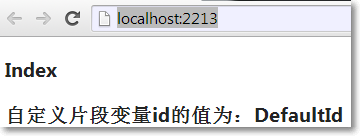
输入:http://localhost:2213/Home/CustomVariable/OK,在Home/CustomVariable.cshtml中显示自定义片段变量的新值: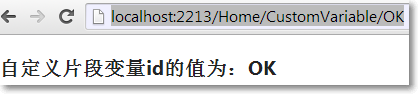
→MVC默认模型绑定机制把自定义片段变量赋值给方法参数
public ViewResult CustomVariable(string id)
        {
            ViewBag.c = id;
            return View();
        }
→把自定义片段变量设置为可选
routes.MapRoute(
                name: "Default",
                url: "{controller}/{action}/{id}",
                defaults: new { controller = "Home", action = "Index", id = UrlParameter.Optional }
            );
→把自定义片段变量设置为可变长
routes.MapRoute(
                name: "Default",
                url: "{controller}/{action}/{id}/{*catchall}",
                defaults: new { controller = "Home", action = "Index", id = UrlParameter.Optional }
            );
即在URL中,自定义片段变量id后面的片段都赋给catchall变量。
设置路由规则搜寻的命名空间和控制器的优先顺序
→如果想让路由规则优先搜寻某个命名空间和控制器,可以这样设置:
routes.MapRoute(
                name: "Default",
                url: "{controller}/{action}/{id}/{*catchall}",
                defaults: new { controller = "Home", action = "Index", id = UrlParameter.Optional },
                constraints:new[]{"UrlsAndRoutes.Controllers"}
            );
这样,路由规则优先搜寻UrlsAndRoutes命名空间下的控制器,然后再搜寻其它可用的命名空间。
→如果想让路由规则优先搜寻某些命名空间和控制器,应该写多条路由,并且有先后顺序,可以这样设置:
routes.MapRoute(
                name: "Default1",
                url: "{controller}/{action}/{id}/{*catchall}",
                defaults: new { controller = "Home", action = "Index", id = UrlParameter.Optional },
                constraints: new[] { "Additional.Controllers" }
            );

            routes.MapRoute(
                name: "Default",
                url: "{controller}/{action}/{id}/{*catchall}",
                defaults: new { controller = "Home", action = "Index", id = UrlParameter.Optional },
                constraints:new[]{"UrlsAndRoutes.Controllers"}
            );
→如果想让路由规则只搜寻某个命名空间,可以这样设置:
Route r = routes.MapRoute(
                name: "Default1",
                url: "{controller}/{action}/{id}/{*catchall}",
                defaults: new { controller = "Home", action = "Index", id = UrlParameter.Optional },
                constraints: new[] { "Additional.Controllers" }
            );

            r.DataTokens["UserNamespaceFallback"] = false;
路由约束
→正则表达式约束路由
routes.MapRoute(
                "Default",
                "{controller}/{action}/{id}/{*catchall}",
                new { controller = "Home", action = "Index", id = UrlParameter.Optional },
                new{ controller = "^H.*"},
                new[]{"UrlsAndRoutes.Controllers"}
            );
→指定值约束路由
routes.MapRoute(
                "Default",
                "{controller}/{action}/{id}/{*catchall}",
                new { controller = "Home", action = "Index", id = UrlParameter.Optional },
                new{ controller = "^H.*", action = "^Index$|^About$"},
                new[]{"UrlsAndRoutes.Controllers"}
            );
→HTTP方式约束路由
routes.MapRoute(
                "Default",
                "{controller}/{action}/{id}/{*catchall}",
                new { controller = "Home", action = "Index", id = UrlParameter.Optional },
                new{ controller = "^H.*", action = "^Index$|^About$", httpMethod = new HttpMethodConstraint("GET","POST")},
                new[]{"UrlsAndRoutes.Controllers"}
            );
→自定义约束,实现IRouteConstraint接口
using System.Web.Routing;

namespace UrlsAndRoutes.Extension
{
    public class UserAgentConstraint : IRouteConstraint
    {
        private string requiredAgent;

        public UserAgentConstraint(string agent)
        {
            this.requiredAgent = agent;
        }
        public bool Match(System.Web.HttpContextBase httpContext, Route route, string parameterName, RouteValueDictionary values, RouteDirection routeDirection)
        {
            return httpContext.Request.UserAgent != null && httpContext.Request.UserAgent.Contains(requiredAgent);
        }
    }
}

            routes.MapRoute(
                "Default",
                "{controller}/{action}/{id}/{*catchall}",
                new { controller = "Home", action = "Index", id = UrlParameter.Optional },
                new
                {
                    controller = "^H.*",
                    action = "^Index$|^About$",
                    httpMethod = new HttpMethodConstraint("GET","POST"),
                    customConstraint = new UserAgentConstraint("IE")
                },
                new[]{"UrlsAndRoutes.Controllers"}
            );
路由允许对静态文件的请求
→在项目根目录下创建static.html。
→把RoutingExistingFiles设置为true:
routes.RouteExistingFiles = true;
→输入http://localhost:2213/static.html:
生成链接
→使用默认路由规则,Html.ActionLink()生成链接
routes.MapRoute(
                name: "Default",
                url: "{controller}/{action}/{id}",
                defaults: new { controller = "Home", action = "Index", id = UrlParameter.Optional }
            );
@Html.ActionLink("关于我们","About")
<a href="/Home/About">关于我们</a>
→添加含有静态片段变量的路由规则,Html.ActionLink()生成链接
routes.MapRoute(
                "NewRoute",
                "App/Do{action}",
                new {controller = "Home"}
            );

            routes.MapRoute(
                name: "Default",
                url: "{controller}/{action}/{id}",
                defaults: new { controller = "Home", action = "Index", id = UrlParameter.Optional }
            );
@Html.ActionLink("关于我们","About")
<a href="/App/DoAbout">关于我们</a>
→Html.ActionLink()带控制器名重载生成链接
@Html.ActionLink("关于我们","About","MyController")
<a href="/MyController/About">关于我们</a>
因为含有2个片段变量的值,所以符合第二条路由规则。
→Html.ActionLink()传递额外的值
先把路由改回:
routes.MapRoute(
                name: "Default",
                url: "{controller}/{action}/{id}",
                defaults: new { controller = "Home", action = "Index", id = UrlParameter.Optional }
            );
@Html.ActionLink("关于我们","About",new {id="MyID"})
<a href="/Home/About/MyID">关于我们</a>
→当在Html.ActionLink()方法中路由匿名函数的变量名与路由规则中的片段变量不一致,路由匿名函数的变量值作为查询字符串追加到输出URL上
@Html.ActionLink("关于我们","About",new {id="MyID", myVariable = "MyValue"})
<a href="/Home/About/MyID?myVariable=MyValue">关于我们</a>
→Html.ActionLink()指定输出链接的标签属性
@Html.ActionLink("关于我们","About","Home",new {id="MyID", myVariable = "MyValue"},new {@class = "MyClass"})
<a class="MyClass" href="/Home/About/MyID?myVariable=MyValue">关于我们</a>
→Html.ActionLink()生成绝对路径链接
@Html.ActionLink("关于我们","About","Home",
    "https",
    "myserver.mydomain.com",
    "myFragmentName",
    new {id="MyID", myVariable = "MyValue"},
    new {@class = "MyClass"})

<a class="MyClass" href="https://myserver.mydomain.com/Home/About/MyID?myVariable=MyValue#myFragmentName">关于我们</a>
→Html.RouteLink()根据路由数据生成链接
@Html.RouteLink("关于我们",new {controller = "Home", action = "About", id = "MyID"})
<a href="/Home/About/MyID">关于我们</a>
→Html.RouteLink()根据路由名称生成链接
@Html.RouteLink("关于我们", "Default", new {action = "About"})
<a href="/Home/About">关于我们</a>
生成URL
Url.Action()的重载和Html.ActionLink()类似,除此之外还包括:
→使用Url.Action()在控制器方法中生成URL
public ViewResult SomeAction()
{
    string url = Url.Action("Index", new {id = "MyID"})
}
→使用Url.RouteUrl()在控制器方法中生成URL
public ViewResult SomeAction()
{
    string url = Url.RouteUrl(new {controller = "Home", action = "Index"});
}
→使用RedirecToAction()在控制器方法中重定向到一个URL
public ActionResult SOmeAction()
{
    return RedirectToAction("Index");
}
→使用RedirecToRoute()在控制器方法中重定向到一个URL
public ActionResult SOmeAction()
{
    return RedirectToRoute(new {controller = "Home", action = "Index", id = "MyID"});
}
来自Jeffery Zhao的生成自定义链接的几种方法
有这样的一个Model:
namespace MvcApplication1.Models
{
    public class Article
    {
        public int Id { get; set; }
        public string Title { get; set; }
    }
}
ArticleController:
public ActionResult Index()
        {
            return View(GetArticles());
        }

        private List<Article> GetArticles()
        {
            return new List<Article>()
            {
                new Article(){Id = 1, Title = "This is an article"},
                new Article(){Id = 2, Title = "We are the champion"}
            };
        }
→Article/Index.cshtml中使用拼接字符串生成链接
@model IEnumerable<MvcApplication1.Models.Article>
@{
    ViewBag.Title = "Index";
    Layout = "~/Views/Shared/_Layout.cshtml";
}

<table>
    @foreach (var item in Model)
    {
        <tr>
            <td>@item.Id</td>
            <td>@item.Title</td>
            <td>
                <a href="/article/@item.Id-@Url.Encode(item.Title.Replace(' ','-'))">查看详细</a>
            </td>
        </tr>
    }
</table>
生成的链接为:<a href="/article/1-This-is-an-article">查看详细</a>
→通过扩展UrlHelper生成链接
using System.Web.Mvc;
using MvcApplication1.Models;

namespace MvcApplication1.Extension
{
    public static class ArticleUrlExtension
    {
        public static string ToArticle(this UrlHelper helper, Article article)
        {
            return "/article/" + article.Id + "-" + helper.Encode(article.Title.Replace(' ', '-'));
        }
    }
}
在Article/Index.cshtml视图中:
@using MvcApplication1.Extension
@model IEnumerable<MvcApplication1.Models.Article>
@{
    ViewBag.Title = "Index";
    Layout = "~/Views/Shared/_Layout.cshtml";
}

<table>
    @foreach (var item in Model)
    {
        <tr>
            <td>@item.Id</td>
            <td>@item.Title</td>
            <td>
                @*<a href="/article/@item.Id-@Url.Encode(item.Title.Replace(' ','-'))">查看详细</a>*@
                <a href="@Url.ToArticle(item)">查看详细</a>
            </td>
        </tr>
    }
</table>