背景
我同时安装了 python2 和 python3 时,python 指向 python2,python3 才是 python3
默认情况下,在 Sublime 内 Ctrl/Cmd + B 运行 python 文件时,调用的是环境变量 PATH 中的 python
所以当我想用 python3 执行文件时,传统方法是先 new 一个 build system 专门运行 python3,每次还都得手动指定。极其繁琐!
需求
我希望 Sublime 可以根据 py 文件开头第一行注释 #!/usr/bin/env python3 来确定是执行 python2 还是 python3
解决方案
需要一个脚本,在 Sublime 调进 build system 时调用这个脚本
写一个新的 Python.sublime-build 文件,在这个文件中调用前面的脚本
用自己写的 Python.sublime-build 覆盖默认的 Python.sublime-build
具体步骤
- 找到 Python.sublime-package 文件,Mac 系统下在
/Applications/Sublime Text.app/Contents/MacOS/Packages/Python.sublime-package - 把它复制一份到
~/Library/Application Support/Sublime Text 3/Packages/User/下面,并把后缀改成 .zip - 解压得到一个 Python 目录,进到这个目录,找到
Python.sublime-build文件,装盘备用,一会下锅。 - 新建一个文件随便给个名字,保存在
~/Library/Application Support/Sublime Text 3/Packages/User/下面,文件内容如下:
import sublime
import sublime_plugin

import subprocess
import threading
import os


class MyPyBuildCommand(sublime_plugin.WindowCommand):

    encoding = 'utf-8'
    killed = False
    proc = None
    panel = None
    panel_lock = threading.Lock()

    def is_enabled(self, kill=False):
        # The Cancel build option should only be available
        # when the process is still running
        if kill:
            return self.proc is not None and self.proc.poll() is None
        return True

    def detect_version(self):
        fname = self.window.active_view ().file_name()
        with open(fname, 'r', encoding='utf-8') as f:
            line = f.readline()
        m = re.search(r'(python[0-9.]*)', line)
        if m and line.startswith("#"):
            return m.group(1)
        return "python"

    def run(self, kill=False):
        if kill:
            if self.proc is not None and self.proc.poll() is None:
                self.killed = True
                self.proc.terminate()
                self.proc = None
            return

        vars = self.window.extract_variables()
        working_dir = vars['file_path']

        # A lock is used to ensure only one thread is
        # touching the output panel at a time
        with self.panel_lock:
            # Creating the panel implicitly clears any previous contents
            self.panel = self.window.create_output_panel('exec')

            # Enable result navigation. The result_file_regex does
            # the primary matching, but result_line_regex is used
            # when build output includes some entries that only
            # contain line/column info beneath a previous line
            # listing the file info. The result_base_dir sets the
            # path to resolve relative file names against.
            settings = self.panel.settings()
            settings.set(
                'result_file_regex',
                r'^File "([^"]+)" line (d+) col (d+)'
            )
            settings.set(
                'result_line_regex',
                r'^s+line (d+) col (d+)'
            )
            settings.set('result_base_dir', working_dir)

            self.window.run_command('show_panel', {'panel': 'output.exec'})

        if self.proc is not None and self.proc.poll() is None:
            self.proc.terminate()
            self.proc = None

        args = [ self.detect_version() ]
        # sublime.message_dialog(vars['file_name'])
        args.append(vars['file_name'])
        env = os.environ.copy()
        env["PYTHONUNBUFFERED"] = "1" # 及时 print
        self.proc = subprocess.Popen(
            args,
            stdin=subprocess.PIPE,
            stdout=subprocess.PIPE,
            stderr=subprocess.STDOUT,
            cwd=working_dir,
            env=env,
        )
        self.killed = False

        threading.Thread(
            target=self.read_handle,
            args=(self.proc.stdout,)
        ).start()

    def read_handle(self, handle):
        # for line in iter(handle.readline, b''):
            # self.queue_write(line.decode(self.encoding))
            # handle.close()
        # return

        chunk_size = 2 ** 13
        out = b''
        while True:
            try:
                data = os.read(handle.fileno(), chunk_size)
                # If exactly the requested number of bytes was
                # read, there may be more data, and the current
                # data may contain part of a multibyte char
                out += data
                if len(data) == chunk_size:
                    continue
                if data == b'' and out == b'':
                    raise IOError('EOF')
                # We pass out to a function to ensure the
                # timeout gets the value of out right now,
                # rather than a future (mutated) version
                self.queue_write(out.decode(self.encoding))
                if data == b'':
                    raise IOError('EOF')
                out = b''
            except (UnicodeDecodeError) as e:
                msg = 'Error decoding output using %s - %s'
                self.queue_write(msg  % (self.encoding, str(e)))
                break
            except (IOError):
                if self.killed:
                    msg = 'Cancelled'
                else:
                    msg = 'Finished'
                self.queue_write('
[%s]' % msg)
                break

    def queue_write(self, text):
        sublime.set_timeout(lambda: self.do_write(text), 1)

    def do_write(self, text):
        with self.panel_lock:
            self.panel.run_command('append', {'characters': text})
- 修改第 3 步的那个 Python.sublime-build 文件:
{
	"target": "my_py_build",
	"selector": "source.python",
	"cancel": {"kill": true}
}
-
随便测试一下
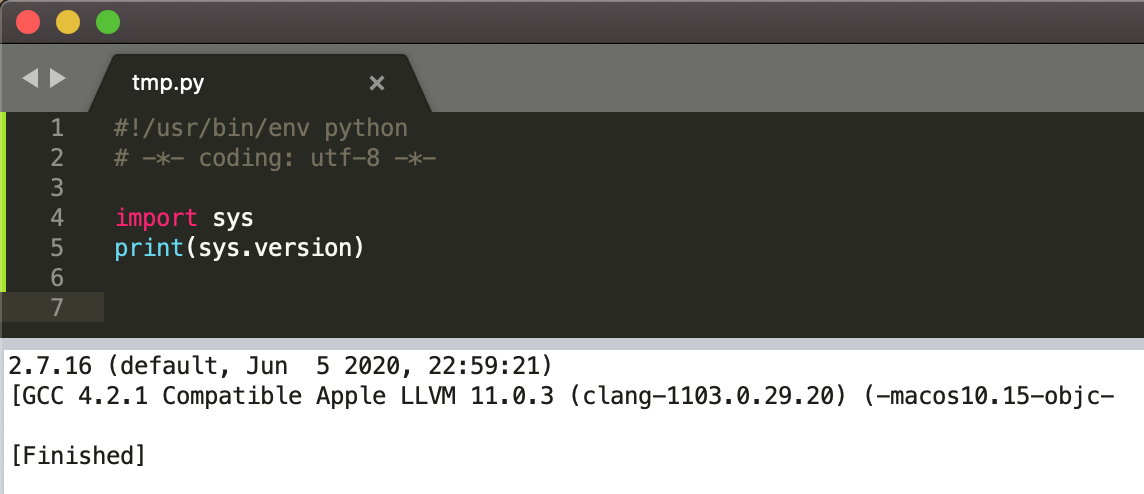
and
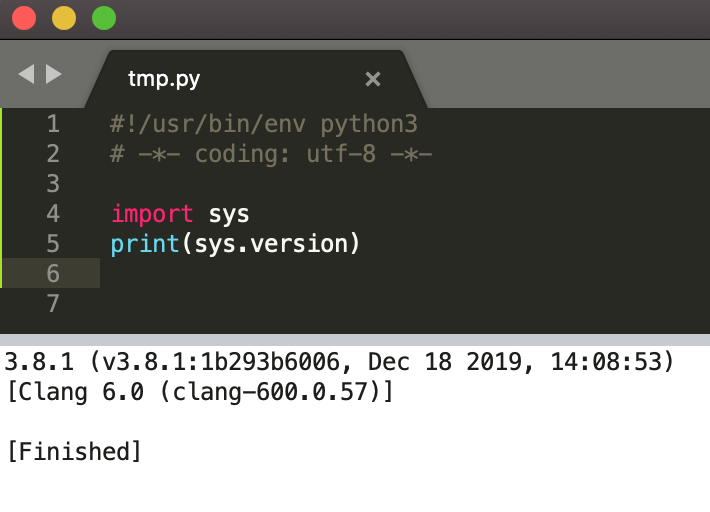
-
done!
-
有问题请留言
参考链接: