移动端click点透bug
click点透bug有一个特定的产生情况:
当上层元素是tap事件,且tap后消失,下层元素是click事件。这个时候,tap上层元素的时候就会触发下层元素的click事件
click点透
以下情况,在B元素上有半透明灰色色遮盖层C,黄色B元素内有可点击链接A
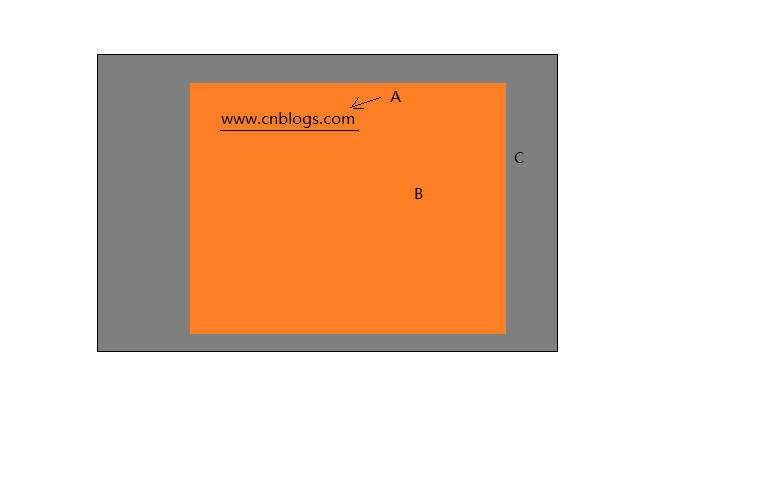
解决方法
-
上下层都是tap事件,缺点:a标签等元素本身就是自带的click事件,更改为tap比较困难
-
缓动动画,让上层元素消失的时候不要瞬间消失,而是以动画的形式消失,事件超过300ms就可以了
-
使用中间层,添加一个透明的中间元素,给它添加click事件并消失,这个时候接收点透的是透明的中间层
-
使用fastclick
<!DOCTYPE html>
<html lang="en">
<head>
    <meta charset="UTF-8">
    <meta name="viewport" content="width=device-width, initial-scale=1.0">
    <meta http-equiv="X-UA-Compatible" content="ie=edge">
    <title>Document</title>
    <style>
        #a,#b{
             100px;
            height: 80px;
            background: blue;
            float: left;
        }
        #a{
            background: red;
        }
        #zhe{
             100%;
            height: 100px;
            background: rgba(0,0,0,0.3);
            position: absolute;
            top: 0;
            left: 0;
            z-index: 1000;
        }
        #zj{
             100%;
            height: 100px;
            background: rgba(0,0,0,0);
            position: absolute;
            top: 0;
            left: 0;
        }
    </style>
</head>
<body>

    <div id="a"></div>
    <div id="b"></div>
    <div id="zj"></div>
    <div id="zhe"></div>

</body>
<script src="https://cdn.bootcss.com/fastclick/1.0.6/fastclick.min.js"></script>
<script src="./zepto.js"></script>
<script>
    //利用fastclick解决点透问题
    // $(function(){
    //     FastClick.attach(document.body);
    //     $("#zhe").tap(function(){
    //         $(this).hide();
    //     })
    //     $("#a").click(function(){
    //         $(this).css("background","blue")
    //     })


    // })


    //两个都用tag事件

    // $(function(){
    //     $("#zhe").tap(function(){
    //         $(this).hide();
    //     })
    //     $("#a").tag(function(){
    //         $(this).css("background","blue")
    //     })

    // })


    //缓冲动画

    // $(function(){
    //     $("#zhe").tap(function(){
    //         setTimeout(function(){
    //             $(this).hide();
    //         }.bind(this),300)
    //     })
    //     $("#a").click(function(){
    //         $(this).css("background","blue")
    //     })

    // })


    //加中间层,点透的时候触发中间层的click事件

    $(function(){
        $("#zhe").tap(function(){
            // setTimeout(function(){
                $(this).hide();
            // }.bind(this),300)
        })

        $("#zj").click(function(){
            $(this).hide()
        })

        $("#a").click(function(){
            $(this).css("background","blue")
        })

    })


</script>
</html>