背景:SpringBoot2的项目要配置 actuator + prometheus的健康检查,按照教程配置好之后再浏览器测试 http://localhost:port/prometheus 后404错误
项目pom文件添加;
<!--actuator-->
<dependency>
    <groupId>org.springframework.boot</groupId>
    <artifactId>spring-boot-starter-actuator</artifactId>
    <version>2.0.1.RELEASE</version>
</dependency>
<!--pometheus 监控-->
<dependency>
    <groupId>io.micrometer</groupId>
    <artifactId>micrometer-registry-prometheus</artifactId>
    <version>1.0.3</version>
</dependency>
springboot2的配置文件application.properties添加
management.endpoints.enabled-by-default=true
management.endpoints.web.exposure.include="*"
management.endpoints.web.base-path=/
management.endpoints.jmx.exposure.include="*"
management.endpoints.jmx.shutdown.enabled=false
management.endpoints.metrics.export.prometheus.enabled=true
management.endpoints.metrics.distribution.percentiles-histogram[http.server.requests]=true
management.endpoints.security.enabled=false
management.endpoint.health.show-details=always
然后启动项目发现


问题解决:

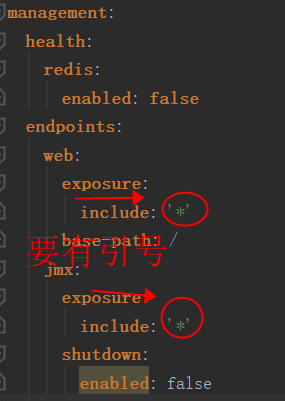
*号在yaml文件中属于关健字,所以要加引号,但是再properties文件中就不能加引号