centos 7
Centos 系统服务脚本目录:
/usr/lib/systemd/
有系统(system)和用户(user)之分,
如需要开机没有登陆情况下就能运行的程序,存在系统服务(system)里,即
/lib/systemd/system/
反之,用户登录后才能运行的程序,存在用户(user)里
服务以.service结尾。
这边以gitlab开机运行为例
注/opt/gitlab/ctlscript.sh是gitlab自带的脚本
[root@em1 system]#vi /usr/lib/systemd/system/gitlab.service
[Unit]
Description=gitlab
After=network.target

[Service]
Type=forking
ExecStart=/opt/gitlab/ctlscript.sh start
ExecReload=/opt/gitlab/ctlscript.sh restart
ExecStop=/opt/gitlab/ctlscript.sh  stop
PrivateTmp=true

[Install]
WantedBy=multi-user.target
将[service]对应的脚本以754的权限保存在目录:/lib/systemd/system
说明:
[Unit]:服务的说明
Description:描述服务
After:描述服务类别
[Service]服务运行参数的设置
Type=forking是后台运行的形式
ExecStart为服务的具体运行命令
ExecReload为重启命令
ExecStop为停止命令
PrivateTmp=True表示给服务分配独立的临时空间
注意:[Service]的启动、重启、停止命令全部要求使用绝对路径
[Install]服务安装的相关设置,可设置为多用户
设置开机自启动
[root@em1 system]# systemctl enable gitlab.service
ln -s '/usr/lib/systemd/system/gitlab.service' '/etc/systemd/system/multi-user.target.wants/gitlab.service'

[root@em1 system]#reboot
其他命令:
启动nginx服务
systemctl start gitlab.service

设置开机自启动
systemctl enable gitlab.service

停止开机自启动
systemctl disable gitlab.service

查看服务当前状态
systemctl status gitlab.service

重新启动服务
systemctl restart gitlab.service

查看所有已启动的服务
systemctl list-units --type=service
任务 旧指令 新指令(/区分新旧指令)
使某服务自动启动 chkconfig --level 3 httpd on / systemctl enable httpd.service
使某服务不自动启动 chkconfig --level 3 httpd off / systemctl disable httpd.service
检查服务状态 service httpd status / systemctl status httpd.service (服务详细信息) systemctl is-active httpd.service (仅显示是否 Active)
显示所有已启动的服务 chkconfig --list / systemctl list-units --type=service
启动某服务 service httpd start / systemctl start httpd.service
停止某服务 service httpd stop / systemctl stop httpd.service
重启某服务 service httpd restart / systemctl restart httpd.service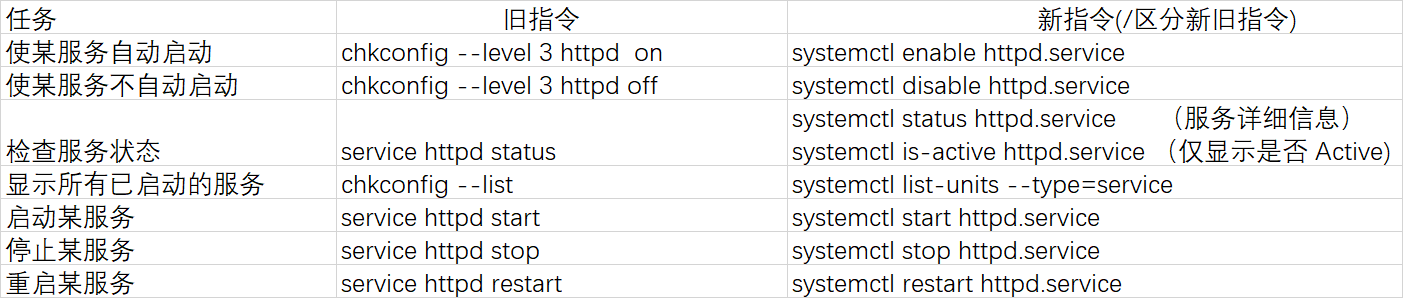
centos 6 :
方法1:
1.首先将脚本写到/etc/init.d/下

2.脚本中加一行内容
#chkconfig 2345 66 77
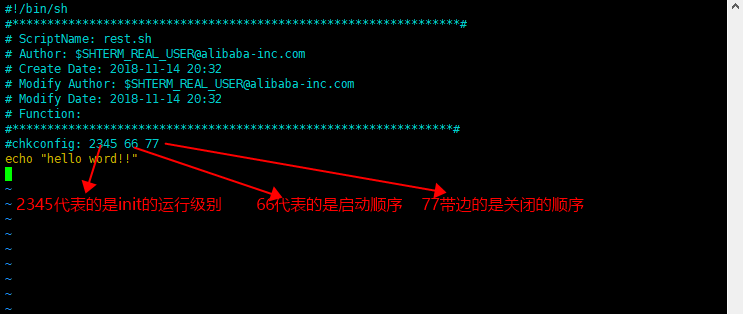
3.在命令行执行
#添加进启动

chkconfig  -add   rest.sh

#开启

chkconfig rest.sh  on

#关闭是:

chkconfig  test.sh  off
方法2:
1.首先将脚本写到/etc/init.d/下
2.脚本中加一行内容
#chkconfig 2345 66 77
2.如果要在int 3自行的话就进进入/etc/rc.d/rc3.d 目录下

3.做软连接执行脚本的位置
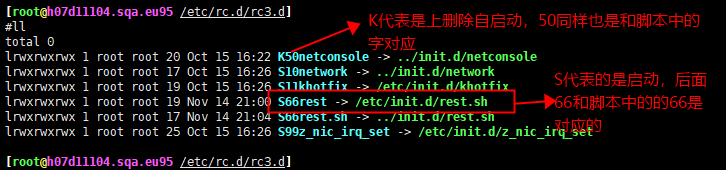
#ln -s /etc/init.d/rest.sh S66rest
链接的名字是有讲究的 大写的S代表的是启动(on),K代表的是关闭(off),后面的数字对应的是脚本中chkconfig 后面对应的值。
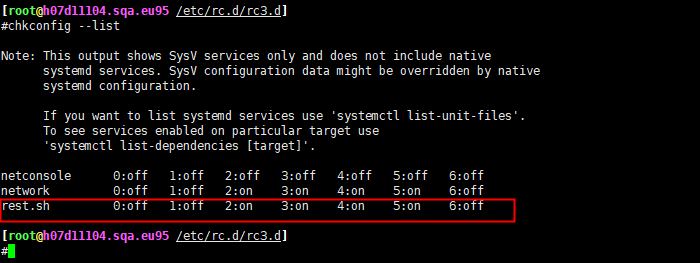
4.chkconfig 可以查看自启动项