Step 0:导入必要的库
import tensorflow as tfimport os
Step 1:获取图片文件名以及对应的标签
首先是读取给定路径下所有图片的名称以及对应的标签。os.listdir(file_dir)可以列出file_dir路径下所有文件名;str.split(sep='.')将字符串str以点(.)分割。
# you need to change this to your data directory
train_dir = 'E:\data\Dog_Cat\train\'#Windows
#train_dir = '/home/kevin/tensorflow/cats_vs_dogs/data/train/'#linux
#获取给定路径下图片名及其对应的标签
def get_files(file_dir):
    '''
    Args:
        file_dir: file directory
    Returns:
        list of images and labels
    '''
    images=[]
    labels=[]
    for file in os.listdir(file_dir):
        name = file.split(sep='.')
        if name[0]=='cat':
            images.append(file_dir + file)
            labels.append(0)
        else:
            images.append(file_dir + file)
            labels.append(1)
    return images, labels
step3:分批次读取图片
由于图片数量太多,如果一次性将全部图片读入内存的话,可能会造成内存不够用的情况,因此需要分批次地将图片读入内存中。我们可以利用tensorflow的tf.train.slice_input_producer函数,利用队列的思想实现。
def get_batch(image, label, image_W, image_H, batch_size, capacity):
    '''
    Args:
        image: list type
        label: list type
        image_W: image width
        image_H: image height
        batch_size: batch size
        capacity: the maximum elements in queue
    Returns:
        image_batch: 4D tensor [batch_size, width, height, 3], dtype=tf.float32
        label_batch: 1D tensor [batch_size], dtype=tf.int32
    '''
    #将python的list数据类型转换为tensorflow的数据类型
    #image = tf.cast(image, tf.string)
    #label = tf.cast(label, tf.int32)

    image = tf.convert_to_tensor(image, dtype=tf.string)
    label = tf.convert_to_tensor(label, dtype=tf.int32)

    # make an input queue  生成一个队列,shuffle=True即将图片打乱放入队列中
    input_queue = tf.train.slice_input_producer([image, label],shuffle=True)

    label = input_queue[1] #获取label对应的队列
    image_contents = tf.read_file(input_queue[0])#读取图片
    image = tf.image.decode_jpeg(image_contents, channels=3)#解码jpg格式图片

    ######################################
    # data argumentation should go to here
    ######################################
    #图片resize
    image = tf.image.resize_image_with_crop_or_pad(image, image_W, image_H)

    # if you want to test the generated batches of images, you might want to comment the following line.
    # 如果想看到正常的图片,请注释掉111行(标准化)和 126行(image_batch = tf.cast(image_batch, tf.float32))
    # 训练时不要注释掉!
    #数据标准化
    image = tf.image.per_image_standardization(image)
    #Creates batches of tensors in tensors.
    image_batch, label_batch = tf.train.batch([image, label],
                                                batch_size= batch_size,
                                                num_threads= 2, #线程数设置
                                                capacity = capacity) #队列中最多能容纳的元素

    #you can also use shuffle_batch
#    image_batch, label_batch = tf.train.shuffle_batch([image,label],
#                                                      batch_size=BATCH_SIZE,
#                                                      num_threads=64,
#                                                      capacity=CAPACITY,
#                                                      min_after_dequeue=CAPACITY-1)

    image_batch = tf.cast(image_batch, tf.float32)

    return image_batch, label_batch
首先,我们需要先把image和label转换成tensorflow的tensor相关数据类型;其次,我们需要将images和labels放入队列中,需要注意的是要设置shuffle=True将顺序打乱(默认shuffle=True)。然后通过tf.read_file和tf.image.decode_jpeg函数读取图片已经将其进行解码。接下来就是重新调整图片大小(通过crop或者pad的方式实现)和将图像归一化。最后就是利用tf.train.batch读取队列中batch_size个数的图像及其对应的标签。
测试:
接下来就是测试上面写的代码是否正确。
import matplotlib.pyplot as plt

BATCH_SIZE = 4
CAPACITY = 256
#图片resize后的大小
IMG_W = 208
IMG_H = 208

#train_dir = '/home/kevin/tensorflow/cats_vs_dogs/data/train/'
train_dir = 'E:\data\Dog_Cat\train\'
image_list, label_list = get_files(train_dir)
image_batch, label_batch = get_batch(image_list, label_list, IMG_W, IMG_H, BATCH_SIZE, CAPACITY)

with tf.Session() as sess:#在会话中运行程序
    i = 0
    coord = tf.train.Coordinator()#线程协调者
    threads = tf.train.start_queue_runners(coord=coord)

    try:
        #        Check if stop was requested.
        while not coord.should_stop() and i<1:

            img, label = sess.run([image_batch, label_batch])
            print(img[0,:,:,:])
            # just test one batch
            for j in range(BATCH_SIZE):
                print('label: %d' %label[j])
                plt.imshow(img[j,:,:,:])
                plt.show()
            i+=1

    except tf.errors.OutOfRangeError:#当读取完列队中所有数据时,抛出异常
        print('done!')
    finally:
        #Request that the threads stop.After this is called, calls to should_stop() will return True.
        coord.request_stop()
    coord.join(threads)
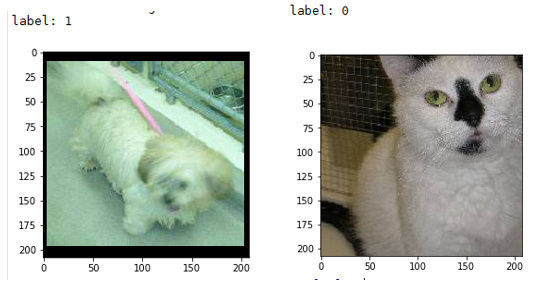
首先是一些参数的设置,然后通过get_files和get_batch建立等下需要运行的Graph。由于读取图片时,涉及到队列已经多线程,因此需要tf.train.Coordinator来产生一个线程协调者,主要作用是协调线程是否终止(This class implements a simple mechanism to coordinate the termination of a set of threads.),更详细的用法可以参考下文的函数介绍和官网的说明。然后调用tf.train.start_queue_runners来启动之前定义好的Graph中所有的线程。
最后的效果:
函数注释:
1)np.hstack:
函数原型:numpy.hstack(tup)
tup可以是python中的元组(tuple)、列表(list),或者numpy中数组(array),函数作用是将tup在水平方向上(按列顺序)合并。
举例:
a=[1,2,3]

b=[4,5,6]

print(np.hstack((a,b)))


输出:[1 2 3 4 5 6 ]
2)transpose()
函数原型:numpy.transpose(a, axes=None)
作用:将输入的array转置,并返回转置后的array
举例:
>>> x = np.arange(4).reshape((2,2))

>>> x

array([[0, 1],

       [2, 3]])

>>> np.transpose(x)

array([[0, 2],

       [1, 3]])
注:
image_list = ["D:\1.jpg","D:\2.jpg","D:\3.jpg"]
label_list = [1,0,1]

temp = np.array([image_list, label_list])
print(temp)
#输出:
#[['D:\1.jpg' 'D:\2.jpg' 'D:\3.jpg']
# ['1' '0' '1']]

temp = temp.transpose()
print(temp)
#输出:
#[['D:\1.jpg' '1']
# ['D:\2.jpg' '0']
# ['D:\3.jpg' '1']]
np.random.shuffle(temp)
print(temp)

#输出:
#[['D:\2.jpg' '0']
# ['D:\1.jpg' '1']
# ['D:\3.jpg' '1']]
3)tf.cast
cast(

    x,

    dtype,

    name=None

)
将x转换为dtype数据类型的张量。
举例:
x = tf.constant([1.8, 2.2], dtype=tf.float32)

tf.cast(x, tf.int32)  # [1, 2], dtype=tf.int32
4)tf.train.slice_input_producer
slice_input_producer(
tensor_list,
num_epochs=None,
shuffle=True,
seed=None,
capacity=32,
shared_name=None,
name=None
)
Produces a slice of each Tensor in tensor_list.
Implemented using a Queue -- a QueueRunner for the Queue is added to the current Graph's QUEUE_RUNNERcollection.
Args:
- tensor_list: A list of Tensor objects. Every Tensor in tensor_list must have the same size in the first dimension.
- num_epochs: An integer (optional). If specified, slice_input_producer produces each slice num_epochs times before generating an OutOfRange error. If not specified, slice_input_producer can cycle through the slices an unlimited number of times.
- shuffle: Boolean. If true, the integers are randomly shuffled within each epoch.
- seed: An integer (optional). Seed used if shuffle == True.
- capacity: An integer. Sets the queue capacity.
- shared_name: (optional). If set, this queue will be shared under the given name across multiple sessions.
- name: A name for the operations (optional).
Returns:
A list of tensors, one for each element of tensor_list. If the tensor in tensor_list has shape [N, a, b, .., z], then the corresponding output tensor will have shape [a, b, ..., z].
Raises:
- ValueError: if slice_input_producer produces nothing from tensor_list.
简单说来,就是生成一个队列,该队列的容量为capacity。
5)tf.read_file
作用:读取输入文件的内容并输出
6)tf.image.decode_jpeg
作用:将JPEG格式编码的图片解码成uint8数据类型的tensor。
7)tf.image.resize_image_with_crop_or_pad
resize_image_with_crop_or_pad(

    image,

    target_height,

    target_width

)
将图片大小调整为target_height和target_width大小。若原图像比较大,则以中心点为裁剪。若原图像比较小,则在短边补零,使得大小为target_height和target_width。
8)tf.image.per_image_standardization
线性尺度变化,使得原图像具有零均值,单位范数( zero mean and unit norm)。
也就是计算(x - mean) / adjusted_stddev,其中mean是图像中所有像素的平均值,adjusted_stddev = max(stddev, 1.0/sqrt(image.NumElements()))。
adjusted_stddev是图像中所有像素的标准差,max作用为防止stddev的值为0。
9)tf.train.batch
batch(

    tensors,

    batch_size,

    num_threads=1,

    capacity=32,

    enqueue_many=False,

    shapes=None,

    dynamic_pad=False,

    allow_smaller_final_batch=False,

    shared_name=None,

    name=None

)
作用:Creates batches of tensors in tensors.即从输入的tensors获取batch_size大小的数据。
该函数是利用队列实现的。因此在使用的时候需要使用QueueRunner启动队列。
10)tf.train.Coordinator()
作用:线程协调者
任意一个线程可以调用coord.request_stop()来使所有线程停止。为了达到这一目的,每个线程必须定期检查coord.should_stop()。只要coord.request_stop()一被调用,那么coord.should_stop()马上返回True。
因此,一个典型的 thread running with a coordinator如下:
while not coord.should_stop():

  ...do some work...
11)tf.train.start_queue_runners
作用:启动graph中所有的队列。
说明:
代码来自:https://github.com/kevin28520/My-TensorFlow-tutorials,略有修改
函数作用主要参考tensorflow官网。https://www.tensorflow.org/versions/master/api_docs/
本文中修改后的代码可以在这里下载:https://github.com/hjl240/dog_vs_cat