声明:本文借鉴蒋金楠先生的博客: https://www.cnblogs.com/lonelyxmas/p/12656993.html
如何动态 的注册Controller,大概思路是 使用 Roslyn解析并编译代码生成dll,利用IActionDescriptorProvider 接口,将生成好的ControllerActionDescriptor添加到ActionDescriptorCollection 集合中
动态生成 assembly 接口
using System;
using System.Collections.Generic;
using System.Linq;
using System.Reflection;
using System.Threading.Tasks;

namespace DynamicRegister1
{
    public interface ICompiler
    {
        /// <summary>
        /// 动态生成 Assembly,使用 Roslyn 来生成
        /// </summary>
        /// <param name="text">需要动态编译的代码</param>
        /// <param name="assemblies"> 生成assembly索要依赖的程序集</param>
        /// <returns></returns>
        Assembly Compile(string text, string assemblyName = null, params Assembly[] assemblies);
        /// <summary>
        /// 动态生成 Assembly,并保存到文件夹,使用 Roslyn 来生成
        /// </summary>
        /// <param name="text">需要动态编译的代码</param>
        /// <param name="assemblies">生成assembly索要依赖的程序集</param>
        /// <returns></returns>
        string DynamicGenerateDllToFile(string text, string assemblyName = null, params Assembly[] assemblies);
    }
}
2 对上面接口简单的实现
using Microsoft.CodeAnalysis;
using Microsoft.CodeAnalysis.CSharp;
using System;
using System.Collections.Generic;
using System.IO;
using System.Linq;
using System.Reflection;
using System.Text;
using System.Threading.Tasks;

namespace DynamicRegister1
{
    public class CompilerService : ICompiler
    {
        public Assembly Compile(string text, string assemblyName = null, params Assembly[] assemblies)
        {
            //引入相关的动态编译包
            //Microsoft.CodeAnalysis.CSharp;
            // 加载相关的引用文件
            var references = assemblies.Select(i => MetadataReference.CreateFromFile(i.Location));
            // 类型为 csharp 动态链接库
            var options = new CSharpCompilationOptions(OutputKind.DynamicallyLinkedLibrary);
            // 将文本生成解析树
            var syntaxTrees = new SyntaxTree[] { CSharpSyntaxTree.ParseText(text) };
            // 程序集名称,如果未空,生成新的程序集名称
            if (assemblyName == null)
                assemblyName = "_" + Guid.NewGuid().ToString("D");
            var compilation = CSharpCompilation.Create(assemblyName, syntaxTrees, references, options);
            // 通过流对象生成相关的程序集
            using MemoryStream stream = new MemoryStream();
            //编译
            var result = compilation.Emit(stream);
            if (result.Success)
            {
                //  编译成功 返回 assembly
                stream.Seek(0, SeekOrigin.Begin);
                return Assembly.Load(stream.ToArray());
            }
            else
            {
                StringBuilder stringBuilder = new StringBuilder();
                // 获取异常
                foreach (Diagnostic codeIssue in result.Diagnostics)
                {
                    stringBuilder.Append($"ID: {codeIssue.Id}," +
                                 $" Message: {codeIssue.GetMessage()}," +
                                 $"Location:{codeIssue.Location.GetLineSpan()}," +
                                 $"Severity:{codeIssue.Severity}---");

                    // AppRuntimes.Instance.Loger.Error("自动编译代码出现异常," + msg);
                }
                throw new Exception(stringBuilder.ToString());
            }

        }

        public string DynamicGenerateDllToFile(string text, string assemblyName = null,params Assembly[] assemblies)
        {

            var options = new CSharpCompilationOptions(OutputKind.DynamicallyLinkedLibrary);
            var syntaxTrees = new SyntaxTree[] { CSharpSyntaxTree.ParseText(text) };
            if (assemblyName == null)
                assemblyName = "_" + Guid.NewGuid().ToString("D");
            var references = assemblies.Select(i => MetadataReference.CreateFromFile(i.Location));
            var compilation = CSharpCompilation.Create(assemblyName, syntaxTrees, references, options);
            var path = Path.Combine(AppDomain.CurrentDomain.BaseDirectory, "Proxy");
            if (!Directory.Exists(path))
            {
                Directory.CreateDirectory(path);
            }
            var apiRemoteProxyDllFile = Path.Combine(path,
                assemblyName + DateTime.Now.ToString("yyyyMMddHHmmssfff") + ".dll");
            var result = compilation.Emit(apiRemoteProxyDllFile);
            if (result.Success)
            {
                return apiRemoteProxyDllFile;
            }
            else
            {
                StringBuilder stringBuilder = new StringBuilder();
                // 获取异常
                foreach (Diagnostic codeIssue in result.Diagnostics)
                {
                    stringBuilder.Append($"ID: {codeIssue.Id}," +
                                 $" Message: {codeIssue.GetMessage()}," +
                                 $"Location:{codeIssue.Location.GetLineSpan()}," +
                                 $"Severity:{codeIssue.Severity}---");

                    // AppRuntimes.Instance.Loger.Error("自动编译代码出现异常," + msg);
                }
                throw new Exception(stringBuilder.ToString());
            }
        }
    }
}
// 从生成号的 assembly 中加载 controller
using Microsoft.AspNetCore.Mvc;
using Microsoft.AspNetCore.Mvc.Abstractions;
using Microsoft.AspNetCore.Mvc.ApplicationModels;
using Microsoft.AspNetCore.Mvc.Controllers;
using Microsoft.AspNetCore.Mvc.Infrastructure;
using Microsoft.Extensions.DependencyInjection;
using Microsoft.Extensions.Primitives;
using System;
using System.Collections.Generic;
using System.Collections.ObjectModel;
using System.Linq;
using System.Reflection;
using System.Threading;
using System.Threading.Tasks;

namespace DynamicRegister1
{
    /*由于针对MVC应用的请求总是指向某一个Action,
     * 所以MVC框架提供的路由整合机制体现在为每一个Action创建一个或者多个终结点
     * (同一个Action方法可以注册多个路由)。
     * 针对Action方法的路由终结点是根据描述Action方法的ActionDescriptor对象构建而成的。
     * 至于ActionDescriptor对象,则是通过注册的一组IActionDescriptorProvider对象来提供的,
     * 那么我们的问题就迎刃而解:通过注册自定义的IActionDescriptorProvider从动态定义的Controller
     * 类型中解析出合法的Action方法,并创建对应的ActionDescriptor对象*/
    public class OwnActionProvider : IActionDescriptorProvider
    {

        private readonly IServiceProvider _serviceProvider;
        private readonly ICompiler _compiler;
        public OwnActionProvider(IServiceProvider serviceProvider, ICompiler compiler)
        {
            _serviceProvider = serviceProvider;
            _compiler = compiler;
            _actions = new List<ControllerActionDescriptor>();
        }
        public int Order => -1000;

        /// <summary>
        /// 当IChangeToken 发生变化,会执行下面两个监听方法
        /// </summary>
        /// <param name="context"></param>
        public void OnProvidersExecuted(ActionDescriptorProviderContext context)
        {
            // 添加action ,添加完成之后,会将   context.Results中的action更新到 ActionDescriptorCollection,见下面源代码
            foreach (var action in _actions)
            {
                context.Results.Add(action);
            }
        }


        public void OnProvidersExecuting(ActionDescriptorProviderContext context)
        {

        }
        private readonly List<ControllerActionDescriptor> _actions;

        /// <summary>
        /// 创建 ApplicationModel
        /// 那么ActionDescriptor如何创建呢?我们能想到简单的方式是调用如下这个Build方法。
        /// 针对该方法的调用存在两个问题:
        /// 第一ControllerActionDescriptorBuilder是一个内部(internal)类型,
        /// 我们指定以反射的方式调用这个方法,
        /// 第二,这个方法接受一个类型为ApplicationModel的参数。
        /// </summary>
        /// <param name="controllerTypes"></param>
        /// <returns></returns>
        ApplicationModel CreateApplicationModel(IEnumerable<Type> controllerTypes)
        {
            //  var s = Microsoft.AspNetCore.Mvc.ApplicationModels.AttributeRouteModel;
            // 因为ApplicationModelFactory 是内建类型,只能通过反射去获取对象 创建 ApplicationModel
            var assembly = Assembly.Load(new AssemblyName("Microsoft.AspNetCore.Mvc.Core"));
            var typeName = "Microsoft.AspNetCore.Mvc.ApplicationModels.ApplicationModelFactory";
            var factoryType = assembly.GetTypes().Single(it => it.FullName == typeName);
            //IServiceProvider通过GetService(Type serviceType)拿到实例
            var factory = _serviceProvider.GetService(factoryType);
            var method = factoryType.GetMethod("CreateApplicationModel");
            var typeInfos = controllerTypes.Select(it => it.GetTypeInfo());
            //通过反射创建 ApplicationModel
            return (ApplicationModel)method.Invoke(factory, new object[] { typeInfos });
        }

        /// <summary>
        ///  生成 ControllerActionDescriptor
        /// </summary>
        /// <param name="sourceCode"></param>
        /// <returns></returns>
        IEnumerable<ControllerActionDescriptor> CreateActionDescrptors(string sourceCode)
        {
            Func<Type, Boolean> IsController = new Func<Type, bool>(typeInfo =>
            {
                if (!typeInfo.IsClass) return false;
                if (typeInfo.IsAbstract) return false;
                if (!typeInfo.IsPublic) return false;
                if (typeInfo.ContainsGenericParameters) return false;
                if (typeInfo.IsDefined(typeof(NonControllerAttribute))) return false;
                if (!typeInfo.Name.EndsWith("Controller", StringComparison.OrdinalIgnoreCase) && !typeInfo.IsDefined(typeof(ControllerAttribute))) return false;
                return true;
            });
            //  生成assemble
            var assembly = _compiler.Compile(sourceCode, null,
                Assembly.Load(new AssemblyName("System.Runtime")),
                typeof(object).Assembly,
                typeof(ControllerBase).Assembly,
                typeof(Controller).Assembly);
            //获取程序集中 类型为控制器的类型
            var controllerTypes = assembly.GetTypes().Where(it => IsController(it));
            // 创建  ApplicationModel,
            var applicationModel = CreateApplicationModel(controllerTypes);

            assembly = Assembly.Load(new AssemblyName("Microsoft.AspNetCore.Mvc.Core"));
            var typeName = "Microsoft.AspNetCore.Mvc.ApplicationModels.ControllerActionDescriptorBuilder";
            // 反射获取 ControllerActionDescriptorBuilder 对象
            var controllerBuilderType = assembly.GetTypes().Single(it => it.FullName == typeName);
            // 反射获取Build 方法
            var buildMethod = controllerBuilderType.GetMethod("Build", BindingFlags.Static | BindingFlags.Public);
            // 创建 ControllerActionDescriptor 对象
            return (IEnumerable<ControllerActionDescriptor>)buildMethod.Invoke(null, new object[] { applicationModel });
        }

        public void AddControllers(string sourceCode) => _actions.AddRange(CreateActionDescrptors(sourceCode));
        /// <summary>
        /// 删除注册的controller
        /// </summary>
        /// <param name="controllerName"></param>
        /// <param name="actionName"></param>
        public void RemoveControllers(string controllerName, string actionName)
        {
            for (int i = 0; i < _actions.Count(); i++)
            {
                if (_actions[i].ActionName == actionName && _actions[i].ControllerName == controllerName)
                    _actions.RemoveAt(i);
            }
        }
        public IEnumerable<ControllerActionDescriptor> ControllerActionDescriptor
        {
            get => _actions;
        }
    }
    /// <summary>
    /// DynamicActionProvider 解决了将提供的源代码向对应ActionDescriptor列表的转换,
    /// 但是MVC默认情况下对提供的ActionDescriptor对象进行了缓存。如果框架能够使用新的ActionDescriptor对象,
    /// 需要告诉它当前应用提供的ActionDescriptor列表发生了改变,
    /// 而这可以利用自定义的IActionDescriptorChangeProvider来实现。
    /// 为此我们定义了如下这个DynamicChangeTokenProvider类型,
    /// 该类型实现了IActionDescriptorChangeProvider接口,
    /// 并利用GetChangeToken方法返回IChangeToken对象通知MVC框架当前的ActionDescriptor已经发生改变。
    /// 从实现实现代码可以看出,当我们调用NotifyChanges方法的时候,状态改变通知会被发出去。
    /// </summary>

    public class OwnChangeTokenProvider : IActionDescriptorChangeProvider
    {
        private CancellationTokenSource _source;
        private CancellationChangeToken _token;
        public OwnChangeTokenProvider()
        {
            _source = new CancellationTokenSource();
            _token = new CancellationChangeToken(_source.Token);
        }
        /// <summary>
        /// 当token 发生变化时,会调用  IActionDescriptorProvider
        /// 中的OnProvidersExecuted,OnProvidersExecuting两个监听方法
        /// </summary>
        /// <returns></returns>
        public IChangeToken GetChangeToken() => _token;
        public void NotifyChanges()
        {
            //  给_source 赋值,并获取旧值
            var old = Interlocked.Exchange(ref _source, new CancellationTokenSource());
            _token = new CancellationChangeToken(_source.Token);
            // 取消旧的注册
            old.Cancel();
        }
    }
    #region  以下是更新ActionDescriptorCollection的源代码

    public class ActionDescriptorCollectionProvider : IActionDescriptorCollectionProvider
    {
        private readonly IActionDescriptorProvider[] _actionDescriptorProviders;
        private readonly IActionDescriptorChangeProvider[] _actionDescriptorChangeProviders;
        private ActionDescriptorCollection _collection;
        private int _version = -1;

        /// <summary>
        /// Initializes a new instance of the <see cref="ActionDescriptorCollectionProvider" /> class.
        /// </summary>
        /// <param name="actionDescriptorProviders">The sequence of <see cref="IActionDescriptorProvider"/>.</param>
        /// <param name="actionDescriptorChangeProviders">The sequence of <see cref="IActionDescriptorChangeProvider"/>.</param>
        public ActionDescriptorCollectionProvider(
            IEnumerable<IActionDescriptorProvider> actionDescriptorProviders,
            IEnumerable<IActionDescriptorChangeProvider> actionDescriptorChangeProviders)
        {
            _actionDescriptorProviders = actionDescriptorProviders
                .OrderBy(p => p.Order)
                .ToArray();

            _actionDescriptorChangeProviders = actionDescriptorChangeProviders.ToArray();

            ChangeToken.OnChange(
                GetCompositeChangeToken,
                UpdateCollection);
        }
        private IChangeToken GetCompositeChangeToken()
        {
            if (_actionDescriptorChangeProviders.Length == 1)
            {
                return _actionDescriptorChangeProviders[0].GetChangeToken();
            }

            var changeTokens = new IChangeToken[_actionDescriptorChangeProviders.Length];
            for (var i = 0; i < _actionDescriptorChangeProviders.Length; i++)
            {
                changeTokens[i] = _actionDescriptorChangeProviders[i].GetChangeToken();
            }

            return new CompositeChangeToken(changeTokens);
        }

        /// <summary>
        /// Returns a cached collection of <see cref="ActionDescriptor" />.
        /// </summary>
        public ActionDescriptorCollection ActionDescriptors
        {
            get
            {
                if (_collection == null)
                {
                    UpdateCollection();
                }

                return _collection;
            }
        }

        private void UpdateCollection()
        {
            var context = new ActionDescriptorProviderContext();

            for (var i = 0; i < _actionDescriptorProviders.Length; i++)
            {
                _actionDescriptorProviders[i].OnProvidersExecuting(context);
            }

            for (var i = _actionDescriptorProviders.Length - 1; i >= 0; i--)
            {
                _actionDescriptorProviders[i].OnProvidersExecuted(context);
            }

            //   返回 ActionDescriptorCollection
            _collection = new ActionDescriptorCollection(
                new ReadOnlyCollection<ActionDescriptor>(context.Results),
                Interlocked.Increment(ref _version)); // 原子操作
        }
    }

    #endregion

}
效果:
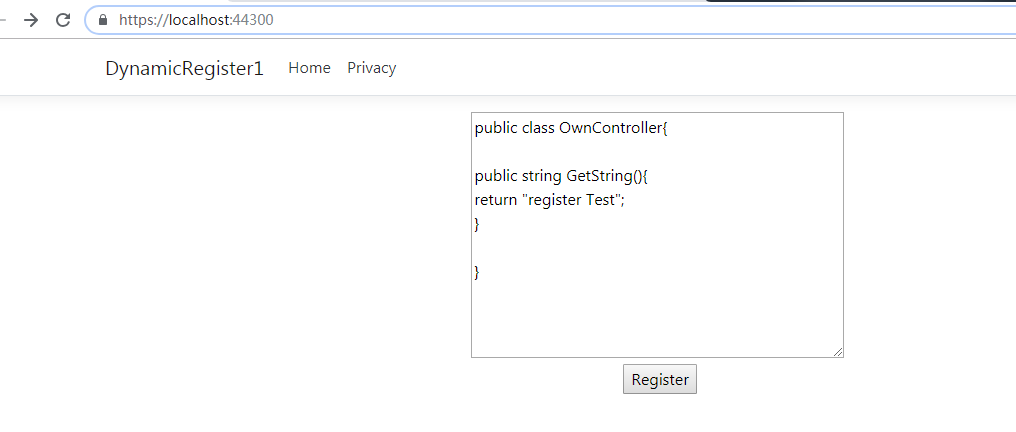
访问注册的方法

二 实现方式2
参考:https://stackoverflow.com/questions/46156649/asp-net-core-register-controller-at-runtime
ApplicationPart 是用来管理运行时中加载的 dll 的,
只要能把带有Controller的dll 加载到ApplicationParts,刷新一下相关的 runtime 就能实现了吧。有了思路,就先看看 .NET Core MVC 源码吧,从里面找找看有没有相关的 Controller 缓存的集合,看能不能动态加载进去。
  public IActionResult Index(string source,
        [FromServices] ApplicationPartManager manager,
        [FromServices] ICompiler compiler,
        [FromServices] OwnChangeTokenProvider tokenProvider)
        {
            try
            {
                manager.ApplicationParts.Add(new AssemblyPart(compiler.Compile(source,null, Assembly.Load(new AssemblyName("System.Runtime")),
                    typeof(object).Assembly,
                    typeof(ControllerBase).Assembly,
                    typeof(Controller).Assembly)));
                tokenProvider.NotifyChanges();
                return Content("OK");
            }
            catch (Exception ex)
            {
                return Content(ex.Message);
            }
        }