三、加入Struts2框架
1、 准备工作
添加jar文件如下:
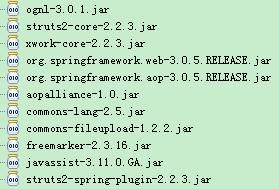
org.springframework.web-3.0.5.RELEASE.jar
org.springframework.aop-3.0.5.RELEASE.jar
这2个jar包是spring的context所依赖的jar包
struts2-spring-plugin-2.2.3.jar是struts整合spring的jar包
2、 在web.xml加入struts2的控制器
<filter>
<filter-name>struts2</filter-name>
<filter-class>org.apache.struts2.dispatcher.FilterDispatcher</filter-class>
</filter>
<filter-mapping>
<filter-name>struts2</filter-name>
<url-pattern>/*</url-pattern>
</filter-mapping>
3、 在src目录添加struts.xml
<?xml version="1.0" encoding="UTF-8"?>
<!DOCTYPE struts PUBLIC
"-//Apache Software Foundation//DTD Struts Configuration 2.0//EN""http://struts.apache.org/dtds/struts-2.0.dtd">
<struts>
<constant name="struts.i18n.encoding" value="UTF-8"/>
<package name="ssMyBatis" extends="struts-default">
</package>
</struts>
启动后,可以看到首页index的页面就基本整合完成。
4、 首先看看Action代码,代码如下:
package com.hoo.action;import java.util.ArrayList;import java.util.List;import javax.inject.Inject;import javax.inject.Named;import org.springframework.stereotype.Component;import com.hoo.biz.AccountBiz;import com.hoo.entity.Account;import com.opensymphony.xwork2.ActionSupport;/** * <b>function:</b> Account Action * @author hoojo * @createDate 2011-5-11 下午12:03:05 * @file AccountAction.java * @package com.hoo.action * @project S2SMyBatis * @blog http://blog.csdn.net/IBM_hoojo * @email hoojo_@126.com * @version 1.0 */@Component
public class AccountAction extends ActionSupport {
/** * @author Hoojo */private static final long serialVersionUID = -973535478139284399L;
@Inject
@Named("accountBiz") private AccountBiz<Account> biz; private Account acc;private List<Account> results = new ArrayList<Account>();
public List<Account> getResults() { return results;}
public Account getAcc() { return acc;}
public void setAcc(Account acc) {
this.acc = acc;}
public String add() throws Exception {
if (!biz.addAccount(acc)) {this.addActionMessage("添加数据失败");
return ERROR;}
return SUCCESS;}
public String show() throws Exception {
results = biz.getList();
return "show";
}
public String remove() throws Exception {
return SUCCESS;}
public String edit() throws Exception {
return SUCCESS;}
public String treeData() throws Exception {
results = biz.getList();
return "tree";
}
}
这个Action被注解成Component,那么在spring的applicationContext配置文件中就不需要进行<bean/>标签的配置了。上面注入了AccountDao,完成相关操作。
5、 由于Struts2要和Spring进行整合,所以struts的配置会有点不同
<action name="account" class="accountAction">
<result type="redirect">account!show.action</result>
<result name="show">/show.jsp</result>
</action>
上面的class不再是AccountAction的classpath,而是spring容器中配置的bean。就是通过@Component注解过的AccountAction,被注解注释过后它的id默认是类名称首字母小写。所以上面的action的配置是accountAction。
6、 由于要整合ExtJS,所以这里用到struts2-json-plugin-2.2.3.jar这个插件,将其加入到lib库中,struts.xml更改成:
<?xml version="1.0" encoding="UTF-8"?>
<!DOCTYPE struts PUBLIC
"-//Apache Software Foundation//DTD Struts Configuration 2.0//EN""http://struts.apache.org/dtds/struts-2.0.dtd">
<struts>
<constant name="struts.i18n.encoding" value="UTF-8"/>
<package name="ssMyBatis" extends="json-default">
<global-results>
<result name="error">/error.jsp</result>
</global-results>
<action name="account" class="accountAction">
<result type="redirect">account!show.action</result>
<result name="show">/show.jsp</result>
<result name="tree" type="json">
<param name="excludeProperties">acc</param>
</result>
</action>
</package>
</struts>
AccountAction中的treeData方法返回的tree,在account这个action配置中找到tree的result,将result的type配置成json。表示该result的数据以json的方式展示。tree这个result还配置了一个param,名称为excludeProperties表示排除的属性。这个参数将排除当前Action中的acc属性。也就是说这个属性将不会得到json的转换。其他属性将会被转换成json。
7、 前台页面
index.jsp
<body>
<a href="account!show.action">显示所有</a> <br>
<a href="add.jsp">添加数据</a><br/>
<a href="account!treeData.action">JSON</a><br/>
</body>
show.jsp
<%@ page language="java" import="java.util.*" pageEncoding="UTF-8"%>
<%@ taglib prefix="s" uri="/struts-tags" %>
<%
String path = request.getContextPath();
String basePath = request.getScheme()+"://"+request.getServerName()+":"+request.getServerPort()+path+"/";
%>
<!DOCTYPE HTML PUBLIC "-//W3C//DTD HTML 4.01 Transitional//EN"><html>
<head>
<base href="<%=basePath%>">
<title>show all data</title>
<meta http-equiv="pragma" content="no-cache">
<meta http-equiv="cache-control" content="no-cache">
<meta http-equiv="expires" content="0">
</head>
<body>
<s:iterator value="results" status="s" var="data">
${data }<===> <s:property value="#data.accountId"/># <s:property value="#data.username"/># <s:property value="#data.password"/># <s:property value="#data.createTime" />#<s:date name="#data.createTime" format="yyyy-MM-dd"/>#
<a href="account!remove.action">删除</a> | <a href="account!edit.action">修改</a>
<br/>
</s:iterator>
</body>
</html>
Struts标签和OGNL表达式显示数据
add.jsp
<%@ page language="java" import="java.util.*" pageEncoding="UTF-8"%>
<%@ taglib prefix="s" uri="/struts-tags" %>
<%
String path = request.getContextPath();
String basePath = request.getScheme()+"://"+request.getServerName()+":"+request.getServerPort()+path+"/";
%>
<!DOCTYPE HTML PUBLIC "-//W3C//DTD HTML 4.01 Transitional//EN"><html>
<head>
<base href="<%=basePath%>">
<title>add</title>
<meta http-equiv="pragma" content="no-cache">
<meta http-equiv="cache-control" content="no-cache">
<meta http-equiv="expires" content="0">
</head>
<body>
<s:form action="account!add.action" method="post">
<s:textfield name="acc.username"/> <s:password name="acc.password"/> <s:submit value="提交"></s:submit></s:form>
</body>
</html>
四、整合ExtJS
1、添加ext的库,版本是2.2.2
需要添加column-tree.css
/* * Ext JS Library 2.2.1 * Copyright(c) 2006-2009, Ext JS, LLC. * licensing@extjs.com * * http://extjs.com/license */.x-column-tree .x-tree-node {
zoom:1;
}
.x-column-tree .x-tree-node-el {
/*border-bottom:1px solid #eee; borders? */zoom:1;
}
.x-column-tree .x-tree-selected {
background: #d9e8fb;
}
.x-column-tree .x-tree-node a {
line-height:18px;
vertical-align:middle;
}
.x-column-tree .x-tree-node a span{
}
.x-column-tree .x-tree-node .x-tree-selected a span{
background:transparent;
color:#000;
}
.x-tree-col {float:left;
overflow:hidden;
padding:0 1px;
zoom:1;
}
.x-tree-col-text, .x-tree-hd-text {
overflow:hidden;
-o-text-overflow: ellipsis;
text-overflow: ellipsis;
padding:3px 3px 3px 5px;
white-space: nowrap;
font:normal 11px arial, tahoma, helvetica, sans-serif;
}
.x-tree-headers {background: #f9f9f9 url(../ext2/resources/images/default/grid/grid3-hrow.gif) repeat-x 0 bottom;
cursor:default;
zoom:1;
}
.x-tree-hd {float:left;
overflow:hidden;
border-left:1px solid #eee;
border-right:1px solid #d0d0d0;
}
.task {background-image:url(../shared/icons/fam/cog.png) !important;
}
.task-folder {background-image:url(../shared/icons/fam/folder_go.png) !important;
}
Ext.tree.ColumnTree.js
/* * Ext JS Library 2.2.1 * Copyright(c) 2006-2009, Ext JS, LLC. * licensing@extjs.com * * http://extjs.com/license */Ext.tree.ColumnTree = Ext.extend(Ext.tree.TreePanel, { lines:false, borderWidth: Ext.isBorderBox ? 0 : 2, // the combined left/right border for each cell cls:'x-column-tree', onRender : function(){ Ext.tree.ColumnTree.superclass.onRender.apply(this, arguments);this.headers = this.body.createChild(
{cls:'x-tree-headers'},this.innerCt.dom);var cols = this.columns, c;
var totalWidth = 0;for(var i = 0, len = cols.length; i < len; i++){
c = cols[i];
totalWidth += c.width;
this.headers.createChild({cls:'x-tree-hd ' + (c.cls?c.cls+'-hd':''),
cn: { cls:'x-tree-hd-text',html: c.header
},
style:''+(c.width-this.borderWidth)+'px;'
});
}
this.headers.createChild({cls:'x-clear'});
// prevent floats from wrapping when clipped this.headers.setWidth(totalWidth); this.innerCt.setWidth(totalWidth);}
});
Ext.tree.ColumnNodeUI = Ext.extend(Ext.tree.TreeNodeUI, { focus: Ext.emptyFn, // prevent odd scrolling behavior renderElements : function(n, a, targetNode, bulkRender){this.indentMarkup = n.parentNode ? n.parentNode.ui.getChildIndent() : '';
var t = n.getOwnerTree(); var cols = t.columns; var bw = t.borderWidth; var c = cols[0]; var buf = ['<li class="x-tree-node"><div ext:tree-node-id="',n.id,'" class="x-tree-node-el x-tree-node-leaf ', a.cls,'">',
'<div class="x-tree-col" style="',c.width-bw,'px;">',
'<span class="x-tree-node-indent">',this.indentMarkup,"</span>",
'<img src="', this.emptyIcon, '" class="x-tree-ec-icon x-tree-elbow">',
'<img src="', a.icon || this.emptyIcon, '" class="x-tree-node-icon',(a.icon ? " x-tree-node-inline-icon" : ""),(a.iconCls ? " "+a.iconCls : ""),'" unselectable="on">',
'<a hidefocus="on" class="x-tree-node-anchor" href="',a.href ? a.href : "#",'" tabIndex="1" ',
a.hrefTarget ? ' target="'+a.hrefTarget+'"' : "", '>',
'<span unselectable="on">', n.text || (c.renderer ? c.renderer(a[c.dataIndex], n, a) : a[c.dataIndex]),"</span></a>",
"</div>"];for(var i = 1, len = cols.length; i < len; i++){
c = cols[i];
buf.push('<div class="x-tree-col ',(c.cls?c.cls:''),'" style="',c.width-bw,'px;">',
'<div class="x-tree-col-text">',(c.renderer ? c.renderer(a[c.dataIndex], n, a) : a[c.dataIndex]),"</div>",
"</div>");}
buf.push(
'<div class="x-clear"></div></div>', '<ul class="x-tree-node-ct" style="display:none;"></ul>', "</li>");if(bulkRender !== true && n.nextSibling && n.nextSibling.ui.getEl()){
this.wrap = Ext.DomHelper.insertHtml("beforeBegin",
n.nextSibling.ui.getEl(), buf.join("")); }else{this.wrap = Ext.DomHelper.insertHtml("beforeEnd", targetNode, buf.join(""));
}
this.elNode = this.wrap.childNodes[0];
this.ctNode = this.wrap.childNodes[1];
var cs = this.elNode.firstChild.childNodes;
this.indentNode = cs[0]; this.ecNode = cs[1]; this.iconNode = cs[2]; this.anchor = cs[3]; this.textNode = cs[3].firstChild;}
});
2、 编写静态ColumnTree
/** * @function column tree column tree 多列信息的tree * @auhor: hoojo * @createDate: Aug 29, 2010 10:39:02 PM * @blog: blog.csdn.net/IBM_hoojo * @email: hoojo_@126.com */Ext.ns("Ext.hoo.tree");Ext.hoo.tree.UserColumnTree = Ext.extend(Ext.tree.ColumnTree, { constructor: function () { Ext.hoo.tree.UserColumnTree.superclass.constructor.call(this, { renderTo: "show", title: "用户信息column tree",450,
hieght: 400,
autoScroll: true, rootVisible: true, columns: [{ header: "名称",100,
dataIndex: "name" }, { header: "性别",100,
dataIndex: "sex" }, { header: "年龄",100,
dataIndex: "age" }, { header: "班级",100,
dataIndex: "classes"}],
loader: new Ext.tree.TreeLoader({ baseAttrs: {uiProvider: Ext.tree.ColumnNodeUI
}
}),
root: new Ext.tree.AsyncTreeNode({ text: "用户基本信息", children: [{ name: "大二一班", classes: "二(1)班", children: [{ name: "微微", sex: "女",age: 20,
classes: "二(1)班", leaf: true },{ name: "筱筱", sex: "女",age: 22,
classes: "二(1)班", leaf: true },{ name: "珠珠", sex: "女",age: 19,
classes: "二(1)班", leaf: true },{ name: "拉拉", sex: "女",age: 19,
classes: "二(1)班", leaf: true}]
},{ name: "二二班", classes: "二(2)班", children: [{ name: "放放", sex: "男",age: 22,
classes: "二(2)班", leaf: true },{ name: "枫枫", sex: "男",age: 22,
classes: "二(2)班", leaf: true}]
},{ name: "未成立", sex: "",age: 0,
classes: "二(3)班", leaf: true}]
})
});
this.on("click", this.onNodeClick, this);
},
onNodeClick: function (node, e) {alert(Ext.encode(node.attributes) + "###" + node.leaf + "###" + Ext.encode(e.getPoint()) + "##" + e.getXY());
}
});
Ext.onReady(function () { Ext.BLANK_IMAGE_URL = "ext2/resources/images/default/s.gif"; new Ext.hoo.tree.UserColumnTree(); });
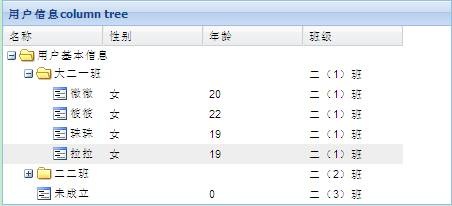
上面的就是一个静态的ColumnTree,在Ext的onReady函数中运行它。
3、 、需要在页面中导入ext库、css、即我们编写的js
<!DOCTYPE html PUBLIC "-//W3C//DTD XHTML 1.0 Transitional//EN" "http://www.w3.org/TR/xhtml1/DTD/xhtml1-transitional.dtd">
<html>
<head>
<title>TreePanel 示例</title>
<meta http-equiv="Content-Type" content="text/html;charset=UTF-8" />
<meta http-equiv="author" content="hoojo"/>
<meta http-equiv="email" content="hoojo_@126.com"/>
<meta http-equiv="ext-lib" content="version 2.2"/>
<meta http-equiv="blog" content="http://blog.csdn.net/IBM_hoojo"/>
<meta http-equiv="blog" content="http://hoojo.cnblogs.com"/>
<link rel="stylesheet" type="text/css" href="ext2/resources/css/ext-all.css" />
<link rel="stylesheet" type="text/css" href="jslib/column-tree.css" />
<script type="text/javascript" src="ext2/adapter/ext/ext-base.js"></script>
<script type="text/javascript" src="ext2/ext-all.js"></script>
<script type="text/javascript" src="ext2/build/locale/ext-lang-zh_CN-min.js"></script>
<script type="text/javascript" src="jslib/Ext.tree.ColumnTree.js"></script>
<script type="text/javascript" src="jslib/Ext.hoo.tree.UserColumnTree.js"></script>
</head>
<body>
<div id="show" style="margin-left: 200px;"></div>
<div id="showBasic" style="margin-left: 200px; margin-top: 50px;"></div>
</body>
</html>
在浏览器中请求http://localhost:8080/S2SMyBatis/columnTree.htm
结果如下
4、 下面编写远程数据的ColumnTree,代码如下:
Ext.ns("Ext.hoo.tree");Ext.hoo.tree.UserBasicColumnTree = Ext.extend(Ext.tree.ColumnTree, { constructor: function () { Ext.hoo.tree.UserBasicColumnTree.superclass.constructor.call(this, { renderTo: "showBasic", title: "远程数据",550,
hieght: 400,
autoScroll: true, rootVisible: true, columns: [{ header: "编号",100,
dataIndex: "accountId" }, { header: "用户名称",100,
dataIndex: "username" }, { header: "密码",100,
dataIndex: "password" }, { header: "创建时间",150,
dataIndex: "createTime"}],
loader: new Ext.tree.TreeLoader({ baseAttrs: {uiProvider: Ext.tree.ColumnNodeUI
}
}),
root: new Ext.tree.AsyncTreeNode({ text: "用户基本信息",children: []
}),
listeners: { expandnode: { fn: this.onExpandNode, scope: this }
}
});
},
onExpandNode: function (node) { //只对未加载过的添加子结点,加载后不在重复加载;避免增加请求,浪费资源 if (!node.attributes.isLoad) { Ext.Ajax.request({ url: Ext.hoo.tree.UserBasicColumnTree.TREE_DATA_URL,
success: function (response, options) { node.attributes.isLoad = true;//设置加载标识
var nodes = Ext.decode(response.responseText); //将json的text转换成js对象
node.appendChild(nodes.results);
},
failure: function (response) { Ext.Msg.alert("程序异常", response.responseText); }
});
}
}
});
Ext.hoo.tree.UserBasicColumnTree.TREE_DATA_URL = "account!treeData.action";由于服务器端返回来的数据是一个对象,而不是一个Array。所以客户端要将数据稍作处理,然后再添加到columnTree的children中。
5、 在上面的onReady中创建这个对象就可以了运行
Ext.onReady(function () { Ext.BLANK_IMAGE_URL = "ext2/resources/images/default/s.gif"; new Ext.hoo.tree.UserColumnTree(); new Ext.hoo.tree.UserBasicColumnTree();});
同样在浏览器中请求http://localhost:8080/S2SMyBatis/columnTree.htm
可以看到

由于Account对象的数据形式不是一个完整的tree形态。所以展示效果就是上面的样子。正确的数据的格式的话,Account中至少包含以下属性:
Boolean leaf; List children; 这样就知道当前节点是否是叶子节点,并且知道其子元素。
 版权所有,欢迎转载,转载请注明出处,谢谢