一前言
https://www.cnblogs.com/huningfei/p/12758980.html 在这篇文章中只用了一个harpoxy,如果它挂掉之后,后端的数据库也不能访问了,这还是存在单点故障的,所以接下来我准备使用keepalived(双主)+haproxy 去实现
二 环境说明
debian系统
keepalived_master1 +haproxy  192.168.7.32
keepalived_master1 +haproxy  192.168.9.52
mysql_master  192.168.6.123
mysql_slave1  192.168.4.21
mysql_slave2  192.168.9.53
vip1:192.168.8.102
vip2:192.168.8.103
三 keepalived配置文件
1 keepalived配置文件(master1)
master1既是一个主,又是另一个主的从,扮演了两个角色
! Configuration File for keepalived
global_defs {
  notification_email {
    root@localhost
    }

notification_email_from keepalived@localhost
smtp_server 127.0.0.1
smtp_connect_timeout 30
router_id HAproxy237
}

vrrp_script chk_haproxy {                                   #HAproxy 服务监控脚本
  script "/etc/keepalived/check_haproxy.sh"
  interval 2
  weight 2
}

vrrp_instance VI_1 {
  state MASTER
  interface eth0
  virtual_router_id 51
  priority 100
  advert_int 1
  authentication {
    auth_type PASS
    auth_pass 1111
}
  track_script {
    chk_haproxy
}
virtual_ipaddress {
    192.168.8.102
}
notify_master "/etc/keepalived/clean_arp.sh 192.168.8.102"
}
vrrp_instance VI_2 {
  state BACKUP
  interface eth0
  virtual_router_id 52
  priority 99
  advert_int 1
  authentication {
    auth_type PASS
    auth_pass 1111
}
virtual_ipaddress {
  192.168.8.103
}
notify_master "/etc/keepalived/clean_arp.sh 192.168.8.103"
}
master2
! Configuration File for keepalived
global_defs {
  notification_email {
    root@localhost
    }

notification_email_from keepalived@localhost
smtp_server 127.0.0.1
smtp_connect_timeout 30
router_id HAproxy237
}

vrrp_script chk_haproxy {                                   #HAproxy 服务监控脚本
  script "/etc/keepalived/check_haproxy.sh"
  interval 2
  weight 2
}

vrrp_instance VI_1 {
  state BACKUP # 这个要跟另一台主机相反
  interface eth0
  virtual_router_id 51
  priority 90 #
  advert_int 1
  authentication {
    auth_type PASS
    auth_pass 1111
}
  track_script {
    chk_haproxy
}
virtual_ipaddress {
    192.168.8.102
}
notify_master "/etc/keepalived/clean_arp.sh 192.168.8.102"
}
vrrp_instance VI_2 {
  state MASTER  # 这个也要跟另一台主机的相反
  interface eth0
  virtual_router_id 52
  priority 100
  advert_int 1
  authentication {
    auth_type PASS
    auth_pass 1111
}
virtual_ipaddress {
  192.168.8.103
}
notify_master "/etc/keepalived/clean_arp.sh 192.168.8.103"
}
2检测脚本
检测haproxy的服务是否正常 (两个keepalved上面都需要有这个脚本)
#!/bin/bash
A=`ps -C haproxy --no-header | wc -l`
if [ $A -eq 0 ];then
sudo /etc/init.d/haproxy start
sleep 3
if [ `ps -C haproxy --no-header | wc -l ` -eq 0 ];then
sudo /etc/init.d/keepalived stop
fi
fi
3 设置更新虚拟服务器(VIP)地址的arp记录到网关脚本(两台机器都要操作)
#!/bin/sh
VIP=$1
GATEWAY=192.168.11.254                                      #这个是本机的网卡的网关地址
/sbin/arping -I eth0 -c 5 -s $VIP $GATEWAY &>/dev/null
4 启动keepalived服务
master1

master2

四 haproxy安装和配置(见https://www.cnblogs.com/huningfei/p/12758980.html)
1 更改配置文件
2 设置启动脚本
3 启动
五 数据库安装
5.1 做好主从(这里不再详写)
5.2 在两个从数据库上面设置;
在slave1和slave2上分别给两个haproxy机器授权:如果还是报错,再尝试给vip授权

grant all privileges on *.* to 'yx1'@'192.168.7.%' identified by '123456';
grant all privileges on *.* to 'yx1'@'192.168.9.%' identified by '123456';
> flush privileges;
>
六 测试keepalived+haproxy是否正常运行
6.1 浏览器访问测试
分别用vip 102和103访问
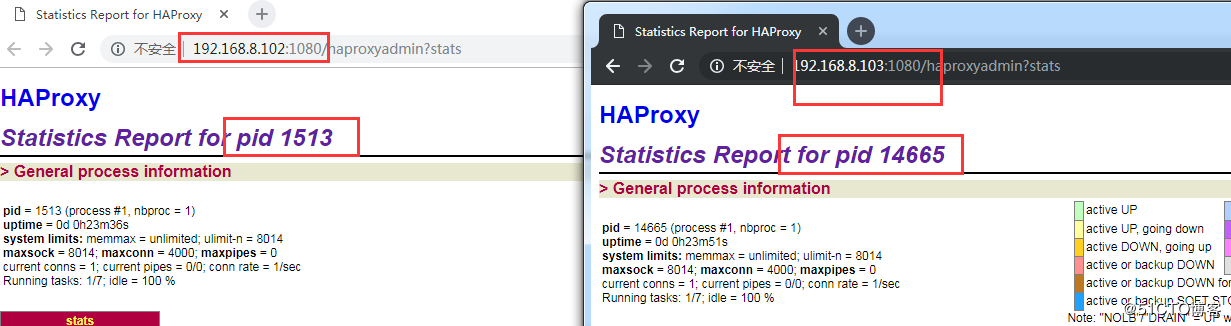
6.2 数据查询测试,在客户端上面用102和103分别去查询从数据库上面的东西
#用的8.102

yx@es-2:~$ mysql -h192.168.8.102 -P3306 -uyx1 -p123456 -e "use test;show tables;"
+----------------+
| Tables_in_test |
+----------------+
| tb1            |
+----------------+
yx@es-2:~$ mysql -h192.168.8.102 -P3306 -uyx1 -p123456 -e "use test;show tables;"
+----------------+
| Tables_in_test |
+----------------+
| tb1            |
| tb2            |
+----------------+

#用 8.103去测试
yx@es-2:~$ mysql -h192.168.8.103 -P3306 -uyx1 -p123456 -e "use test;show tables;"
+----------------+
| Tables_in_test |
+----------------+
| tb1            |
+----------------+
yx@es-2:~$ mysql -h192.168.8.103 -P3306 -uyx1 -p123456 -e "use test;show tables;"
+----------------+
| Tables_in_test |
+----------------+
| tb1            |
| tb2            |
+----------------+
6.3 停掉其中一台keepalvied服务,再次进行上面的两步测试,发现还是正常的.
6.4 停掉其中的haproxy服务,发现haproxy会立马再启动起来,前提是keepalived服务在运行,这是因为通过上面那个检查脚本实现的
