原创作品,允许转载,转载时请务必以超链接形式标明文章 原始出处 、作者信息和本声明。否则将追究法律责任。http://devbean.blog.51cto.com/448512/243546
说实话,本来我是没有打算放一个很大的例子的,一则比较复杂,二来或许需要很多次才能说得完。不过,现在已经说完了绘图部分,所以计划还是上一个这样的例子。这里我会只做出一个简单的画板程序,大体上就是能够画直线和矩形吧。这样,我计划分成两种实现,一是使用普通的QWidget作为画板,第二则是使用Graphcis View Framework来实现。因为前面有朋友说不大明白Graphics View的相关内容,所以计划如此。
好了,现在先来看看我们的主体框架。我们的框架还是使用Qt Creator创建一个Gui Application工程。
简单的main()函数就不再赘述了,这里首先来看MainWindow。顺便说一下,我一般不会使用ui文件,所以这些内容都是手写的。首先先来看看最终的运行结果:
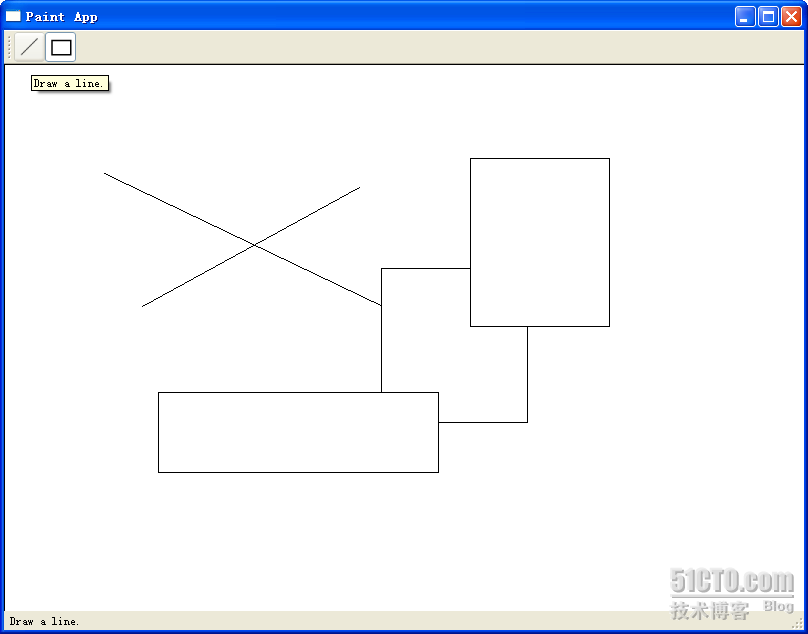
或许很简单,但是至少我们能够把前面所说的各种知识串连起来,这也就达到目的了。
现在先来看看MainWindow的代码:
mainwindow.h
 #ifndef MAINWINDOW_H #define MAINWINDOW_H #include <QtGui> #include "shape.h" #include "paintwidget.h" class MainWindow : public QMainWindow { Q_OBJECT public: MainWindow(QWidget *parent = 0); signals: void changeCurrentShape(Shape::Code newShape); private slots: void drawLineActionTriggered(); void drawRectActionTriggered(); }; #endif // MAINWINDOW_H
mainwindow.cpp
#include "mainwindow.h" MainWindow::MainWindow(QWidget *parent) : QMainWindow(parent) { QToolBar *bar = this->addToolBar("Tools"); QActionGroup *group = new QActionGroup(bar); QAction *drawLineAction = new QAction("Line",
bar); drawLineAction->setIcon(QIcon(":/line.png")); drawLineAction->setToolTip(tr("Draw a line.")); drawLineAction->setStatusTip(tr("Draw a line.")); drawLineAction->setCheckable(true); drawLineAction->setChecked(true); group->addAction(drawLineAction); bar->addAction(drawLineAction); QAction *drawRectAction = new QAction("Rectangle",
bar); drawRectAction->setIcon(QIcon(":/rect.png")); drawRectAction->setToolTip(tr("Draw a rectangle.")); drawRectAction->setStatusTip(tr("Draw a rectangle.")); drawRectAction->setCheckable(true); group->addAction(drawRectAction); bar->addAction(drawRectAction); QLabel *statusMsg = new QLabel; statusBar()->addWidget(statusMsg); PaintWidget *paintWidget = new PaintWidget(this); setCentralWidget(paintWidget); connect(drawLineAction, SIGNAL(triggered()), this, SLOT(drawLineActionTriggered())); connect(drawRectAction, SIGNAL(triggered()), this, SLOT(drawRectActionTriggered())); connect(this, SIGNAL(changeCurrentShape(Shape::Code)), paintWidget, SLOT(setCurrentShape(Shape::Code))); } void MainWindow::drawLineActionTriggered() { emit changeCurrentShape(Shape::Line); } void MainWindow::drawRectActionTriggered() { emit changeCurrentShape(Shape::Rect); } 应该说,从以往的学习中可以看出,这里的代码没有什么奇怪的了。我们在MainWindow类里面声明了一个信号,changeCurrentShape(Shape::Code),用于按钮按下后通知画图板。注意,QActio的triggered()信号是没有参数的,因此,我们需要在QAction的槽函数中重新emit我们自己定义的信号。构造函数里面创建了两个QAction,一个是drawLineAction,一个是drawRectAction,分别用于绘制直线和矩形。MainWindow的中心组件是PainWidget,也就是我们的画图板。下面来看看PaintWidget类:
paintwidget.h
#ifndef PAINTWIDGET_H #define PAINTWIDGET_H #include <QtGui> #include <QDebug> #include "shape.h" #include "line.h" #include "rect.h" class PaintWidget : public QWidget { Q_OBJECT public: PaintWidget(QWidget *parent = 0); public slots: void setCurrentShape(Shape::Code s) { if(s != currShapeCode) { currShapeCode = s; } } protected: void paintEvent(QPaintEvent *event); void mousePressEvent(QMouseEvent *event); void mouseMoveEvent(QMouseEvent *event); void mouseReleaseEvent(QMouseEvent *event); private: Shape::Code currShapeCode; Shape *shape; bool perm; QList<Shape*> shapeList; }; #endif // PAINTWIDGET_H paintwidget.cpp
#include "paintwidget.h" PaintWidget::PaintWidget(QWidget *parent) : QWidget(parent), currShapeCode(Shape::Line), shape(NULL), perm(false) { setSizePolicy(QSizePolicy::Expanding, QSizePolicy::Expanding); } void PaintWidget::paintEvent(QPaintEvent *event) { QPainter painter(this); painter.setBrush(Qt::white); painter.drawRect(0, 0, size().width(), size().height()); foreach(Shape * shape, shapeList) { shape->paint(painter); } if(shape) { shape->paint(painter); } } void PaintWidget::mousePressEvent(QMouseEvent
*event) { switch(currShapeCode) { case Shape::Line: { shape = new Line; break; } case Shape::Rect: { shape = new Rect; break; } } if(shape != NULL) { perm = false; shapeList<<shape; shape->setStart(event->pos()); shape->setEnd(event->pos()); } } void PaintWidget::mouseMoveEvent(QMouseEvent *event) { if(shape && !perm) { shape->setEnd(event->pos()); update(); } } void PaintWidget::mouseReleaseEvent(QMouseEvent
*event) { perm = true; } PaintWidget类定义了一个slot,用于接收改变后的新的ShapeCode。最主要的是,PaintWidget重定义了三个关于鼠标的事件:mousePressEvent,mouseMoveEvent和mouseReleaseEvent。
我们来想象一下如何绘制一个图形:图形的绘制与鼠标操作息息相关。以画直线为例,首先我们需要按下鼠标,确定直线的第一个点,所以在mousePressEvent里面,我们让shape保存下start点。然后在鼠标按下的状态下移动鼠标,此时,直线就会发生变化,实际上是直线的终止点在随着鼠标移动,所以在mouseMoveEvent中我们让shape保存下end点,然后调用update()函数,这个函数会自动调用paintEvent()函数,显示出我们绘制的内容。最后,当鼠标松开时,图形绘制完毕,我们将一个标志位置为true,此时说明这个图形绘制完毕。
为了保存我们曾经画下的图形,我们使用了一个List。每次按下鼠标时,都会把图形存入这个List。可以看到,我们在paintEvent()函数中使用了foreach遍历了这个List,绘制出历史图形。foreach是Qt提供的一个宏,用于遍历集合中的元素。
最后我们来看看Shape类。
shape.h
#ifndef SHAPE_H #define SHAPE_H #include <QtGui> class Shape { public: enum Code { Line, Rect }; Shape(); void setStart(QPoint s) { start = s; } void setEnd(QPoint e) { end = e; } QPoint startPoint() { return start; } QPoint endPoint() { return end; } void virtual paint(QPainter
& painter) = 0; protected: QPoint start; QPoint end; }; #endif // SHAPE_H shape.cpp
#include "shape.h" Shape::Shape() { } Shape类最重要的就是保存了start和end两个点。为什么只要这两个点呢?因为我们要绘制的是直线和矩形。对于直线来说,有了两个点就可以确定这条直线,对于矩形来说,有了两个点作为左上角的点和右下角的点也可以确定这个矩形,因此我们只要保存两个点,就足够保存这两种图形的位置和大小的信息。paint()函数是Shape类的一个纯虚函数,子类都必须实现这个函数。我们现在有两个子类:Line和Rect,分别定义如下:
line.h
#ifndef LINE_H #define LINE_H #include "shape.h" class Line : public Shape { public: Line(); void paint(QPainter &painter); }; #endif // LINE_H line.cpp
#include "line.h" Line::Line() { } void Line::paint(QPainter &painter) { painter.drawLine(start, end); } rect.h
#ifndef RECT_H #define RECT_H #include "shape.h" class Rect : public Shape { public: Rect(); void paint(QPainter &painter); }; #endif // RECT_H rect.cpp
#include "rect.h" Rect::Rect() { } void Rect::paint(QPainter &painter) { painter.drawRect(start.x(), start.y(), end.x() - start.x(), end.y() - start.y()); } 使用paint()函数,根据两个点的数据,Line和Rect都可以绘制出它们自身来。此时就可以看出,我们之所以要建立一个Shape作为父类,因为这两个类有几乎完全相似的数据对象,并且从语义上来说,Line、Rect与Shape也完全是一个is-a的关系。如果你想要添加颜色等的信息,完全可以在Shape类进行记录。这也就是类层次结构的好处。