manjaro无法通过蓝牙配对beatsX, 无法连接,也没有办法配对
- manjaro linux
- beatsX
1. 创建一个文件
可先不创建配置文件,先尝试后面的部分,实在不行再创建这个文件
sudo tee /etc/bluetooth/audio.conf <<-'EOF'
[General]
Disable=Socket
Disable=Headset
Enable=Media,Source,Sink,Gateway
AutoConnect=true
load-module module-switch-on-connect
EOF
2. 修改配置文件
编译文件/etc/bluetooth/main.conf修改ControllerMode为bredr
# Restricts all controllers to the specified transport. Default value
# is "dual", i.e. both BR/EDR and LE enabled (when supported by the HW).
# Possible values: "dual", "bredr", "le"
ControllerMode = bredr
If you have just one Bluetooth toggle and you switch from computer all the time, change this line too. Change the code to this.
# AutoEnable defines option to enable all controllers when they are found.
# This includes adapters present on start as well as adapters that are plugged
# in later on. Defaults to 'false'.
AutoEnable=true
3. 安装软件包
sudo pacman -S bluez bluez-utils pulseaudio-bluetooth pavucontrol pulseaudio-alsa pulseaudio-bluetooth-a2dp-gdm-fix
4. 后续操作
#然后启动蓝牙以及pulseaudio服务
systemctl enable bluetooth
systemctl start bluetooth
pulseaudio -k                   # 确保没有pulseaudio启动
pulseaudio --start              # 启动pulseaudio服务
# 然后可以以图形化的方式或者命令行方式就可以连接蓝牙了,这里演示一下命令行方式:

bluetoothctl #连接交互命令
power on #开启控制器电源,默认关闭
devices #获取要配对设备的MAC
agent on #打开代理
pair MAC_ADDRESS #配对,输入MAC地址即可配对,建议使用Tab
connect MAC_ADDRESS #连接,建议使用Tab
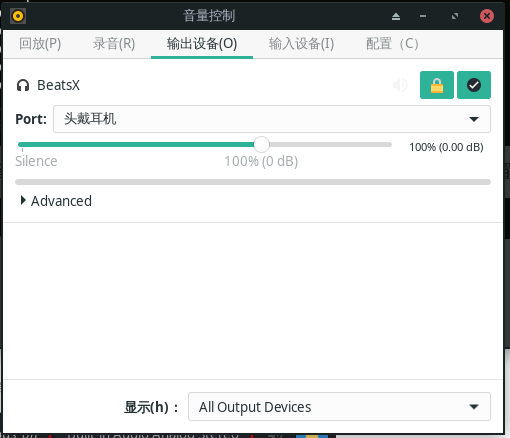
5. 指定音频输出
pavucontrol
ref