In this short post I will explain the difference between attributes and properties in HTML. The .prop() function introduced in jQuery 1.6 raised a lot of questions about the difference and I hope this post will help you to understand it.
What is an attribute?
Attributes carry additional information about an HTML element and come in name=”value” pairs.
Example:
<div class=”my-class”></div>. Here we have a div tag and it has a class attribute with a value of my-class.
What is a property?
Property is a representation of an attribute in the HTML DOM tree. So the attribute in the example above would have a property named className with a value of my-class.
Our DIV node
|- nodeName = "DIV"
|- className = "my-class"
|- style
|- ...
|- ...
What is the difference between attribute and property?
Attributes are in your HTML text document/file, whereas properties are in HTML DOM tree. This means that attributes do not change and always carry initial (default) values. However, HTML properties can change, for example when user checks a checkbox, inputs text to textarea or uses JavaScript to change the property value.
Here is a visual representation:

Assume user inputs his name "Joe" into the inputbox. Here are what attribute and property values of an element will be.
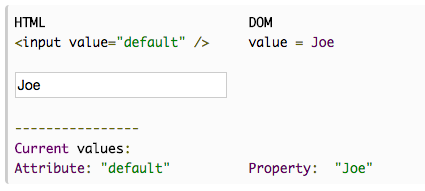
As you can see, only element’s property is changed, because it is in the DOM and dynamic. But element’s attribute is in HTML text and can not be changed!
I hope this helps to understand the difference between attributes and properties. If you have any questions please leave them on jQueryHowto Facebook page.
Also, stay tuned for the next post about the difference between jQuery.attr() and jQuery.prop() and when to use one over another.
简而言之:attribute是相对于html 代码而言,你可以在浏览器对象检查器中看到;
而property,是对Dom而言,还会包含对样式方面的信息,更多是用在数据编辑时使用