在上一篇我已经写了个登录的主界面,这一篇登录的界面和上一篇的差别就只是将_login()方法的写法给改变了
上一篇 FLutter的登录界面传送门
因为登录成功之后我们需要跳转到主界面,所以需要用到路由
代码
  //region 登录功能,密码正确则跳转
  bool _login() {
    if (_userName.text == "admin" && _userPws.text == "123456") {
      Navigator.of(context).pushAndRemoveUntil(
          new MaterialPageRoute(
              builder: (context) => new IndexPage()),
              (route) => route == null);
      return true;
    } else {
      showDialog(
          context: context,
          builder: (context) {
            return AlertDialog(
              title: Text("提示"),
              content: Text("账号或密码错误,请检查"),
              actions: <Widget>[
                FlatButton(
                  child: Text("确认"),
                  onPressed: () {
                    Navigator.of(context).pop(true); //关闭对话框
                  },
                )
              ],
            );
          });
      return false;
    }
  }
我们再来看看上一篇是怎么写的
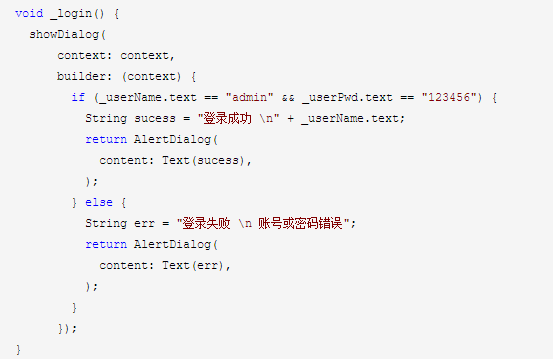
可以看到,上一篇用的是 void 这一次用的是bool,之所以用bool的原因是因为我们需要判断用户名密码是否正确,这时候就需要判断true和false,
用void就没法判断,强行跳转就会报错。
登录按钮事件不变
                  onPressed: () {
                    if ((_keyFrom.currentState as FormState).validate()) {
                      _login();
                    }
                  },
这段代码也很简单,就是先判断输入框是否输入正确,和上一篇一样,然后在判断登录状态是否为true,
如果为true则跳转到IndexPage的这个界面去,跳转过去后清空路由,使用户无法使用返回键返回登录状态。
indexPage的代码,就是实现一个底部的导航栏
import 'package:flutter/material.dart';
import 'package:newlogin/firstPage.dart';
import 'package:newlogin/secondPage.dart';
import 'package:newlogin/thirdPage.dart';


class IndexPage extends StatefulWidget {
  @override
  State<StatefulWidget> createState() => IndexPageState();

}
class IndexPageState extends State<IndexPage> {
  int _tabIndex=0;
  List<BottomNavigationBarItem> _navigationView;
  var appBarTitles=['首页','发现','我的'];
  PageController pageController;
  var _body;
//  初始化几个底部item
  initData(){
    _body=new IndexedStack(
      children: <Widget>[
        new FirstPage(),new SecondPage(),new ThirdPage()
      ],
      index: _tabIndex,
    );
  }
  @override
  void initState(){
    super.initState();
    _navigationView=<BottomNavigationBarItem>[
      new BottomNavigationBarItem(
        icon: const Icon(Icons.home),
        title: new Text(appBarTitles[0]),
        backgroundColor: Colors.blue
      ),
      new BottomNavigationBarItem(
        icon: const Icon(Icons.widgets),
        title:new Text(appBarTitles[1]),
        backgroundColor: Colors.blue
      ),
      new BottomNavigationBarItem(
        icon: const Icon(Icons.person),
        title: new Text(appBarTitles[2])
      ),
    ];
  }
  final navigatorKey=GlobalKey<NavigatorState>();
  @override
  Widget build(BuildContext context) {
    initData();
    return new MaterialApp(
      navigatorKey: navigatorKey,
      theme: new ThemeData(
        primaryColor: Colors.blue,
        accentColor: Colors.blue,
      ),
      home: new Scaffold(
        appBar: new AppBar(
          title: new Text(
            appBarTitles[_tabIndex],
            style: new TextStyle(color: Colors.white),
          ),
        ),
        body: _body,
        bottomNavigationBar: new BottomNavigationBar(
          items: _navigationView
          .map((BottomNavigationBarItem navigationView)=>navigationView)
          .toList(),
          currentIndex: _tabIndex,
          type: BottomNavigationBarType.fixed,
          onTap: (index) {
            setState(() {
              _tabIndex = index;
            });
          },
        ),
      ),
    );
  }

}
firstPage.dart代码,其他两个也一样,就不一一上代码了
import 'package:flutter/material.dart';

class FirstPage extends StatefulWidget {
  @override
  State<StatefulWidget> createState() => new FirstPageState();

}

class FirstPageState extends State<FirstPage> {
  @override
  Widget build(BuildContext context) {
    return new Scaffold(
      body: new Center(
        child: new Text('这是第一个界面'),
      ),
    );
  }

}
如果上面的比较慢可以用下面的 Gitee传送门