一 Nginx yum安装
1.1 前置准备
  1 [root@nginx01 ~]# systemctl status firewalld.service	#检查防火墙
  2 [root@nginx01 ~]# getenforce				#检查SELinux
  3 Disabled
提示:建议关闭防火墙,或通过如下方式放通相关80或443端口:
  1 firewall-cmd --permanent --add-port=80/tcp
  2 firewall-cmd --permanent --add-port=443/tcp
1.2 配置yum源
  1 [root@nginx01 ~]# cat > /etc/yum.repos.d/nginx.repo <<EOF
  2 [nginx-stable]
  3 name=nginx stable repo
  4 baseurl=http://nginx.org/packages/centos/$releasever/$basearch/
  5 gpgcheck=1
  6 enabled=1
  7 gpgkey=https://nginx.org/keys/nginx_signing.key
  8 module_hotfixes=true
  9
 10 [nginx-mainline]
 11 name=nginx mainline repo
 12 baseurl=http://nginx.org/packages/mainline/centos/$releasever/$basearch/
 13 gpgcheck=1
 14 enabled=0
 15 gpgkey=https://nginx.org/keys/nginx_signing.key
 16 module_hotfixes=true
 17 EOF
1.3 安装Nginx
  1 [root@nginx01 ~]# yum -y install nginx
  2 [root@nginx01 ~]# nginx -v
  3 nginx version: nginx/1.18.0
提示:如上安装默认安装为当前最新稳定版,若需要安装开发版,可执行yum-config-manager --enable nginx-mainline,然后yum安装,不建议安装开发版。
参考:https://nginx.org/en/linux_packages.html。
  1 [root@nginx01 ~]# systemctl start nginx
  2 [root@nginx01 ~]# systemctl enable nginx			#启动服务
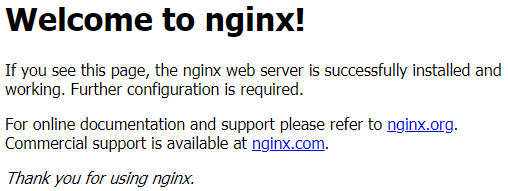
1.4 测试访问
浏览器访问:http://172.24.8.71/
1.5 其他信息
  1 [root@nginx01 ~]# nginx -V			#查看yum安装所编译的模块及参数
  2 nginx version: nginx/1.18.0
  3 built by gcc 4.8.5 20150623 (Red Hat 4.8.5-39) (GCC)
  4 built with OpenSSL 1.0.2k-fips  26 Jan 2017
  5 TLS SNI support enabled
  6 configure arguments: --prefix=/etc/nginx --sbin-path=/usr/sbin/nginx --modules-path=/usr/lib64/nginx/modules --conf-path=/etc/nginx/nginx.conf --error-log-path=/var/log/nginx/error.log --http-log-path=/var/log/nginx/access.log --pid-path=/var/run/nginx.pid --lock-path=/var/run/nginx.lock --http-client-body-temp-path=/var/cache/nginx/client_temp --http-proxy-temp-path=/var/cache/nginx/proxy_temp --http-fastcgi-temp-path=/var/cache/nginx/fastcgi_temp --http-uwsgi-temp-path=/var/cache/nginx/uwsgi_temp --http-scgi-temp-path=/var/cache/nginx/scgi_temp --user=nginx --group=nginx --with-compat --with-file-aio --with-threads --with-http_addition_module --with-http_auth_request_module --with-http_dav_module --with-http_flv_module --with-http_gunzip_module --with-http_gzip_static_module --with-http_mp4_module --with-http_random_index_module --with-http_realip_module --with-http_secure_link_module --with-http_slice_module --with-http_ssl_module --with-http_stub_status_module --with-http_sub_module --with-http_v2_module --with-mail --with-mail_ssl_module --with-stream --with-stream_realip_module --with-stream_ssl_module --with-stream_ssl_preread_module --with-cc-opt='-O2 -g -pipe -Wall -Wp,-D_FORTIFY_SOURCE=2 -fexceptions -fstack-protector-strong --param=ssp-buffer-size=4 -grecord-gcc-switches -m64 -mtune=generic -fPIC' --with-ld-opt='-Wl,-z,relro -Wl,-z,now -pie'
  7 [root@nginx01 ~]# rpm -ql nginx			#查看所安装的文件
  8 [root@nginx01 ~]# rpm -qc nginx 		        #查看相关的配置文件
二 Nginx源码编译安装
2.1 依赖组件
1 [root@nginx01 ~]# yum -y install gcc gcc-c++ wget autoconf pcre pcre-devel openssl openssl-devel openssh-clients net-tools vim ntp screen lrzsz bash-completion bash-completion-extras lvm2 make automake epel-release tree zlib zlib-devel libtool
提示:部分依赖包为比如,如:
zlib库:zlib库是ngx_http_gzip_module(gzip压缩模块)所必需的
openssl库 :--with-http_ssl_module使用该模块必需装openssl库,来实现http支持https协议。
2.2 编译安装
  1 [root@nginx01 ~]# useradd -s /sbin/nologin -M nginx	#提前创建用户及用户组
  2 [root@nginx01 ~]# wget http://nginx.org/download/nginx-1.17.8.tar.gz
  3 [root@nginx01 ~]# tar -xvf nginx-1.17.8.tar.gz
  4 [root@nginx01 ~]# cd nginx-1.17.8/
  5 [root@nginx01 nginx-1.17.8]# ./configure
  6 --conf-path=/usr/local/nginx/conf/nginx.conf
  7 --error-log-path=/var/log/nginx/error.log
  8 --group=nginx
  9 --http-client-body-temp-path=/var/cache/nginx/client_temp
 10 --http-fastcgi-temp-path=/var/cache/nginx/fastcgi_temp
 11 --http-log-path=/var/log/nginx/access.log
 12 --http-proxy-temp-path=/var/cache/nginx/proxy_temp
 13 --http-scgi-temp-path=/var/cache/nginx/scgi_temp
 14 --http-uwsgi-temp-path=/var/cache/nginx/uwsgi_temp
 15 --lock-path=/var/run/nginx.lock
 16 --pid-path=/var/run/nginx.pid
 17 --prefix=/usr/local/nginx
 18 --sbin-path=/usr/local/bin/nginx
 19 --user=nginx
 20 --with-http_gzip_static_module
 21 --with-http_realip_module
 22 --with-http_ssl_module
 23 --with-http_stub_status_module
 24 --with-http_sub_module
 25 --with-http_v2_module
 26 --with-stream
 27 --with-stream_realip_module
 28 --with-stream_ssl_module
 29 [root@nginx01 nginx-1.17.8]# make && make install
 30 [root@nginx01 ~]# nginx -V			        #查看安装版本
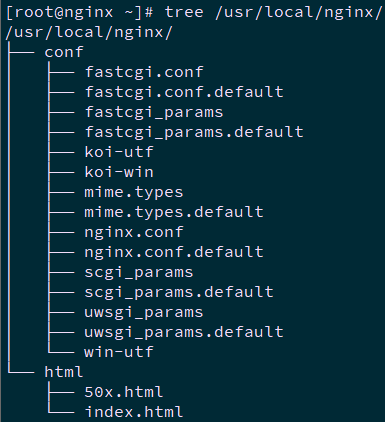
 31 [root@nginx01 ~]# tree /usr/local/nginx/		#查看目录结构
2.3 服务管理
  1 [root@nginx01 ~]# echo $PATH
  2 /usr/local/sbin:/usr/local/bin:/usr/sbin:/usr/bin:/root/bin
  3 [root@nginx01 ~]# mkdir -p /var/cache/nginx/
  4 [root@nginx01 ~]# ll /usr/local/bin/
  5 total 7.5M
  6 -rwxr-xr-x 1 root root 7.5M Mar  5 01:09 nginx
提示:若nginx的prefix未编译系统PATH中,如/opt/nginx/,需要在PATH中,可通过如下方式添加:
echo 'PATH=/opt/nginx/:$PATH' > /etc/profile.d/nginx.sh
  1 [root@nginx01 ~]# nginx			#服务启动
  2 [root@nginx01 ~]# nginx -s stop		#服务关闭
  3 [root@nginx01 ~]# nginx -s reload	        #重载配置文件
  4 [root@nginx01 ~]# nginx -s reopen	        #重启Nginx
  5 [root@nginx01 ~]# nginx -s quit		#关闭Nginx
  6 [root@nginx01 ~]# nginx -t		        #测试配置文件
  7 [root@nginx01 ~]# nginx -t -c 【file】	#使用额外的配置文件测试
  8 [root@nginx01 ~]# ps aux | grep nginx	#查看进程
  9 [root@nginx01 ~]# netstat -ano | grep 80	#查看端口
2.4 开机启动
  1 [root@nginx01 ~]# vi /usr/lib/systemd/system/nginx.service
  2 [Unit]
  3 Description=nginx - high performance web server
  4 Documentation=http://nginx.org/en/docs/
  5 After=network-online.target remote-fs.target nss-lookup.target
  6 Wants=network-online.target
  7
  8 [Service]
  9 Type=forking
 10 PIDFile=/var/run/nginx.pid
 11 ExecStart=/usr/local/bin/nginx -c /usr/local/nginx/conf/nginx.conf
 12 ExecReload=/bin/kill -s HUP $MAINPID
 13 ExecStop=/bin/kill -s TERM $MAINPID
 14
 15 [Install]
 16 WantedBy=multi-user.target
 17 [root@nginx01 ~]# systemctl daemon-reload
 18 [root@nginx01 ~]# systemctl start nginx.service		#启动服务
 19 [root@nginx01 ~]# systemctl enable nginx.service	#开机启动
说明:
Description:描述服务
After:描述服务类别
[Service]:服务运行参数的设置
Type=forking:是后台运行的形式
ExecStart:为服务的具体运行命令
ExecReload:为重启命令
ExecStop:为停止命令
PrivateTmp=True:表示给服务分配独立的临时空间
注意:[Service]的启动、重启、停止命令全部要求使用绝对路径
[Install]运行级别下服务安装的相关设置,可设置为多用户,即系统运行级别为3
systemctl start nginx.service (启动nginx服务)
systemctl stop nginx.service (停止nginx服务)
systemctl enable nginx.service (设置开机自启动)
systemctl disable nginx.service (停止开机自启动)
systemctl status nginx.service (查看服务当前状态)
systemctl restart nginx.service (重新启动服务)
systemctl list-units --type=service (查看所有已启动的服务)
2.5 测试访问
浏览器访问:http://172.24.8.71/
2.6 编译选项
1 [root@nginx01 nginx-1.17.8]# ./configure --help #查看编译选项
如下为常见编译选项及其释义:
三 Nginx目录及模块
3.1 相关目录
如下以Nginx yum安装后的目录为例:
3.2 Nginx模块
Nginx模块分为Nginx官方模块和Nginx第三方模块。
四 Nginx变量及状态码
4.1 Nginx变量
ngx_http_core_module的内置变量通常有:http请求变量、Nginx内置变量、自定义变量。
$uri:当前请求的URI,不带参数;
$request_uri:请求的URI,带完整参数;
$host:http请求报文中的host首部,如果没有则以处理此请求的虚拟主机的主机名代替;
$hostname:Nginx服务运行所在主机的主机名;
$remote_addr:客户端IP;
$remote_prot:客户端端口;
$remote_user:使用用户认证时客户端用户输入的用户名;
$request_filename:用户请求中的URI经过本地root或alias转换后映射的本地文件路径;
$request_method:请求方法,GET、POST、PUT;
$server_addr:服务器地址;
$server_name:服务器名称;
$server_port:服务器端口;
$server_protocol:服务器向客户端发送响应时的协议,如http/1.1、http/1.0;
$scheme:在请求中使用scheme。如http://xxx.com中的http;
$http_HEADER:匹配请求报文中指定的HEADER;
$http_host:匹配请求报文中的host首部。
4.2 http状态码
http状态码是用以表示网页服务器HTTP响应状态的3位数字代码。可通过查看HTTP状态码来判断服务器状态,常见的有404、502等。
- 301:永久移动,被请求的资源已被永久移动位置;
- 302:请求的资源限制临时从不同的URI响应请求;
- 305:使用代理,被请求的资源必须通过指定的代理才能访问;
- 307:临时跳转,被请求的资源在临时从不同的URL响应请求;
- 400:错误请求;
- 402:需要付款,预留状态码,用于将来一些数字货币或者微支付;
- 403:禁止访问,服务器已理解请求,但拒绝执行它;
- 404:找不到对象,请求失败,资源不存在;
- 406:不可接受的,请求的资源内容特性无法满足请求头部中的条件,因而无法生成响应实体;
- 408:请求超时;
- 409:冲突,由于和被请求的资源的当前状态之间存在冲突,请求无法完成;
- 410:遗失的,被请求的资源在服务器上已经不再可用,而且没有任何已知的转发地址;
- 413:响应实体太大,服务器拒绝处理当前请求,请求超过服务器所能处理和允许的最大值;
- 417:期望失败。在请求头 Expect 中指定的预期内容无法被服务器满足;
- 418:我是一个茶壶。超文本咖啡罐控制协议,但是并没有被实际的HTTP服务器实现;
- 420:方法失效;
- 422:不可处理的实体。请求格式正确,但是由于含有语义错误,无法响应;
- 500:服务器内部错误。服务器遇到了一个未曾预料的状况,导致了它无法完成对请求的处理;
- 502:请求后端失败;
- 504:请求成功,但是响应超时。