上一篇《系统操作日志设计》,已基本介绍了为什么要系统操作日志和设计系统操作日志部分内容,如不清楚系统操作日志的请点这里。 :)
通了解《系统操作日志设计》,已基本明确我们不能通过clone的方式来做日志的设计,因为这样不仅会造成的你数据库表爆炸的情况,还大大的增加了工作量,减少了系统的可维护性。
通过思考大概清楚系统操作日志的设计,以下是其UML图:
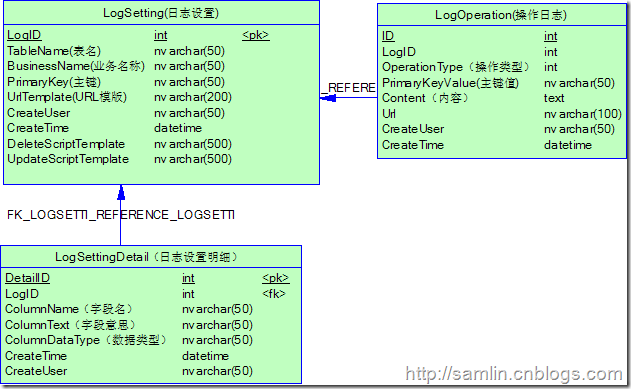
通过上图,我们可以了解知道该UML主要由三个表组成,其中一个主表LogSetting和两个从表分别是LogOperation和LogSettingDetail。
那么怎么样才能通过这样的设计来现实我们的日志功能呢?
其实一开始我就觉得通过.net的反射功能可以很简单、很方便的实现这个功能,所以我就顺着一个思路来实现她;通过反射动态的获取Model实体的属性,然后再根据LogSettingDetail配置来匹配所要记录的字段信息。
先来主要的代码吧,发现将思想用文字表达出来还是较困难的,代码比较直接:
代码的实现
usingSystem;usingSystem.Data;usingSystem.Configuration;usingSystem.Web;usingSystem.Web.Security;usingSystem.Web.UI;usingSystem.Web.UI.WebControls;usingSystem.Web.UI.WebControls.WebParts;usingSystem.Web.UI.HtmlControls;usingBLL.Sys;usingSystem.Collections.Generic;usingSystem.Collections.Specialized;usingSystem.Text;usingSystem.Reflection;/// <summary>
///LogManager 的摘要说明/// </summary>public classLogManager<T>whereT :new()
{#regionConstructor/// <summary>
    ///日志管理构造函数/// </summary>publicLogManager()
    {
        tableName =typeof(T).Name;
        Model.Sys.LogSettingmodel = GetLogSetting(tableName);if(model !=null)
        {
            businessName = model.BusinessName;
            logID = model.LogID;
            primaryKey = model.PrimaryKey;
            urlTemplate = model.UrlTemplate;
            deleteScriptTemplate = model.DeleteScriptTemplate;
            updateScriptTemplate = model.UpdateScriptTemplate;
        }else{throw newArgumentNullException("日志设置为空!");
        }
    }/// <summary>//////日志管理构造函数/// </summary>
    /// </summary>
    /// <param name="tableName">表名</param>
    /// <param name="businessName">业务名称</param>publicLogManager(stringtableName,stringbusinessName)
    {this.tableName = tableName;this.businessName = businessName;

        Model.Sys.LogSettingmodel = GetLogSetting(tableName, businessName);if(model !=null)
        {
            logID = model.LogID;
            primaryKey = model.PrimaryKey;
            urlTemplate = model.UrlTemplate;
            deleteScriptTemplate = model.DeleteScriptTemplate;
            updateScriptTemplate = model.UpdateScriptTemplate;
        }else{throw newArgumentNullException("日志设置为空!");
        }
    }#endregion


    #regionPropertiesprivate intlogID;private stringtableName;private stringbusinessName;private stringprimaryKey;private stringurlTemplate;private stringdeleteScriptTemplate;private stringupdateScriptTemplate;/// <summary>
    ///日志设置实体列表/// </summary>publicList<Model.Sys.LogSetting> LogSettingList
    {get{
            System.Web.Caching.Cachecache =HttpRuntime.Cache;List<Model.Sys.LogSetting> list = cache["LogSettingList"]asList<Model.Sys.LogSetting>;if(list !=null&& list.Count > 0)
            {returnlist;
            }else{LogSettingbll =newLogSetting();
                list = bll.GetModelList(string.Empty);
                cache["LogSettingList"] = list;returnlist;
            }
        }set{
            System.Web.Caching.Cachecache =HttpRuntime.Cache;
            cache["LogSettingList"] =null;
        }
    }/// <summary>
    ///日志设置明细/// </summary>publicList<Model.Sys.LogSettingDetail> LogSettingDetail
    {get{
            System.Web.Caching.Cachecache =HttpRuntime.Cache;List<Model.Sys.LogSettingDetail> list = cache["LogSettingDetail"]asList<Model.Sys.LogSettingDetail>;if(list !=null&& list.Count > 0)
            {returnlist;
            }else{LogSettingDetailbll =newLogSettingDetail();
                list = bll.GetModelList(string.Empty);
                cache["LogSettingDetail"] = list;returnlist;
            }
        }set{
            System.Web.Caching.Cachecache =HttpRuntime.Cache;
            cache["LogSettingDetail"] =null;
        }
    }#endregion

    #regionMethod/// <summary>
    ///通过logId获取日志设置明细/// </summary>
    /// <param name="logId">日志设置编号</param>
    /// <returns></returns>privateList<Model.Sys.LogSettingDetail> GetLogSettingDetails(intlogId)
    {if(logId == 0)throw newArgumentNullException("LogID为空");List<Model.Sys.LogSettingDetail> list =newList<Model.Sys.LogSettingDetail>();foreach(Model.Sys.LogSettingDetailvarinLogSettingDetail)
        {if(var.LogID == logId)
                list.Add(var);
        }returnlist;
    }/// <summary>
    ///通过tableName和businessName来获取日志设置对象/// </summary>
    /// <param name="tableName"></param>
    /// <param name="businessName"></param>
    /// <returns></returns>privateModel.Sys.LogSettingGetLogSetting(stringtableName,stringbusinessName)
    {foreach(Model.Sys.LogSettingvarinLogSettingList)
        {if(var.TableName.Equals(tableName,StringComparison.InvariantCultureIgnoreCase) && var.BusinessName.Equals(businessName,StringComparison.InvariantCultureIgnoreCase))returnvar;
        }return null;
    }privateModel.Sys.LogSettingGetLogSetting(stringtableName)
    {foreach(Model.Sys.LogSettingvarinLogSettingList)
        {if(var.TableName.Equals(tableName,StringComparison.InvariantCultureIgnoreCase))returnvar;
        }return null;
    }/// <summary>
    ///比较两个实体,然后返回实体中每个属性值不同的内容/// </summary>
    /// <param name="oldObj"></param>
    /// <param name="newObj"></param>
    /// <returns></returns>public stringCompare(T oldObj, T newObj)
    {TypeobjTye =typeof(T);StringBuildersbResult =newStringBuilder();stringtableHeader ="<table class=/"GridView/" cellspacing=/"0/" rules=/"all/" border=/"1/" id=/"gv/" style=/"border-collapse:collapse;/">";
        tableHeader +="<tr><th scope=/"col/">序号</th><th scope=/"col/">字段</th><th scope=/"col/">名称</th><th scope=/"col/">旧值</th><th scope=/"col/">新值</th></tr>";stringtableRow ="<tr class='{0}'><td>{1}</td><td>{2}</td><td>{3}</td><td>{4}</td><td>{5}</td></tr>";List<Model.Sys.LogSettingDetail> list = GetLogSettingDetails(logID);inti = 1;foreach(Model.Sys.LogSettingDetailvarinlist)
        {PropertyInfoproperty = objTye.GetProperty(var.ColumnName);if(property !=null&& !property.IsSpecialName)
            {objecto = property.GetValue(oldObj,null);objectn = property.GetValue(newObj,null);if(!IsEqual(property.PropertyType, o, n))
                {
                    sbResult.AppendFormat(tableRow, i % 2 == 0 ?"odd":"even", i, var.ColumnName, var.ColumnText, o, n);
                    i++;
                }

            }
        }

        sbResult.Append("</table>");#regionAdd Log Recordif(i > 1)
        {
            Model.Sys.LogOperationoperModel =newModel.Sys.LogOperation();
            operModel.LogID = logID;
            operModel.OperationType = (int)OperationType.Update;
            operModel.Content = tableHeader + sbResult.ToString();
            operModel.CreateTime =DateTime.Now;if(HttpContext.Current !=null)
                operModel.CreateUser =HttpContext.Current.User.Identity.Name;if(!string.IsNullOrEmpty(primaryKey))
            {PropertyInfop = objTye.GetProperty(primaryKey);objecto = p.GetValue(newObj,null);if(o !=null)
                {
                    operModel.PrimaryKeyValue = o.ToString();if(urlTemplate.Contains("{0}"))
                        operModel.Url =string.Format(urlTemplate, o.ToString());
                }

            }LogOperationoperBll =newLogOperation();
            operBll.Add(operModel);

        }#endregion

        returntableHeader + sbResult.ToString();

    }/// <summary>
    ///删除实体操作,这里并不是真的删除该实体,而是将删除的操作记录在日志中/// </summary>
    /// <param name="obj"></param>
    /// <returns></returns>public stringDelete(T obj)
    {TypeobjTye =typeof(T);StringBuildersbResult =newStringBuilder();stringtableHeader ="<table class=/"GridView/" cellspacing=/"0/" rules=/"all/" border=/"1/" id=/"gv/" style=/"border-collapse:collapse;/">";
        tableHeader +="<tr><th scope=/"col/">序号</th><th scope=/"col/">字段</th><th scope=/"col/">名称</th><th scope=/"col/">值</th></tr>";stringtableRow ="<tr class='{0}'><td>{1}</td><td>{2}</td><td>{3}</td><td>{4}</td></tr>";List<Model.Sys.LogSettingDetail> list = GetLogSettingDetails(logID);inti = 1;foreach(Model.Sys.LogSettingDetailvarinlist)
        {PropertyInfoproperty = objTye.GetProperty(var.ColumnName);if(property !=null&& !property.IsSpecialName)
            {objecto = property.GetValue(obj,null);

                sbResult.AppendFormat(tableRow, i % 2 == 0 ?"odd":"even", i, var.ColumnName, var.ColumnText, o);
                i++;
            }
        }

        sbResult.Append("</table>");#regionAdd Log Record

        Model.Sys.LogOperationoperModel =newModel.Sys.LogOperation();
        operModel.LogID = logID;
        operModel.OperationType = (int)OperationType.Delete;
        operModel.Content = tableHeader + sbResult.ToString();
        operModel.CreateTime =DateTime.Now;if(!string.IsNullOrEmpty(primaryKey))
        {PropertyInfop = objTye.GetProperty(primaryKey);objecto = p.GetValue(obj,null);if(o !=null)
            {
                operModel.PrimaryKeyValue = o.ToString();if(urlTemplate.Contains("{0}"))
                    operModel.Url =string.Format(urlTemplate, o.ToString());
            }
        }if(HttpContext.Current !=null)
            operModel.CreateUser =HttpContext.Current.User.Identity.Name;LogOperationoperBll =newLogOperation();
        operBll.Add(operModel);#endregion
        return string.Empty;
    }/// <summary>
    ///添加实体,将添加的操作记录在日志中/// </summary>
    /// <param name="obj"></param>
    /// <returns></returns>public stringAdd(T obj)
    {TypeobjTye =typeof(T);StringBuildersbResult =newStringBuilder();stringtableHeader ="<table class=/"GridView/" cellspacing=/"0/" rules=/"all/" border=/"1/" id=/"gv/" style=/"border-collapse:collapse;/">";
        tableHeader +="<tr><th scope=/"col/">序号</th><th scope=/"col/">字段</th><th scope=/"col/">名称</th><th scope=/"col/">值</th></tr>";stringtableRow ="<tr class='{0}'><td>{1}</td><td>{2}</td><td>{3}</td><td>{4}</td></tr>";List<Model.Sys.LogSettingDetail> list = GetLogSettingDetails(logID);inti = 1;foreach(Model.Sys.LogSettingDetailvarinlist)
        {PropertyInfoproperty = objTye.GetProperty(var.ColumnName);if(property !=null&& !property.IsSpecialName)
            {objecto = property.GetValue(obj,null);

                sbResult.AppendFormat(tableRow, i % 2 == 0 ?"odd":"even", i, var.ColumnName, var.ColumnText, o);
                i++;
            }
        }

        sbResult.Append("</table>");#regionAdd Log Record

        Model.Sys.LogOperationoperModel =newModel.Sys.LogOperation();
        operModel.LogID = logID;
        operModel.OperationType = (int)OperationType.Add;
        operModel.Content = tableHeader + sbResult.ToString();
        operModel.CreateTime =DateTime.Now;if(!string.IsNullOrEmpty(primaryKey))
        {PropertyInfop = objTye.GetProperty(primaryKey);objecto = p.GetValue(obj,null);if(o !=null)
            {
                operModel.PrimaryKeyValue = o.ToString();if(urlTemplate.Contains("{0}"))
                    operModel.Url =string.Format(urlTemplate, o.ToString());
            }
        }if(HttpContext.Current !=null)
            operModel.CreateUser =HttpContext.Current.User.Identity.Name;LogOperationoperBll =newLogOperation();
        operBll.Add(operModel);#endregion
        return string.Empty;
    }/// <summary>
    ///复制一个对象/// </summary>
    /// <param name="obj"></param>
    /// <returns></returns>publicT Clone(T obj)
    {TypeobjTye =typeof(T);
        T model =newT();PropertyInfo[] properties = objTye.GetProperties();foreach(PropertyInfopropertyinproperties)
        {if(!property.IsSpecialName)
            {objecto = property.GetValue(obj,null);
                property.SetValue(model, o,null);
            }


        }returnmodel;
    }private boolIsEqual(TypedataType,objectoldObj,objectnewObj)
    {if(oldObj ==null&& newObj ==null)return true;if(dataType ==typeof(int))
        {return(int)oldObj == (int)newObj;
        }else if(dataType ==typeof(decimal))
        {return(decimal)oldObj == (decimal)newObj;
        }else if(dataType ==typeof(double))
        {return(double)oldObj == (double)newObj;
        }else if(dataType ==typeof(Guid))
        {return(Guid)oldObj == (Guid)newObj;
        }else if(dataType ==typeof(DateTime))
        {return(DateTime)oldObj == (DateTime)newObj;
        }else
            returnoldObj.Equals(newObj);

    }#regionScript. Excute//public int DeleteBusRecode(string primaryKeyValue)
    //{
    //    if (string.IsNullOrEmpty(tableName))
    //        throw new ArgumentException("tableName为空");
    //    if(string.IsNullOrEmpty(primaryKey))
    //        throw new ArgumentException("primaryKey为空");
    //    if (string.IsNullOrEmpty(deleteScriptTemplate))
    //        throw new ArgumentException("deleteScriptTemplate为空");

    //    string strSql = string.Format(deleteScriptTemplate, primaryKeyValue);

    //    Database db = DatabaseFactory.CreateDatabase();
    //    return 0;


    //}#endregion

    #endregion}public enumOperationType{
    Select = 0,
    Add = 1,
    Update = 2,
    Delete = 3
}
使用的场景
Model文件:
publicclassEmployeeModel

{publicintID{get;set;}publicstringName{get;set;}

…

}
下面介绍如何将系统操作日志集成到你的业务系统中
添加操作:
EmployeeBll bll = new EmployeeBll();
EmployeeModel model = new EmployeeModel();
/* model 实体经过漫长的 赋值 后… */
bll.Add(model); //添加实体
//添加系统操作记录
//日志LogManager<EmployeeModel> log =newLogManager<EmployeeModel>();
log.Add(model);
更新操作:
EmployeeBll bll = new EmployeeBll();
EmployeeModel model = bll.GetModel(employeeID);
LogManager<EmployeeModel> log =newLogManager<EmployeeModel>();
EmployeeModel modelOld = log.Clone(model); //克隆EmployeeModel实体对象,这个主要是在系统操作日志记录时使用的
/* model 实体又经过漫长的 赋值 后… */
bll.Update(model); //更新实体
//将更新的内容写入系统操作日志中
log.Compare(modelOld, model); //原来的实体和赋值后的实体对比,并将更新的内容写入系统操作日志中
删除操作:
在GridView的RowDeleting事件中获取要删除的实体
EmployeeBll bll = new EmployeeBll();
EmployeeModel model = bll.GetModel(employeeID);
bll.Delete(employeeID);
LogManager<EmployeeModel> log =newLogManager<EmployeeModel>();
log.Delete(model);       //实体的内容记录到日志中
.csharpcode, .csharpcode pre { font-size: small; color: black; font-family: consolas, "Courier New", courier, monospace; background-color: #ffffff; /*white-space: pre;*/ } .csharpcode pre { margin: 0em; } .csharpcode .rem { color: #008000; } .csharpcode .kwrd { color: #0000ff; } .csharpcode .str { color: #006080; } .csharpcode .op { color: #0000c0; } .csharpcode .preproc { color: #cc6633; } .csharpcode .asp { background-color: #ffff00; } .csharpcode .html { color: #800000; } .csharpcode .attr { color: #ff0000; } .csharpcode .alt { background-color: #f4f4f4; 100%; margin: 0em; } .csharpcode .lnum { color: #606060; }
总结:
大家可以看到代码还是比较粗糙的,有不少的重复的代码,下一节将会讨论如何进行系统操作日志管理。
另外如何大家有什么意见或想法请分享提出。
本节用到的知识点:
1、泛型
2、反射
3、缓存
优点:
1、使用和集成方便,代码量小;
2、大大提高工作效率,避免表爆炸;
缺点:
1、代码有待优化;
2、可扩展性较差