原创地址:http://www.cnblogs.com/jfzhu/p/4041638.html
转载请注明出处
前面的文章中介绍过《Step by Step 创建一个WCF Service 》以及《如何使用WCF的Trace与Message Log功能》,本文介绍如何创建一个AJAX-Enabled WCF Service。
(一)创建一个WCF AJAX-enabled service
1. 打开Visual Studio 2012,创建一个ASP.NET Empty Web Application Project,命名为SandwichServices。这时Visual Studio的web.config文件内容为:
<?xml version="1.0"?>
<configuration>
  <system.web>
    <compilation debug="true" targetFramework="4.0" />
  </system.web>
</configuration>
2. 添加一个AJAX-enabled WCF Service,命名为CostService.svc
using System.ServiceModel;
using System.ServiceModel.Activation;

namespace SandwichServices
{
    [ServiceContract(Namespace = "SandwichServices")]
    [AspNetCompatibilityRequirements(RequirementsMode = AspNetCompatibilityRequirementsMode.Allowed)]
    public class CostService
    {
        // To use HTTP GET, add [WebGet] attribute. (Default ResponseFormat is WebMessageFormat.Json)
        // To create an operation that returns XML,
        //     add [WebGet(ResponseFormat=WebMessageFormat.Xml)],
        //     and include the following line in the operation body:
        //         WebOperationContext.Current.OutgoingResponse.ContentType = "text/xml";
        [OperationContract]
        public void DoWork()
        {
            // Add your operation implementation here
            return;
        }

    }
}
因为我们不打算使用TCP等HTTP之外的Protocol,所以设置为AspNetCompatibilityEnabled。
3. 修改Namespace ServiceContractAttribute,并添加一个CostOfSandwiches方法
using System.ServiceModel;
using System.ServiceModel.Activation;

namespace SandwichServices
{
    [ServiceContract(Namespace = "SandwichServices")]
    [AspNetCompatibilityRequirements(RequirementsMode = AspNetCompatibilityRequirementsMode.Allowed)]
    public class CostService
    {
        // To use HTTP GET, add [WebGet] attribute. (Default ResponseFormat is WebMessageFormat.Json)
        // To create an operation that returns XML,
        //     add [WebGet(ResponseFormat=WebMessageFormat.Xml)],
        //     and include the following line in the operation body:
        //         WebOperationContext.Current.OutgoingResponse.ContentType = "text/xml";
        [OperationContract]
        public void DoWork()
        {
            // Add your operation implementation here
            return;
        }

        [OperationContract]
        public double CostOfSandwiches(int quantity)
        {
            return 1.25 * quantity;
        }
    }
}
4. 这时Visual Studio生成的web.config文件
<?xml version="1.0"?>
<configuration>
  <system.web>
    <compilation debug="true" targetFramework="4.0" />
  </system.web>
  <system.serviceModel>
    <behaviors>
      <endpointBehaviors>
        <behavior name="SandwichServices.CostServiceAspNetAjaxBehavior">
          <enableWebScript />
        </behavior>
      </endpointBehaviors>
    </behaviors>
    <serviceHostingEnvironment aspNetCompatibilityEnabled="true"
        multipleSiteBindingsEnabled="true" />
    <services>
      <service name="SandwichServices.CostService">
        <endpoint address="" behaviorConfiguration="SandwichServices.CostServiceAspNetAjaxBehavior"
            binding="webHttpBinding" contract="SandwichServices.CostService" />
      </service>
    </services>
  </system.serviceModel>
</configuration>
如果在浏览器中访问CostService.svc,得到如下错误
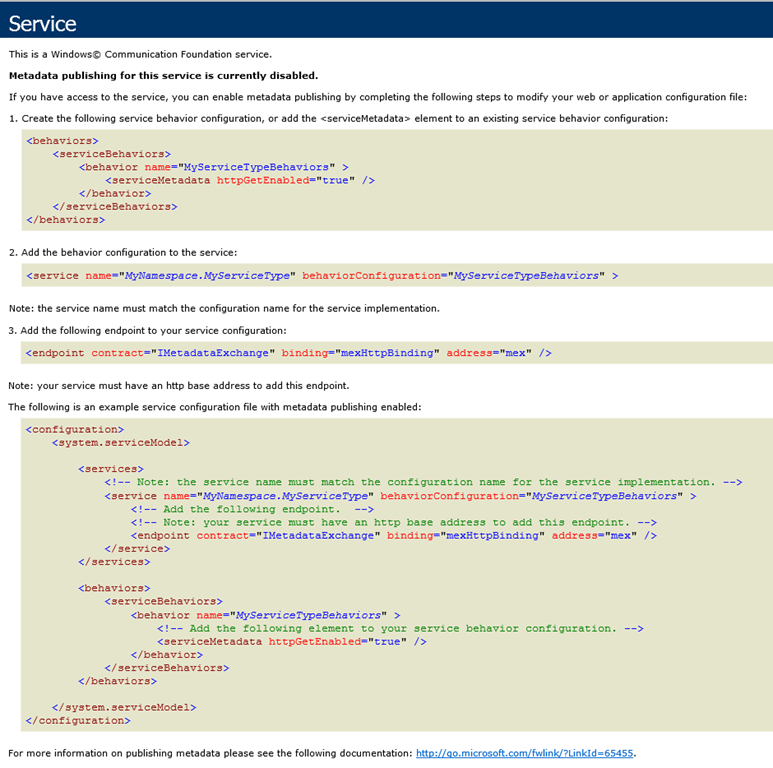
5. 修改web.config文件
<?xml version="1.0"?>
<configuration>
  <system.web>
    <compilation debug="true" targetFramework="4.0" />
  </system.web>
  <system.serviceModel>
    <behaviors>
      <endpointBehaviors>
        <behavior name="SandwichServices.CostServiceAspNetAjaxBehavior">
          <enableWebScript />
        </behavior>
      </endpointBehaviors>
      <serviceBehaviors>
        <behavior name="SandwichServices.CostServiceServiceBehavior" >
          <serviceMetadata httpGetEnabled="true" />
        </behavior>
      </serviceBehaviors>
    </behaviors>
    <serviceHostingEnvironment aspNetCompatibilityEnabled="true"
        multipleSiteBindingsEnabled="true" />
    <services>
      <service name="SandwichServices.CostService" behaviorConfiguration="SandwichServices.CostServiceServiceBehavior">
        <endpoint address="" behaviorConfiguration="SandwichServices.CostServiceAspNetAjaxBehavior"
            binding="webHttpBinding" contract="SandwichServices.CostService" />
        <endpoint contract="IMetadataExchange" binding="mexHttpBinding" address="mex" />
      </service>
    </services>
  </system.serviceModel>
</configuration>
再次在浏览器中打开CostService.svc,可以正常访问了。
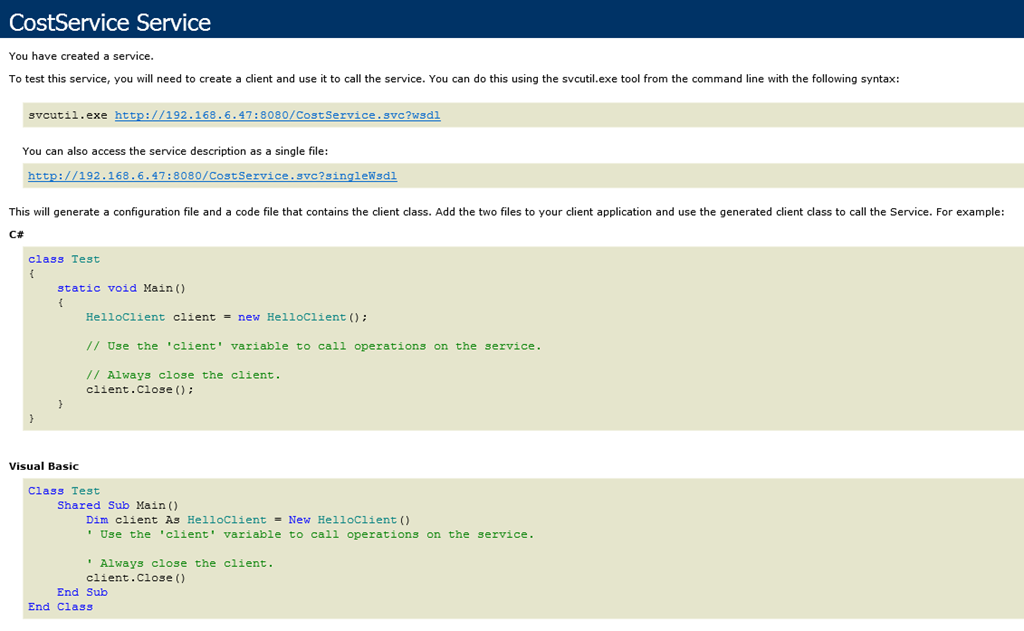
(二)创建Client端,调用WCF Service
1. 创建一个aspx Page
<%@ Page Language="C#" AutoEventWireup="true" CodeBehind="WebForm2.aspx.cs" Inherits="WebClient.WebForm2" %>

<!DOCTYPE html>

<html xmlns="http://www.w3.org/1999/xhtml">
<head runat="server">
    <title></title>
    <script language="javascript" type="text/javascript">
        function Button1_onclick() {
            var service = new SandwichServices.CostService();
            service.CostOfSandwiches(3, onSuccess, null, null);
        }

        function onSuccess(result) {
            alert(result);
        }
    </script>
</head>
<body>
    <form id="form1" runat="server">
    <div>
        <p>
        <input id="Button1" type="button" value="Price for 3 Sandwiches" onclick="return Button1_onclick()" />
        </p>
    </div>
        <asp:ScriptManager ID="ScriptManager1" runat="server">
            <Services>
                <asp:ServiceReference Path="http://192.168.6.47:8080/CostService.svc" />
            </Services>
        </asp:ScriptManager>
    </form>
</body>
</html>
2. 在浏览器中打开该页面,然后用F12工具可以看到加载进来的JavaScript,是WCF Service生成的。

Fiddler

3. 点击按钮调用WCF Service
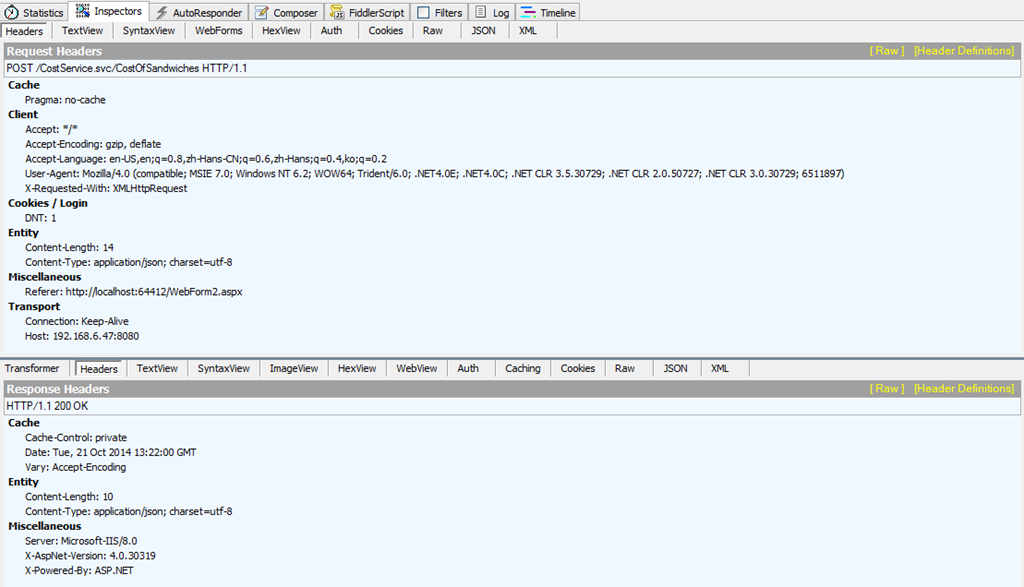

(三) 总结
WCF Service的配置文件中的endpoint的binding要使用webHttpBinding,endpointBehavior要设置成enableWebScript。
WebForm中要在ScriptManager中添加WCF Service的引用。