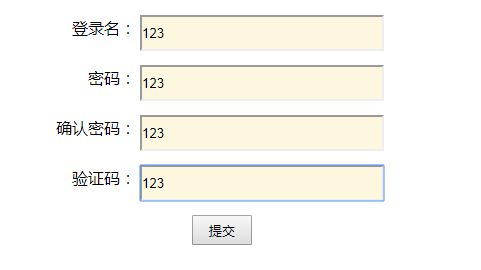
<!DOCTYPE html>
<html>
    <head>
        <meta charset="UTF-8">
        <title></title>
        <style type="text/css">
            input{
                 240px;
                height: 30px;
                margin-top: 10px;
            }
            .right{
                text-align: right;
            }
        </style>
        <script>
            function check(){
                var phone = document.getElementById("phone").value;
                var pwd = document.getElementById("pwd").value;
                var qr_pwd = document.getElementById("qr_pwd").value;
                var nb = document.getElementById("nb").value;

                if(phone==null || phone==""){
                    document.getElementById("span_phone").innerHTML="*登录名不能为空!";
                    return;
                }else{
                    document.getElementById("span_phone").innerHTML="<font style='color: green;'>√正确</font>";
                }
                if(pwd==null || pwd==""){
                    document.getElementById("span_pwd").innerHTML="*密码不能为空!";
                    return;
                }else{
                    document.getElementById("span_pwd").innerHTML="<font style='color: green;'>√正确</font>";
                }
                if(qr_pwd==null || qr_pwd==""){
                    document.getElementById("span_qr_pwd").innerHTML="*确认密码不能为空!";
                    return;
                }else{
                    document.getElementById("span_qr_pwd").innerHTML="<font style='color: green;'>√正确</font>";
                }
                if(qr_pwd!=pwd){
                    document.getElementById("span_qr_pwd").innerHTML="*确认密码和密码不一致!";
                    return;
                }else{
                    document.getElementById("span_qr_pwd").innerHTML="<font style='color: green;'>√正确</font>";
                }
                if(nb==null || nb==""){
                    document.getElementById("span_nb").innerHTML="*验证码不能为空!";
                    return;
                }else{
                    document.getElementById("span_nb").innerHTML="<font style='color: green;'>√正确</font>";
                }

                //提交表单
                document.getElementById("f2").submit();
            }
        </script>
    </head>
    <body>
        <center>
      //注意:method="post"时Hbuilder可能会出现"内部服务器错误"提示字样!WebStrom则不会出现此问题。
      //也可将method="post"改为method="get"解决此问题
      //action="跳转的html文件"
            <form id="f2" action="demo1.html" method="post">
                <table style="border: 1px;">
                    <tr>
                        <td  class="right">登录名:</td>
                        <td><input id="phone" type="text"/></td>
                        <td><span id="span_phone" style="color: red;"></span></td>
                    </tr>
                    <tr>
                        <td class="right">密码:</td>
                        <td><input id="pwd" type="text"/></td>
                        <td><span id="span_pwd" style="color: red;"></span></td>

                    </tr>
                    <tr>
                        <td class="right">确认密码:</td>
                        <td><input id="qr_pwd" type="text"/></td>
                        <td><span id="span_qr_pwd" style="color: red;"></span></td>
                    </tr>
                    <tr>
                        <td class="right">验证码:</td>
                        <td><input id="nb" type="text"/></td>
                        <td><span id="span_nb" style="color: red;"></span></td>
                    </tr>
                    <tr>
                        <td colspan="3" style="text-align: center;">
                            <input type="button" onclick="check()" value="提交" style=" 60px;;"/>
                        </td>
                    </tr>
                </table>
            </form>
        </center>
    </body>
</html>