前两天在解决一个项目缺陷时,突发感兴趣,了解一下~
1 JS事件
document.oncontextmenu // 右键菜单

document.onpaste //粘贴

document.oncopy //复制

document.oncut //剪切

document.onselectstart //选中开始时
+ 触发时间为目标对象被开始选中时(即选中动作刚开始,尚未实质性被选中)
+ 基本上都能支持,但不被 input 和 textarea 标签支持
+ 注意:如果想在火狐中禁用的话可以使用样式控制 div { -moz-user-select: none; }

document.onselect //选中已发生时
+ 文本框中的文本被选中时发生
+ 被 input 和 textarea 标签支持
补充: select相关API
- 取消诸多网页中选中事件对版权的保护措施,可尝试如下几种方法:
- 控制台输入:
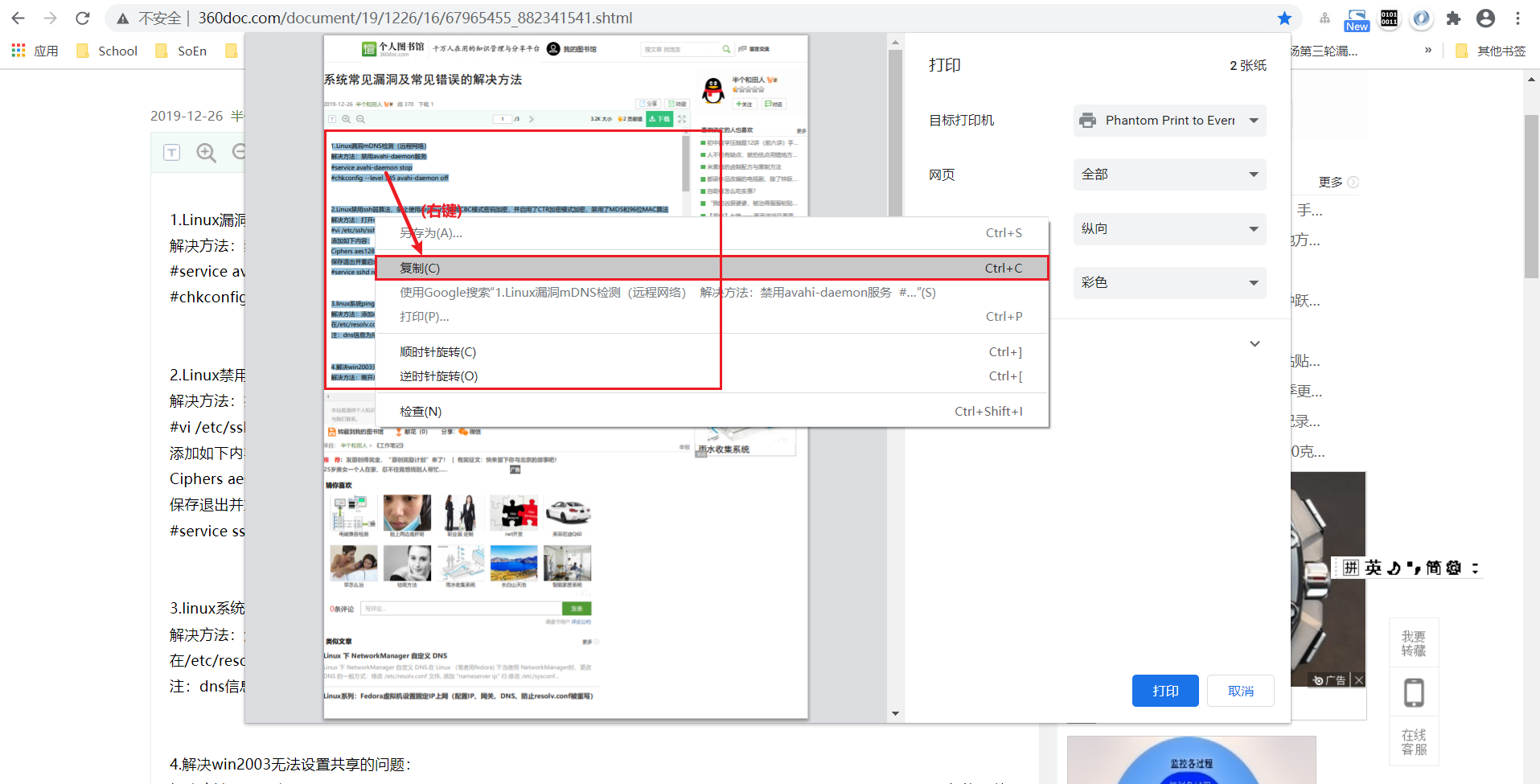
$=0 - 首先, Ctrl + P (打印当前网页) ; 然后在打印的预览界面中选中目标文本,并鼠标右键选择"复制(Ctrl+C)"拷贝之~
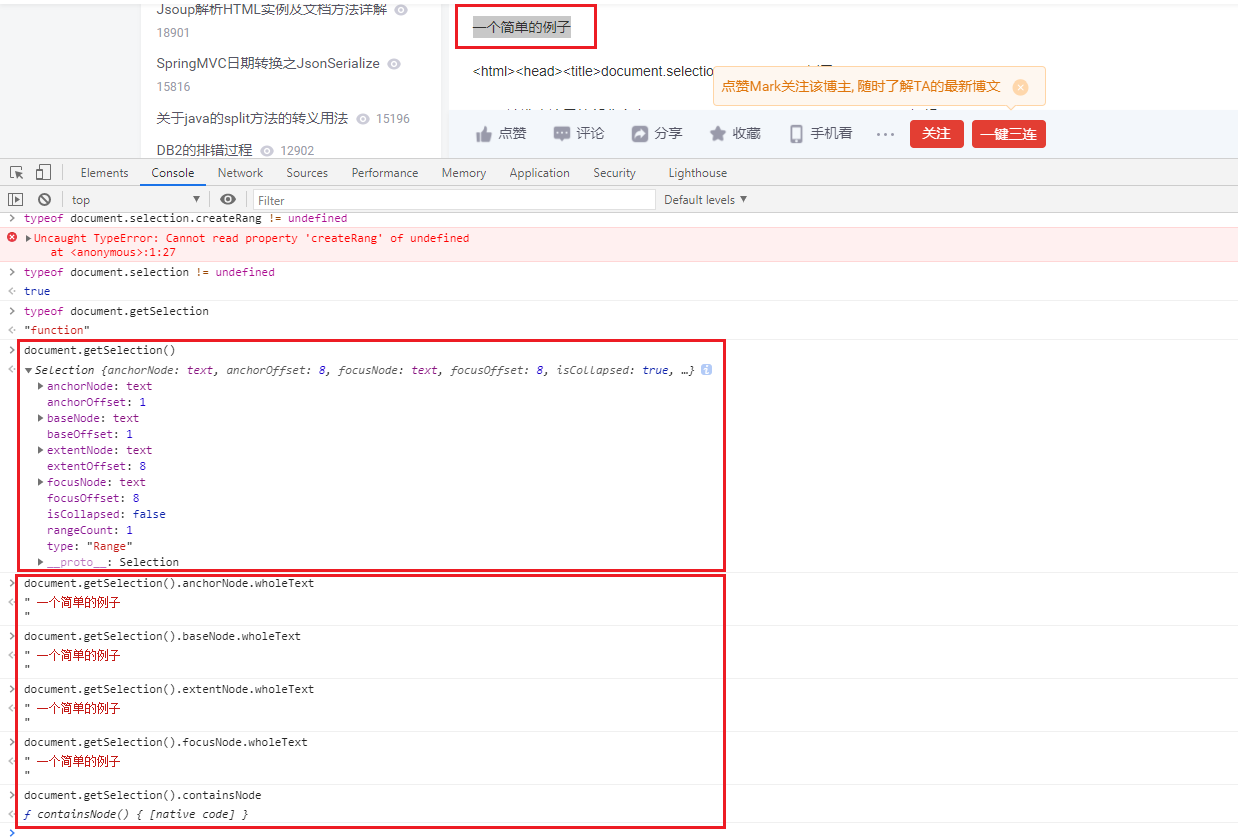
- 利用 document.getSelection()/selection的API来获取选中的文本
document.getSelection().focusNode.wholeText //选中的当前元素的文本

document.getSelection().focusNode.parentElement.parentNode.innerText
document.getSelection().focusNode.parentNode.previousElementSibling.innerText
document.getSelection().focusNode.parentElement.nextElementSibling.innerText
- document.selection / document.getSelection
IE:
    支持 document.selection
    不支持 document.getSelection
FireFox / Safari:window.getSelection
    不支持 document.selection
    支持 document.getSelection
Chrome (86.0.4240.111):
    不支持 document.selection
    支持 document.getSelection

document.selection /  document.getSelection 都不是标准语法。

--------------------------------------------------------------------------------
【 document.getSelection() 函数返回的对象 】
获取选中的文本: document.getSelection().[anchorNode/baseNode/extentNode/focusNode/].[wholeText/textContent/data/nodeValue]

【selection 对象】
代表了当前激活选中区,即高亮文本块,和/或文档中用户可执行某些操作的其它元素。
selection 对象的典型用途是作为用户的输入,以便识别正在对文档的哪一部分正在处理,或者作为某一操作的结果输出给用户。

用户和脚本都可以创建选中区。用户创建选中区的办法是拖曳文档的一部分。脚本创建选中区的办法是在文本区域或类似对象上调用 select 方法。要获取当前选中区,请对 document 对象应用 selection 关键字。要对选中区执行操作,请先用 createRange 方法从选中区创建一个文本区域对象。

一个文档同一时间只能有一个选中区。选中区的类型决定了其中为空或者包含文本和/或元素块。尽管空的选中区不包含任何内容,你仍然可以用它作为文档中的位置标志。
[选中目标DOM]
// 获取selection对象
var selection = window.getSelection();
// 清空selection对象
selection.removeAllRanges();

// 创建1个Range实例
var ele = document.getElementById('blogTitle')
var range = new Range();
range.selectNodeContents(ele);

// selection对象设置range实例
selection.addRange(range);
2 JS源码
//屏蔽右键菜单 (<input> / <textarea> / type=text 除外)
document.oncontextmenu = function (event){
    if(window.event){
        event = window.event;
    }try{
        var the = event.srcElement;
        if (!((the.tagName == "INPUT" && the.type.toLowerCase() == "text") || the.tagName == "TEXTAREA")){
            return false;
        }
        return true;
    }catch (e){
        return false;
    }
}


//屏蔽粘贴 (<input> / <textarea> / type=text 除外)
document.onpaste = function (event){
    if(window.event){
        event = window.event;
    }try{
        var the = event.srcElement;
        if (!((the.tagName == "INPUT" && the.type.toLowerCase() == "text") || the.tagName == "TEXTAREA")){
            return false; // false 表示 禁用 粘贴功能
        }
        return true;
    }catch (e){
        return false;
    }
}


//屏蔽复制 (<input> / <textarea> / type=text 除外)
document.oncopy = function (event){
    if(window.event){
        event = window.event;
    }try{
        var the = event.srcElement;
        if(!((the.tagName == "INPUT" && the.type.toLowerCase() == "text") || the.tagName == "TEXTAREA")){
            return false;
        }
        return true;
    }catch (e){
        return false;
    }
}


//屏蔽剪切 (<input> / <textarea> / type=text 除外)
document.oncut = function (event){
    if(window.event){
        event = window.event;
    }try{
        var the = event.srcElement;
        if(!((the.tagName == "INPUT" && the.type.toLowerCase() == "text") || the.tagName == "TEXTAREA")){
            return false;
        }
        return true;
    }catch (e){
        return false;
    }
}


//屏蔽(文本)选中 (<input> / <textarea> / type=text 除外)
document.onselectstart = function (event){
    if(window.event){
        event = window.event;
    }try{
        var the = event.srcElement;
        if (!((the.tagName == "INPUT" && the.type.toLowerCase() == "text") || the.tagName == "TEXTAREA")){
            return false;
        }
        return true;
    } catch (e) {
        return false;
    }
}
3 附件: 完整源码
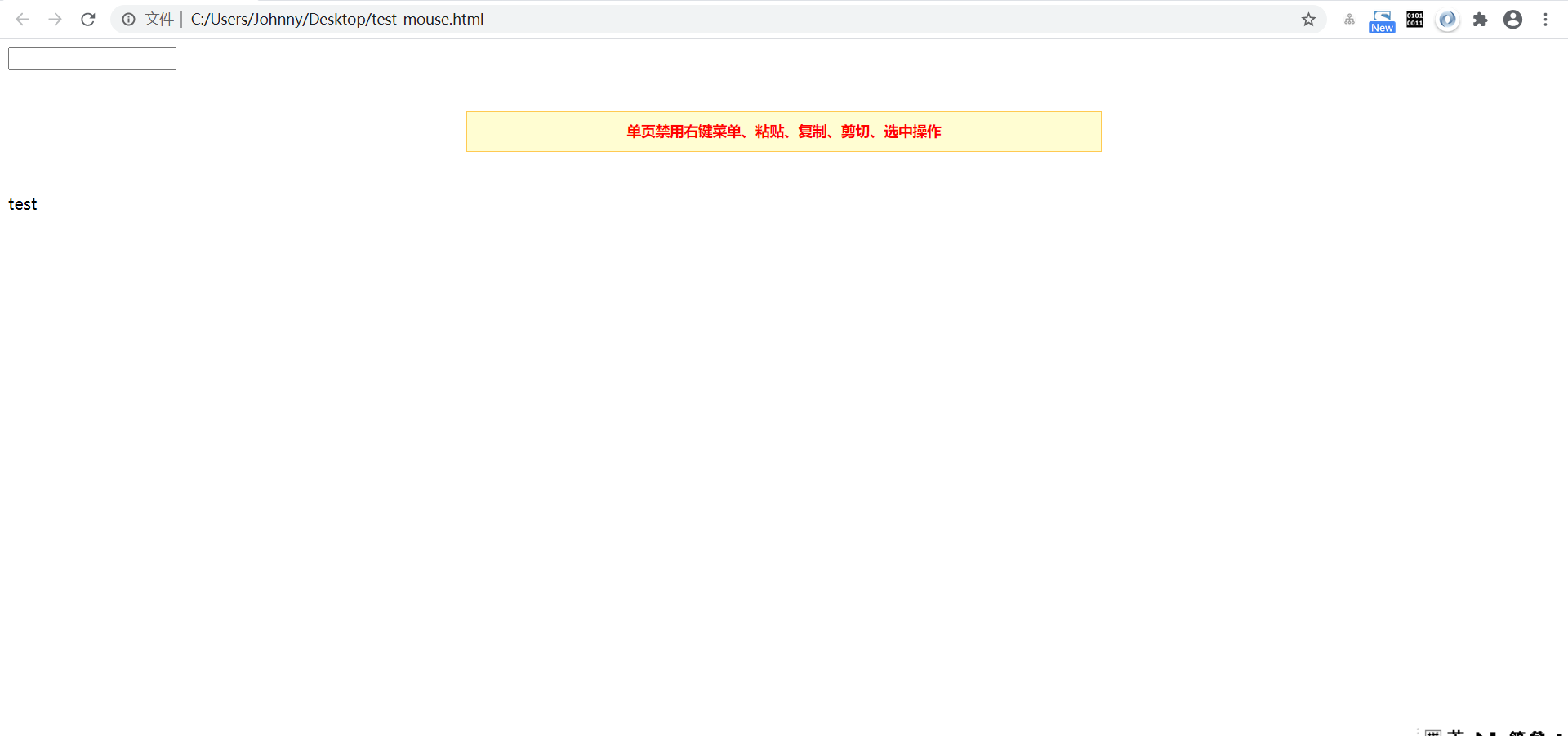
展开查看
<!DOCTYPE html PUBLIC "-//W3C//DTD XHTML 1.0 Transitional//EN" "http://www.w3.org/TR/xhtml1/DTD/xhtml1-transitional.dtd">
<html xmlns="http://www.w3.org/1999/xhtml">
<head>
<meta http-equiv="Content-Type" content="text/html; charset=utf-8" />
<title>js屏蔽浏览器右键菜单,粘贴,复制,剪切,选中</title>
<meta name="description" content="js代码制作屏蔽浏览器右键菜单,屏蔽浏览器粘贴,屏蔽浏览器复制,屏蔽浏览器剪切,屏蔽浏览器选中,不会屏蔽搜索引擎蜘蛛抓取页面,不影响seo优化。可以设置网页内容代码不被用户随意下载等。" />
</head><body>
<input type="input" />
<script type="text/javascript">
//屏蔽右键菜单 (<input> / <textarea> / type=text 除外)
document.oncontextmenu = function (event){
if(window.event){
event = window.event;
}try{
var the = event.srcElement;
if (!((the.tagName == "INPUT" && the.type.toLowerCase() == "text") || the.tagName == "TEXTAREA")){
return false;
}
return true;
}catch (e){
return false;
}
}//屏蔽粘贴 (<input> / <textarea> / type=text 除外)
document.onpaste = function (event){
if(window.event){
event = window.event;
}try{
var the = event.srcElement;
if (!((the.tagName == "INPUT" && the.type.toLowerCase() == "text") || the.tagName == "TEXTAREA")){
return false; // false 表示 禁用 粘贴功能
}
return true;
}catch (e){
return false;
}
}//屏蔽复制 (<input> / <textarea> / type=text 除外)
document.oncopy = function (event){
if(window.event){
event = window.event;
}try{
var the = event.srcElement;
if(!((the.tagName == "INPUT" && the.type.toLowerCase() == "text") || the.tagName == "TEXTAREA")){
return false;
}
return true;
}catch (e){
return false;
}
}//屏蔽剪切 (<input> / <textarea> / type=text 除外)
document.oncut = function (event){
if(window.event){
event = window.event;
}try{
var the = event.srcElement;
if(!((the.tagName == "INPUT" && the.type.toLowerCase() == "text") || the.tagName == "TEXTAREA")){
return false;
}
return true;
}catch (e){
return false;
}
}//屏蔽(文本)选中 (<input> / <textarea> / type=text 除外)
document.onselectstart = function (event){
if(window.event){
event = window.event;
}try{
var the = event.srcElement;
if (!((the.tagName == "INPUT" && the.type.toLowerCase() == "text") || the.tagName == "TEXTAREA")){
return false;
}
return true;
} catch (e) {
return false;
}
}
</script><div style="600px;margin:40px auto;text-align:center;border:solid 1px #FFCA52;background:#FFFDD2;height:28px;line-height:28px;font-size:14px;padding:5px 10px;color:#ff0000;font-weight:800;">单页禁用右键菜单、粘贴、复制、剪切、选中操作</div>
test
</body>
</html>