本文章将从两个方向分别介绍 OC 与 swift 混编
1. 第一个方向从 swift工程 中引入 oc类
1. 1 如何在swift的类中使用oc类
1.2 如何在swift中实现oc的代理方法
1.3 如何在swift中实现oc的Block回调
2 二个方向从OC工程中引入swift类
2.1 如何在OC类中使用swift类
2.2 如何在OC中实现swift的代理方法
2.3 如何在OC中实现swift中类似Block回调
下面是具体的实现过程:
1.1 如何在swift的类中使用oc类?
1. swift工程中引入OC类。 具体实现过程。
1.1 新建一个swift工程类。 取名 swiftOrOC
1.2 实现的功能为 : 从swift. viewController.swift 中 push到 OC语言 secondViewController 控制器
1.2.1 新建SecondViewController 类 。
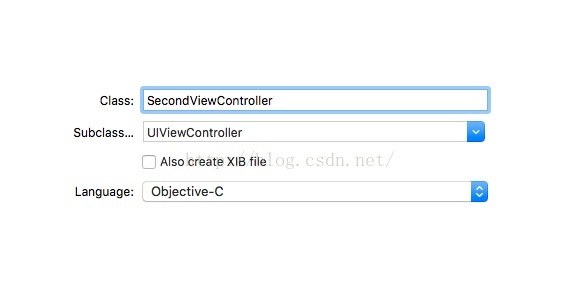
1.2.2 建立桥接文件。 (很重要)
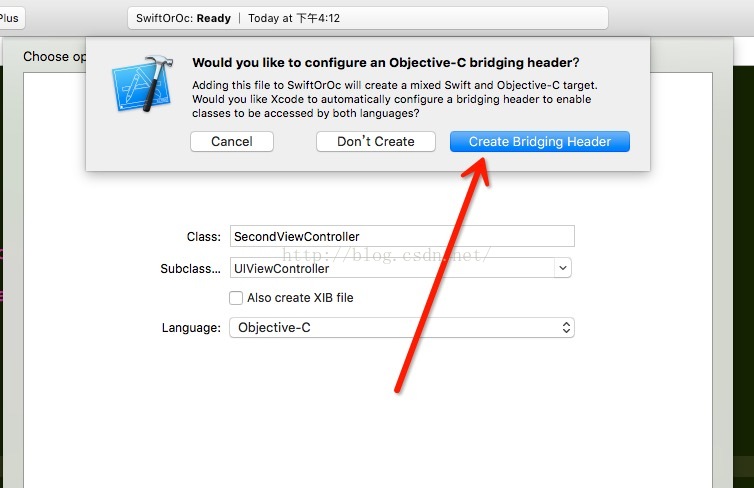
一定要记得点击这个按钮。
1.2.3 接下来工程目录如下:
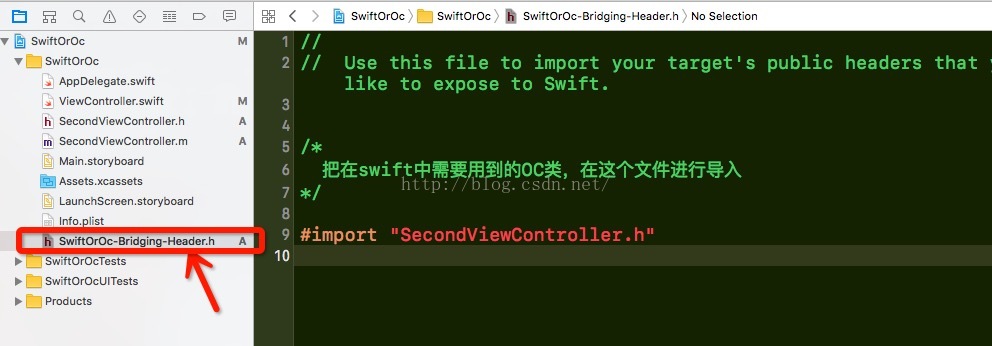
1.2.4 接下来就可以实现具体的跳转功能了。
ViewController.swift中具体实现
import UIKit

class ViewController: UIViewController {

    @IBOutlet weak var hintLabel: UILabel!  //稍后用来显示回调

    // push 到 oc controller
    @IBAction func pushAction(_ sender: AnyObject) {
        let secondVC = SecondViewController.init()
        self.navigationController?.pushViewController(secondVC, animated: true)
    }

    override func viewDidLoad() {
        super.viewDidLoad()
        // Do any additional setup after loading the view, typically from a nib.
    }

    override func didReceiveMemoryWarning() {
        super.didReceiveMemoryWarning()
        // Dispose of any resources that can be recreated.
    }
}
1.2 如何在swift中实现oc的代理方法
1.2.1 首先在 SecondViewController.h 中声明一个协议。具体代码
#import <UIKit/UIKit.h>

@protocol SecondDelegate <NSObject>

-(void)refreshHintLabel:(NSString *)hintString;

@end

@interface SecondViewController : UIViewController

@property (nonatomic,weak)id<SecondDelegate> secondDelegate;
@end
1.2.3 接下来就非常简单了,让ViewController.swift只需要成为SecondViewController的代理,然后遵循她的协议,就可以了。 具体代码如下。
1.2.3.1 遵循协议

1.2.3.2 成为代理,并实现协议方法,更改controller.swift中hintLabel的text。
- // push 到 oc controller
- @IBAction func pushAction(_ sender: AnyObject) {
- let secondVC = SecondViewController.init()
- secondVC.secondDelegate = self;
- self.navigationController?.pushViewController(secondVC, animated: true)
- }
- // SecondViewControll的代理方法
- func refreshHintLabel(_ hintString: String!) {
- hintLabel.text = "secondView textView.text = " + hintString;
- }
1.3 如何在swift中实现oc的Block回调
1.3.1 具体过程与1.2小节一样。 直接上代码。
1.3.2 声明block;
- typedef void(^RefreshHintLabelBlock)(NSString *hintString);
- @interface SecondViewController : UIViewController
- @property (nonatomic, copy) RefreshHintLabelBlock hintBlock;
- @end
1.3.3 block的回调。 SecondViewController.m中
- #pragma mark 返回上一页回调 ,将用户输入的用户名传回给 ViewController.swift
- -(BOOL)navigationShouldPopOnBackButton{
- if (_hintBlock) {
- _hintBlock(textField.text);
- }
- return YES;
- }
1.3.4 在swift类中调用 oc的block.
- // push 到 oc controller
- @IBAction func pushAction(_ sender: AnyObject) {
- let secondVC = SecondViewController.init()
- secondVC.secondDelegate = self;
- secondVC.hintBlock = {(t:String?)in
- self.hintLabel.text = "secondView textView.text = " + t!
- }
- self.navigationController?.pushViewController(secondVC, animated: true)
- }
工程已上传到git上,git地址: https://github.com/zhonggaorong/SwiftOrOc/tree/master
2. OC工程中引入swift类。 具体实现过程。
耽误了不少时间, 今天才开始写oc工程中引入swift类。
demo地址:
https://github.com/jukai9316/OCtoSwift
2.1 如何在OC类中使用swift类
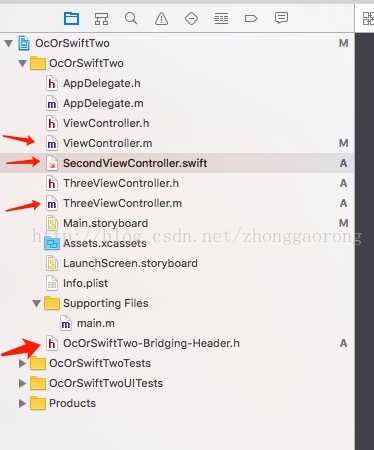
- #import "OcOrSwiftTwo-swift.h"
- import UIKit
- import Foundation
- // 必须加上@objc 代理才能在oc类中可见。
- @objc(EditTextFieldDelegate)
- protocol EditTextFieldDelegate:NSObjectProtocol {
- func editTextField(_ str: String) -> Void
- }
- @objc(SecondViewController)
- class SecondViewController: UIViewController {
- var editorDelegate:EditTextFieldDelegate?
- var textField:UITextField?
- var addButton:UIButton?
- var pushButton:UIButton?
- typealias editorBlock = (_ t:String) -> Void
- var myEidtorBlock:editorBlock?
- override func viewDidLoad() {
- super.viewDidLoad()
- self.view.backgroundColor = UIColor.white
- textField = UITextField.init(frame: CGRect.init(x: 50, y: 60, 200, height: 50))
- textField?.placeholder = "输入返回首页的内容"
- self.view.addSubview(textField!)
- addButton = UIButton.init(type: .custom)
- addButton?.setTitleColor(UIColor.black, for: .normal)
- addButton?.setTitle("pop", for: .normal)
- addButton?.frame = CGRect.init(x: 50, y: 150, 200, height: 50)
- addButton?.layer.borderColor = UIColor.black.cgColor
- addButton?.layer.borderWidth = 1.0
- addButton?.addTarget(self, action: #selector(popAction), for: .touchUpInside)
- self.view.addSubview(addButton!)
- pushButton = UIButton.init(type: .custom)
- pushButton?.setTitleColor(UIColor.black, for: .normal)
- pushButton?.setTitle("push", for: .normal)
- pushButton?.frame = CGRect.init(x: 50, y: 250, 200, height: 50)
- pushButton?.layer.borderColor = UIColor.black.cgColor
- pushButton?.layer.borderWidth = 1.0
- pushButton?.addTarget(self, action: #selector(pushAction), for: .touchUpInside)
- self.view.addSubview(pushButton!)
- }
- func popAction() -> Void {
- if editorDelegate != nil {
- editorDelegate?.editTextField((textField?.text)!)
- }
- if ((self.myEidtorBlock) != nil){
- self.myEidtorBlock!((textField?.text!)!)
- }
- self.navigationController?.popViewController(animated: true)
- }
- func pushAction() -> Void {
- let three = ThreeViewController.init()
- self.navigationController?.pushViewController(three, animated: true)
- }
- #import "ViewController.h"
- #import "OcOrSwiftTwo-swift.h"
- @interface ViewController ()<EditTextFieldDelegate>
- @property (nonatomic, strong) UITextField *showTextField;
- @property (nonatomic, strong) UIButton *pushButton;
- @end
- @implementation ViewController
- - (void)viewDidLoad {
- [super viewDidLoad];
- _showTextField = [[UITextField alloc]initWithFrame:CGRectMake(50, 100 , 200, 50)];
- _showTextField.placeholder = @"swift传回的文本内容";
- _showTextField.adjustsFontSizeToFitWidth = YES;
- _showTextField.enabled = NO;
- [self.view addSubview:_showTextField];
- _pushButton = [UIButton buttonWithType:UIButtonTypeCustom];
- [_pushButton.layer setBorderColor:[UIColor blackColor].CGColor];
- [_pushButton.layer setBorderWidth:1.0];
- [_pushButton setFrame:CGRectMake(50, 200, 200, 50)];
- [_pushButton setTitleColor:[UIColor blackColor] forState:UIControlStateNormal];
- [_pushButton setTitle:@"push" forState:UIControlStateNormal];
- [_pushButton addTarget:self action:@selector(pushAction) forControlEvents:UIControlEventTouchUpInside];
- [self.view addSubview:_pushButton];
- }
- -(void)pushAction{
- SecondViewController *second = [[SecondViewController alloc]init];
- // second.editorDelegate = self;
- /*
- swift中的闭包回滴
- */
- second.myEidtorBlock = ^(NSString *str) {
- _showTextField.text = [NSString stringWithFormat:@"second传回信息: %@",str];
- };
- [self.navigationController pushViewController:second animated:YES];
- }
- #pragma mark swift中的代理
- -(void)editTextField:(NSString *)str{
- _showTextField.text = [NSString stringWithFormat:@"second传回信息: %@",str];
- }
- - (void)didReceiveMemoryWarning {
- [super didReceiveMemoryWarning];
- // Dispose of any resources that can be recreated.
- }