Autodesk Vault 2014的Subscription 包中有一个组件叫做Thin Client。这个瘦客户端有着全新的界面,又给了我们一个全新的选择。ThinClient实际是在Vault Server端架设了一个web站点,用户只需要浏览器就可以直接查看Vault数据,而不需安装Vault Explorer软件。当然也不消耗License,就不用掏钱了,哈哈、
除了省费用外,关键还是方便,比如我们在设计流程中需要主管领导审核,我们需要主管领导安装Vault Explorer客户端。而且每次设计更改完毕后请领导审批时还要费很多口舌,“领导,您进到XX目录的XX子目录,然后找到我改的xx文件,您看合适不?”现在有了ThinClient,直接给领导一个ULR连接,“领导,这是我最近的更改,妥否请批示。”是不是简单的很多?
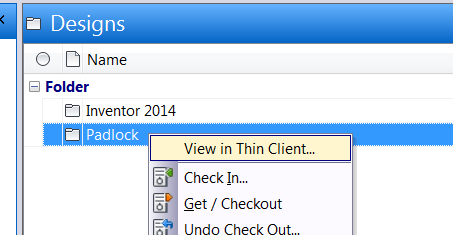
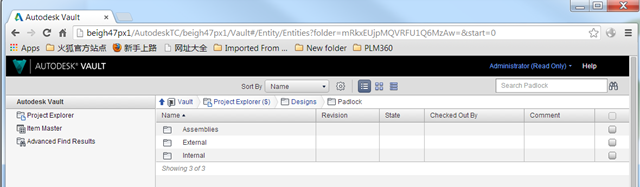
现在就写一个插件来实现Vault Explorer和Thin Client的集成。我们的目标是为文件夹和文件添加右键菜单,生成Thin Client的ULR并在默认浏览器中打开。如图:
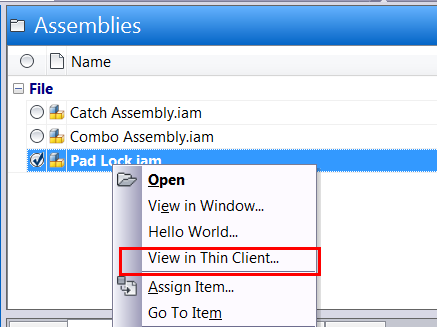
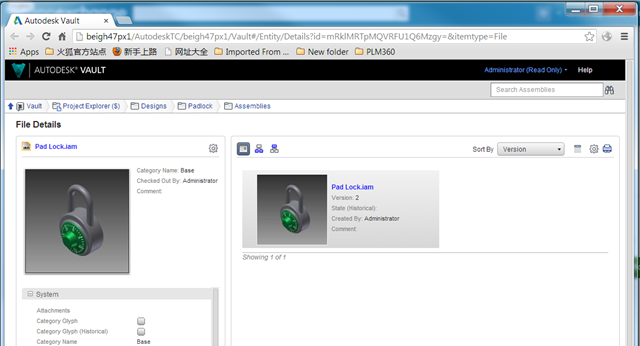
对于文件,如下:
当然,你还可以更进一步,把这个ULR保存到数据库中,或者你的ERP系统等,从而实现Vault和其他系统的集成。
你可以使用Vault 插件向导来创建这个插件,下面是核心代码:
    void ThinClientUrlCmd_Execute(object sender, CommandItemEventArgs e)
    {

      WebServiceManager webMgr = currentConnection.WebServiceManager;

      ISelection selectedItem = e.Context.CurrentSelectionSet.FirstOrDefault<ISelection>();
      if (selectedItem != null)
      {
        Uri serverUri = new Uri(webMgr.InformationService.Url);
        string url;

        if (selectedItem.TypeId == SelectionTypeId.File)
        {
          File file = webMgr.DocumentService.GetLatestFileByMasterId(selectedItem.Id);
          if (file == null)
          {
            return;
          }

          string[] ids = webMgr.KnowledgeVaultService.GetPersistentIds(
            VDF.Vault.Currency.Entities.EntityClassIds.Files,
           new long[] { file.Id },
           Autodesk.Connectivity.WebServices.EntPersistOpt.Latest);

          string id = ids[0];
          id = id.TrimEnd('=');
          url = string.Format("{0}://{1}/AutodeskTC/{1}/{2}#/Entity/Details?id=m{3}=&itemtype=File",
               serverUri.Scheme, serverUri.Host, currentConnection.Vault, id);

          //Open with default broswer
          Process.Start(url);

          //copy url to clipboard
          Clipboard.SetText(url);
        }

        if (selectedItem.TypeId == SelectionTypeId.Folder)
        {
          Folder folder = webMgr.DocumentService.GetFolderById(selectedItem.Id);
          if (folder == null)
          {
            return;
          }

          string[] ids = webMgr.KnowledgeVaultService.GetPersistentIds(
            VDF.Vault.Currency.Entities.EntityClassIds.Folder,
            new long[] { folder.Id },
            Autodesk.Connectivity.WebServices.EntPersistOpt.Latest);

          string id = ids[0];
          id = id.TrimEnd('=');
          url = string.Format("{0}://{1}/AutodeskTC/{1}/{2}#/Entity/Entities?folder=m{3}=&start=0",
            serverUri.Scheme, serverUri.Host, currentConnection.Vault, id);

          //Open with default broswer
          Process.Start(url);

          //copy url to clipboard
          Clipboard.SetText(url);
        }


      }


    }
完整代码已经发布到了Github.com, 请到https://github.com/ADN-DevTech/Vault_Thinclient_Integration 下载。