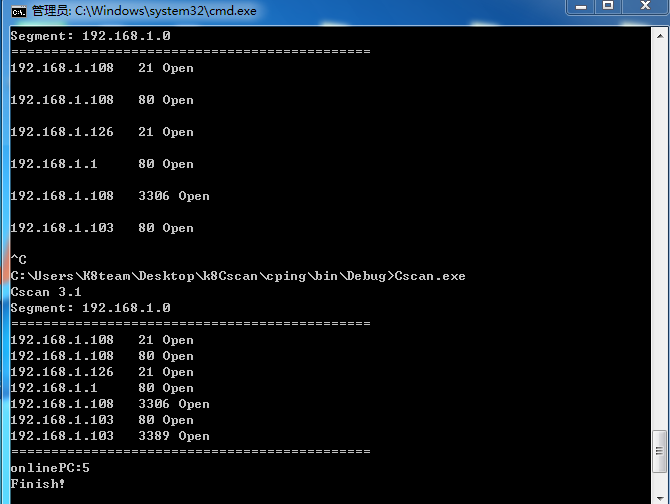
主程序: K8Cscan 大型内网渗透自定义扫描器
https://www.cnblogs.com/k8gege/p/10519321.html
Cscan端口扫描插件源码
以下代码编译成netscan.dll,和Cscan.exe放在一起即可,大家可根据需要自行定制需扫描的端口。
当然也可以直接调用s.exe,但网上部分版本的s,启动多个时,S可能会崩溃或退出无结果返回。
再说调用DLL不会像调用s.exe那样占用资源,且会产生30个S扫描器进程(它不崩溃的话)
https://github.com/k8gege/K8CScan/blob/master/K8Cscan%20Moudle%20PortScan.cs
using System;
using System.Collections.Generic;
using System.Text;
using System.Net;
using System.Text.RegularExpressions;
using System.Net.Sockets;
//Cscan 3.1 PortScan Moudle
namespace CscanDLL
{
    public class scan
    {
        public static string run(string ip)
        {
            if (string.IsNullOrEmpty(ip))
                return "";
            else
            {
                if (K8CheckPort(ip, 21))
                    Console.Write(ip + "	21 Open
");
                if (K8CheckPort(ip, 80))
                    Console.Write(ip + "	80 Open
");
                if (K8CheckPort(ip, 1433))
                    Console.Write(ip + "	1433 Open
");
                if (K8CheckPort(ip, 3306))
                    Console.Write(ip + "	3306 Open
");
                if (K8CheckPort(ip, 1521))
                    Console.Write(ip + "	1521 Open
");
                if (K8CheckPort(ip, 3389))
                    Console.Write(ip + "	3389 Open
");
            }

            return "";
        }

        private static bool K8CheckPort(string ip, int Port)
        {
            //int Port = 21;
            IPAddress scanip = IPAddress.Parse(ip);
            IPEndPoint point = new IPEndPoint(scanip, Port);
            try
            {
                TcpClient tcp = new TcpClient();
                tcp.Connect(point);
                //Console.WriteLine(scanip + "	" + Port + "	Open");
                return true;
            }
            catch (Exception ex)
            {
                //Console.WriteLine(scanip + "	" + Port + "	Close");
                return false;
            }
        }

    }
}
效果: