一,服务端配置
 1 #!/bin/sh
 2 #########################################################
 3 #by:kingle                                                #
 4 #use: configuraion rsync                                            #
 5 #version:1.0                                            #
 6 #########################################################
 7 . /etc/init.d/functions
 8 BackPath=/backup
 9 Passwd=123456
10 Name=rsync_backup
11 IP=10.0.0.0/24
12 Port=`losf 873|wc -l`
13 Rev=`tail -l /etc/rc.local`
14 rsync_conf(){
15     cat >/etc/rsyncd.conf<<EOF
16         uid = rsync
17         gid = rsync
18         use chroot = no
19         max connections = 200
20         timeout = 300
21         pid file = /var/run/rsyncd.pid
22         lock file = /var/run/rsync.lock
23         log file = /var/log/rsyncd.log
24         ignore errors
25         read only = no
26         list = no
27         hosts allow =10.0.0.0/24
28         auth users = rsync_backup
29         secrets file =/etc/rsync.password
30         [backup]
31         path = $BackPath
32         EOF
33     if [ -f /etc/rsync.conf ];then
34         echo "rsync is configuration successing!"
35     else
36         echo "please to help!!"
37     fi
38 }
39 rsync_user(){
40 id rsync &>/dec/null
41 if [ $? -ne 0 ];then
42     useradd -s /sbin/nologin -M rsync
43 else
44     echo "hava user!!"
45 fi
46
47 }
48 rsync_C_file(){
49 mkdir $BackPath -p
50 chown -R rsync.rsync $BackPath
51 echo "$Name:$Passwd" >/etc/rsync.password
52 chmod 600 /etc/rsync.password
53 if [ $Port -eq 2 ]; then
54     echo "rsync starting"
55 else
56     rsync --daemon
57 fi
58 if [ $Rev -eq "rsync --daemon" ]; then
59     echo "rev ok"
60 else
61     echo "rsync --daemon" >>/etc/rc.local
62 fi
63 }
64 main (){
65     rsync_conf
66     rsync_user
67     rsync_C_file
68 }
69 main
二,客户端配置
 1 #!/bin/sh
 2 #########################################################
 3 #by:kingle                                                #
 4 #use: configuraion rsync                                            #
 5 #version:1.0                                            #
 6 #########################################################
 7
 8 echo "123456" > /etc/rsync.password
 9 chmod 600 /etc/rsync.password
10 mkdir /backup -p
三,测试
在/backup/目录下创建文件
rsync -avzP /backup/ rsync_backup@10.0.0.201::backup --password-file=/etc/rsync.password
查看服务端是否存在
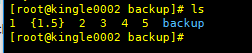
四,全网备份脚本
 1 #!/bin/sh
 2 #########################################################
 3 #by:kingle                                                #
 4 #use: configuraion rsync                                            #
 5 #version:1.0                                            #
 6 #########################################################
 7 #!/bin/sh
 8 . /etc/init.d/functions
 9 Backup_Dir=/backup
10 Passwd=123456
11 Passwd_File=/etc/rsync.password
12 IP=`hostname -I|awk '{print $2}'`
13 Remote_IP=10.0.0.201
14 Create_dir(){
15 [ ! -d ${Backup_Dir}/$IP ] && mkdir -p ${Backup_Dir}/$IP
16 echo "$Passwd" >$Passwd_File && chmod 600 $Passwd_File
17 }
18 Backup_File(){
19 cd / &&
20 tar zchf ${Backup_Dir}/$IP/sysconfig_$(date +%F).tar.gz var/spool/cron/root etc/rc.local server/scripts etc/sysconfig/iptables
21 }
22 Push_date(){
23 find ${Backup_Dir}/$IP/ -type f -name "*.tar.gz"|xargs md5sum >${Backup_Dir}/$IP/zhiwen_$(date +%F).txt
24 rsync -az ${Backup_Dir}/$IP "rsync_backup"@${Remote_IP}::backup --password-file=${Passwd_File}
25 if [ $? -eq 0 ];then
26   action "backup" /bin/true
27 else
28   action "backup" /bin/false
29 fi
30 find ${Backup_Dir}/$IP -type f -name "*.tar.gz" -mtime +5|xargs rm -f
31 if [ $? -eq 0 ];then
32   action "rm" /bin/true
33 else
34   action "rm" /bin/false
35 fi
36 }
37 main(){
38 Create_dir
39 Backup_File
40 Push_date
41 }
42 main
nfs 全网分发,全网执行