今日思语:城市的生活很快,有时学会让自己慢下来,慢慢来
对于做一些文件上传操作时,一般我们是直接在前端页面加入类型为file的input标签,也可以使用postman来进行文件的上传测试,如下:
postman下载地址:https://www.getpostman.com/downloads/ ,下载完之后进行安装即可。
demo信息表.xls如下:

此处以解析excel文件为例:
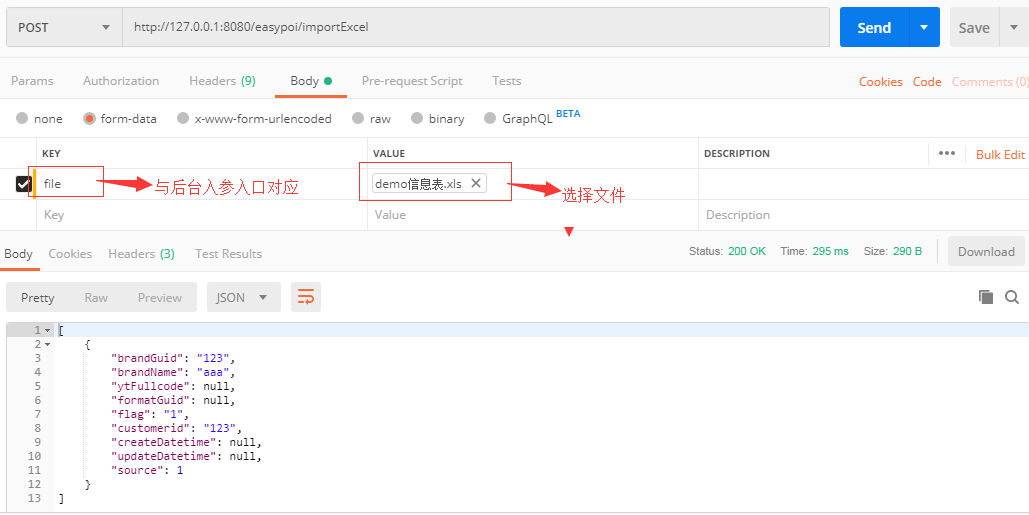
对应后台实现,此处用easypoi处理,需要引入easypoi相关依赖:
        <!--easypoi-->
        <dependency>
            <groupId>cn.afterturn</groupId>
            <artifactId>easypoi-base</artifactId>
            <version>${easypoi.version}</version>
        </dependency>
        <dependency>
            <groupId>cn.afterturn</groupId>
            <artifactId>easypoi-annotation</artifactId>
            <version>${easypoi.version}</version>
        </dependency>
        <dependency>
            <groupId>cn.afterturn</groupId>
            <artifactId>easypoi-web</artifactId>
            <version>${easypoi.version}</version>
        </dependency>
调用接口实现
@RestController
@RequestMapping("/easypoi")
public class EasyPoiExcelController {

    @PostMapping("/importExcel")
    public List<BrandInfo> importExcel(@RequestParam("file") MultipartFile file) throws Exception {
        List<BrandInfo> BrandInfos = ExcelImportUtil
                .importExcel(file.getInputStream(), BrandInfo.class, new ImportParams());
        return BrandInfos;
    }
}