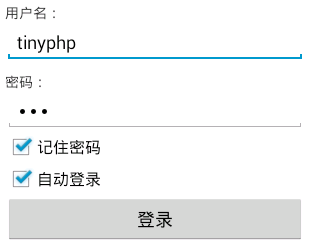
主要代码:

public class LoginActivity extends Activity {
    private EditText username;
    private EditText userpassword;
    private CheckBox remember;
    private CheckBox autologin;
    private Button login;
    private SharedPreferences sp;
    private String userNameValue,passwordValue;


    @Override
    protected void onCreate(Bundle savedInstanceState) {
        // TODO Auto-generated method stub
        super.onCreate(savedInstanceState);
        setContentView(R.layout.login);


        // 初始化用户名、密码、记住密码、自动登录、登录按钮
        username = (EditText) findViewById(R.id.username);
        userpassword = (EditText) findViewById(R.id.userpassword);
        remember = (CheckBox) findViewById(R.id.remember);
        autologin = (CheckBox) findViewById(R.id.autologin);
        login = (Button) findViewById(R.id.login);

        sp = getSharedPreferences("userInfo", 0);
        String name=sp.getString("USER_NAME", "");
        String pass =sp.getString("PASSWORD", "");


        boolean choseRemember =sp.getBoolean("remember", false);
        boolean choseAutoLogin =sp.getBoolean("autologin", false);
  //      Toast.makeText(this, name, Toast.LENGTH_SHORT).show();

        //如果上次选了记住密码,那进入登录页面也自动勾选记住密码,并填上用户名和密码
        if(choseRemember){
            username.setText(name);
            userpassword.setText(pass);
            remember.setChecked(true);
        }
        //如果上次登录选了自动登录,那进入登录页面也自动勾选自动登录
        if(choseAutoLogin){
            autologin.setChecked(true);
        }


        login.setOnClickListener(new OnClickListener() {

            // 默认可登录帐号tinyphp,密码123
            @Override
            public void onClick(View arg0) {
                userNameValue = username.getText().toString();
                passwordValue = userpassword.getText().toString();
                SharedPreferences.Editor editor =sp.edit();

                // TODO Auto-generated method stub
                if (userNameValue.equals("tinyphp")
                        && passwordValue.equals("123")) {
                    Toast.makeText(LoginActivity.this, "登录成功",
                            Toast.LENGTH_SHORT).show();

                    //保存用户名和密码
                    editor.putString("USER_NAME", userNameValue);
                    editor.putString("PASSWORD", passwordValue);

                    //是否记住密码
                    if(remember.isChecked()){
                        editor.putBoolean("remember", true);
                    }else{
                        editor.putBoolean("remember", false);
                    }


                    //是否自动登录
                        if(autologin.isChecked()){
                            editor.putBoolean("autologin", true);
                        }else{
                            editor.putBoolean("autologin", false);
                        }
                    editor.commit();

                    //跳转
                    Intent intent =new Intent(LoginActivity.this,SuccessActivity.class);
                    startActivity(intent);
                } else {
                    Toast.makeText(LoginActivity.this, "用户名或密码错误,请重新登录!",
                            Toast.LENGTH_SHORT).show();
                }

            }

        });

    }

}
<?xml version="1.0" encoding="utf-8"?>
<LinearLayout xmlns:android="http://schemas.android.com/apk/res/android"
    android:layout_width="match_parent"
    android:layout_height="match_parent"
    android:orientation="vertical"
    android:padding="10dp" >

    <TextView
        android:layout_width="wrap_content"
        android:layout_height="wrap_content"
        android:text="用户名:" />

    <EditText
        android:id="@+id/username"
        android:layout_width="match_parent"
        android:layout_height="wrap_content"
        android:ems="10"
        android:inputType="textPersonName" >
    </EditText>

    <TextView
        android:layout_width="wrap_content"
        android:layout_height="wrap_content"
        android:layout_marginTop="10dp"
        android:text="密码:" />

    <EditText
        android:id="@+id/userpassword"
        android:layout_width="match_parent"
        android:layout_height="wrap_content"
        android:ems="10"
        android:inputType="textPassword" >
    </EditText>

    <CheckBox
        android:id="@+id/remember"
        android:layout_width="wrap_content"
        android:layout_height="wrap_content"
        android:text="记住密码" />

    <CheckBox
        android:id="@+id/autologin"
        android:layout_width="wrap_content"
        android:layout_height="wrap_content"
        android:text="自动登录" />

    <Button
        android:id="@+id/login"
        android:layout_width="match_parent"
        android:layout_height="wrap_content"
        android:text="登录" />

</LinearLayout>