nohup java -Dconfig=/usr/local/app/server/conf/server.config.conf -Dcom.sun.management.jmxremote.port=10208 -Dcom.sun.management.jmxremote.ssl=false -Dcom.sun.management.jmxremote.authenticate=false -Xms1000m -Xmx1000m -Xmn500m -Xss1000k -XX:PermSize=128M -XX:+UseConcMarkSweepGC -XX:CMSInitiatingOccupancyFraction=60 -XX:+PrintGCApplicationStoppedTime -XX:+PrintGCDateStamps -XX:+CMSParallelRemarkEnabled -XX:+CMSScavengeBeforeRemark -XX:+UseCMSCompactAtFullCollection -XX:CMSFullGCsBeforeCompaction=0 -verbosegc -XX:+PrintGCDetails -XX:ErrorFile=/usr/local/app/app_log/server/jvm_error.log -jar /usr/local/app/server/bin/server.jar -cp /usr/local/app/server/bin/classes:/usr/local/app/server/bin/conf:/usr/local/app/server/bin/lib/* 2>&1 | tee /usr/local/app/start.log >> /dockerdata/start_history.log 2>&1 &
指定端口:
java -jar aa.jar --server.port 9000
java命令用法:
Usage: java [-options] class [args...]
           (to execute a class)
   or  java [-options] -jar jarfile [args...]
           (to execute a jar file)
where options include:
    -d32          use a 32-bit data model if available
    -d64          use a 64-bit data model if available
    -server       to select the "server" VM
                  The default VM is server,
                  because you are running on a server-class machine.


    -cp <class search path of directories and zip/jar files>
    -classpath <class search path of directories and zip/jar files>
                  A : separated list of directories, JAR archives,
                  and ZIP archives to search for class files.
    -D<name>=<value>
                  set a system property
    -verbose:[class|gc|jni]
                  enable verbose output
    -version      print product version and exit
    -version:<value>
                  require the specified version to run
    -showversion  print product version and continue
    -jre-restrict-search | -no-jre-restrict-search
                  include/exclude user private JREs in the version search
    -? -help      print this help message
    -X            print help on non-standard options
    -ea[:<packagename>...|:<classname>]
    -enableassertions[:<packagename>...|:<classname>]
                  enable assertions with specified granularity
    -da[:<packagename>...|:<classname>]
    -disableassertions[:<packagename>...|:<classname>]
                  disable assertions with specified granularity
    -esa | -enablesystemassertions
                  enable system assertions
    -dsa | -disablesystemassertions
                  disable system assertions
    -agentlib:<libname>[=<options>]
                  load native agent library <libname>, e.g. -agentlib:hprof
                  see also, -agentlib:jdwp=help and -agentlib:hprof=help
    -agentpath:<pathname>[=<options>]
                  load native agent library by full pathname
    -javaagent:<jarpath>[=<options>]
                  load Java programming language agent, see java.lang.instrument
    -splash:<imagepath>
                  show splash screen with specified image
-cp:class search path of directories and zip/jar files
-D<name>=<value>:set a system property。在代码中 可以通过System.getProperty("")获得此属性值。
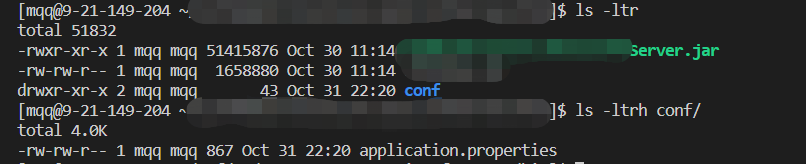
使用jar包外的application.properties