一、在pc端的input是一个大的知识点
【1】文本框
<input type="text">
【2】 密码框
<input type="password">
【3】提交按钮
<input type="submit" >
【4】重置按钮
<input type="reset" >
【5】单选框
<input type="radio" >
【6】复选框
<input type="checkbox" >
【7】普通按钮
<input type="button" >
【8】 文件选择控件
<input type="file" >
【9】隐藏框
<input type="hidden" >
【10】 图片按钮
<input type="image" >
补充:
placeholder 属性提供可描述输入字段预期值的提示信息(hint)。
该提示会在输入字段为空时显示,并会在字段获得焦点时消失。
placeholder 属性适用于以下的 <input> 类型:text, search, url, telephone, email 以及 password。
二、<input type="text">标签与<textarea>的区别
在我们开发时经常需要用到输入框,通常解决办法就是<input type="text">和<textarea>,那么这两个标签有什么区别呢?
1:<input type="text">标签
text标签是单行文本框,不会换行。
通过size属性指定显示字符的长度,注意:当使用css限定了宽高,那么size属性就不再起作用。
value属性指定初始值,Maxlength属性指定文本框可以输入的最长长度。
可以通过width和height设置宽高,但是也不会增加行数,下面是一个例子:
<input type="text" style=" 200px; height: 100px" value="我是设置过宽高的text">
结果:文本依然只有一行,并且居中显示。

2:<textarea>标签
<textarea>是多行文本输入框,文本区中可容纳无限数量的文本,其中的文本的默认字体是等宽字体(通常是 Courier),可以通过 cols 和 rows 属性来规定 textarea 的尺寸,不过更好的办法是使用 CSS 的 height 和 width 属性。下面是一个例子:
<textarea rows="5" cols="5">我是通过cols和rows定的大小,我的cols是20,rows是10</textarea>
结果:

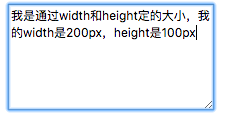
<textarea style=" 200px; height: 100px">我是通过width和height定的大小,我的width是200px,heigh是100px</textarea>
结果: