一、建立LoginViewModel视图模型
using System.ComponentModel.DataAnnotations;

namespace Shop.ViewModel
{
    public class LoginViewModel
    {
        [Required]
        [Display(Name = "用户名")]
        public string Name { get; set; }
        [Required]
        [DataType(DataType.Password)]
        [Display(Name = "密码")]
        public string Password { get; set; }
    }
}
二、登录方法
public IActionResult Login()
{
    return View();
}
三、登录页面
@model Shop.ViewModel.LoginViewModel
@{
    ViewData["Title"] = "Login";
}

<h1>Login</h1>
<form class="form-horizontal" asp-action="Login" method="post">
    <fieldset>
        <div class="control-group">
            <label class="control-label">用户名</label>
            <div class="controls">
                <input type="text" placeholder="" class="input-xlarge" asp-for="Name">
            </div>
        </div>
        <div class="control-group">
            <label class="control-label">密码</label>
            <div class="controls">
                <input type="text" placeholder="" class="input-xlarge" asp-for="Password">
            </div>
        </div>
        <input type="submit" class="btn btn-primary" value="登录"/>
    </fieldset>
</form>
四、登录实现
[HttpPost]
public async Task<IActionResult> Login(LoginViewModel input)
{
    if (!ModelState.IsValid)
    {
        return View(input);
    }

    var user = await _userManager.FindByNameAsync(input.Name);
    if (user != null)
    {
        var result = await _signInManager.PasswordSignInAsync(user, input.Password, false, false);
        if (result.Succeeded)
        {
            return RedirectToAction("Index");
        }
    }
    ModelState.AddModelError("", "用户名或密码错误");
    return View(input);
}
五、注销
[HttpPost]
public async Task<IActionResult> Logout()
{
    await _signInManager.SignOutAsync();
    return RedirectToAction("Index", "Home");
}
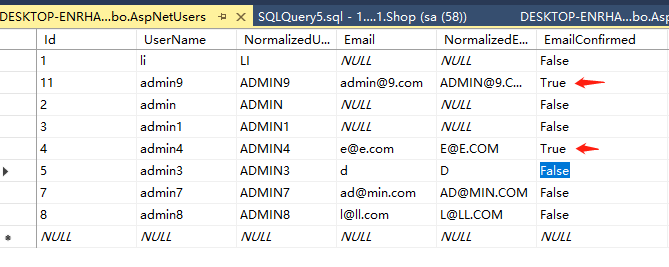
六、新建用户后不能直接登录,因为在Startup.cs类中定义了用户需要确认后才能登录,配置代码如下
services.AddDefaultIdentity<IdentityUser>(options => options.SignIn.RequireConfirmedAccount = true)
                .AddEntityFrameworkStores<ApplicationDbContext>();
因现在学习原理为主,自己增加用户后先在数据库(AspNetUsers)手工修改确认或者将上述需要验证设置为false,验证方式如下最好参考官方多重身份验证
- RequireConfirmedAccount 账户确认
- RequireConfirmedEmail 邮件确认
- RequireConfirmedPhoneNumber 电话确认