在上章分析了红外platform_driver后,已经修改bug后,接下来我们自己创建一个红外platform_device平台设备,其实写一个平台设备很简单.
创建红外platform_device平台设备步骤为:
- 1) 创建一个platform_device设备,其中.name= "gpio-rc-recv",并注册设备
- 2) 在driversmedia ckeymaps里创建一个名字为rc-my-text.c键值映射文件
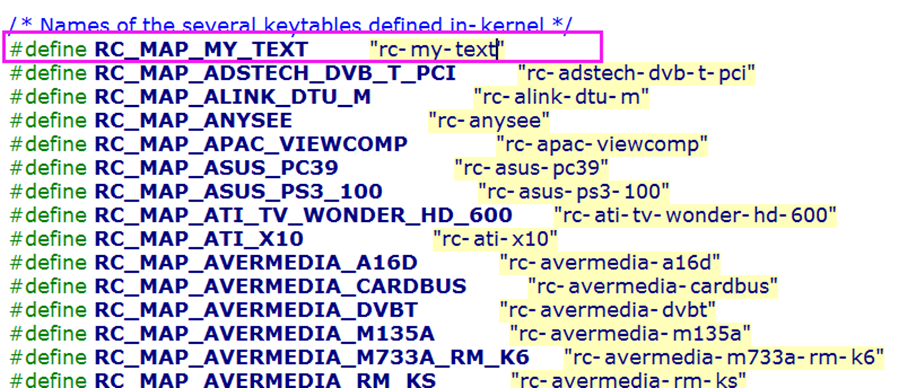
1.首先在include/media/rc-map.h添加rc-my-text.c键值映射文件的名字
2.由于我们板子上的红外接收编码是NEC格式,并且是GPIO类型,所以配置Make menuconfig:
->Device Drivers
    -> Multimedia support (MEDIA_SUPPORT [=y])
       -> Remote controller decoders (RC_DECODERS [=y])
            [*]   Enable IR raw decoder for the NEC protocol
                 //选择NEC协议, ,使CONFIG_IR_NEC_DECODER=y

  ->Device Drivers
    -> Multimedia support (MEDIA_SUPPORT [=y])
        -> Remote Controller devices (RC_DEVICES [=y])
             [*]   GPIO IR remote control
                //选择GPIO接收类型,使CONFIG_IR_GPIO_CIR=y
3.写ir_recv_test.c文件,来注册platform_device
#include <linux/platform_device.h>
#include <media/gpio-ir-recv.h>
#include <media/rc-map.h>
#include <linux/gpio.h>
#include <linux/of_gpio.h>

static struct gpio_ir_recv_platform_data ir_recv_data = {
    .gpio_nr = GPIO_PD(5),
    .active_low = 1,
    .map_name = RC_MAP_MY_TEXT,             //.map_name ="rc-my-text",用来匹配键映射表
    .allowed_protos = 0,                    //允许支持所有编码协议
};

static struct platform_device ir_recv_device = {
    .name   = "gpio-rc-recv",
    .id     = -1,
    .num_resources  = 0,
    .dev        = {
        .platform_data  = &ir_recv_data,
    },
};
static int __init ir_recv_test_init(void)
{
         platform_device_register(&ir_recv_device);
         return 0;
}

arch_initcall(ir_recv_test_init);
4.然后将ir_recv_test.c文件添加到Makefile中
obj-y += ir_recv_test.o
编译内核后,便实现一个红外驱动设备.
由于我们不知道遥控器具体键值对应的编码,所以先测试,获取编码值后,再创建键值映射文件
5.编译测试
如下图所示,我们以上下左右确定5个按键为例:
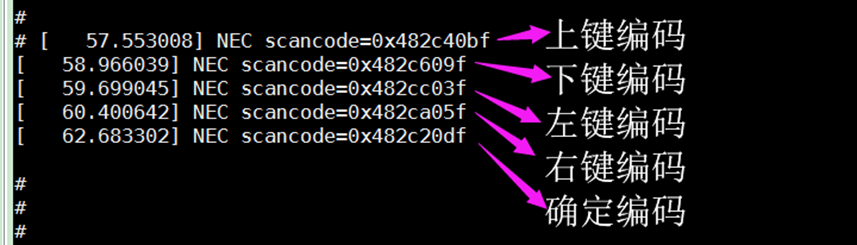
注意:上图显示的仅仅是打印信息,并没有上传input按键值,所以需要创建键值映射文件
6.创建driversmedia ckeymaps c-my-text.c键值映射文件
一般上下左右按键都要实现重复功能(比如:按下一直调音量)
而确定按键一般不实现重复功能.
所以代码如下:
#include <media/rc-map.h>
#include <linux/module.h>

static struct rc_map_table latte_key[] = {          //所有支持的映射表
         { 0x48ac40bf, KEY_UP},
         { 0x48ac609f, KEY_DOWN},
         { 0x48acc03f, KEY_LEFT},
         { 0x48aca05f, KEY_RIGHT},
         { 0x48ac20df, KEY_ENTER},
};

static struct rc_map_table repeat_key[] = {     //支持重复按下的映射表
         { 0x48ac40bf, KEY_UP},
         { 0x48ac609f, KEY_DOWN},
         { 0x48acc03f, KEY_LEFT},
         { 0x48aca05f, KEY_RIGHT},
};

static struct rc_map_list latte_map = {
         .map = {
                  .scan    = latte_key,
                  .size    = ARRAY_SIZE(latte_key),
                  .rc_type = RC_TYPE_NEC,                       //编码类型为NEC
                  .name    = RC_MAP_MY_TEXT,                 //用来匹配platform_device
                  .repeat_key = repeat_key,
                  .repeat_size = ARRAY_SIZE(repeat_key),
         }
};

static int __init init_rc_map_latte(void)
{
         return rc_map_register(&latte_map);
}

static void __exit exit_rc_map_latte(void)
{
         rc_map_unregister(&latte_map);
}

module_init(init_rc_map_latte)
module_exit(exit_rc_map_latte)

MODULE_LICENSE("GPL");
MODULE_AUTHOR("Mauro Carvalho Chehab <mchehab@redhat.com>");
然后修改driversmedia ckeymapsMakefile,将该文件添加进去
7.编译试验
当一直按下上下左右任意键时,可以看到能实现重复功能:
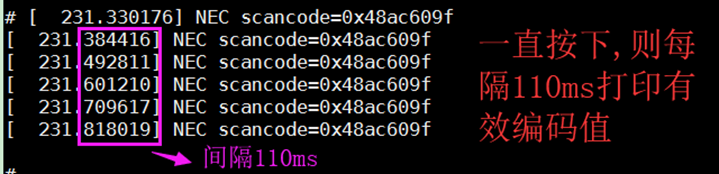
通过getevent查看一直按下时,是否一直input上报事件:

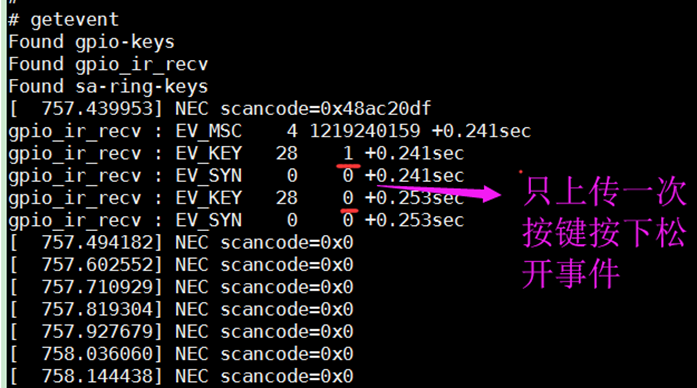
当一直按下确定键时:
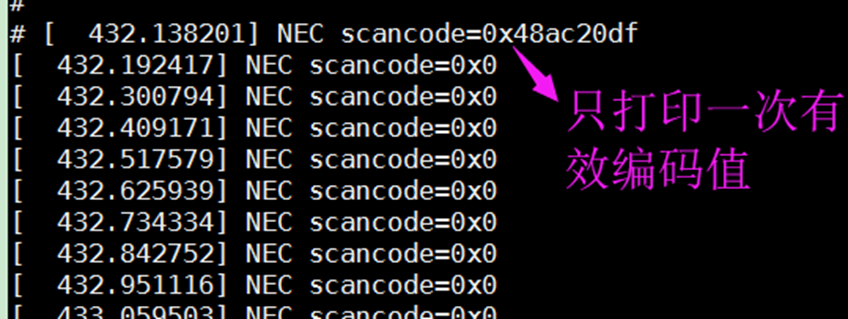
通过getevent查看一直按下确定键时,是否只上传一次input上报事件: