WPF 中的Path.Data 不再多介绍,M开始坐标点 C弧度坐标点 L 直线坐标点
  <Path x:Name="path0" Data="M 10,100 C 35,0 135,0 160,100 180,190 285,200 310,100" Height="135.32"
                  Stretch="Uniform" Stroke="#FF61E70A" StrokeThickness="2"    HorizontalAlignment="Center" VerticalAlignment="Center" />

  <Path x:Name="path0" Data="M95,50 L324.67997,50 324.67997,119.67997 234.67998,119.67997 234.67998,184.68002
                  344.67999,184.68002 394.68,134.67999 C394.68,134.67999 394.68,189.68005
                  394.68,129.68002 394.68,69.679984 434.68002,89.679985 434.68002,89.679985
                  L477.18005,132.18003 477.18005,164.68004 419.68006,164.6800" Height="135.32"
                  Stretch="Uniform" Stroke="#FF61E70A" StrokeThickness="2"    HorizontalAlignment="Center" VerticalAlignment="Center" />

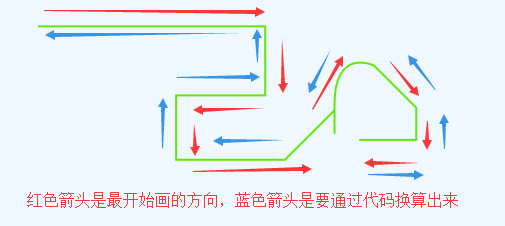
个人写了关于Path.Data数据反向,意思就是把Path的数据逆转,但是图形是没有变化的
Xaml代码如下:


<Window x:Class="WPFPathReverse.MainWindow"
        xmlns="http://schemas.microsoft.com/winfx/2006/xaml/presentation"
        xmlns:x="http://schemas.microsoft.com/winfx/2006/xaml"
        xmlns:d="http://schemas.microsoft.com/expression/blend/2008"
        xmlns:mc="http://schemas.openxmlformats.org/markup-compatibility/2006"
        xmlns:local="clr-namespace:WPFPathReverse"
        mc:Ignorable="d"
        Title="MainWindow" Height="600" Width="500">
    <Grid>
        <Grid.RowDefinitions>
            <RowDefinition Height="50"></RowDefinition>
            <RowDefinition></RowDefinition>
            <RowDefinition></RowDefinition>
        </Grid.RowDefinitions>
        <StackPanel Orientation="Horizontal">
            <Button Content="正向动画" Width="80" Margin="5" Click="btnPositive_Click"></Button>
            <Button Content="反向动画" Width="80" Margin="5" Click="btnRevPositive_Click"></Button>
        </StackPanel>
        <Canvas Grid.Row="1" >
            <Path x:Name="path0" Data="M1,1 L230.67997,1 230.67997,70.67997 140.67998,70.67997 140.67998,135.68002 300.68,85.67999 C300.68,85.67999 300.68,140.68005 300.68,80.68002 300.68,20.679984 340.68002,40.679985 340.68002,40.679985 L383.18005,83.18003 383.18005,115.68004 325.68006,115.68" Height="136.68"
                  Stretch="None" Stroke="#FF61E70A" StrokeThickness="2"  Width="384.18"   />
        </Canvas>

        <Canvas x:Name="canvas" Grid.Row="2"></Canvas>
    </Grid>
</Window>
Code代码如下
using System;
using System.Collections.Generic;
using System.Linq;
using System.Text;
using System.Text.RegularExpressions;
using System.Threading.Tasks;
using System.Windows;
using System.Windows.Controls;
using System.Windows.Data;
using System.Windows.Documents;
using System.Windows.Input;
using System.Windows.Media;
using System.Windows.Media.Animation;
using System.Windows.Media.Imaging;
using System.Windows.Navigation;
using System.Windows.Shapes;

namespace WPFPathReverse
{
    /// <summary>
    /// MainWindow.xaml 的交互逻辑
    /// </summary>
    public partial class MainWindow : Window
    {
        public MainWindow()
        {
            InitializeComponent();
            this.Loaded += MainWindow_Loaded;
        }

        private void MainWindow_Loaded(object sender, RoutedEventArgs e)
        {
            string data = this.path0.Data.ToString();
            var result = ConvertReverseData(data);
            Path newpath = new Path();
            newpath.Data = PathGeometry.CreateFromGeometry(Geometry.Parse(result));
            newpath.HorizontalAlignment = HorizontalAlignment.Center;
            newpath.VerticalAlignment = VerticalAlignment.Center;
            newpath.Stretch = this.path0.Stretch;
            newpath.Stroke = new SolidColorBrush(Colors.Red);
            newpath.StrokeThickness = 2;
            newpath.Width = this.path0.Width;
            newpath.Height = this.path0.Height;
            canvas.Children.Add(newpath);
        }

        /// <summary>
        /// 反向Data数据
        /// </summary>
        /// <param name="data"></param>
        /// <returns></returns>
        string ConvertReverseData(string data)
        {
            data = data.Replace("M", "").Replace(" ", "/");
            Regex regex = new Regex("[a-z]", RegexOptions.IgnoreCase);
            MatchCollection mc = regex.Matches(data);
            //item1 从上一个位置到当前位置开始的字符 (match.Index=原始字符串中发现捕获的子字符串的第一个字符的位置。)
            //item2 当前发现的匹配符号(L C Z M)
            List<Tuple<string, string>> tmpList = new List<Tuple<string, string>>();
            int curPostion = 0;
            for (int i = 0; i < mc.Count; i++)
            {
                Match match = mc[i];
                if (match.Index != curPostion)
                {
                    string str = data.Substring(curPostion, match.Index - curPostion);
                    tmpList.Add(new Tuple<string, string>(str, match.Value));
                }
                curPostion = match.Index + match.Length;
                if (i + 1 == mc.Count)//last
                {
                    tmpList.Add(new Tuple<string, string>(data.Substring(curPostion), match.Value));
                }
            }
            //char[] spChar = new char[2] { 'C', 'L' };
            //var tmpList = data.Split(spChar);
            List<string[]> spList = new List<string[]>();
            for (int i = 0; i < tmpList.Count; i++)
            {
                var cList = tmpList[i].Item1.Split('/');
                spList.Add(cList);
            }
            List<string> strList = new List<string>();
            for (int i = spList.Count - 1; i >= 0; i--)
            {
                string[] clist = spList[i];
                for (int j = clist.Length - 1; j >= 0; j--)
                {
                    if (j == clist.Length - 2)//对于第二个元素增加 L或者C的标识
                    {
                        var pointWord = tmpList[i - 1].Item2;//获取标识
                        strList.Add(pointWord + clist[j]);
                    }
                    else
                    {
                        strList.Add(clist[j]);
                    }
                }
            }
            string reverseData = "M" + string.Join(" ", strList);
            return reverseData;

        }

        private void btnPositive_Click(object sender, RoutedEventArgs e)
        {
            MatrixStory(0, this.path0.Data.ToString());
        }

        private void btnRevPositive_Click(object sender, RoutedEventArgs e)
        {
            string data = this.path0.Data.ToString();
            var result = ConvertReverseData(data);
            MatrixStory(1, result);
        }

        /// <summary>
        ///
        /// </summary>
        /// <param name="orientation">0正向 1反向</param>
        /// <param name="data">路径数据</param>
        private void MatrixStory(int orientation, string data)
        {
            Border border = new Border();
            border.Width = 10;
            border.Height = 10;
            border.Visibility = Visibility.Collapsed;
            if (orientation==0)
            {
                border.Background = new SolidColorBrush(Colors.Blue);
            }
            else
            {
                border.Background = new SolidColorBrush(Colors.Green);
            }

            this.canvas.Children.Add(border);
            Canvas.SetLeft(border, -border.Width / 2);
            Canvas.SetTop(border, -border.Height / 2);
            border.RenderTransformOrigin = new Point(0.5, 0.5);

            MatrixTransform matrix = new MatrixTransform();
            TransformGroup groups = new TransformGroup();
            groups.Children.Add(matrix);
            border.RenderTransform = groups;
            //NameScope.SetNameScope(this, new NameScope());
            string registname = "matrix" + Guid.NewGuid().ToString().Replace("-", "");
            this.RegisterName(registname, matrix);
            MatrixAnimationUsingPath matrixAnimation = new MatrixAnimationUsingPath();
            matrixAnimation.PathGeometry = PathGeometry.CreateFromGeometry(Geometry.Parse(data));
            matrixAnimation.Duration = new Duration(TimeSpan.FromSeconds(5));
            matrixAnimation.DoesRotateWithTangent = true;//旋转
            //matrixAnimation.FillBehavior = FillBehavior.Stop;
            Storyboard story = new Storyboard();
            story.Children.Add(matrixAnimation);
            Storyboard.SetTargetName(matrixAnimation, registname);
            Storyboard.SetTargetProperty(matrixAnimation, new PropertyPath(MatrixTransform.MatrixProperty));

            #region 控制显示与隐藏
            ObjectAnimationUsingKeyFrames ObjectAnimation = new ObjectAnimationUsingKeyFrames();
            ObjectAnimation.Duration = matrixAnimation.Duration;
            DiscreteObjectKeyFrame kf1 = new DiscreteObjectKeyFrame(Visibility.Visible, TimeSpan.FromMilliseconds(1));
            ObjectAnimation.KeyFrames.Add(kf1);
            story.Children.Add(ObjectAnimation);
            //Storyboard.SetTargetName(border, border.Name);
            Storyboard.SetTargetProperty(ObjectAnimation, new PropertyPath(UIElement.VisibilityProperty));
            #endregion
            story.FillBehavior = FillBehavior.Stop;
            story.Begin(border, true);
        }
    }
}
执行效果如下:
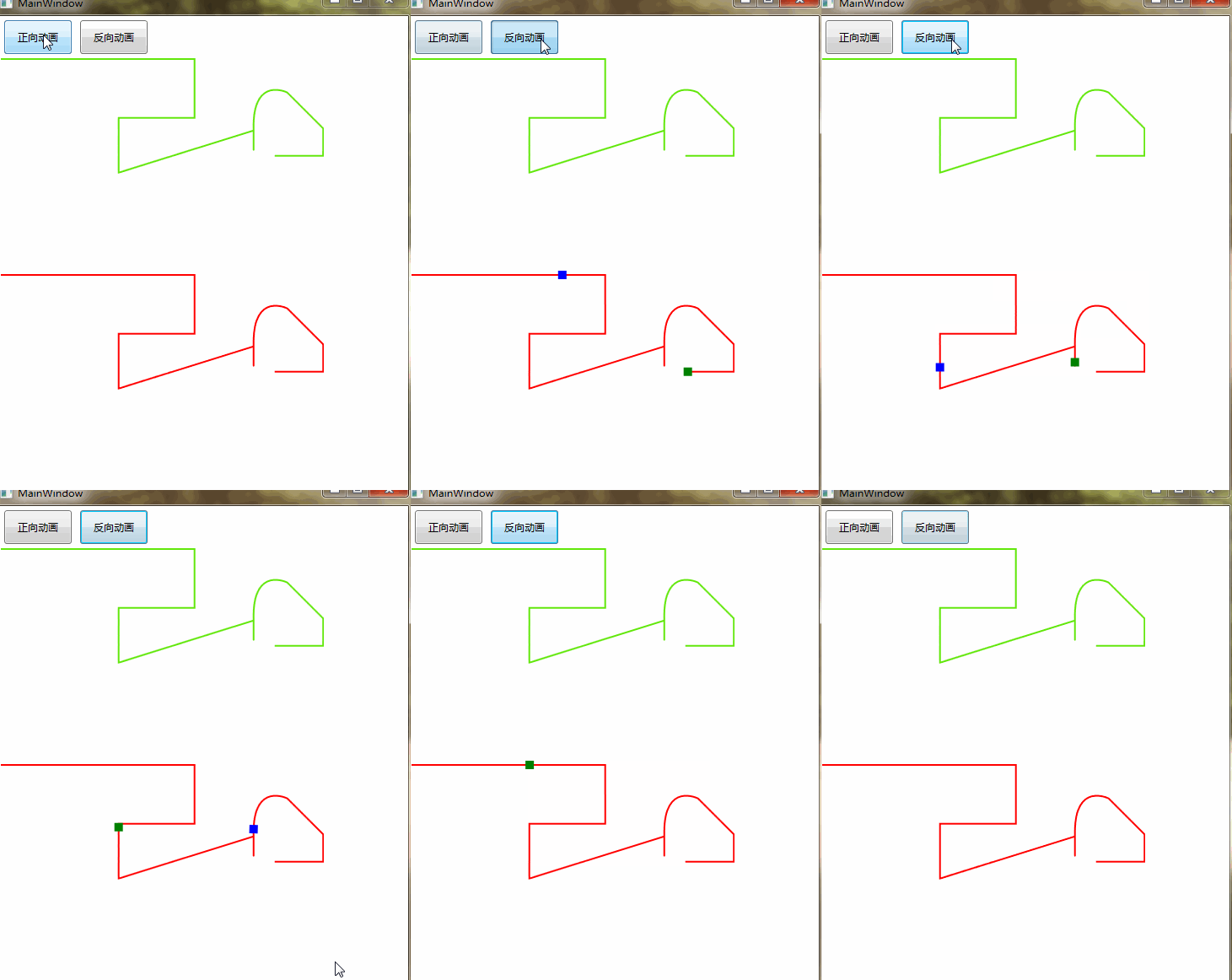
写这个Path反转的目的是动态生成动画的时候,可以逆向执行动画,而不必为逆向动画重新画一个Path.
上面代码中反转Path有bug(各种不同的Path数据格式,下面是修复后的代码)
 string ConvertReverseData(string data)
        {
            data = data.Replace("M", "");
            Regex regex = new Regex("[a-z]", RegexOptions.IgnoreCase);
            MatchCollection mc = regex.Matches(data);
            //item1 从上一个位置到当前位置开始的字符 (match.Index=原始字符串中发现捕获的子字符串的第一个字符的位置。)
            //item2 当前发现的匹配符号(L C Z M)
            List<Tuple<string, string>> tmpList = new List<Tuple<string, string>>();
            int curPostion = 0;
            for (int i = 0; i < mc.Count; i++)
            {
                Match match = mc[i];
                if (match.Index != curPostion)
                {
                    string str = data.Substring(curPostion, match.Index - curPostion);
                    tmpList.Add(new Tuple<string, string>(str, match.Value));
                }
                curPostion = match.Index + match.Length;
                if (i + 1 == mc.Count)//last
                {
                    tmpList.Add(new Tuple<string, string>(data.Substring(curPostion), match.Value));
                }
            }
            List<string[]> spList = new List<string[]>();
            Regex regexnum = new Regex(@"(-?d+.?d*)", RegexOptions.IgnoreCase);
            for (int i = 0; i < tmpList.Count; i++)
            {
                //处理坐标数据 ex M 96 288 C 576 0, 0 0, 480 288
                //ex M 10,100 C 35,0 135,0 160,100 180,190 285,200 310,100
                //ex M95,50 L324.67997,50 324.67997,119.67997 234.67998,119.67997 234.67998,184.68002
                //344.67999,184.68002 394.68,134.67999 C394.68,134.67999 394.68,189.68005
                //394.68,129.68002 394.68,69.679984 434.68002,89.679985 434.68002,89.679985
                // L477.18005,132.18003 477.18005,164.68004 419.68006,164.6800
                MatchCollection childMcs = regexnum.Matches(tmpList[i].Item1);
                if (childMcs.Count % 2 != 0)
                {
                    //分组数据有问题
                    continue;
                }
                int groups = childMcs.Count / 2;
                var strTmp = new string[groups];
                for (int j = 0; j < groups; j++)
                {
                    string cdatas = childMcs[j * 2] + "," + childMcs[j * 2 + 1];//重组数据
                    strTmp[j] = cdatas;
                }
                spList.Add(strTmp);
            }

            #region 逆向数据
            List<string> strList = new List<string>();
            for (int i = spList.Count - 1; i >= 0; i--)
            {
                string[] clist = spList[i];
                for (int j = clist.Length - 1; j >= 0; j--)
                {
                    if (j == clist.Length - 2 && i > 0)//对于第二个元素增加 L或者C的标识
                    {
                        var pointWord = tmpList[i - 1].Item2;//获取标识
                        strList.Add(pointWord + clist[j]);
                    }
                    else
                    {
                        strList.Add(clist[j]);
                        //M10,50 L44.679973,69.679973 C43.627604,76.057983 43.410881,76.928271 41.082803,81.687898
                        if (clist.Length == 1 && i > 0)//说明只有一个元素 ex L44.679973,69.679973
                        {
                            strList.Add(tmpList[i - 1].Item2);
                        }
                    }
                }
            }
            string reverseData = "M" + string.Join(" ", strList);
            #endregion

            return reverseData;

        }
如果大家在使用过程中还有发现算法bug,请在下方评论并把data贴出来。粘贴格式如下:
<Path x:Name="path0" Data="M 96 288 C 576 0, 0 0, 480 288"
Stretch="None" Stroke="#FF61E70A" StrokeThickness="2" />