SpringSecurityOAuth核心源码解析
蓝色表示接口,绿色表示类
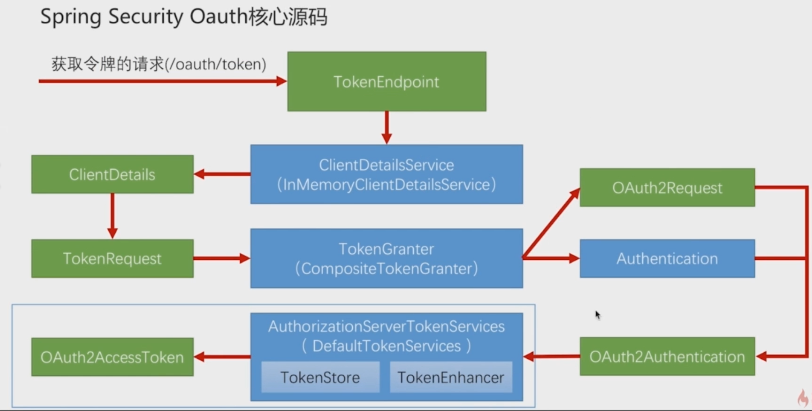
1,TokenEndpoint 整个入口点,相当于一个controller,不同的授权模式获取token的地址都是 /oauth/token ,通过grant_type 参数标识不同的授权类型,这个类就是判断授权类型 grant_type的。
2,TokenEndpoint收到请求后先调用 ClientDetailsService 读取第三方应用的信息。client_id、client_secret 来获取不同的第三方应用信息,封装在ClientDetails里;TokenEndpoint还会创建一个TokenRequest 的对象 ,封装了请求grant_type等信息,将ClientDetails放在TokenRequest 里
3,TokenRequest 会调用TokenGranter (令牌授权者)四种授权模式的实现,根据请求的grant_type 挑一种令牌生成的逻辑,都会产生OAuth2Request(整合了ClientDetails+TokenRequest) 、 Authentication(封装授权用户的信息,通过UserDetailsService获取),这两个对象整合起来生成 OAuth2Authentication 对象(包装了哪个第三方应用在请求哪个用户授权,授权模式,授权参数等信息),
4,OAuth2Authentication 最后传给AuthorizationServerTokenServices(认证服务器令牌服务)的默认实现,生成一个令牌。AuthorizationServerTokenServices 里还有TokenStore用来处理令牌的存取,TokenEnhancer 令牌增强器。
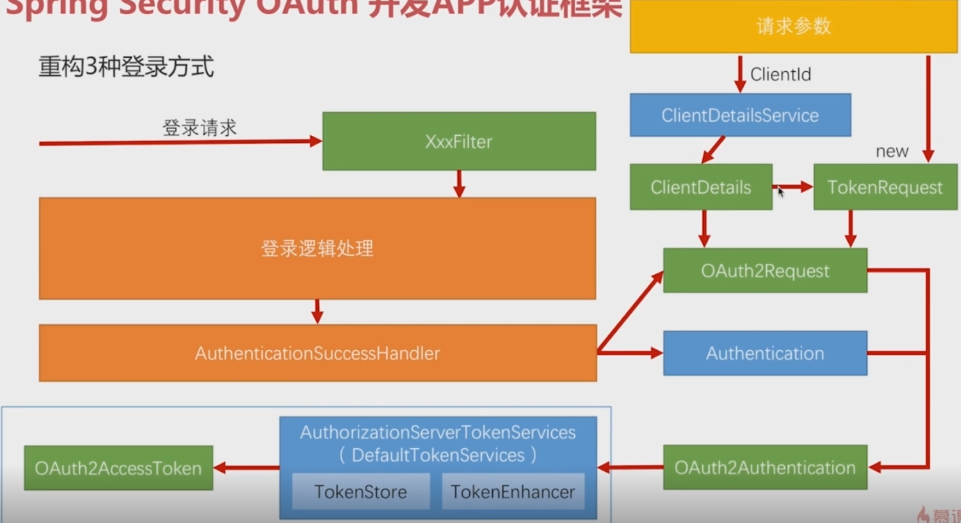
重构三种登录方式
要做的就是在登录成功后,按照Spring Security OAuth 生成 access_token 的逻辑,生成自己的token。
分析:
逆着推,要想有OAuth2AccessToken ------>AuthorizationServerTokenServices(spring已提供默认实现)------>OAuth2Authentication对象--------->Authentication(登录成功后会有这个对象)、OAuth2Request。
所以只需要构建OAuth2Request即可。
OAuth2Request-------->ClientDetails( 封装第三方应用的信息)------------>ClientDetailsService------------>接收ClientId 构建ClientDetails-------------->请求参数
--------->TokenRequest-------->根据ClientDetails信息new出来
此部分代码都是app项目里的
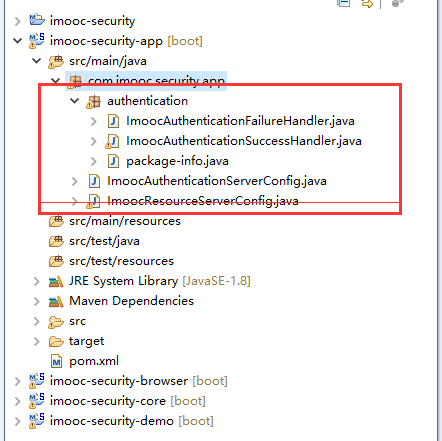
其中一部分是从BasicAuthenticationFilter 类里copy一段代码,这个类是处理Basic登录用的,copy一段获取请求头信息的
ImoocAuthenticationSuccessHandler:
/**
 * 认证成功后做的处理
 * ClassName: ImoocAuthenticationSuccessHandler
 * @Description:  认证成功后做的处理
 * @author lihaoyang
 * @date 2018年3月1日
 */
@Component("imoocAuthenticationSuccessHandler")
public class ImoocAuthenticationSuccessHandler
        //spring默认的登录成功处理器,实现了AuthenticationSuccessHandler接口,适配登录后 重定向和返回json两种用这个实现
        extends SavedRequestAwareAuthenticationSuccessHandler
        //返回json用这个实现
        /*implements AuthenticationSuccessHandler*/{

    private Logger logger = LoggerFactory.getLogger(getClass());

    //springmvc启动会自动注册一个ObjectMapper
    @Autowired
    private ObjectMapper objectMapper;

    @Autowired
    private SecurityProperties securityProperties;

    @Autowired
    private ClientDetailsService clientDetailsService;

    @Autowired
    private AuthorizationServerTokenServices authorizationServerTokenServices;

    @Override
    public void onAuthenticationSuccess(HttpServletRequest request, HttpServletResponse response,
            Authentication authentication) throws IOException, ServletException {

        logger.info("登录成功");
        //获取请求头里Authorization信息
        String header = request.getHeader("Authorization");
        //没有client信息
        if (header == null || !header.startsWith("Basic ")) {
            throw new UnapprovedClientAuthenticationException("请求头中无client信息");
        }


            /**
             * 构造OAuth2Request 第一步,从请求头获取clientId
             */
            //base64解码获取clientId、clientSecret
            String[] tokens = extractAndDecodeHeader(header, request);
            assert tokens.length == 2;

            String clientId = tokens[0];
            String clientSecret = tokens[1];
            /**
             * 构造OAuth2Request 第二步,根据clientId 获取ClientDetails对象
             */
            ClientDetails clientDetails = clientDetailsService.loadClientByClientId(clientId);

            if(clientDetails == null){
                throw new UnapprovedClientAuthenticationException("clientId对应的配置信息不存在,clientId:"+clientId);
            }else if(!StringUtils.equals(clientDetails.getClientSecret(), clientSecret)){
                throw new UnapprovedClientAuthenticationException("clientSecret不匹配,clientId:"+clientId);
            }

            /**
             * 构造OAuth2Request 第三步,new TokenRequest
             * 第一个参数是个map,放的是每个授权模式特有的参数,springsecurity会根据这些参数构建Authentication
             * 我们这里已获取到了Authentication,弄个空的map就可
             */
            TokenRequest tokenRequest = new TokenRequest(MapUtils.EMPTY_MAP, clientId, clientDetails.getScope(), "custom");

            /**
             * 构造OAuth2Request 第四步,创建 OAuth2Request
             */
            OAuth2Request oAuth2Request = tokenRequest.createOAuth2Request(clientDetails);
            /**
             * 构造OAuth2Request 第五步,创建 OAuth2Authentication
             */
            OAuth2Authentication oAuth2Authentication = new OAuth2Authentication(oAuth2Request, authentication);
            /**
             * 构造OAuth2Request 第六步,authorizationServerTokenServices创建 OAuth2AccessToken
             */
            OAuth2AccessToken accessToken = authorizationServerTokenServices.createAccessToken(oAuth2Authentication);

            response.setContentType("application/json;charset=UTF-8");
            response.getWriter().write(objectMapper.writeValueAsString(accessToken));

    }


    /**
     * base64解码请求头 Basic aW1vb2M6aW1vb2NzZWNyZXQ=
     * Decodes the header into a username and password.
     *
     * @throws BadCredentialsException if the Basic header is not present or is not valid
     * Base64
     */
    private String[] extractAndDecodeHeader(String header, HttpServletRequest request)
            throws IOException {
        //Basic aW1vb2M6aW1vb2NzZWNyZXQ= 截取Basic后的
        byte[] base64Token = header.substring(6).getBytes("UTF-8");
        byte[] decoded;
        try {
            //解码后格式   用户名:密码
            decoded = Base64.decode(base64Token);
        }
        catch (IllegalArgumentException e) {
            throw new BadCredentialsException(
                    "Failed to decode basic authentication token");
        }

        String token = new String(decoded, "UTF-8");

        int delim = token.indexOf(":");

        if (delim == -1) {
            throw new BadCredentialsException("Invalid basic authentication token");
        }
        //返回的数组是   [用户名(就是client_id),clientSecret] 其实就是配置的
        /**
         * security.oauth2.client.clientId = imooc
            security.oauth2.client.clientSecret = imoocsecret
         */
        return new String[] { token.substring(0, delim), token.substring(delim + 1) };
    }

}
ImoocResourceServerConfig:安全配置
/**
 * 资源服务器,和认证服务器在物理上可以在一起也可以分开
 * ClassName: ImoocResourceServerConfig
 * @Description: TODO
 * @author lihaoyang
 * @date 2018年3月13日
 */
@Configuration
@EnableResourceServer
public class ImoocResourceServerConfig extends ResourceServerConfigurerAdapter{

    //自定义的登录成功后的处理器
    @Autowired
    private AuthenticationSuccessHandler imoocAuthenticationSuccessHandler;

    //自定义的认证失败后的处理器
    @Autowired
    private AuthenticationFailureHandler imoocAuthenticationFailureHandler;

    //读取用户配置的登录页配置
    @Autowired
    private SecurityProperties securityProperties;

    @Autowired
    private SmsCodeAuthenticationSecurityConfig smsCodeAuthenticationSecurityConfig;

    @Override
    public void configure(HttpSecurity http) throws Exception {

        http

        //----------表单认证相关配置---------------
        .formLogin()
            .loginPage(SecurityConstants.DEFAULT_UNAUTHENTICATION_URL) //处理用户认证BrowserSecurityController
            .loginProcessingUrl(SecurityConstants.DEFAULT_LOGIN_PROCESSING_URL_FORM)
            .successHandler(imoocAuthenticationSuccessHandler)//自定义的认证后处理器
            .failureHandler(imoocAuthenticationFailureHandler) //登录失败后的处理
            .and()
        //-----------授权相关的配置 ---------------------
        .authorizeRequests()
            // /authentication/require:处理登录,securityProperties.getBrowser().getLoginPage():用户配置的登录页
            .antMatchers(SecurityConstants.DEFAULT_UNAUTHENTICATION_URL,
            securityProperties.getBrowser().getLoginPage(),//放过登录页不过滤,否则报错
            SecurityConstants.DEFAULT_LOGIN_PROCESSING_URL_MOBILE,
            SecurityConstants.SESSION_INVALID_PAGE,
            SecurityConstants.DEFAULT_VALIDATE_CODE_URL_PREFIX+"/*").permitAll() //验证码
            .anyRequest()        //任何请求
            .authenticated()    //都需要身份认证
        .and()
            .csrf().disable() //关闭csrf防护
        .apply(smsCodeAuthenticationSecurityConfig);//把短信验证码配置应用上

    }


}
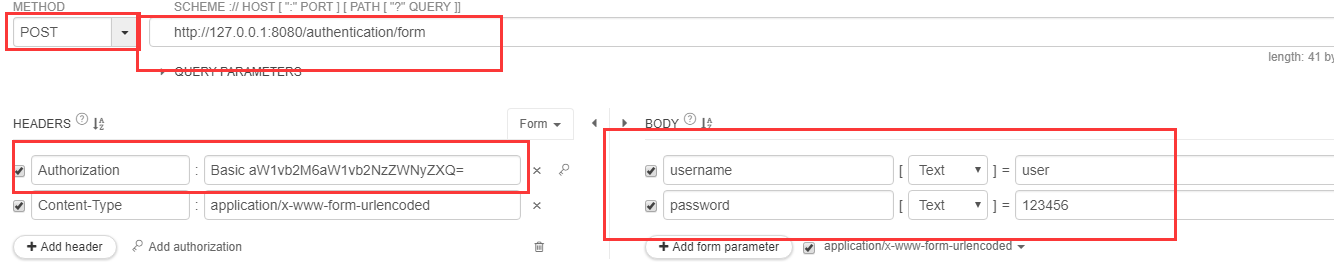
启动demo项目,demo项目此时依赖app项目,此时做的是表单登录的处理
访问表单登录:添加Authorization信息,username配置的cilentId:imooc ,password配置的clientSecret:imoocsecret
#第三方应用client_id
security.oauth2.client.clientId = imooc
#注意clientSecret 大写
security.oauth2.client.clientSecret = imoocsecret
响应token:
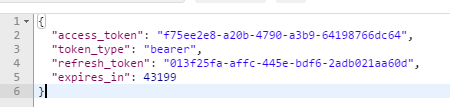
{
"access_token": "f75ee2e8-a20b-4790-a3b9-64198766dc64",
"token_type": "bearer",
"refresh_token": "013f25fa-affc-445e-bdf6-2adb021aa60d",
"expires_in": 43199
}
拿着token 访问用户信息请求 http://127.0.0.1:8080/user/me,header加上

响应:
{
"password": null,
"username": "user",
"authorities":[
{
"authority": "ROLE_USER"
},
{
"authority": "admin"
}
],
"accountNonExpired": true,
"accountNonLocked": true,
"credentialsNonExpired": true,
"enabled": true,
"userId": "user"
}
至此可以通过通过用户名密码获取token,拿着token访问用户信息了!
具体代码放在了github https://github.com/lhy1234/spring-security