<!DOCTYPE html>
<html lang="en">
<head>
<meta charset="UTF-8">
<meta http-equiv="X-UA-Compatible" content="IE=edge">
<meta name="viewport" content="width=device-width, initial-scale=1.0">
<title>Document</title>
<style>
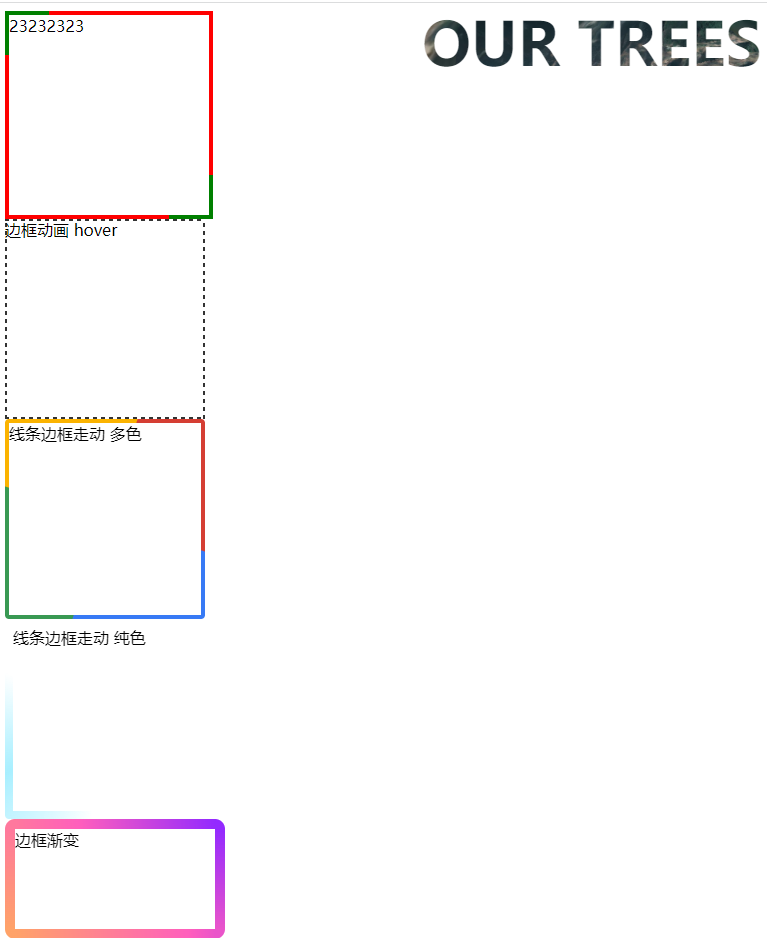
.gcontainer{
200px;
height: 200px;
border: 4px solid red;
position: relative;
}
.gcontainer::before{
content: '';
display: inline-block;
position: absolute;
top: -4px;
left: -4px;
40px;
height: 40px;
border-left:4px solid green ;
border-top:4px solid green ;
}
.gcontainer::after{
content: '';
display: inline-block;
position: absolute;
bottom: -4px;
right: -4px;
40px;
height:40px;
border-right:4px solid green ;
border-bottom:4px solid green ;
}
.gcontainer:hover::before{
calc(100% + 4px);
height:100%;
}
.gcontainer:hover::after{
calc(100% + 4px);
height:100%;
}
/* ############## */
.yashicont{
background:
linear-gradient(90deg, #333 50%, transparent 0) repeat-x,
linear-gradient(90deg, #333 50%, transparent 0) repeat-x,
linear-gradient(0deg, #333 50%, transparent 0) repeat-y,
linear-gradient(0deg, #333 50%, transparent 0) repeat-y;
background-size: 8px 2px, 8px 2px, 2px 8px, 2px 8px;
background-position: 0 0, 0 100%, 0 0, 100% 0;
200px;
height: 200px;
}
.yashicont:hover {
animation: linearGradientMove .3s infinite linear;
}
@keyframes linearGradientMove {
100% {
background-position: 4px 0, -4px 100%, 0 -4px, 100% 4px;
}
}
/* ################## */
.fadbox{
200px;
height: 200px;overflow: hidden;position: relative;
border-radius: 4px;
}
.ysncjcony{
position: relative;
100%;
height: 100%;
animation: rotate 4s linear infinite;
}
.ysncjcony::after {
content: '';
position: absolute;
left: -50%;
top: -50%;
200%;
height: 200%;
background-repeat: no-repeat;
background-size: 50% 50%, 50% 50%;
background-position: 0 0, 100% 0, 100% 100%, 0 100%;
background-image: linear-gradient(#399953, #399953), linear-gradient(#fbb300, #fbb300), linear-gradient(#d53e33, #d53e33), linear-gradient(#377af5, #377af5);
}
@keyframes rotate {
100% {
transform: rotate(1turn);
}
}
.conticony{
position: absolute;
96%;
height: 96%;
top: 2%;
left: 2%;
background-color: #fff;
}
/* 3########### */
.fadboxdan{
200px;
height: 200px;overflow: hidden;position: relative;
border-radius: 4px;
}
.ysncjconydan{
position: relative;
100%;
height: 100%;
animation: rotate 4s linear infinite;
}
.ysncjconydan::after {
content: '';
position: absolute;
left: -50%;
top: -50%;
200%;
height: 200%;
background: conic-gradient(transparent, rgba(168, 239, 255, 1), transparent 30%);
animation: rotate 10s linear infinite;
}
@keyframes rotate {
100% {
transform: rotate(1turn);
}
}
.conticonydan{
position: absolute;
92%;
height: 92%;
top: 4%;
left: 4%;
background-color: #fff;
}
/* ############## */
.bkjbian{
200px;
height: 100px;
border: 10px solid;
border-image: linear-gradient(45deg, gold, deeppink) 1;
clip-path: inset(0px round 10px);
animation: huerotate 6s infinite linear;
filter: hue-rotate(360deg);
}
@keyframes huerotate {
0% {
filter: hue-rotate(0deg);
}
100% {
filter: hue-rotate(360deg);
}
}
/* ######### */
.bjtior{
position: absolute;
top: 0;
right: 0;
350px;
height: 200px;
background: url(./img/2.png) no-repeat center center;
font-size: 60px;
font-weight: bold;
background-size: cover;
background-clip: text;
-webkit-background-clip:text; /* 这个属性的意思是,以区块内的文字作为裁剪区域向外裁剪,文字的背景即为区块的背景,文字之外的区域都将被裁剪掉 */
-o-background-clip:text;
-ms-background-clip:text;
color: transparent;
}
</style>
</head>
<body>
<div class="gcontainer" onclick="rr()">
23232323
</div>
<div class='yashicont'>边框动画 hover</div>
<div class='fadbox'>
<div class='ysncjcony'></div>
<div class='conticony'>线条边框走动 多色</div>
</div>
<div class='fadboxdan'>
<div class='ysncjconydan'></div>
<div class='conticonydan'>线条边框走动 纯色</div>
</div>
<div class='bkjbian'>边框渐变</div>
<div class='bjtior'>OUR TREES</div>
<script>
function rr(){
console.log('2342342')
}
</script>
</body>
</html>